PaperQuay
English | Chinese
An open-source AI paper workspace for PDF reading, translation, structured overviews, inline notes, Zotero import, Agent workflows, and local RAG.







Quick Navigation |
Why PaperQuay |
Features |
Quick Start |
Development
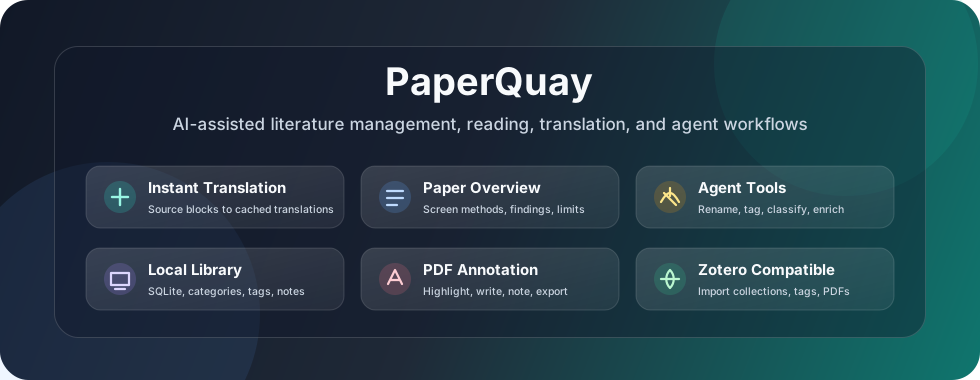
Quick Navigation
Problem & Positioning |
Latest Update |
What Makes It Different |
Core Workflow |
Completed Features |
Architecture |
Zotero Compatibility |
Todo
Latest Update
The v0.1.24 release focuses on review writing, knowledge graph usability, MinerU configuration, library storage migration, and note synchronization polish:
- Review Word export now handles LaTeX formulas, missing figures, localized section titles, richer references, and inline figure placement from model output.
- Knowledge graph workflows now include reference syncing, clearer relation controls, edge legends, export tools, and more direct node interactions.
- MinerU parsing can use a configurable API base URL, making local MinerU deployments easier to use.
- Library storage folder changes now migrate the existing directory structure and attachment paths into the new location.
- Reader and notes workflows gained selection-translation highlighting, resizable library navigation, paper-list sorting, and safer note external-update detection.
PaperQuay - Open AI Paper Workspace That Keeps Reading Flow Intact
PaperQuay is more than a PDF reader, AI summary tool, or Zotero add-on. It is a local-first, open-source AI paper workspace designed for graduate students, researchers, and heavy paper-reading users who want to import papers, read PDFs, translate, generate paper overviews, write inline research notes, organize tags, import Zotero libraries, use Agent-assisted literature management, and build a local RAG knowledge base without leaving the same desktop app.
Traditional paper reading often means switching between Zotero, a PDF reader, translation tools, ChatGPT, and a separate note app. PaperQuay brings those steps into one continuous desktop workflow so importing, reading, understanding, translating, annotating, note-taking, organizing, and knowledge-base building can happen in the same place while keeping Zotero compatibility optional rather than mandatory.
Technically, PaperQuay is built as an Electron + React + TypeScript/Vite desktop application. The React renderer implements the literature library, PDF reader, rich notes, Agent workspace, and settings UI; the Electron main process and local Node.js backend handle filesystem access, IPC, Zotero import, SQLite persistence, app updates, and cross-platform packaging. PDF rendering uses PDF.js, rich notes use Tiptap/ProseMirror, local data uses SQLite/sql.js and sqlite-vec, and AI features connect through OpenAI-compatible APIs for translation, paper overviews, Agent tool use, and RAG retrieval.
| Research workflow problem | Traditional tools | PaperQuay |
|---|
| Translation latency interrupts reading | Translate only after selecting text, often with visible API delay | Pre-translate MinerU structural blocks and jump instantly to cached translations |
| Side-by-side translation hurts focus | Two columns require constant eye movement and can break formatting | Keep the original PDF visible while navigating to precise translated blocks on demand |
| Pure translated files lose source context | Original wording, terminology, and academic expression are hidden | Keep source text, parsed blocks, translation, notes, and overview linked together |
| Paper notes become detached | Notes live in a separate app and lose PDF position context | Store rich notes, tags, links, paper references, and backlinks in the local library |
| Fast paper screening is repetitive | Upload PDFs to an LLM one by one and manually organize outputs | Generate and store structured paper overviews inside the local library |
| AI model choices are locked down | Built-in models or platform-specific token pricing | Bring your own OpenAI-compatible endpoint, model, and runtime parameters |
| Large libraries are hard to clean | Manual renaming, tagging, metadata fixes, and classification | Agent tools can assist with batch rename, metadata completion, tagging, and classification |
| Zotero migration is inconvenient | Either stay locked in Zotero or rebuild everything manually | Import Zotero collections, tags, and PDF attachments as an optional source |
What Makes PaperQuay Different
Live workflow demo: browse the library, open papers, inspect structured reading, and move into the Agent workspace without leaving the same desktop flow.
Instant Block-Level Translation
PaperQuay uses a translation workflow designed for long paper reading sessions. It can translate and cache MinerU-parsed structural blocks in advance. Later, when reading, clicking a source block can instantly jump to its translated counterpart. Translation no longer needs to happen only after each click or selection.
Tiptap-Based Notes Workspace
PaperQuay includes a dedicated Notes workspace built on Tiptap. Each note is stored locally as Tiptap JSON, rendered HTML, and searchable plain text. The editor supports headings, lists, task lists, code blocks, tables, images, math, highlights, links, slash-style insertions, folders, pin and favorite states, outline, backlinks, and autosave.
Notes are designed to stay inline with the research workflow. You can connect ideas with [[note]] links, organize topics with #tags, reference library papers with @paper, and jump through those inline references instead of keeping reading notes in a separate note silo.
Fast Paper Screening from the Overview Panel
PaperQuay is designed not only for deep reading, but also for screening large numbers of papers quickly. In the overview panel, each paper can directly surface AI-generated fields such as background, research question, method, experiment setup, key findings, conclusions, and limitations.
Reading Time Visibility
PaperQuay records time spent across PDF positions and surfaces it as reading heat previews in the library and a dedicated reading-time chart in the paper detail panel. This makes it easier to see which parts of a paper have actually received attention.
Literature Library, Not Just Import
PaperQuay can build an independent local library with PDF import, a configurable storage folder, categories, tags, metadata editing, search, filtering, notes, and local SQLite persistence. Zotero remains supported as an optional import source, not a required dependency.
Agent Operations for Paper Management
The agent workspace is designed for library operations, not just conversation. It can assist with batch renaming, metadata completion, smart tagging, tag cleanup, automatic classification, and paper summarization while exposing tool calls and results for user review.
Core Workflow
| Step | What happens |
|---|
| 1. Import PDFs | Drag PDFs into the app or choose files from the import dialog. |
| 2. Confirm metadata | Review title, authors, year, venue, DOI, abstract, keywords, and duplicate warnings. |
| 3. Organize library | Create categories, drag papers into collections, add tags, and mark favorites. |
| 4. Parse with MinerU | Convert PDFs into structured blocks with page-region linkage. |
| 5. Generate overviews | Produce reusable paper overviews for fast screening and later review. |
| 6. Translate full text | Cache translated blocks so reading can jump instantly between source and translation. |
| 7. Read and annotate | Highlight, write, add notes, jump to annotations, and export annotated PDFs. |
| 8. Review reading time | Inspect reading-time charts and heat previews to see which parts of the PDF were read. |
| 9. Write notes | Create rich Tiptap notes, organize them in folders, link notes with [[title]], add #tags, and jump through @paper references. |
| 10. Use the agent | Ask the agent to rename, classify, tag, clean metadata, or summarize selected papers. |
PaperQuay Screenshots
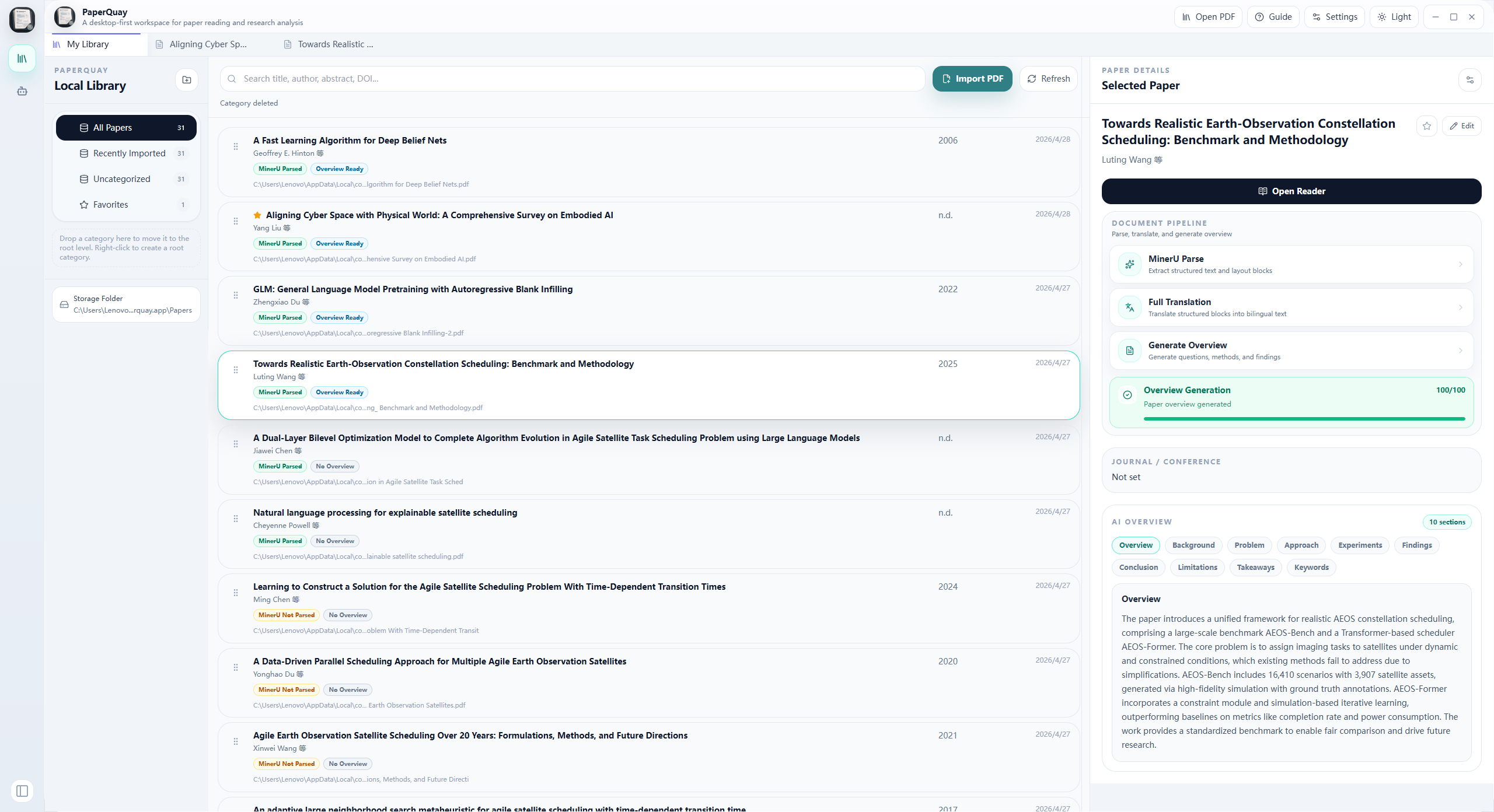
Main library workspace: manage papers, categories, metadata, reading progress, notes, and AI-generated overviews in one desktop view.
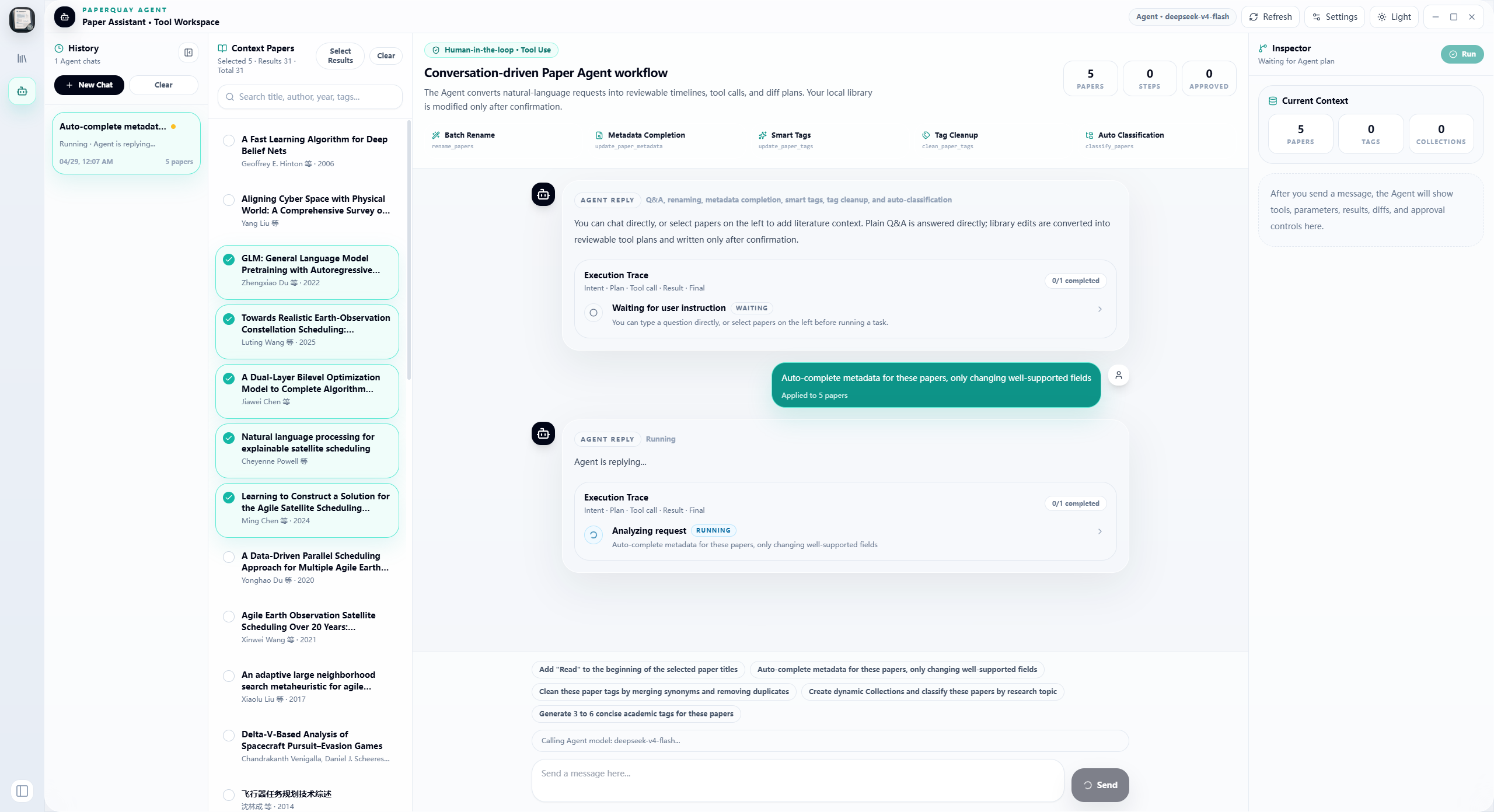
Agent workspace: chat with the paper assistant, inspect execution traces, review tool calls, and run batch library operations with human confirmation.
Completed Features
These items are implemented in the current desktop app.
| Area | Completed capabilities |
|---|
| Local library | Local SQLite storage for papers, authors, categories, tags, attachments, notes, annotations, import records, settings, and RAG indexes |
| PDF import | File picker and drag-and-drop import with a confirmation screen before files enter the library |
| File management | Configurable storage folder, copy / move / keep-path import modes, naming rules, original-path tracking, and private local file handling |
| Metadata | OpenAlex enrichment by DOI or title, optional OpenAlex API key / mailto settings, Crossref fallback, and manual editing before import |
| Categories | System categories, custom categories, nested subcategories, collapsible branches, context menus, drag sorting, hierarchy changes, and favorites |
| Paper details | Title, authors, year, venue, DOI, URL, abstract, keywords, tags, notes, citation, favorite state, and a reading-time chart |
| Notes workspace | Dedicated Tiptap notes workspace with folders, search, tags, pinned notes, favorites, outline, backlinks, and local autosave |
| Notes editor | Rich text, headings, lists, task lists, code blocks, tables, images, math, highlights, links, component blocks, and slash-style insertions |
| Inline note links | [[note]] wiki links, #tag references, @paper references, autocomplete menus, and inline navigation across notes and papers |
| Reader | PDF reader with MinerU structured block views, region-based linkage, reading heat progress, reading-time recording, and annotation tools |
| Translation | Full-text translation, cached block translations, and selection translation through OpenAI-compatible models |
| Paper overview | AI-generated screening fields for background, research questions, methods, experiment setup, findings, conclusions, and limitations |
| Agent workspace | Conversation UI with execution traces, tool call cards, paper selection, metadata tools, rename tools, tagging, classification, and summaries |
| Zotero import | Import local Zotero collections, tags, and available PDF attachments from zotero.sqlite |
| Backup | WebDAV backup and restore for the library database, notes database, and local RAG SQLite database |
| Updates | In-app update checks, Windows and Linux automatic update flow, and macOS release-page handoff |
| Themes | Light and dark UI modes optimized for long desktop reading sessions |
First-Run Workflow
- Open Settings and choose a default paper storage folder.
- Import PDFs by drag and drop or by clicking the import button.
- Confirm or edit metadata in the import confirmation dialog.
- Let PaperQuay copy PDFs into its storage folder and save records in the local library.
- Create categories and subcategories from the left sidebar.
- Drag papers into categories, add tags, mark favorites, and open papers in the reader.
- Open Notes to create rich-text notes, link related ideas, and connect notes to papers.
- Configure an OpenAI-compatible endpoint and model if you want AI features.
- Configure a MinerU API key if you want MinerU parsing.
- Optionally connect a Zotero data directory and import existing Zotero collections and PDFs.
Architecture
PaperQuay uses Electron as its desktop host. The React renderer talks to a local Electron backend through IPC for filesystem access, persistence, Zotero import, PDF handling, and packaging.
| Path | Responsibility |
|---|
src/ | React + TypeScript UI, feature modules, state, and frontend services |
src/features/literature/ | Local literature library UI, import workflow, category tree, and paper details |
src/features/reader/ | Reader shell, linked reading workspace, settings, and AI reading actions |
src/features/pdf/ | PDF rendering, overlays, annotation surface, and PDF-specific interactions |
src/features/blocks/ | MinerU block rendering and structured content views |
src/features/agent/ | Agent chat UI, execution traces, tool cards, and library operation entry points |
src/features/notes/ | Tiptap-based notes workspace, editor toolbar, custom autocomplete extensions, outline, and backlinks |
src/stores/useNotesStore.ts | Zustand state for notes, tags, active note selection, autosave, and workspace errors |
src/services/ | Frontend bridges to Electron IPC commands |
src/platform/electron/ | Renderer-side bridge wrappers for commands, events, window controls, and file-drop events |
electron/ | Electron main process, preload bridge, command backend, packaging helpers, and local persistence |
The Notes editor uses the official Tiptap packages and was implemented against the upstream source at ueberdosis/tiptap. The local WikiLink, HashTag, and PaperReference extensions follow the same architecture as Tiptap's official Mention node and @tiptap/suggestion plugin: a Tiptap inline node stores structured attributes, and the Suggestion plugin handles matching, rendering, keyboard navigation, and insertion. The editor also follows Tiptap's React NodeView examples for component blocks: custom blocks are real Tiptap nodes rendered through ReactNodeViewRenderer, with NodeViewWrapper and NodeViewContent separating non-editable controls from editable content.
Requirements
- Node.js 18 or newer
- Windows, macOS, or Linux
Optional external services:
- MinerU API key for cloud PDF structure parsing.
- OpenAI-compatible API key for paper overviews, translation, QA, and agent tasks.
- Internet access for OpenAlex and Crossref metadata enrichment.
- Optional OpenAlex premium API key and
mailto polite-pool email for steadier batch metadata lookup.
Development
Install dependencies:
npm install
Start the desktop app in development mode:
npm run dev
Build the frontend only:
npm run build
Preview the built web assets:
npm run preview
Build the desktop installer:
npm run electron:build
Zotero Compatibility
PaperQuay can read a local Zotero data directory that contains zotero.sqlite. During import it copies the Zotero database to a temporary read-only working file and does not modify your original Zotero database.
Imported data enters PaperQuay's own local literature library. Zotero collections become local categories, and available local PDFs inside those collections are copied into the PaperQuay paper storage folder.
Zotero is an optional compatibility source, not a required dependency. You can build a complete library directly inside PaperQuay without using Zotero.
Data and Privacy
PaperQuay is local-first. The literature library, notes, and local RAG indexes are stored in SQLite databases, and imported PDFs are stored in the paper storage folder you configure.
Optional WebDAV backup can upload the local library, notes, and RAG databases to the remote server you configure. API keys, local PDFs, parser outputs, and backups should stay out of source control.
Do not commit local data, API keys, PDFs, parser outputs, notes databases, or backups. The .gitignore excludes common local runtime folders, SQLite databases, legacy JSON library data, API key files, build output, backup archives, and private PDFs by default.
Todo Roadmap
These items are planned or still being deepened beyond the completed features above.
- Better metadata extraction from PDF first pages.
- DOI / arXiv / Semantic Scholar enrichment options.
- Deeper two-way binding between PDF regions, annotations, and standalone notes.
- Citation style generation and export.
- Folder watching and automatic import queues.
- RAG-based knowledge-base QA across papers and notes.
- One-click survey generation and Word / LaTeX research draft generation.
- Signed macOS release flow for smoother installation and update checks.
- Optional cloud sync after the local-first model is stable.
Acknowledgements
PaperQuay is also shaped by discussions, feedback, and shared ideas from the LinuxDo community.
The Notes workspace builds on Tiptap. Thanks to the Tiptap maintainers for the extensible editor framework and examples that help power PaperQuay's note-taking experience.
License
PaperQuay Community Edition is licensed under AGPL-3.0-only.
If you distribute modified versions or provide modified versions over a network, keep the license and copyright notices, mark your changes, and provide the corresponding source code under AGPL terms. For closed-source commercial licensing, commercial support, or brand-name permission, contact the maintainer separately. See TRADEMARKS.md for brand-use notes.