



WrzDJ
A real-time song request system for DJs. Guests scan a QR code to submit requests. DJs manage everything from a live dashboard with automatic track detection from their equipment via plugins for Denon, Pioneer, Serato, and Traktor.
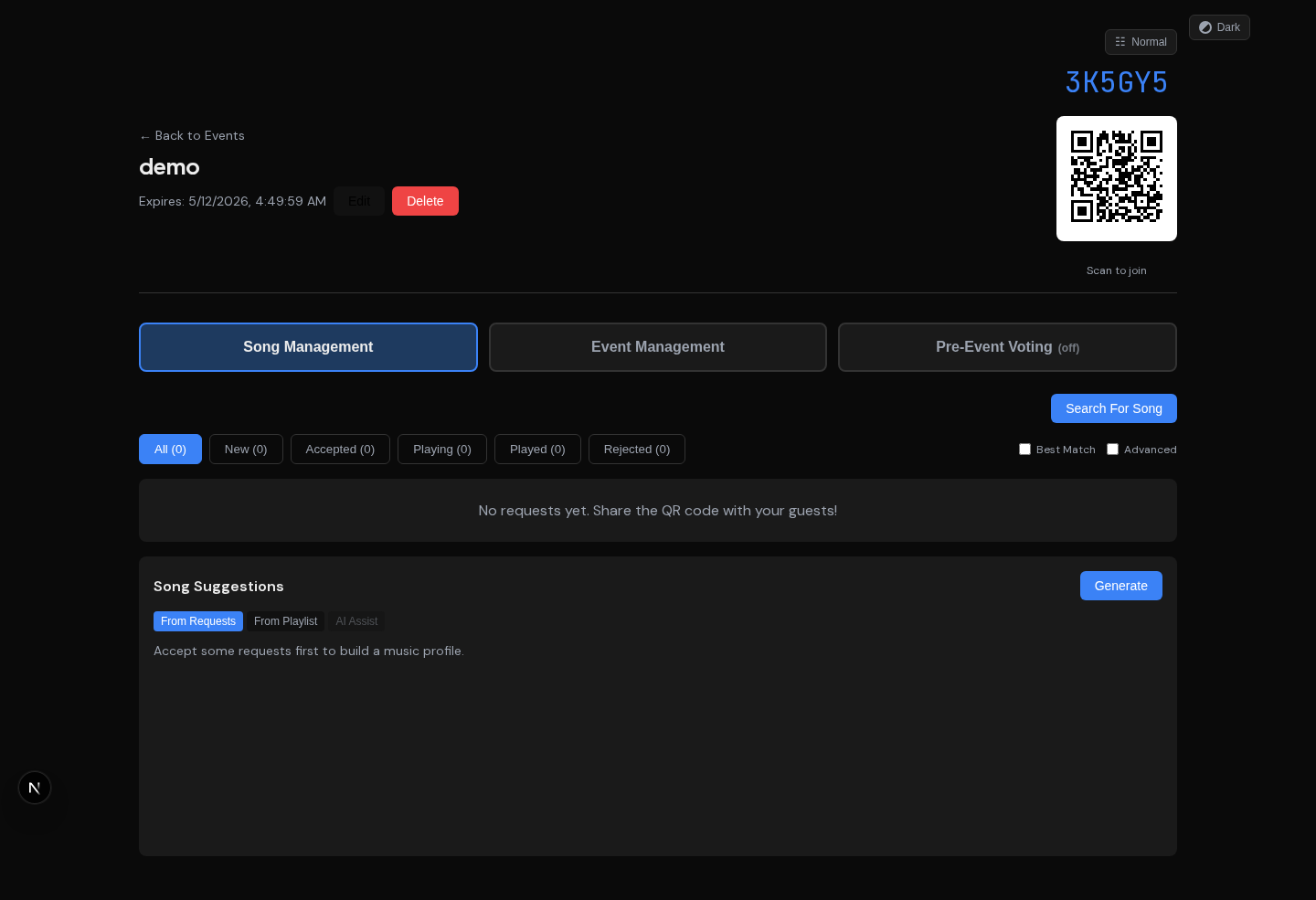
Song Management: request queue with BPM/key/genre metadata, accept/reject, song suggestions
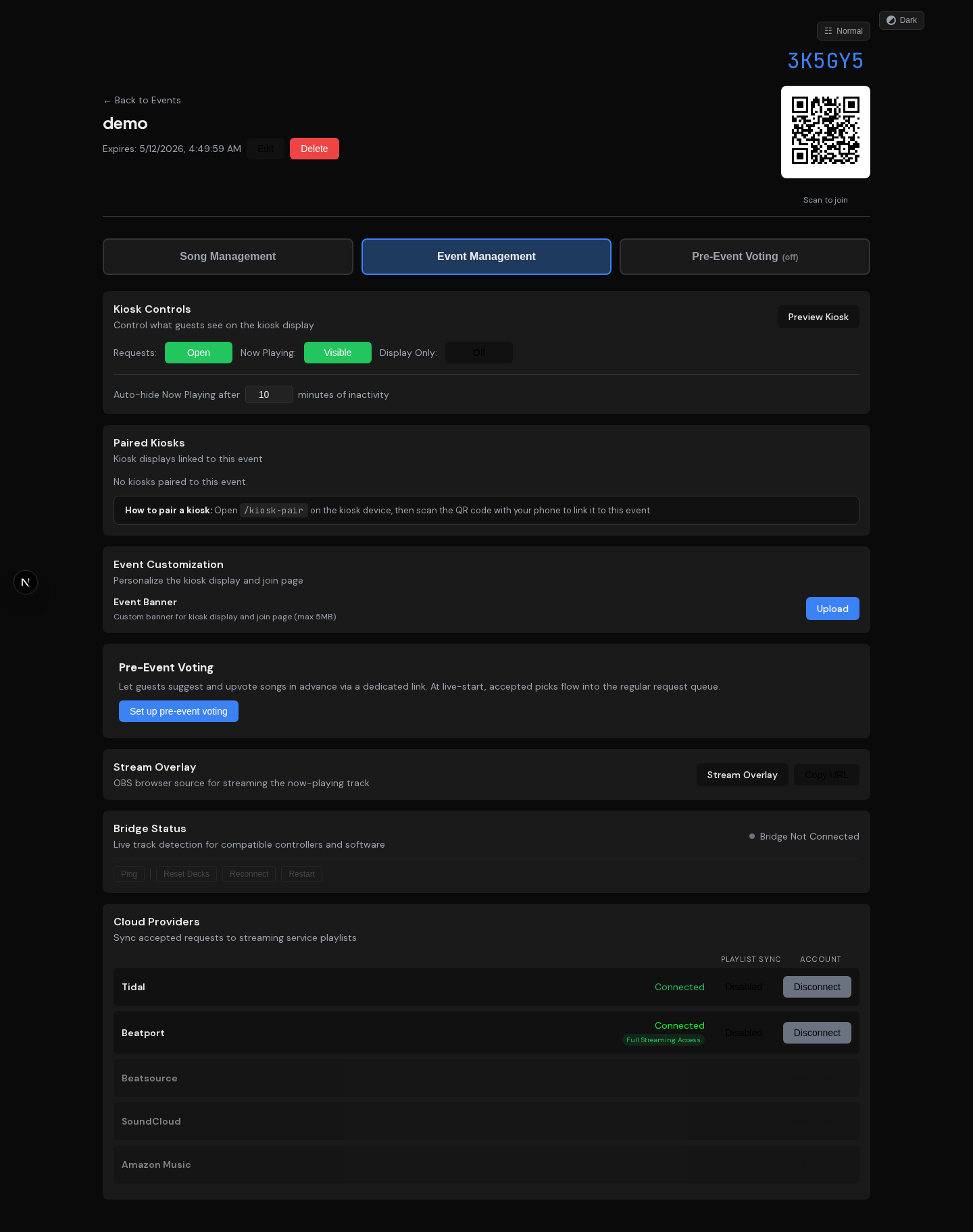
Event Management: kiosk controls, bridge status with admin commands, cloud provider sync
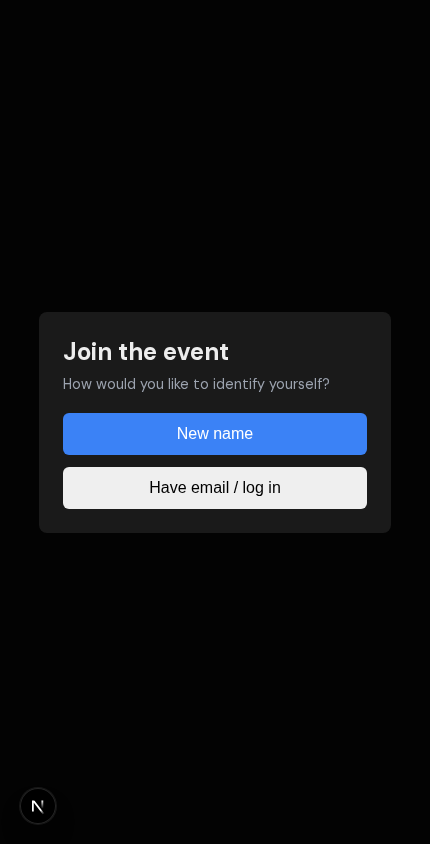
Guest join page: scan a QR code, browse the queue, request a song
Features
Guest experience
- QR code join, no app install or login required
- Search songs via Tidal, submit requests with notes, upvote others
- Live request queue and kiosk display showing what's playing now
- Cloudflare Turnstile human verification (invisible managed challenge) on
/join and /collect
- Nickname gate (profanity filter + letter-padding bypass protection) on standard events, or frictionless join — when the DJ enables it, guests skip the nickname/email step and get an auto-generated name they can rename later (great for weddings and private parties)
- Email verification with one-time codes (Resend API) and cross-device guest profile merge
- Pre-event song collection (
/collect) — guests vote on suggestions before the night, DJs bulk-review
- Inline song preview in the collect detail sheet (Tidal embed)
- Verified badge next to email-verified nicknames in request lists and leaderboard
- Tower v2 UI on
/join and /collect with banner art, song detail panels, and vibes enrichment
DJ dashboard
- Accept, reject, and manage requests in real-time (SSE push updates)
- Tabbed event detail with Song Management and Event Management views
- Search Beatport, and Tidal directly from the dashboard
- Inline audio previews for Tidal tracks
- Color-coded Camelot key badges and BPM proximity indicators for harmonic mixing
- Single-active playing constraint (marking a new track auto-transitions the previous one)
- Multi-service playlist sync to Tidal and Beatport with version-aware matching
- Manual track linking when auto-match fails
- Event banners, play history with source badges, CSV export
- "Enrich All" advanced action to backfill BPM/key/genre on existing requests in batches
- Pre-event collection toggle per event (enable guest voting before doors open)
- Frictionless-join toggle per event (skip the guest nickname/email gate, auto-name guests), with a per-DJ account default applied to new events
- Collection suggestions sync to a dedicated pre-event Tidal playlist; bidirectional option auto-rejects requests removed from the playlist
- Self-service account management: DJs can update their own password and email address
- Bridge connection status, activity log, contextual help system
- Cloud provider OAuth (Tidal, Beatport) with per-event playlist sync toggles
Song recommendations
- Three modes: From Requests (musical profile), From Playlist (template), AI Assist (natural language via Claude)
- Scored on BPM compatibility, harmonic key, genre similarity, and artist diversity
- Half-time BPM matching, junk filtering, MusicBrainz artist verification badges
- Background metadata enrichment via ISRC matching, Beatport, Tidal, MusicBrainz, Soundcharts
Admin dashboard
- User management with role-based access (admin/dj/pending) and self-registration
- Integration health dashboard with per-service enable/disable toggles
- AI/LLM settings, search rate limits, system settings (all DB-backed, no restart needed)
- Human verification enforcement toggle (soft mode for rollout, hard mode post-rollout)
Security & identity
- Fernet-encrypted OAuth tokens at rest (MultiFernet for key rotation)
- Supply-chain hardening: all GitHub Actions pinned to commit SHAs, committed lockfiles (
uv.lock at CVE-floor versions, package-lock.json), CI security scans (bandit, pip-audit, npm audit), and a SHA-digest-pinned base image in the bridge build
- Separate public codes for pre-event collection (
/collect) and live join (/join); guest-facing endpoints never expose internal event IDs
- IP-free guest identity (cookie + ThumbmarkJS reconciliation, no IP storage or logging)
- HMAC-signed
wrzdj_human cookie with 60-min sliding window after Turnstile pass
- IP-bound nonce flow for kiosk-pair (no Turnstile on input-less Pi devices)
Kiosk display
- Full-screen three-column layout: Now Playing, Up Next, Recently Played
- QR pairing with session persistence across power cycles
- Custom banner backgrounds, built-in request modal with touchscreen keyboard, display-only mode
- Raspberry Pi deployment with WiFi captive portal and crash recovery watchdog
Stream overlay
- Transparent OBS browser source at
/e/{code}/overlay
- Now Playing track with album art, queue with vote counts
Bridge (DJ equipment detection)
- Plugin system: Denon StageLinQ, Pioneer PRO DJ LINK, Serato DJ, Traktor Broadcast
- Automatic request matching via fuzzy search, Tidal album art enrichment
- Circuit breaker, reconnection with backoff, track buffer replay
- Upstream dependency contract testing with weekly drift detection CI
- Desktop app (Windows/macOS/Linux) or CLI
WrzDJSet (Beta)
WrzDJSet is an AI-assisted set planner built into the DJ dashboard. Instead of hand-building a
setlist track by track, you gather candidate songs into a pool, let WrzDJ draft an energy-aware
running order, then refine it conversationally with an AI agent before exporting to your DJ software.
It is currently in Beta: the full plan-a-set loop (import → build → refine → export) is shipped
and usable, while deeper integrations (local-library readers, more export targets, collaboration) are
still on the roadmap.
How it works
- Build a pool. Pull candidate tracks from several sources — a live event's requests, your Tidal
or Beatport playlists, a public playlist URL, or manual search. Tracks are de-duplicated on import
(by ISRC, with an artist + title fuzzy fallback) and tagged by source, so you can drop a whole
source at once.
- Draft the order (Pass 1). A deterministic pass generates time-based slots for your target set
length and greedily orders the pool, scoring each transition on energy, BPM, Camelot-key
compatibility, transitional role, mood, and artist diversity — then runs a 2-opt refinement that
respects any slots you've locked and any track pairings you've saved.
- Shape the energy curve. Apply a built-in or saved energy-curve template (with slow-window
markers for breaks); every slot gets a target energy the builder mixes toward.
- Refine with the AI agent (Pass 2). The set is auto-critiqued — graded, with flags such as
energy dips, vibe clashes, era jumps, or a banger buried too early — and you can chat with an agent
to reshape it ("make the first 20 minutes warmer", "lock slot 5", "swap these two"). The agent
works through a fixed, auditable toolkit of reorder / swap / lock / insert / curve actions, each
requiring a rationale, with full undo/redo and autosave.
- Export. Send the finished set to Rekordbox XML, Engine DJ, Lexicon, M3U, or plaintext — or push
it straight to a Tidal playlist. A preflight check flags any unresolved tracks first.
Tracks carry "vibe" metadata — energy (0–10), mood, era, sing-along and dance-floor signals, and a
transitional role — which drives the transition scoring. Vibes resolve in three tiers: your own
overrides first, then community consensus (aggregated from other DJs' tweaks once there is enough
agreement), then an AI-generated baseline. You can upvote or adjust any vibe, which feeds the shared
consensus.
AI & privacy
All AI calls route through WrzDJ's LLM Gateway connector system — there is no hard-coded model
provider in the set builder. Each DJ's calls use their configured connector (or an org default), and
usage is logged for auditing. See ARCHITECTURE.md and docs/LLM-PLUGIN.md for the gateway contract.
Sharing
Any set can be shared as a read-only link (a revocable capability token) and duplicated as a starting
point for the next night.
Beta limitations (on the roadmap)
- Reading from local DJ libraries (Rekordbox / Serato / Engine DJ on disk) and streaming local
files through the Bridge
- Writing to Serato crates / Engine DJ databases and to Spotify / Apple Music playlists
- Reusable set templates, real-time collaboration (invite co-editors), and taste-profile
training from your vibe history
- Structural "autobuild" agent tools (e.g. fill-to-duration, move-range)
- No hard caps on AI usage yet — per-DJ usage is audited, but cost guardrails are not surfaced to you
WrzDJSet lives under server/app/services/setbuilder/ (backend) and dashboard/app/(dj)/setbuilder/
(frontend).
Architecture
App & data plane — guests and the DJ share one Next.js frontend. Guest actions pass through the
Cloudflare Turnstile human-verification gate; DJs/admins authenticate with a JWT instead. The
backend fans out to music/metadata services, and the highlighted Bridge Service is the seam into
the equipment plane shown below.
graph TD
    Guests[Guests] -->|scan QR| Frontend["Next.js Frontendguest pages + DJ dashboard"]
    DJ[DJ] -->|dashboard| Frontend
    Frontend <-->|guest requests| Turnstile["Cloudflare Turnstilehuman-verification gate"]
    Turnstile <--> Backend[FastAPI Backend]
    Frontend -.->|DJ / admin: JWT bearer| Backend
    Backend --> DB[(PostgreSQL)]
    Backend <-->|HTTP, API key auth| Bridge["Bridge Serviceplugin system → see below"]
    Backend --> APIs

    subgraph APIs["Music & metadata APIs"]
        direction TB
        Spotify["Spotify — search"] ~~~ Beatport["Beatport — sync + search"] ~~~ Soundcharts["Soundcharts — discovery + BPM/key"]
        Tidal["Tidal — sync + search + album art"] ~~~ MusicBrainz["MusicBrainz — genre + verification"]
    end

    style Bridge fill:#7c3aed,stroke:#a78bfa,color:#ffffff
    style Turnstile fill:#f6821f,stroke:#ffb366,color:#ffffff
Equipment plane — the Bridge Service runs the DJ-equipment plugins. The highlighted FastAPI
Backend is the same seam from the diagram above (it pushes now-playing data over HTTP).
graph TD
    Backend["FastAPI Backendsee above"] <-->|HTTP, API key auth| Bridge["Bridge Serviceplugin system"]
    Bridge --> StageLinQ["StageLinQLAN"]
    Bridge --> ProDJLink["PRO DJ LINKEthernet"]
    Bridge --> Session["Sessionfile"]
    Bridge --> Icecast["Icecastlocal"]

    StageLinQ --> Denon[Denon CDJs]
    ProDJLink --> Pioneer[Pioneer CDJs]
    Session --> Serato[Serato]
    Icecast --> Traktor[Traktor Pro]

    style Backend fill:#7c3aed,stroke:#a78bfa,color:#ffffff
| Service | Stack | Directory |
|---|
| Backend | Python, FastAPI, SQLAlchemy 2.0, PostgreSQL, Alembic | server/ |
| Frontend | Next.js 16, React 19, TypeScript, vanilla CSS | dashboard/ |
| Bridge | Node.js, TypeScript, plugin architecture | bridge/ |
| Bridge App | Electron, React, Vite, electron-forge | bridge-app/ |
| Kiosk | Raspberry Pi, Cage (Wayland), Chromium, Python stdlib | kiosk/ |
Supported DJ Equipment
Denon (via StageLinQ) -- SC6000, SC5000, Prime 4/4+, Prime 2, Prime Go, X1850/X1800 mixer
Pioneer (via PRO DJ LINK) -- CDJ-3000, CDJ-2000NXS2/NXS, XDJ-1000MK2, XDJ-700, DJM-900NXS2/750MK2 mixer. Requires Ethernet (same LAN).
Serato (via session file monitoring) -- Serato DJ Pro/Lite, any controller. Reads session files from disk, no network setup needed.
Traktor (via Broadcast) -- Traktor Pro 3/4, any controller with broadcast enabled.
Quick Start (Local Development)
Prerequisites
- Docker + Docker Compose
- Python 3.11+
- Node.js 24.15+ on the 24.x LTS line, or Node.js 26+
- Tidal Developer Account (for song search and album art enrichment)
git clone https://github.com/thewrz/WrzDJ.git
cd WrzDJ
cp .env.example .env
# Edit .env with your Spotify/Tidal API keys, JWT secret, etc.
2. Start the database
docker compose up -d db
3. Install git hooks
./scripts/setup-hooks.sh
4. Start the backend
cd server
python -m venv .venv
source .venv/bin/activate
pip install -e ".[dev]"
alembic upgrade head
python -m app.scripts.create_user --username admin --password admin
uvicorn app.main:app --reload --host 0.0.0.0 --port 8000
5. Start the dashboard
cd dashboard
npm install
npm run dev
6. Access the apps
7. (Optional) Run the bridge
The bridge connects to DJ equipment and reports "Now Playing" data to the server. It requires a running WrzDJ server (steps 1-6 above).
Desktop app (recommended): Download from Releases (Windows .exe, macOS .dmg, Linux .AppImage). Also available via winget install WrzDJ.WrzDJ-Bridge on Windows.
The desktop app requires macOS 13 (Ventura) or later. Release builds support
Windows/Linux x64 and macOS x64/arm64.
CLI bridge:
cd bridge
npm install
cp .env.example .env
# Edit .env with your API URL, bridge API key, event code, and protocol
npm start
Deployment
Production uses a subdomain model: app.your-domain.example (frontend) and api.your-domain.example (backend).
Docker Compose (Local Full Stack)
docker compose up --build
Deploy from Pre-Built Images (GHCR)
Self-hosters can run pre-built multi-arch images from GitHub Container Registry instead of building from source:
ghcr.io/wrzonance/wrzdj-api — FastAPI backendghcr.io/wrzonance/wrzdj-web — Next.js frontend (the API URL is patched in at container start, so one image works for any domain)
Tags: stable (newest release, the default), vYYYY.MM.DD (a pinned release), latest / main (HEAD of main, unreleased), sha- (every commit).
cd /opt && git clone https://github.com/thewrz/WrzDJ.git && cd WrzDJ
cp deploy/.env.example deploy/.env   # set WRZDJ_VERSION (default: stable) and secrets
./deploy/deploy-ghcr.sh              # pulls images, restarts the stack, polls /health
deploy/docker-compose.ghcr.yml runs db + api + web straight from the registry (no --build); deploy/deploy-ghcr.sh [VERSION] is the one-command pull-and-restart helper.
PaaS (Render / Railway)
Render auto-detects render.yaml. Push to GitHub, connect to Render, set credentials in the Environment tab.
Railway: Create project on Railway, add PostgreSQL, deploy server/ and dashboard/ as separate services.
VPS (Docker + nginx)
cd /opt && git clone https://github.com/thewrz/WrzDJ.git && cd WrzDJ
cp deploy/.env.example deploy/.env  # Fill in secure values
docker compose -f deploy/docker-compose.yml up -d --build
Set up nginx:
APP_DOMAIN=app.yourdomain.com API_DOMAIN=api.yourdomain.com ./deploy/setup-nginx.sh
# A fresh host starts with an HTTP bootstrap; obtain both certificate types,
# then rerun setup-nginx.sh to install the HTTPS vhosts. Replace the email
# address with the ACME account address used for this host.
sudo certbot --nginx --agree-tos --email admin@yourdomain.com --cert-name app.yourdomain.com --key-type ecdsa -d app.yourdomain.com
sudo certbot --nginx --agree-tos --email admin@yourdomain.com --cert-name api.yourdomain.com --key-type ecdsa -d api.yourdomain.com
sudo certbot --nginx --agree-tos --email admin@yourdomain.com --cert-name app.yourdomain.com-rsa --key-type rsa -d app.yourdomain.com
sudo certbot --nginx --agree-tos --email admin@yourdomain.com --cert-name api.yourdomain.com-rsa --key-type rsa -d api.yourdomain.com
APP_DOMAIN=app.yourdomain.com API_DOMAIN=api.yourdomain.com ./deploy/setup-nginx.sh
GoAccess analytics are available for production traffic — see deploy/scripts/analytics.sh.
See deploy/DEPLOYMENT.md for full setup instructions.
Required Backend Environment Variables
ENV=production
DATABASE_URL=
JWT_SECRET=
TOKEN_ENCRYPTION_KEY=
SPOTIFY_CLIENT_ID / SPOTIFY_CLIENT_SECRET
TIDAL_CLIENT_ID / TIDAL_CLIENT_SECRET
BEATPORT_CLIENT_ID / BEATPORT_CLIENT_SECRET
BRIDGE_API_KEY=
TURNSTILE_SITE_KEY / TURNSTILE_SECRET_KEY  # Cloudflare Turnstile (human verification + DJ self-reg)
HUMAN_COOKIE_SECRET=  # signs wrzdj_human cookie
RESEND_API_KEY  # email verification provider
EMAIL_FROM_ADDRESS=noreply@send.yourdomain.com
SOUNDCHARTS_APP_ID / SOUNDCHARTS_API_KEY  # discovery API
LISTENBRAINZ_USER_TOKEN  # optional, ListenBrainz artist discovery for recommendations
CORS_ORIGINS=https://app.yourdomain.com
PUBLIC_URL=https://app.yourdomain.com
API Documentation
Interactive API docs are available at /docs when the backend is running.
Project Structure
WrzDJ/
  server/           # FastAPI backend
  dashboard/        # Next.js frontend
  bridge/           # DJ equipment bridge (Node.js)
  bridge-app/       # Electron desktop app for the bridge
  kiosk/            # Raspberry Pi kiosk deployment
  deploy/           # Production deployment configs
  scripts/          # Git hooks and dev tooling
  .github/workflows # CI, release, and dependency health pipelines
License
MIT