 rudbman



A multi-platform GUI database workbench written in Rust, built on
gpui — the GPU-accelerated UI framework behind the Zed
editor — that talks to any database with a JDBC driver through an embedded
JVM bridge.
> Status: early releases. Everything below works today. Expect the rough
> edges of a first release; see docs/status.md for what is
> known to be missing.
What works today
- Any JDBC driver. Drivers are downloaded from Maven Central by
coordinate or picked from disk, the driver class is auto-detected from the
JAR, and each connection gets its own isolated class loader. Row data
crosses the JNI boundary in a compact columnar batch format — not as one
JSON string per row.
- Connections as tabs, each with its own work area: split panes, tabbed
editors and table details, per-connection query numbering. Switching the
connection tab switches the explorer and the whole work area with it. With
nothing open, a welcome screen lists the saved connections and opens one in
a click. Reopening a connection restores its tabs, split layout, SQL drafts,
and query builders. Right-click a work tab to rename it; leave its name blank
to return to the default. Workspaces save automatically and on close. SQL is
restored without running it; result rows and unapplied database edits are not
saved. Splitting copies the selected tab into the new pane. Drag a work tab to
reorder it or move it to another pane, and drag a connection tab to reorder
the connections. A pane disappears when its last tab closes, with the final
pane kept open.
- Connection folders. Group saved connections by folder in the connection
dialog. Click a folder heading to collapse or expand it, or focus it with
Tab and press Space or Enter. Folded folders
stay folded when you reopen the dialog during the same app session.
- SSH tunnels with password or private-key auth, loopback binds only,
and no PTY on the bastion —
nologin jump hosts work. Secrets live in the
OS keychain, never on disk, and credentials are masked out of logs and
JDBC URLs.
- A schema explorer — catalogs, schemas, tables, views, sequences,
routines — and a table detail panel with columns, keys, references in both
directions, and DDL in a read-only, highlighted editor (the server's own text
where the dialect offers it, reconstructed from metadata where it does not).
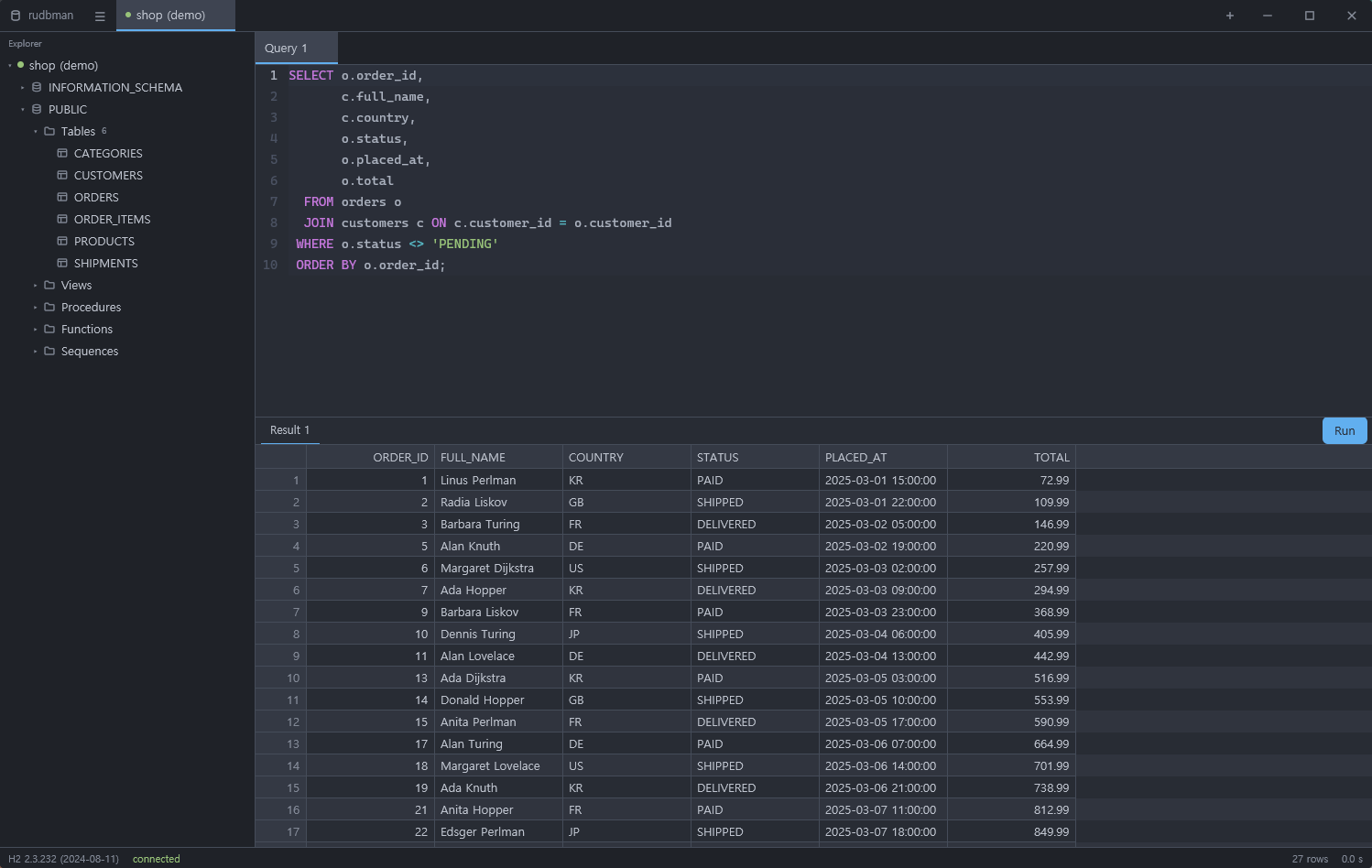
- A SQL workbench: an editor with incremental dialect-aware highlighting
and IME support, SQL keyword/function/table/column completion (including table aliases),
statement splitting, run-one/run-selection/run-all,
cancellation, multiple result sets, and a virtualized grid that fetches rows
as you scroll instead of loading the whole result — up to 200,000 rows per
grid, with a note when the result has more.
Format SQL (Ctrl/Cmd+Shift+F)
lays out the selection, or the whole editor, in the sqlstyle.guide river
layout. On a connection that does not commit each statement as it runs, the
editor's Commit and Rollback buttons end the transaction; while it
is open, grid applies, structure changes and transfers on that connection
are refused rather than committing or discarding it.
Completion opens while typing or with Ctrl+Space:
use ↑/↓ to choose, Enter/Tab to insert, and Esc to dismiss. Names come from
the current connection, with columns loaded on demand; comments and string
literals do not trigger suggestions.
Built-in function suggestions include
COUNT, SUM, AVG, MIN, MAX
and common scalar functions for the connection's dialect. Completing a
function replaces its name while preserving any existing arguments.
- BLOB/CLOB viewing and editing. Double-click a LOB cell (including NULL)
or choose Open LOB from its context menu. CLOBs use a text editor and
UTF-8 files; BLOBs use editable hexadecimal byte pairs and binary files.
Save to file exports the complete value. Replace from file snapshots
a replacement without changing the database. Add to changes (Ctrl/Cmd+Enter)
stages the value; the grid's existing Apply preview and transaction perform
the database update. Empty values and NULL remain distinct. Read-only results
can still be viewed and saved. The first 1 MiB is shown for larger values;
these stay fully exportable and can be replaced from a file without loading
the whole value into the editor. Result snapshots use temporary disk space
and are removed when the result and its edits are released.
- Multiline text cells show the first line followed by visible
\n
separators. Double-click or choose Open text editor to edit the actual
lines in the same viewer, then stage and Apply as usual. Copying and database
writes keep the original line breaks; ordinary text remains a string value.
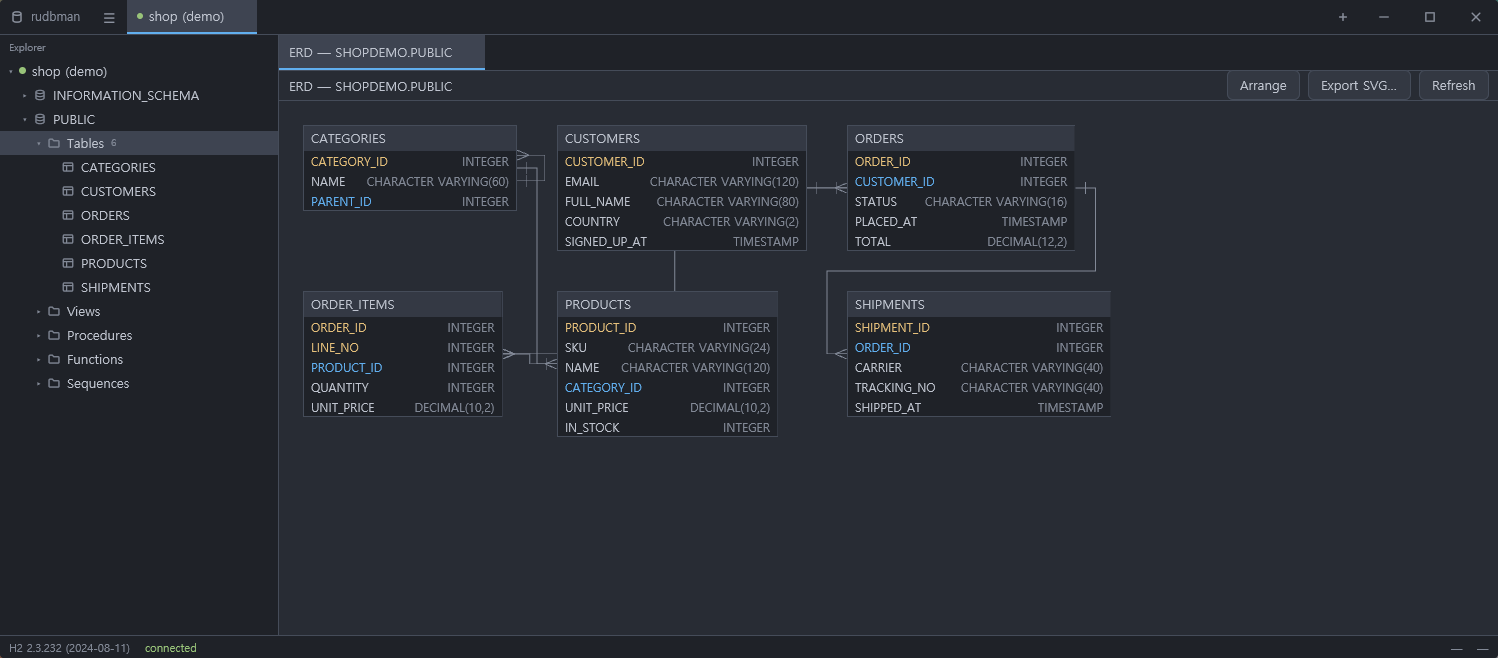
- ERD diagrams of a whole schema or catalog, from the explorer with
Ctrl/Cmd+E. Tables are placed by a
hierarchical (Sugiyama) layout of rudbman's own and joined by orthogonal
routed edges; drag a table and the new position is saved per connection and
restored next time. Export the diagram as SVG.
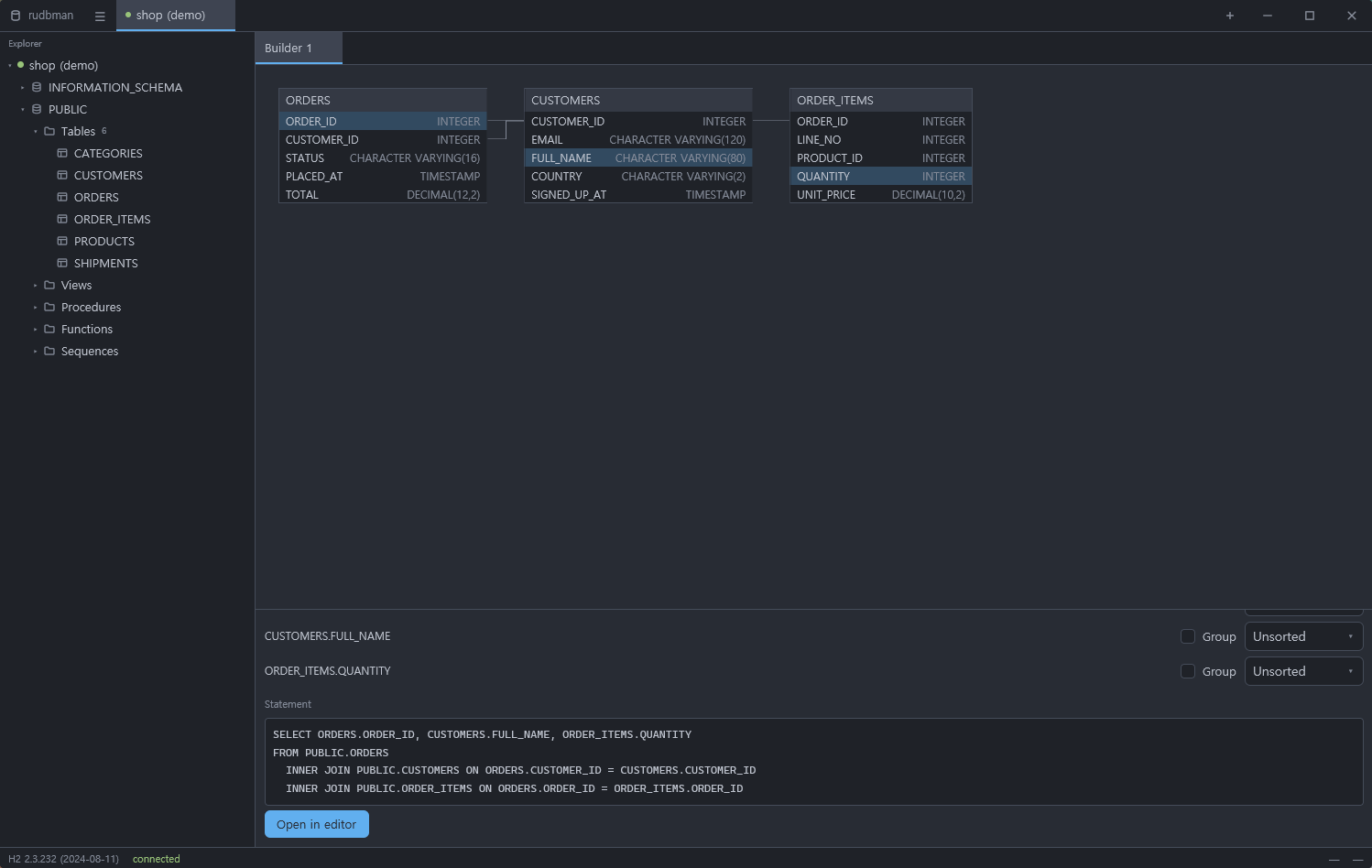
- A visual query builder. Drag tables out of the explorer onto a canvas,
click columns to toggle them into the
SELECT list, and drag column to
column to join (INNER, LEFT, RIGHT, FULL). Forms cover WHERE,
GROUP BY and ORDER BY, the SQL preview updates as you go with
identifiers quoted the way the dialect wants them, and one click opens the
statement in an editor.
- Backup of a schema or catalog to a replayable
.sql: every CREATE
first, every foreign-key ALTER after, then INSERTs ordered by a
topological sort of the foreign keys, optionally gzipped, with progress and
cancellation.
- DB-to-DB transfer. Copy tables between two open connections, by plain
insert or by upsert —
MERGE, ON CONFLICT or ON DUPLICATE KEY as the
target dialect spells it. On a bad row, abort, skip it, or log it and carry
on (batches are isolated with savepoints so one bad row does not cost the
batch), with per-row progress for both copied and skipped rows.
- Script extraction: any table to a replayable
.sql, to CSV, or
through a user template — streamed to the file inside the JVM with progress
and cancellation. Script execution is the same editor pipeline: open a
.sql file, run it, get per-statement errors.
- Context menus on every surface that has actions worth reaching for —
the explorer tree, the result grid, the editor, the ERD and builder
canvases, and the tab strips.
- Themes and languages: UI and editor theme registries with live
preview, import/export, and a user theme directory; eight UI languages
(en, ko, ja, zh-CN, de, es, fr, ru).
Installing
Download the build for your platform from
Releases. No JDK needed —
every download carries a Java runtime built with jlink, and rudbman uses the
one next to its executable.
-
Windows — two downloads, the same program inside.
…-setup.exe is an installer. It installs into your user profile, so it
needs no administrator rights and raises no UAC prompt, and it adds a
Start-menu entry plus an Apps & features entry you can uninstall from
later. Uninstalling removes only the program: settings, themes and saved
connections stay.….zip is the same tree, portable. Unzip it wherever you like and run
rudbman.exe from inside the folder — keep the folder together, because
the executable finds its Java runtime and bridge JAR beside itself.
Either way the executable is self-signed at best, so SmartScreen may say
"Windows protected your PC"; choose More info → Run anyway.
-
macOS — unpack the .tar.gz and drag rudbman.app to Applications.
The bundle is ad-hoc signed rather than notarized, so Gatekeeper quarantines
it on arrival: the first launch needs right-click → Open instead of a
double-click, and if macOS still refuses (newer versions offer no way
through), drop the quarantine flag and launch normally:
xattr -r -d com.apple.quarantine /Applications/rudbman.app
On macOS 15 and later there is a second hurdle. The system asks each app
separately for permission to reach the local network, and because the
bundle is only ad-hoc signed it usually never gets the prompt and never
appears under System Settings → Privacy & Security → Local Network,
which offers no way to add an app by hand. The permission is then denied
silently: connections to a database on your LAN — a 192.168.x.x or
10.x.x.x address, or a .local name — fail with "No route to host",
while localhost connections work as usual. The dependable way through is
to launch the binary from Terminal, whose execution context is always
allowed on the local network:
/Applications/rudbman.app/Contents/MacOS/rudbman
It has to be the executable itself; open rudbman.app hands the launch to
launchd and does not count. If you would rather try to get the prompt
back, run tccutil reset All com.aihouse.rudbman, delete every copy of
rudbman.app (empty the Trash too), reboot, then reinstall and launch —
with an ad-hoc signature it may or may not ask. Updating to macOS 15.2 or
newer, which fixed several of these cases, also helps.
-
Linux — unpack the .tar.gz and run ./install.sh. It copies the tree
to ~/.local/share/rudbman, links it from ~/.local/bin/rudbman, and
installs the desktop entry and icons. Needs no root, and the launcher in
the application menu works whether or not ~/.local/bin is on your PATH
(add it to start rudbman from a shell too). The binary needs glibc 2.35 or
newer: Ubuntu 22.04, Debian 12 and later, or a distribution built on them,
MX Linux 23 among them. The script checks for it and for the system
libraries rudbman needs — libxcb, xkbcommon with its X11 half and an EGL or
Vulkan loader — and prints the command that installs any that are missing.
To use a JDK of your own instead of the bundled runtime, point
RUDBMAN_JAVA_HOME at it (Java 17 or newer).
Building
Prerequisites: stable Rust, a JDK (17+) with Gradle wrapper support for the
bridge. The widget kit, the grid, the editor and the patched gpui come from a
pinned revision of rugpui fetched by Cargo
itself, so no separate checkout of it is needed.
# The Java half first: the Rust build refuses to proceed without the bridge JAR.
cd bridge && ./gradlew build && cd ..

# Then the workspace. Cargo fetches rugpui (and, through its patch table, gpui)
# from git on first build.
cargo build --release
A build from source has no bundled runtime, so it looks for a JVM on the
system — RUDBMAN_JAVA_HOME, then JAVA_HOME, then the usual locations. Only
the release archives ship a runtime of their own.
Running the tests mirrors CI: the bridge suite first, then the Rust
workspace, whose integration tests boot a real JVM against a real in-memory
H2 (the driver JAR is found in the Gradle cache, or pointed at with
RUDBMAN_TEST_H2_JAR):
cd bridge && ./gradlew build && cd ..
cargo test --workspace
On Linux, gpui links against libxkbcommon (with its X11 half),
wayland-client and fontconfig development packages; see
.github/workflows/ci.yml for the exact list.
Release archives are built by
.github/workflows/release.yml from a version
tag: Gradle, then jlink, then cargo, then packaging.
Architecture
SSH transport, tunnel ownership, connection validation and saving, and JVM
startup come from rudbkit, pinned to one
Git revision in the root Cargo manifest. Cargo fetches it automatically. The
application keeps its own settings, keychain, Java bridge protocol and dialog
layout; its SSH crate is a compatibility facade over the shared transport.
The design document — the JNI wire protocol, the columnar batch codec, the
data-plane rule that row data never crosses the JNI boundary, the SSH tunnel
lifecycle, and the milestone plan — lives in
docs/architecture.md. Current progress and
open items are tracked in docs/status.md.
The widget kit, the virtualised result grid and the code editor are not in this
repository. They are rugpui, extracted so that
the three desktop applications built on them stop carrying byte-identical
copies of the same code. Nothing there knows what a database is: rudbman hands
the editor a Highlighter over rudbman-sql
(crates/rudbman-app/src/sql_highlight.rs) and the grid a GridSource over a
JDBC cursor.
Neither is the layer above the widgets. rugpui-shell, from the same
repository, is the window that draws its own title bar, the self-updater that
replaces the installed copy with the one GitHub published, the about and update
dialogs, the split-pane tree, the palette catalogue and its editor, and the
pieces the settings form is built out of — each of them written once here and
then copied twice. It knows nothing about rudbman either: the name, the version,
the release endpoints, the words and the ignored-release tag are handed to it by
crates/rudbman-app/src/app_identity.rs at start-up.
gpui comes from a pinned revision of Zed's monorepo rather than from crates.io,
whose newest release (0.2.2) predates the split of the crate into a
platform-independent core, a gpui_platform facade and per-OS backends. Four of
those crates — gpui, gpui_linux, gpui_macos, gpui_windows — are patched
back over the git source, each change marked RULOGMAN PATCH: among them the
live title-bar switch, three X11 fixes and a macOS 26 blur fix upstream has no
answer for, all listed in rugpui's root manifest. rugpui vendors them and
rudbman's [patch."https://github.com/zed-industries/zed"] table points at
that copy, which is what keeps one gpui in the binary — two would make the
Globals the widgets install invisible to the application. rugpui is the
single origin of those trees:
rulogman points its patch table at the
same copy, so a fix made there reaches both projects.
Contributing
See the contribution guide for development setup, bridge and
database tests, project structure and the workflow for submitting changes.
License
MIT. The gpui crates rugpui vendors keep their upstream licenses.