🛡️ Windows Care Kit
Carry your settings across a Windows reinstall — and get them back in the right place.
Open-source, ad-free, radically honest: it tells you what can't transfer instead of faking success. Covers the full format lifecycle: Uninstall · Clean · Backup · Migrate · Reinstall · Restore.




⚠️ Status — Beta, read this first
The core maintenance, backup, migration, reinstall, and restore workflows are implemented, the build is clean (0 warnings / 0 errors), and the project has an extensive host-safe test suite. Every destructive action runs only behind a dry-run preview + your explicit approval through a single safety gate.
> 🚧 Real-world destructive operations are still undergoing supervised testing. Treat this as beta: always have a separate backup before letting it delete, restore, or migrate on a machine you care about. See Roadmap for what's built vs. planned.
🤔 What is it?
Windows Care Kit is one native Windows app that covers the whole format / reinstall lifecycle — the things you normally juggle across three or four separate (often ad-laden, opaque) tools. It is open source, ad-free, telemetry-free, and auditable, and it is honest: when something can't safely transfer (an encrypted password, a cloud-only save), the app tells you instead of pretending.
| Module | What it does |
|---|
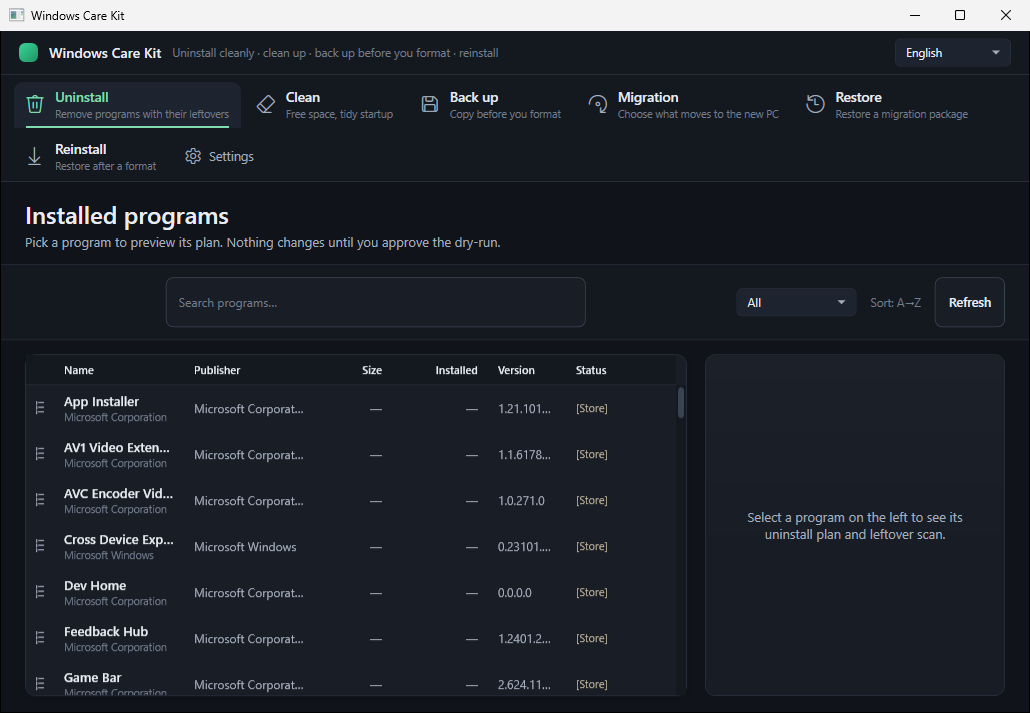
| 🗑️ Uninstall | Remove classic + UWP apps, scan & clean leftovers, run the official uninstaller, per-user AppX removal |
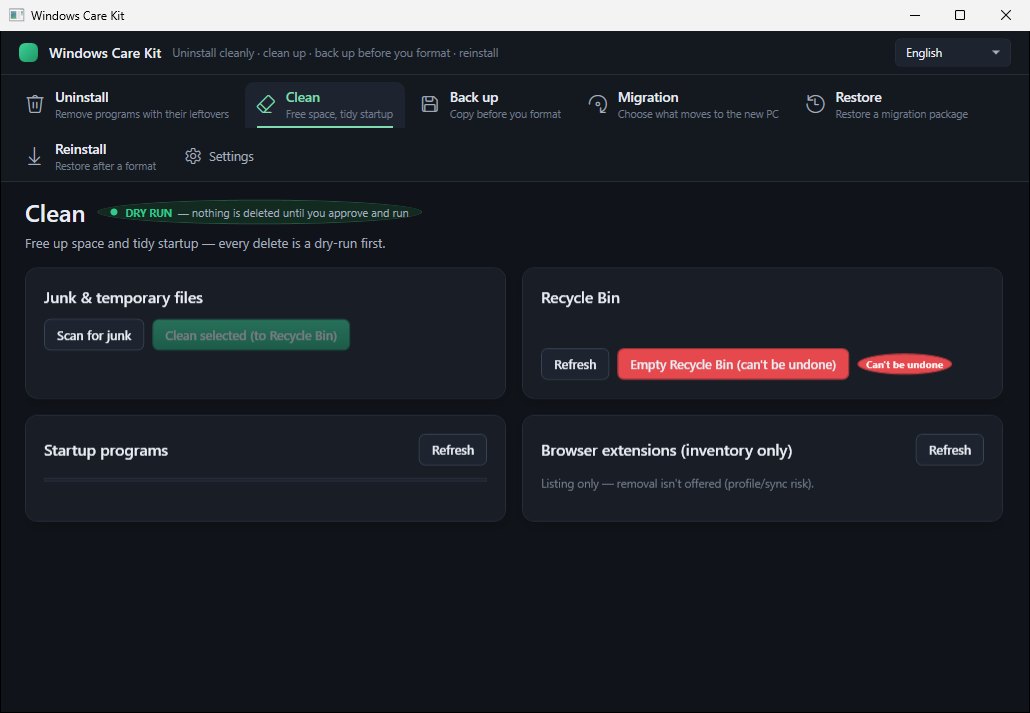
| 🧹 Clean | Junk/temp cleanup (to Recycle Bin), startup manager, browser-extension inventory, empty Recycle Bin |
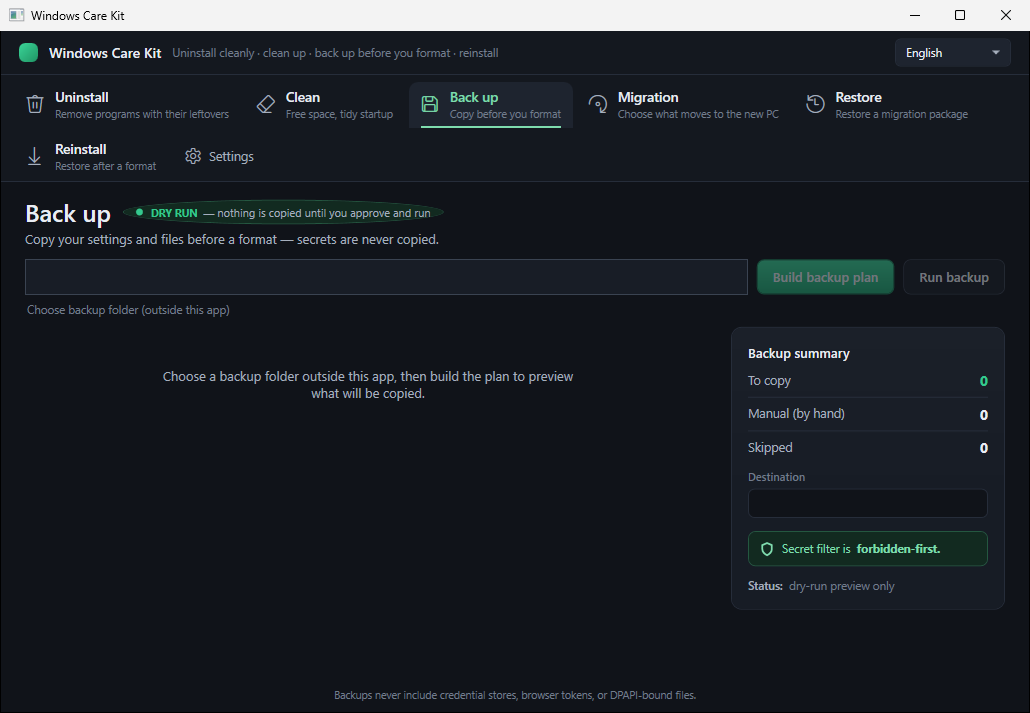
| 💾 Backup | Manifest-driven backup of the few things you can't just re-download before a format |
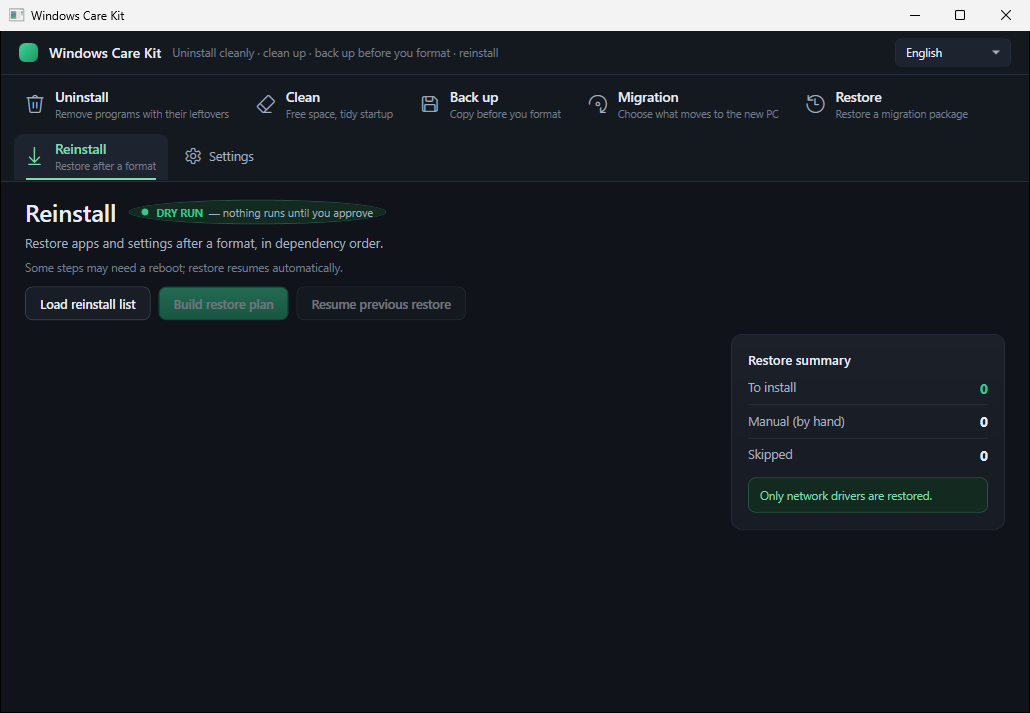
| 📦 Reinstall | Reinstall apps via winget/npm after a format, with dependency ordering and checkpoint/resume |
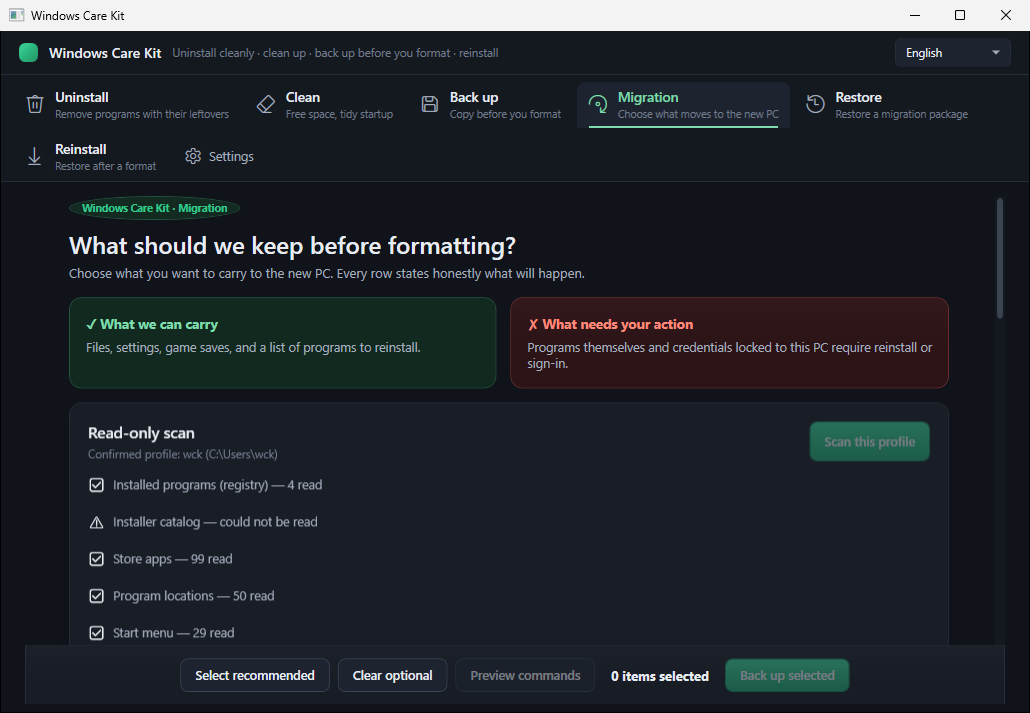
| 💼 Migration | Detect portable app settings and choose what to carry to the new PC — honest about what can't transfer |
| ♻️ Restore | Load a migration package, preview and approve the exact plan, then restore eligible settings with timestamped .bak protection and undo |
Who it's for: gamers, AI/developer power-users, and everyday people who are about to reinstall Windows and don't want to lose what matters.
🔄 How it works
flowchart LR
  U[Uninstall - remove unwanted apps] --> C[Clean - clear junk]
  C --> B[Backup - package settings and data, credential files filtered]
  B --> M[Migration - detect and capture portable settings]
  M --> F[FORMAT - fresh Windows]
  F --> R[Reinstall - reinstall your apps]
  R --> S[Restore - preview and restore eligible settings]
Maintenance starts before you decide to format, Backup and Migration capture what is portable, and Restore stays honest about what cannot move.
📸 Screenshots
💼 Migration — the honest part
🗑️ Uninstall
🧹 Clean
💾 Backup
📦 Reinstall
✨ Features
🗑️ Uninstall
- Read-only inventory of installed classic (Win32) and UWP/Store apps.
- Runs the app's official uninstaller, then a leftover-cleanup wizard for the files/registry keys it leaves behind.
- Per-user AppX removal for Store apps.
- Every removal: dry-run preview → you approve → it runs (never silent).
🧹 Clean
- Junk / temp scan & clean — removals go to the Recycle Bin (recoverable), not a hard delete.
- Startup manager — see and disable what launches at boot.
- Empty Recycle Bin — behind an explicit confirmation, and logged.
- Browser-extension inventory — list what's installed, open its folder.
💾 Backup
- Manifest-driven plan for the irreplaceable stuff before a format.
- Tool / payload separation: re-downloadable apps are never copied — only an install list is written, so your backup stays small.
- Credential filtering is enforced: known credential-file names (
Login Data, Local State, key4.db, .npmrc, .env, …) are skipped, and text configs are content-scanned so files with embedded tokens are dropped before copy. Review the report and backup contents before relying on them.
- Produces a human-readable
REPORT.md and MANUAL_TODO.md (the things only you can do — e.g. re-login somewhere).
- Your personal backup data lives outside the app, never in the repo.
📦 Reinstall / Restore
- winget / npm reinstall plan with a sensible restore order and checkpoint/resume.
- Restore settings after install — config files are merged after the app exists, with a timestamped
.bak so nothing is blindly overwritten.
- Auth probe — tells you where you'll need to log in again.
The Migration screen uses a recipe-based detection catalog covering 40 applications to find
portable settings and present a selectable, honest preview of what can be carried to a new Windows
profile.
Honest deferral for machine-locked settings: recipes classify settings that cannot be rebound
reliably on another machine as manual or deferred. They are never shown as a successful automatic
restore. The preview explains what was detected, what is eligible, and what still requires manual
work.
Available today: recipe-based detection, selection, and live capture in the WPF Migration
screen — pick a backup folder, approve the dry-run plan, and the selected settings are copied there
through the same safety-gated backup engine. On the new machine, the Restore screen loads that
package, rebuilds and displays the exact plan, requires explicit approval of its hash, writes
eligible settings with timestamped .bak protection, and offers an approved undo flow.
Machine-locked and manual items remain honest skips; they are never reported as restored.
🔒 Safety model (non-negotiable)
This is the part most "cleaner" tools get wrong. Here it is the core design:
- One gate, no exceptions. Every destructive action passes through a single
SafetyGate (system-folder guards, junction/symlink resolution, protected process/service guards) and is re-validated again at execution time (TOCTOU-safe).
- Dry-run first, always. Nothing happens until you see a typed, risk-classified plan and approve it.
- Honest interface. If something can't transfer (DPAPI-encrypted passwords, cloud-only saves), the app says so — it doesn't fake success.
- No telemetry, no analytics, no phone-home. The app never contacts a server on its own. The only network activity happens when you run the Install module — it reinstalls your apps via
winget/npm, and shows you the exact, approved plan before anything downloads.
- Tool/payload separation + credential filtering: known secret-store files are name-filtered, text configs are scanned for embedded tokens, and the report tells you what was skipped. Review the backup before storing or sharing it.
- Auditable: a single sanctioned execution layer, an analyzer that fails the build if destructive APIs are used outside it, and a redacted execution log.
⬇️ Download & run
- Download the latest component installer (recommended) or the self-contained portable ZIP from Releases.
- Verify the SHA256 of the asset against the value on the release page.
- Run Setup and choose the modules you want, or extract the entire portable ZIP and run
WindowsCareKit.exe.
> Note: the build is unsigned (this is a free, no-revenue project, so there's no code-signing certificate). Windows SmartScreen may warn on first run — this is expected for unsigned apps; the SHA256 check is your integrity guarantee. There is no auto-updater — check the Releases page.
🛠️ Build from source
Requires the .NET 10 SDK.
git clone https://github.com/ydbilgin/windows-care-kit.git
cd windows-care-kit
dotnet build WindowsCareKit.slnx -c Release
dotnet test  WindowsCareKit.slnx -c Release --filter "Category!=Destructive"
Project layout: src/ (modules + safety core + execution layer), tests/ (automated tests), sandbox/ (disposable destructive-proof harnesses), docs/ (tracked design assets and screenshots).
🤖 Development workflow — built with Codex
Windows Care Kit is developed and maintained with OpenAI Codex as the primary coding agent.
Each change starts from a written spec; Codex writes the implementation and the automated tests
(the suite is extensive and host-safe under the explicit non-destructive filter), and every change goes through an independent,
multi-pass review before the maintainer merges it. Codex also handles the routine maintainer chores:
build/test verification, changelog and doc updates, and recipe-catalog hygiene.
This is deliberate for a tool that performs destructive, system-level operations: the same
discipline the app promises its users (spec → implement → review → never fake success) is applied to its own
development. The agent's working rules live in AGENTS.md; the human maintainer owns
scoping, final review, and every merge.
🗺️ Roadmap
Built today (beta): the six workflows above, a 40-application settings recipe catalog, machine-aware capture/restore, the safety gate + gated executor, a localizable English/Turkish UI, and the automated test suite.
Next candidates:
- 🔎 Broader curated settings-recipe coverage and a manual-path addition flow.
- 💽 Multi-drive scan (not just C:), with cloud-redundancy detection (skip what Steam Cloud / OneDrive already holds).
- 📋 Broader package inventory coverage — capture what's installed across more package managers (the list, not the files) and reinstall it.
- 📥 Import / "recovery profile" — portable selection profile + optional auto-install of missing apps.
- 🎮 Optional game-file backup (Steam/Epic), with honest platform limits (Xbox/Game Pass = reinstall-only).
See CONTRIBUTING.md and SECURITY.md for the engineering and safety rules.
🤝 Contributing
Issues and PRs welcome. Because this app performs destructive, system-level operations, contributions are reviewed with that in mind:
- Destructive code lives only in the sanctioned execution layer; the analyzer enforces this.
- New behavior needs tests; tests use fakes/synthetic data, never real personal data.
- See
CONTRIBUTING.md and SECURITY.md for the development & disclosure process.
🔐 Security
Found a security issue? Please report it privately (see SECURITY.md) rather than opening a public issue. This project treats user-data safety as its primary promise.
🕵️ Privacy
No telemetry, no analytics, no phone-home — the app never contacts a server on its own. The only network activity is when you run the Install module, which reinstalls your apps via winget/npm; it shows you the exact, approved plan before anything downloads. Your backup data (payload/) never enters the repository and never leaves your machine unless you move it.
🌍 Language
The app has a built-in language selector (top-right). It ships with English and Turkish, and the UI is fully localizable: adding a language is a data-only change — drop a translated lang/.json (with a meta.languageName entry) next to the executable and it appears in the selector, no rebuild required. A Turkish README is also available.
📄 License
MIT.
Built in the open. No ads, no tracking, no dark patterns — just a tool that tells you the truth before it touches your system.