NullByte — AI Coding Assistant



NullByte is a lightweight Electron-based desktop tool that gives you instant access to Google's Gemini AI while you code. It sits on top of your IDE, browser, or terminal as a non-intrusive floating panel — perfect for quick code explanations, debugging help, and on-the-fly learning.
> ⚠️ Disclaimer: NullByte is designed as a personal productivity and learning tool. It is not intended for use during interviews, exams, proctored assessments, or any scenario where external assistance is prohibited. Please use this tool ethically and responsibly.
✨ Features
- Always-On-Top Panel — A floating panel that stays visible over your IDE, browser, or any other application so you can reference AI-generated solutions without switching windows.
- Click-Through Mode — The panel doesn't interfere with your workflow; mouse events pass through to the application underneath.
- Global Hotkeys — Control everything via keyboard shortcuts without leaving your current app.
- Gemini AI Integration — Leverages Google's latest multimodal AI models for intelligent code analysis and solutions.
- Screenshot & Solve — Capture a portion of your screen (error messages, code snippets, UI bugs) and let AI analyze it instantly.
- Secure API Key Storage — Your Gemini API key is stored with encryption on your local machine.
🚀 Getting Started
1. Install via Homebrew (macOS)
The fastest way for macOS users to install NullByte and keep it updated is through our custom Homebrew tap:
brew tap 101yogeshsharma/nullbyte
brew install nullbyte
> [!CAUTION]
> ### ⚠️ macOS Security Note
> Because NullByte is currently an unsigned developer tool, macOS will block it from opening the first time with a "Apple could not verify..." warning.
>
> 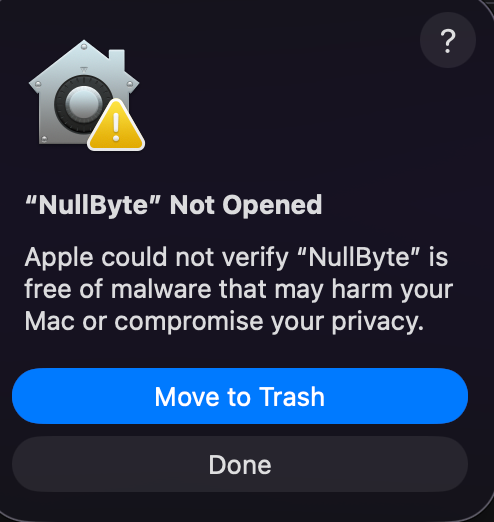 >
> To fix this, you have two options:
>
> 1. Terminal (Deep Clean): Open your terminal and run the following command to remove the quarantine tag:
>
>
> To fix this, you have two options:
>
> 1. Terminal (Deep Clean): Open your terminal and run the following command to remove the quarantine tag:
> bash > xattr -d com.apple.quarantine /Applications/NullByte.app >
> 2. System Settings:
> - Go to System Settings > Privacy & Security.
> - Scroll down to the Security section.
> - Click Open Anyway next to the NullByte block notice.
Note: You may be prompted to allow the application to open since it is an unsigned release currently.
2. Install via Winget (Windows)
Windows users can soon install NullByte natively via Microsoft's Winget package manager!
winget install NullByte
(Note: NullByte relies on central submission to microsoft/winget-pkgs. If the latest release isn't available immediately, give the pull request a few hours to merge).
3. Manual Installation (Windows/Linux/Mac)
Prerequisites
Make sure you have the following installed on your machine:
Clone the Repository
git clone https://github.com/101yogeshsharma/NullByte.git
cd NullByte
Install Dependencies
npm install
3. Get a Gemini API Key
NullByte uses Google's Gemini AI under the hood. You'll need a free API key:
- Go to Google AI Studio.
- Sign in with your Google account.
- Click "Get API Key" → "Create API Key".
- Copy the key — you'll paste it into NullByte when you first launch it.
> Note: Your API key may have restrictions. If the default gemini3 27B model fails, try selecting another model from the app's dropdown menu.
4. Run in Development Mode
npm run start
This launches NullByte directly. You can also use:
npm run dev
5. Build for Production
To create a standalone installer that you can share or install on any machine:
# To build macOS (.dmg)
npm run build:mac

# To build Windows (.exe)
npm run build:win
The output installers will be placed in the dist/ folder.
> 💡 Tip for Git Bash / WSL users: You can also use the included build script:
> bash > chmod +x build.sh > ./build.sh >
> It handles dependency checks, cleans previous builds, and creates the .exe in one step.
📁 Project Structure
NullByte/
├── main.js                 # Electron main process — window creation, hotkeys, AI logic
├── preload.js              # Preload script — bridges main ↔ renderer securely
├── renderer/               # Frontend UI files
│   └── overlay.html        # The overlay's HTML, CSS, and client-side JS
├── assets/
│   └── icon.png            # App icon (512×512)
├── build/
│   └── installer.nsh       # NSIS installer customization script
├── verify_key.js           # Gemini API key validation utility
├── electron-builder.yml    # Electron Builder configuration
├── package.json            # Project metadata and scripts
└── build.sh                # Bash build helper script
🎮 Usage
- Launch NullByte.
- Enter your API Key — Get a free Gemini API key from Google AI Studio and paste it when prompted.
- Use keyboard shortcuts to interact with NullByte:
| Shortcut | Action |
|---|
Ctrl + Shift + S | Capture a screenshot (adds to queue) |
Ctrl + Shift + G / Ctrl + Shift + Enter | Solve with AI |
Ctrl + Shift + D | Solve (alternative shortcut) |
Ctrl + Shift + Q | Toggle NullByte visibility |
Ctrl + Shift + X | Clear screenshot queue |
Ctrl + Shift + M | Toggle AI model selection |
Ctrl + Shift + Arrow Keys | Scroll through the solution |
- Workflow: Capture a screenshot of a coding problem or error → press Solve → read the AI-generated explanation and solution right in NullByte.
🔧 Technical Details
- Always-On-Top Window — Built as an Electron
BrowserWindow with alwaysOnTop enabled, using a frameless, transparent design for minimal visual footprint.
- Click-Through — Uses Electron's
setIgnoreMouseEvents API so the tool doesn't block interaction with underlying apps.
- Compact UI — Uses a toolbar-style window to keep the interface minimal and out of the way.
- Self-Hiding Capture — NullByte temporarily hides before taking screenshots to ensure clean captures of the content beneath it.
🎨 Customization
- Icon — Replace
assets/icon.png with your own 512×512 PNG.
- Theme — Edit the styles in
renderer/overlay.html to customize colors, fonts, and layout.
❓ Troubleshooting
| Problem | Solution |
|---|
npm install fails | Make sure you have Node.js v18+ installed. Run node -v to check. |
| NullByte doesn't appear | Press Ctrl + Shift + Q to toggle visibility. Check if the app is running in the system tray. |
| "Invalid API Key" error | Double-check your Gemini API key at Google AI Studio. Make sure there are no extra spaces. |
| Build fails with privilege errors | Run your terminal as Administrator and try again. |
| Screenshots are blank | Make sure you're not running the app in a virtual machine, as some VMs restrict screen capture APIs. |
🤝 Contributing
Contributions are welcome! Here's how you can help:
- Fork this repository.
- Create a branch for your feature or fix:
git checkout -b feature/your-feature-name
- Make your changes and commit them:
git commit -m "Add: your feature description"
- Push to your fork:
git push origin feature/your-feature-name
- Open a Pull Request against the
main branch of this repository.
Ideas for Contributions
- 🐛 Bug fixes and stability improvements
- 🎨 UI/UX enhancements
- 🌐 Multi-platform support (macOS, Linux)
- 📝 Documentation improvements
- ✨ New AI model integrations
📄 License
This project is licensed under the Apache License 2.0 — see the LICENSE file for details.