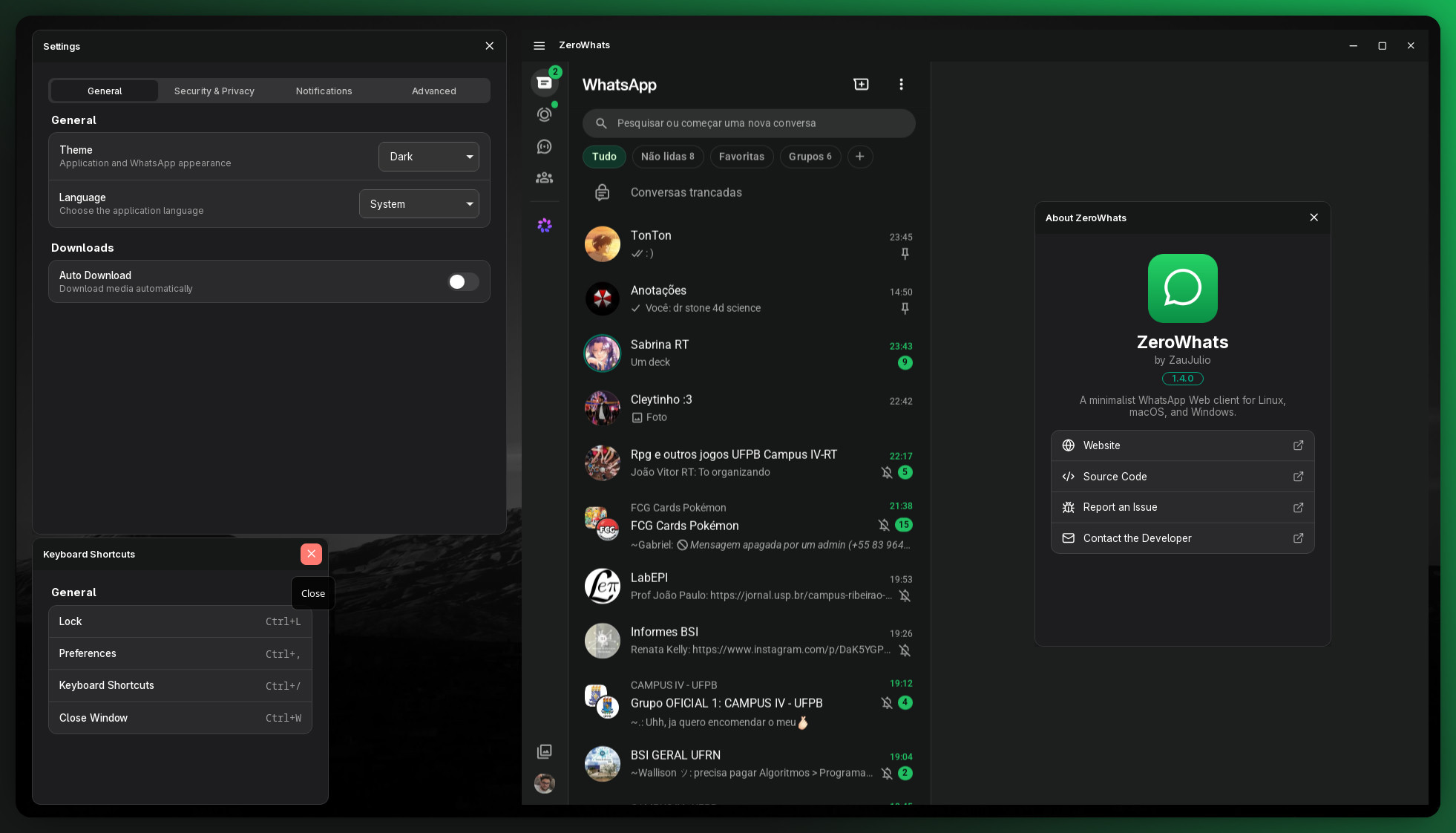
Why ZeroWhats?
WhatsApp Web in a real desktop window, with the things the browser tab can't give
you — and nothing it shouldn't:
- 🔔 Native OS notifications. WhatsApp's web notifications are redirected to
the system notification service. No browser permission prompts, and no MPRIS
media-session pollution of your media keys.
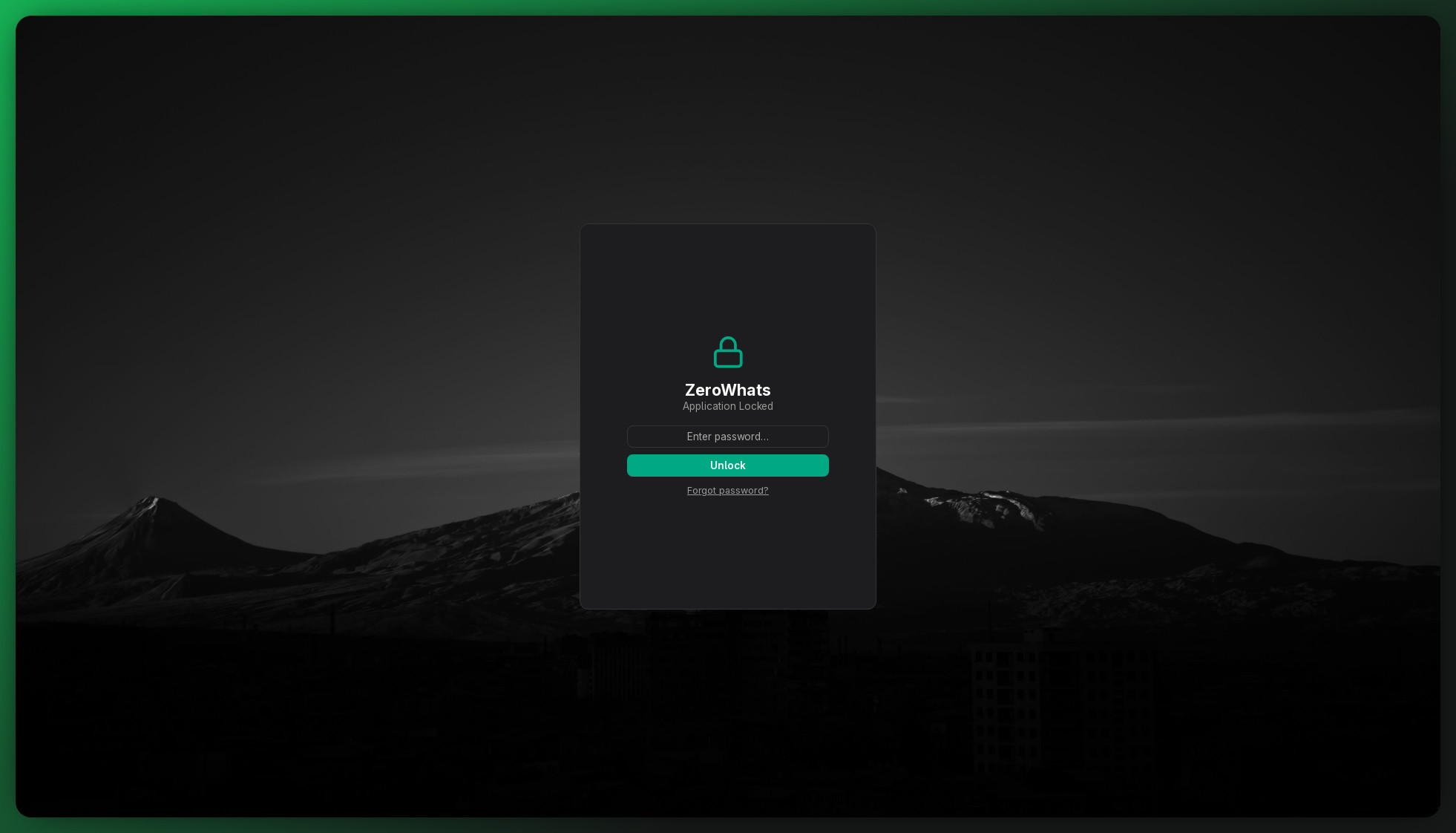
- 🔒 App lock. Optional password (Argon2id), with lock-on-close and
lock-on-idle (auto-lock after N minutes). Removing or replacing the
password requires the current one, or a system-admin authentication (polkit
on Linux, UAC on Windows, an admin prompt on macOS) — so a thief can't just
strip the lock. Forgot it entirely? On Linux you reset via polkit; elsewhere
ZeroWhats offers to log out and wipe local data. Settings stay inaccessible
while the app is locked.
- 🔢 Tray unread counter. The unread total is drawn as a badge right on the
tray icon — visible on GNOME/AppIndicator, macOS and Windows.
- 🖱️ Tray menu. Show, Preferences, Mute/Unmute (toggles label), a
separator, then Lock (once a password is set) and Quit. Per-item icons
render on KDE/macOS/Windows; GNOME's AppIndicator bridge doesn't support
per-item menu icons, so there it's labels + separator only.
- 🛡️ WhatsApp-only sandbox. The app window will only ever navigate to
WhatsApp; any other link opens in your real browser. Local UI runs under a
strict CSP.
- 🎨 Light / dark / system theme, for both the app chrome and WhatsApp.
- ✍️ Spell check. Toggle it on and pick your dictionaries (English, Portuguese,
Spanish, French, German, Italian…) in Settings → Advanced. Misspellings are
underlined in the message box. On Linux this uses the system hunspell/enchant
dictionaries — install the ones you need (see Spell check dictionaries below).
On macOS and Windows, the OS spell checker is used automatically.
- 📋 Clipboard paste that actually works. Paste screenshots and files or
images copied from your file manager straight into a chat — a workaround for a
long-standing WebKitGTK limitation on Linux.
- 🖼️ Stickers & emoji render correctly on Linux by advertising a real WebKit
(Safari) user-agent, so WhatsApp serves the WebKit-tested code path.
- 🪟 Custom frameless window with an in-page titlebar: maximize button,
double-click-to-maximize, and edge/corner resize grips.
- 🔄 Built-in update checker. A background thread queries the GitHub Releases
API once a week (no telemetry, no data sent). When a new version is found, a
dismissible banner appears on the WhatsApp page. You can also check manually
from the hamburger menu, the About page, or Settings → General. The Update
screen shows full release notes and a one-click link to download.
- 🪶 Tiny & fast. A size-optimized Rust binary and the system WebView — a
fraction of an Electron app's footprint.
Security hardening
ZeroWhats treats the WhatsApp Web page as untrusted — all communication
between the remote origin and the Rust backend goes through a narrow
zw:// event bridge, never direct command invocation. On top of that:
- Scheme allowlist — the open-external handler only forwards
http,
https, and mailto URLs. Protocol handlers like file:// or steam://
are blocked, preventing a compromised page from launching local applications.
- Download sanitization — filenames are stripped to their base name
component (no
../../ traversal) and blob payloads are capped at 256 MB.
- Path containment — "show in folder" validates that the target is inside
the configured download directory before revealing it to the file manager.
- Brute-force protection — the unlock flow enforces server-side exponential
backoff (1 → 2 → 4 → … → 30 s) after 3 failed password attempts.
- Config file permissions — on Linux/macOS,
config.json is written with
0600 permissions so other users on the same machine cannot read the
password hash.
- Correct atomic ordering — the lock flag uses
Acquire/Release instead
of Relaxed for correct cross-thread visibility on ARM.
- No
innerHTML — all injected-script DOM construction uses textContent
and the DOM API; no untrusted data is interpolated as HTML.
See SECURITY.md for the full threat model.
Install
Grab the file for your platform from the latest release:
| OS | File | Notes |
|---|
| Linux | .AppImage | Portable — chmod +x and run. |
| Linux | .deb / .rpm | sudo apt install ./ZeroWhats_*.deb / sudo dnf install ./*.rpm |
| Linux | AUR (zerowhats-bin) | See release/. |
| Windows | .msi / -setup.exe | Uses the built-in WebView2. |
| macOS | .dmg | Universal builds for Apple Silicon & Intel. |
> Linux note: like every Tauri app, ZeroWhats uses the system WebKitGTK
> (libwebkit2gtk-4.1) and an AppIndicator tray. The .deb/.rpm declare these
> as dependencies; the .AppImage bundles most of them. A "zero-dependency"
> static binary isn't possible on Linux because the WebView is a system library —
> that's exactly why the binary stays so small. Windows (WebView2) and macOS
> (WKWebView) ship their WebView with the OS.
Where is my data?
| What | Linux | macOS | Windows |
|---|
Settings (config.json) | ~/.config/com.zaujulio.zerowhats/ | ~/Library/Application Support/com.zaujulio.zerowhats/ | %APPDATA%\com.zaujulio.zerowhats\ |
| WhatsApp session (cookies, IndexedDB, service worker) | ~/.local/share/com.zaujulio.zerowhats/ | ~/Library/Application Support/com.zaujulio.zerowhats/ | %LOCALAPPDATA%\com.zaujulio.zerowhats\ |
config.json holds your preferences and the Argon2id password hash (never the
password itself). Deleting the data dir fully resets the app and logs WhatsApp out —
which is exactly what the non-Linux "forgot password" flow does for you.
Development
Requires bun, the Rust toolchain, and the
Tauri prerequisites for your OS.
bun install
bun run tauri dev      # run with hot-reload
bun run tauri build    # build optimized installers for the current OS
VS Code users get Run > Debug ZeroWhats (LLDB) wired up via .vscode/.
Architecture
One frameless window loads WhatsApp Web; a set of JavaScript files is injected
into the page to add the titlebar, intercept notifications, and bridge events back
to Rust. The Settings / About / Shortcuts / Lock screens are separate frameless
Preact windows that communicate with the backend over typed Tauri commands.
ZeroWhats/
├─ src/                         # Preact frontend (frameless secondary windows)
│  ├─ lib/                      #   non-UI layers
│  │  ├─ api.ts                 #     typed Tauri command bindings (IPC)
│  │  ├─ theme.ts               #     light/dark window chrome
│  │  ├─ window.ts              #     reveal-when-ready (no open-flash)
│  │  ├─ translations/          #     en / pt-BR locale strings
│  │  └─ cx.ts                  #     className-join helper
│  ├─ ui/
│  │  └─ components/            #     AppWindow, Group, Row, Toggle, Select
│  ├─ screens/                  #   one directory per window label
│  │  ├─ Settings/              #     index.tsx + Settings.module.css
│  │  ├─ About/                 #     index.tsx + About.module.css
│  │  ├─ Shortcuts/             #     index.tsx + Shortcuts.module.css
│  │  ├─ Lock/                  #     index.tsx + Lock.module.css
│  │  └─ Update/                #     index.tsx + Update.module.css
│  ├─ App.tsx                   #   routes a screen by the window's label
│  └─ styles.css                #   global tokens, theme vars, resets
├─ src-tauri/
│  ├─ src/                      # Rust backend — one module per concern
│  │  ├─ main.rs                #     bootstrap + web→Rust event bridge
│  │  ├─ window.rs              #     windows + WhatsApp-only navigation guard
│  │  ├─ lock.rs                #     lock state, unlock, auto-lock
│  │  ├─ notification.rs        #     native notifications + mute
│  │  ├─ tray.rs                #     system tray + unread-badge renderer
│  │  ├─ commands.rs            #     thin #[command] IPC layer (local windows)
│  │  ├─ config.rs              #     config model + DTOs
│  │  ├─ password.rs            #     Argon2id hashing + polkit reset
│  │  ├─ updater.rs             #     GitHub release checker + semver compare
│  │  ├─ scripts.rs             #     loads web/*.js via include_str!
│  │  └─ web/                   #     scripts injected into the WhatsApp page
│  │     ├─ bootstrap.js        #       early init + tauri API bridge
│  │     ├─ titlebar.js         #       hamburger menu → zw://action events
│  │     ├─ notifications.js    #       Notification intercept → zw://notify
│  │     ├─ unread-badge.js     #       DOM badge count → zw://unread
│  │     ├─ links.js            #       external links → zw://open-external
│  │     ├─ update-banner.js     #       update-available banner → zw://action
│  │     ├─ auto-lock.js        #       idle timer → zw://action{lock}
│  │     ├─ rounded-corners.js  #       frameless window corner styling
│  │     ├─ fullscreen.js       #       fullscreen toggle
│  │     ├─ find.js             #       in-page text search
│  │     ├─ background-sync.js  #       background tab sync keepalive
│  │     └─ wipe-session.js     #       on-demand session wipe
│  ├─ capabilities/             # Tauri ACL (remote-origin permissions)
│  ├─ icons/                    # app icons (generated from ../icon.svg)
│  └─ tauri.conf.json
├─ release/                     # packaging defs (linux/aur/win/mac)
├─ icon.svg                     # icon source
└─ .github/workflows/           # CI — release.yml
Component architecture
---
config:
  layout: elk
  theme: dark
---
graph LR
    subgraph Proc[ZeroWhats process]
        direction TB
        subgraph Frontend
            WA[WhatsApp Web\nwebview]
            WebJS[Injected JS\nweb/*.js]
            PreactWins[Preact windows\nSettings · About\nShortcuts · Lock]
        end
        subgraph Rust[Rust backend]
            Main[main.rs\nevent bridge]
            Window[window.rs]
            Lock[lock.rs]
            Tray[tray.rs]
            Notif[notification.rs]
            Cmds[commands.rs]
        end
    end

    WA --> WebJS
    WebJS -->|zw:// events| Main
    PreactWins -->|Tauri commands| Cmds
    Main --> Window & Lock & Tray & Notif
    Cmds --> Lock & Window

    Tray --> SysTray[System tray\nbadge icon]
    Notif --> OSNotif[OS notifications]
    Window --> WA & PreactWins
    Lock --> LockFile[(config.json)]
zw:// event flow
The injected scripts run at the remote web.whatsapp.com origin, which Tauri
prevents from calling app commands directly. Events are the only bridge.
---
config:
  layout: elk
  theme: dark
---
sequenceDiagram
    participant Main as Main Window(WhatsApp Web + injected scripts)
    participant Aux as Auxiliary Window(Settings · About · Shortcuts · Lock)
    participant Bus as Tauri Event Bus
    participant Rust as Rust
    participant BE as Backend

    Note over Main: User clicks the hamburger menu
    Main->>Bus: zw://action {action:"settings"}
    Bus->>Rust: dispatch
    Rust->>BE: window::open_settings()
    BE-->>Aux: ✔ Settings window shown to user

    Note over Main: New message received
    Main->>Bus: zw://notify {title, body}
    Bus->>Rust: dispatch
    Rust->>BE: notification::notify()
    Note right of BE: ✔ native notificationdisplayed by OS

    Note over Main: Unread badge updated in DOM
    Main->>Bus: zw://unread {count}
    Bus->>Rust: dispatch
    Rust->>BE: tray::set_unread(count)
    Note right of BE: ✔ tray icon badgeupdated with count

    Note over Main: User clicks an external link
    Main->>Bus: zw://open-external {url}
    Bus->>Rust: dispatch
    Rust->>BE: opener::open(url)
    Note right of BE: ✔ URL opens in thesystem default browser

    Note over Main: Auto-lock: idle timer expired
    Main->>Bus: zw://action {action:"lock"}
    Bus->>Rust: dispatch
    Rust->>BE: lock::lock()
    BE-->>Aux: ✔ lock screen shown to user

    Note over Aux: User enters password and confirms
    Aux->>Rust: unlock() via Tauri IPC
    Rust->>BE: verify Argon2id hash
    BE-->>Rust: hash valid
    Rust-->>Aux: unlocked
    Aux-->>Main: ✔ main window restored to user
Why events, not commands, from the WhatsApp page
The titlebar lives inside the remote web.whatsapp.com page. Tauri only lets a
remote origin call core commands — never app commands — so the injected
scripts can't invoke() ours. Instead they emit events (zw://action,
zw://unread, zw://notify), which is a core capability granted in
capabilities/default.json; register_web_events in main.rs listens and
dispatches. (This is what makes the hamburger menu actually open windows.)
Spell check dictionaries
On Linux, spell check is powered by the system's hunspell/enchant libraries.
Install the dictionary packages for the languages you want to use:
# Arch / AUR
sudo pacman -S hunspell-en_us hunspell-pt-br hunspell-es_es hunspell-fr hunspell-de hunspell-it

# Debian / Ubuntu
sudo apt install hunspell-en-us hunspell-pt-br hunspell-es hunspell-fr hunspell-de-de hunspell-it

# Fedora / RHEL
sudo dnf install hunspell-en-US hunspell-pt-BR hunspell-es hunspell-fr hunspell-de hunspell-it
Then enable spell check and select your languages in Settings → Advanced.
On macOS and Windows, the OS built-in spell checker is used automatically
based on your system language settings — no extra downloads needed.
FAQ
How do I mute notifications?
Use the tray menu — it's a single toggle that flips between "Mute" and
"Unmute". Muting fully suppresses notifications (no title, no body, nothing
shown); it's not just a "quiet" mode.
Ctrl+W doesn't close the app while it's locked — is that a bug?
No, that's intentional. On the lock screen, Ctrl+W hides the window to the
tray (same as closing the main window) instead of closing/unlocking it — the
app stays locked either way. It's only reachable again from the tray.
Does ZeroWhats have access to my messages?
No. ZeroWhats is a thin shell around WhatsApp Web — it stores no message content
and sends no telemetry. All data lives in WhatsApp's servers and the local WebView
storage (cookies, IndexedDB) that WhatsApp itself writes. The Rust backend never
reads that data.
Why does it need polkit / admin rights on Linux?
It doesn't, for normal use. Polkit is only invoked when you forget your app-lock
password and choose to reset it. In that flow, polkit confirms your system identity
so ZeroWhats knows it is safe to wipe the stored password hash.
Why WebKitGTK instead of a bundled browser engine?
Using the system WebView keeps the binary small (no bundled Chromium), lets
ZeroWhats benefit from OS-level security updates, and matches how every native
GNOME/KDE web-adjacent app works. The trade-off is that WebKitGTK versions differ
across distros — see CONTRIBUTING.md for the required system
packages.
The window is blank or white on my Linux setup. What do I do?
This is typically a WebKitGTK DMABUF renderer issue on NVIDIA + Wayland setups.
Launch with ZW_FORCE_SOFTWARE=1 set in your environment. If that fixes it, set
the variable permanently in your shell profile or desktop entry.
Can I use ZeroWhats behind a corporate proxy?
Yes — open Settings → General and enter your HTTP/HTTPS proxy URL. ZeroWhats sets
http_proxy / https_proxy for the WebKit process before it starts, so all
traffic goes through the proxy. The setting takes effect on the next launch.
What is the app-lock password stored as?
Only as an Argon2id hash — the actual password is never saved. The hash lives
in config.json in the OS app-config directory (see Where is my data? above).
Anyone with read access to that file can attack the hash offline, so the lock is
designed to deter casual access, not determined local attackers. See
SECURITY.md for the full threat model.
Contributing
Pull requests and issues are welcome! See CONTRIBUTING.md for
setup instructions, coding conventions, and the PR checklist.
Code of Conduct
This project follows the Contributor Covenant v2.1. By
participating you agree to uphold these standards. Violations may be reported to
zaujulio.dev@gmail.com.
Contributors

Want to see your avatar here? Open a PR!
Releases & packaging
bun run tauri build produces installers for the current OS. The full
cross-platform matrix and the AUR definitions live in
release/, and .github/workflows/release.yml builds and publishes
them all on a vX.Y.Z tag push. See release/README.md.
License
MIT © ZauJulio. Not affiliated with WhatsApp or Meta.