blob: minimal note manager




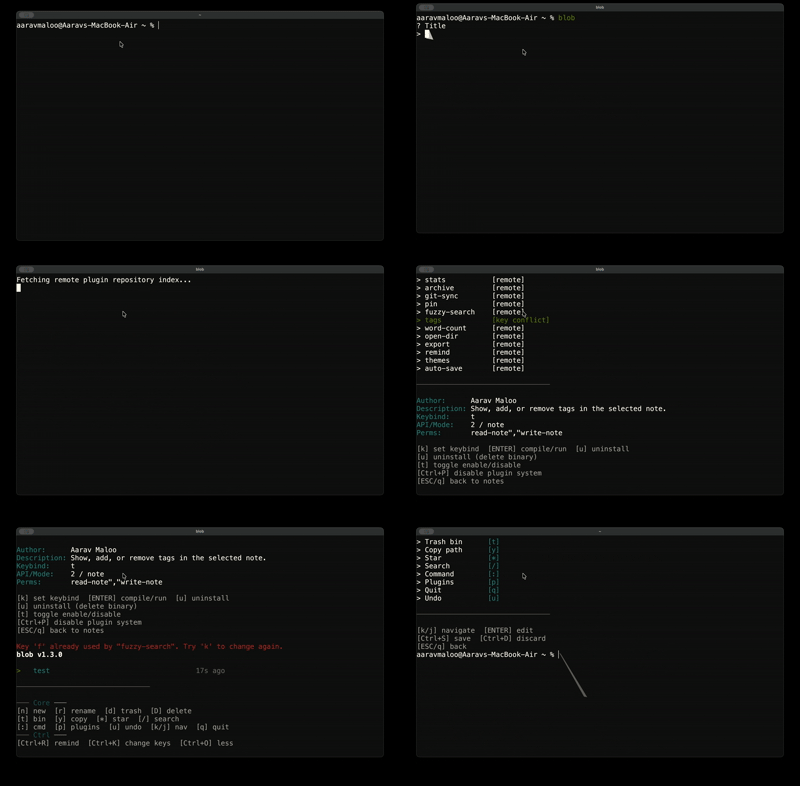
blob is a minimalistic and efficient inline terminal note manager that stays out of your way. It is programmed in C and keeps the interface small, fast, and terminal-native.
Features
- inline interactive note selector
- markdown note creation
- live note search
- rename, trash, restore, and hard delete flows
- interactive trash bin viewer (
t) — browse, restore, or purge trashed notes
- command palette for core actions and installed plugins
- favorites / starred notes (
*) — float favourite notes to the top
- config file (
~/.local/share/blob/config) — persistent editor, theme, and sort settings
- built-in themes — dark, light, dracula, solarized presets with a plugin switcher
- relative timestamps and pagination
- safer plugin installs with API, mode, and permission metadata
- multi-level undo (
u) and redo (Ctrl+Z) — undo up to 10 previous trash/rename actions
- configurable sorting —
sort = mtime|title|size with Ctrl+T cycling and reverse support
- trash auto-purge (
purge_days) — trashed notes older than N days are cleaned up on startup
blob doctor — run blob doctor (or :doctor) for a self-check of dirs, config, and plugins- session restore — re-selects the last opened note on launch
- quick view (
v) — read a note inline without opening your editor
- vim-style navigation —
g/G top/bottom, PgUp/PgDn page, Ctrl+U/Ctrl+D half-page
- customizability
Customizing blob
blob reads ~/.local/share/blob/config on startup. The config file uses a simple key = value format:
editor = nvim
theme = dracula
sort = mtime
| Setting | Description |
|---|
editor | Overrides $EDITOR (default: vim on macOS/Linux, notepad on Windows) |
theme | Color preset: default, dark, light, dracula, solarized |
sort | Sort order: mtime (newest first), title (alphabetical), size |
sort_reverse | true/false — reverse the sort direction (favorites still float to top) |
purge_days | Auto-delete trashed notes older than this many days (0 disables) |
key_view | Keybind for quick view mode (default: v) |
You can also set the editor via the EDITOR environment variable — the config file takes precedence.
Installation
blob can be installed via yay, brew, winget, github releases, or can be compiled from scratch.
To install it using Homebrew (macOS / Linux), use the following commands.
brew tap aaravmaloo/tap
brew install blob
and you will be good to go!
To install it using yay (arch linux), use the following command.
yay -S blob-bin
and you will be good to go!
To install it using winget run the following command.
winget install aaravmaloo.blob
and you will be good to go!
To compile from scratch, use the following steps.
clone:
git clone https://github.com/aaravmaloo/blob
change dir:
cd blob
compile:
make
Or for an optimized release build:
make release
Note: On Windows, you may need to use mingw32-make instead of make depending on your environment.
Keybindings
| Key | Action |
|---|
↑/↓ | Navigate notes |
Enter | Open note |
n | Create note |
r | Rename note |
d | Move note to trash |
D | Permanently delete note |
t | Open trash bin (restore or permanently delete trashed notes) |
y | Copy note path |
* | Star / unstar note (floats to top) |
/ | Search notes |
: | Open command palette |
p | Open plugins manager |
v | Quick view note (read inline, e to edit) |
g / G | Jump to first / last note |
PgUp / PgDn | Scroll a full page |
Ctrl+U / Ctrl+D | Scroll half a page |
Ctrl+T | Cycle sort order (mtime → title → size) |
Ctrl+Z | Redo |
Ctrl+R | Show reminders |
Esc | Clear search |
q | Quit |
Plugins
blob supports optional, compiled plugins to extend its features (like encryption or sync) without bloating the core. Press p inside the interface to manage plugins. For every step/access blob does, it requires your permission for maximum safety.
Plugins declare an API version, run mode, and permissions in their README manifest. blob warns about legacy plugins, keybind conflicts, and plugins that require a newer API.
Built-in plugins
| Plugin | Key | What it does |
|---|
lock | — | Encrypt/decrypt notes with a password |
stats | s | Show character, word, and line counts |
archive | a | Move notes to an archive folder |
git-sync | g | Commit and push notes to a git repo |
pin | i | Pin/unpin notes (floated to top with prefix) |
fuzzy-search | f | Fuzzy search across note titles and content |
tags | z | Read, add, and clear tags metadata |
word-count | w | Words, chars, lines, sentences, reading time |
open-dir | o | Open the note's folder in your file explorer |
export | e | Export to HTML, PDF, or DOCX via pandoc |
remind | m | Set a timed system notification for a note |
themes | c | Select and apply a built-in color theme |
If you are a developer and want to create your own plugin, see PLUGIN_DEVELOPMENT.md.
Storage
blob stores notes in:
Linux:
~/.local/share/blob/notes
macOS:
~/Library/Application Support/blob/notes
Windows:
%LOCALAPPDATA%\blob\notes
Philosophy
Diagnostics
If something isn't working, run the built-in self-check:
blob doctor
It verifies your data dir, notes dir, config file, favorites, plugin keybind overrides, plugin compilation state, plugin system, and session file. Missing dirs or un-compiled plugins are reported with [!!] and the command exits non-zero. You can also run it from inside the TUI with the :doctor command palette entry.
Philosophy
blob is designed to be:
- minimal
- keyboard-driven
- fast
- dependency-free
- an inline selector, not a fullscreen TUI