pttr abhimanyu003
Use this command to install pttr:
winget install --id=abhimanyu003.pttr -e pttr is a cross-platform terminal UI application designed to simplify viewing and managing open ports and processes on your system.
Key Features:
- Cross-Platform Support: Works seamlessly on macOS, Linux, and Windows.
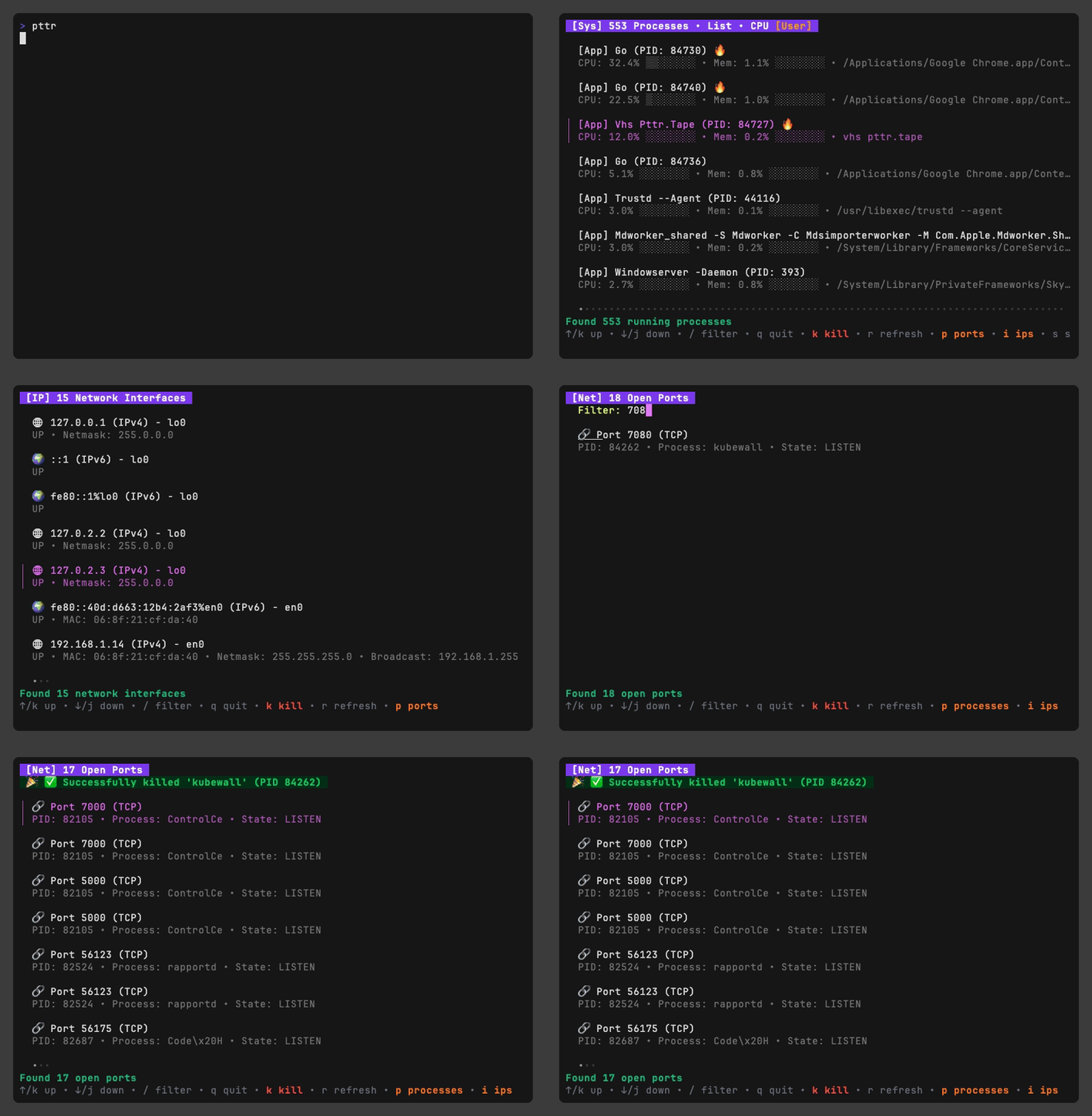
- Modern Terminal UI: Features a visually appealing interface with colors, icons, and real-time updates.
- Triple View Modes: Toggle between viewing open ports, running processes, or network interfaces.
- Smart Process Management: Kill processes by PID or name, view parent process relationships, and monitor resource usage (CPU and memory) with visual indicators.
- Port Detection: Automatically scans for open ports and displays associated services.
- Filtering & Sorting: Search and filter by name, port number, PID, or resource usage; sort processes in various modes.
- High Usage Alerts: Identifies high CPU or memory consumption with color-coded alerts.
Audience & Benefit:
Ideal for developers, system administrators, and power users who need efficient management of ports and processes. pttr provides a clear, real-time view of system activity, enabling quick identification and resolution of issues. Its intuitive design and cross-platform compatibility make it a valuable tool for streamlining system monitoring and maintenance.
Install pttr via winget for easy setup and start managing your system's ports and processes with precision.