Codex Usage Meter for Windows



A small, privacy-friendly Windows tray application that shows your latest Codex usage limit at a glance.
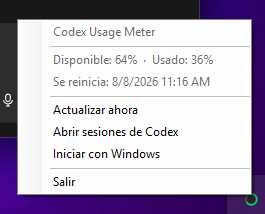
> [!IMPORTANT]
> This is an early development version. The app reads rate-limit snapshots written by Codex to local session files. That file format is not a documented public API and may change in future Codex versions.
Codex is not an installer dependency. If Codex is absent, the meter stays idle and reports that no usage data is available. It starts reading automatically after Codex creates a local session. If Codex is later removed, the meter returns safely to the same idle state. The Codex extension for Visual Studio Code is compatible because it writes the same local session data.
Features
- Uses the rolling five-hour limit for the tray icon and shows both five-hour and weekly availability in its tooltip.
- Optionally shows a normal or compact usage card when you hover over or left-click the tray icon.
- Lets you pin that card as an always-visible desktop widget, drag it anywhere, and remember its position.
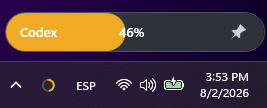
- Offers a compact pinned mode where the entire capsule is the weekly available-usage bar, with an integrated pin and five-hour reset countdown.
- Plays a subtle shine across the compact bar when it opens and on immediate local session writes.
- Keeps the activity shine responsive during current Codex runs by combining session task-state events with local runtime-write metadata; it does not inspect conversation content.
- Optionally shows a three-pixel weekly usage bar across the screen above the taskbar, with a visible marker for the rolling five-hour limit and a brighter shine while Codex is working.
- Shows a monochrome sun, moon or Earth symbol for detected Sol, Luna or Terra models in both widget sizes.
- Displays separate weekly and five-hour reset countdowns.
- Shows the locally reported credit balance beneath the reset countdown without assuming that credits represent resets.
- Uses green, amber, or red independently: the tray icon follows five-hour availability, while widget and taskbar progress follow weekly availability.
- Reacts to Codex session changes almost immediately, with a 30-second fallback refresh.
- Offers persistent weekly-limit notifications for integer percentage changes, 50/75/90% usage thresholds, and resets. Percentage notifications are disabled by default on new installations.
- Opens the Windows setting used to keep its icon permanently visible.
- Uses a stable native notification-area identity so Windows can retain that visibility choice across upgrades.
- Optionally starts with Windows.
- Runs locally without account credentials, analytics, or telemetry from this app.
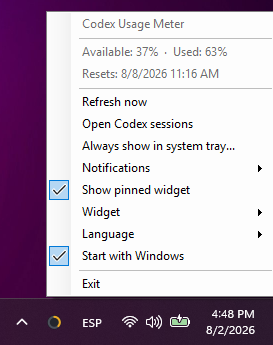
- Supports English and Spanish, selected during installation or changed later from the tray menu.
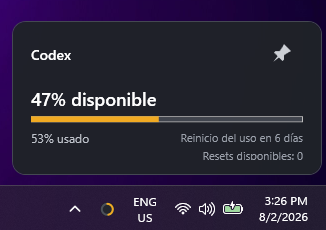
The optional widget can use a detailed normal card or a minimal compact usage bar. Both designs use the weekly limit for their percentage and progress, show the five-hour reset countdown, and can be shown temporarily or pinned and dragged anywhere on the desktop. Hovering over the tray icon shows the widget without taking keyboard focus.
The separate usage-bar option adds a non-interactive weekly-limit line immediately above the Windows taskbar. It starts at the left edge, shortens from the right as weekly availability falls, and places a short white marker at the rolling five-hour availability. It can remain enabled while either widget design is used for tray hover. Its thickness can be set from one to five pixels, and it can follow the notification area automatically, target a specific detected display, or appear on every display.
The line stays above normal and maximized browser windows while the taskbar is visible, hides for full-screen videos and applications on its display, and reappears without taking keyboard focus. Mouse clicks pass through to the application beneath it. A small window over a still-visible full-screen video keeps the line hidden; normal windows that fully cover the video allow it to reappear.

| Normal | Compact |
|---|
 |  |
Languages
The tray menu and usage displays support English and Spanish, with immediate switching from the language submenu.
Installation
Portable release
Download the latest Windows installer and run it. The installer works per user, does not require administrator privileges, and keeps a stable location for future upgrades.
The portable ZIP remains available for users who prefer not to install the app.
Published builds are self-contained: the destination PC does not need the .NET runtime installed.
WinGet
The app is available in the Windows Package Manager community catalog. Installation and upgrades use:
winget install --id aesgalexis.CodexUsageMeter --exact
winget upgrade --id aesgalexis.CodexUsageMeter --exact
New releases appear in WinGet after the catalog update is accepted; the GitHub downloads are available immediately.
Interactive installer builds offer English and Spanish. Portable and silent WinGet installations use the Windows display language on first run. The language can always be changed later from the tray menu and is preserved across upgrades.
Using the app
The app has no main window. After starting it, look for the circular indicator next to the Windows clock; it may initially appear under the hidden-icons arrow.
- Default behavior: no widget is shown; right-click opens the original tray menu and left-click shows the usage balloon.
- Widget: choose Disabled, Normal or Compact. The chosen design is used for both hover and pinned display.
- Usage bar: independently shows or hides the thin progress line above the taskbar.
- About: shows the installed version, privacy model, project links, license context, and unatomo attribution.
- Pin: keep the card visible as a draggable desktop widget. Its position is restored next time.
- Right-click: pin or hide the widget, refresh, enable startup with Windows, or exit.
- Show always in the system tray: opens the Windows taskbar setting directly, where you can promote Codex Usage Meter out of the hidden-icons menu.
- Notifications: enables or disables percentage changes, individual warning thresholds, and reset notices.
If the icon reports that no data is available, run at least one Codex task and select Update now.
How it works
Codex writes session events below %USERPROFILE%\.codex\sessions. The app searches recent .jsonl session files, reads only their tail, and extracts the latest rate_limits snapshot. It does not read the files to reconstruct conversations.
Codex local sessions
        ↓
CodexSessionUsageProvider
        ↓
UsageSnapshot
        ↓
Windows tray indicator
The provider compares event timestamps across recent sessions rather than trusting file modification order. It reads both primary and secondary rate-limit windows and identifies them by duration. The tray indicator, widgets, taskbar line and notifications use the weekly window consistently, while the rolling five-hour window is exposed separately through its taskbar marker and widget countdown. Temporary read failures retain the last valid value and mark it as stale.
The reader is isolated behind an IUsageProvider interface so it can be replaced if OpenAI publishes a suitable supported API.
Privacy and security
- No OpenAI password, API key, or ChatGPT token is requested.
- Session contents and usage values never leave the computer.
- This project does not include its own analytics or telemetry.
- The optional start-with-Windows setting is stored in the current user's standard Windows
Run registry key.
- Notification preferences are stored in
%LOCALAPPDATA%\CodexUsageMeter\settings.json.
See SECURITY.md for vulnerability reporting.
Requirements
For a published build:
- Windows 10 or Windows 11, x64.
- Codex or the Codex extension for Visual Studio Code, plus at least one recent task, is required only to display usage data.
- The app can be installed and started without Codex; it will wait for local session data.
For development:
Development
Clone and run:
git clone https://github.com/aesgalexis/codex-usage-meter-windows.git
cd codex-usage-meter-windows
dotnet run --project .\src\CodexUsageMeter.App\CodexUsageMeter.App.csproj
Build and verify:
dotnet build .\CodexUsageMeter.sln --configuration Release
dotnet run --project .\tests\CodexUsageMeter.Tests\CodexUsageMeter.Tests.csproj --configuration Release
On an interactive Windows desktop, add -- --window-checks to the test command to also verify that hiding and showing the usage line preserves the active window, passes mouse input through, and prevents mouse activation.
Create a self-contained portable build:
dotnet publish .\src\CodexUsageMeter.App\CodexUsageMeter.App.csproj `
  -p:PublishProfile=win-x64 `
  --output .\artifacts\win-x64
Project structure
src/
  CodexUsageMeter.App/             WPF application and tray integration
  CodexUsageMeter.Core/            Stable models and provider contract
  CodexUsageMeter.Infrastructure/  Local Codex session reader
tests/
  CodexUsageMeter.Tests/           Dependency-free parser/provider checks
Roadmap
- English and Spanish localization following the localization plan.
- Optional corner snapping and widget appearance controls.
- Native Windows toast notifications and richer scheduling controls.
- Installer and automatic updates.
- ARM64 builds.
- Additional usage providers if a supported API becomes available.
Ideas and contributions are welcome. Read CONTRIBUTING.md before opening a pull request.
Disclaimer
This is an independent open-source project and is not an official OpenAI product. Codex and OpenAI are trademarks of OpenAI.
License
Distributed under the MIT License.