bdinfo-rs scans BDMV folders and .iso images — playlists, clips, M2TS demux — and produces the
classic BDInfo disc report: per-stream video and audio specs, codecs, measured bitrates, resolution,
and HDR / Dolby Vision / HDR10+. One parser engine,
bdinfo-rs-core
(docs), is the whole analyzer behind a documented API — disc
discovery, MPLS/CLPI/index parsing, M2TS demux, the codec scanners, the UDF 2.50 reader, the report
renderer — and all three front-ends are thin shells over it, so the report is byte-identical
whichever you use.
- The BDInfo report, byte-for-byte — deterministic across every platform and front-end.
- Structure and metadata only — no decryption, no circumvention, and feature content is never
copied. It works on already-decrypted discs; analyze the ones you own.
- Memory-safe —
unsafe is forbid-den; malformed input returns an error, never a crash.
- Zero C — in-house M2TS demuxer, 13 codec scanners, and UDF 2.50
.iso reader. No libbluray, no FFI.
- Fast and small — a pipelined demuxer that stays near NVMe read speed; the CLI is a ~1 MB binary with no runtime.
- Everywhere — Windows, macOS, and Linux on x64 and arm64, plus WebAssembly.
Desktop app
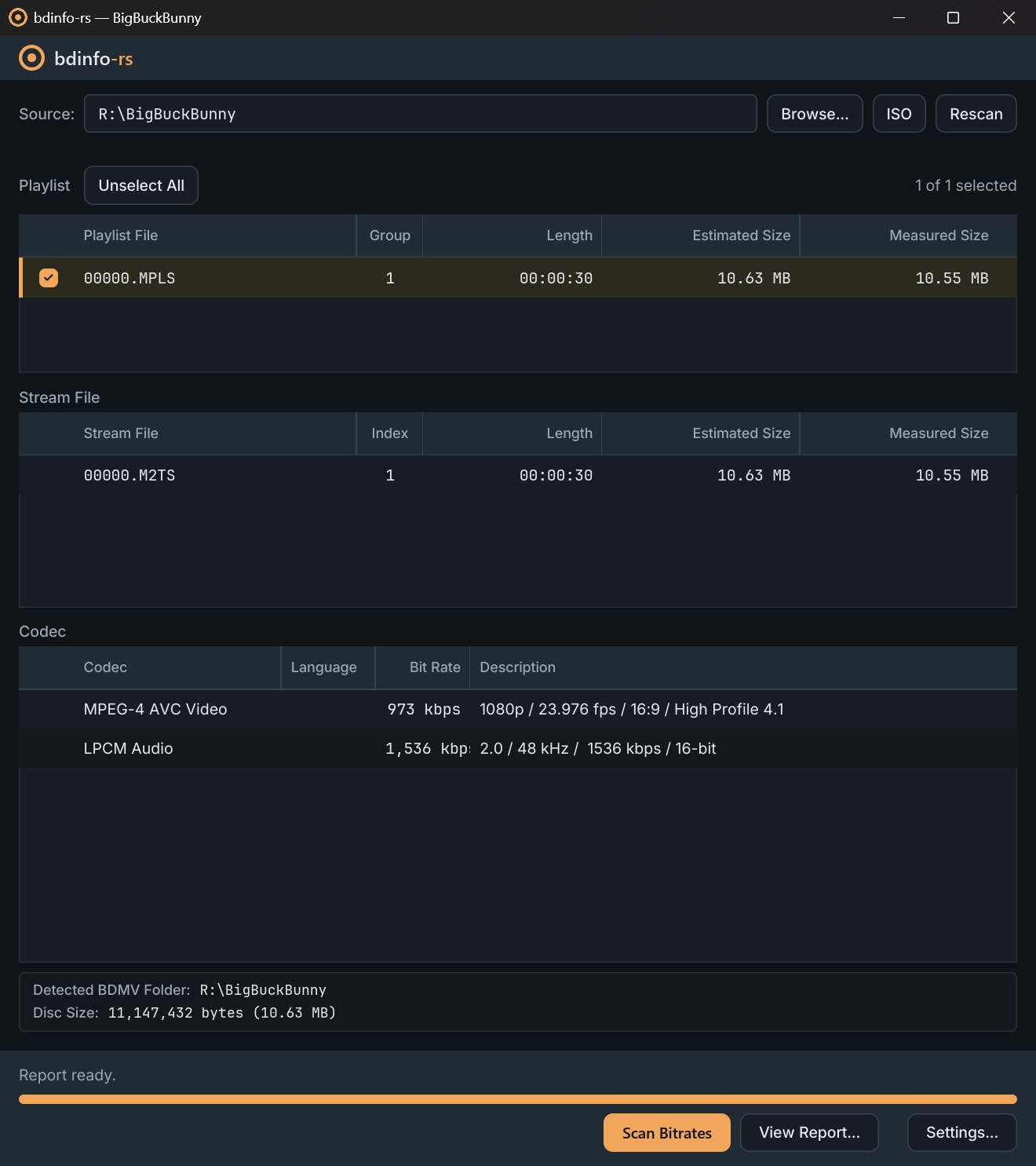
Open a BDMV folder or .iso, pick playlists from the familiar three-pane view, scan with live
progress, then save or copy the report. Pure Rust and GPU-accelerated (wgpu, with a software
fallback) — no webview and no bundled runtime.
winget install agentjp.bdinfo-rs-gui              # Windows
brew install --cask agentjp/tap/bdinfo-rs-gui     # macOS
yay -S bdinfo-rs-gui-bin                          # Arch
apt/dnf, cargo install, the portable-mode marker, and the first-launch prompts on unsigned
Windows and macOS builds are in INSTALL.md.
The desktop app releases on its own gui-v* tags, independently of the command-line releases.
Settings, logs, and troubleshooting: crates/bdinfo-rs-gui.
Command line
brew install agentjp/tap/bdinfo-rs      # macOS / Linux
winget install agentjp.bdinfo-rs        # Windows
yay -S bdinfo-rs-bin                    # Arch
cargo binstall bdinfo-rs                # Rust, prebuilt
Every other route — Scoop, apt/dnf, install script, Docker, prebuilt archives, from source —
is in INSTALL.md.
bdinfo-rs [REPORT_DEST]
BD_PATH takes the disc root, the BDMV folder, any directory inside it, or an .iso. The report
is written to REPORT_DEST as BDINFO.{volume label}.txt — defaulting to the disc folder, and
required for an .iso.
bdinfo-rs D:\Rips\MY_MOVIE                       # playlist table, then pick interactively
bdinfo-rs my_movie.iso C:\Reports                # an .iso needs an explicit report folder
bdinfo-rs D:\Rips\MY_MOVIE --list                # print the playlist table, scan nothing
bdinfo-rs D:\Rips\MY_MOVIE --mpls 00800,00801    # scan exactly these playlists
bdinfo-rs D:\Rips\MY_MOVIE --whole               # scan everything the table lists
The table hides short playlists and looping ones, and names what it withheld.
--show-short-playlists and --show-looping-playlists put each category back — into the table,
the picker, and --whole. --short-playlist-seconds moves the cutoff a playlist has to reach to
count as long, 20 seconds by default:
bdinfo-rs D:\Rips\MY_MOVIE --short-playlist-seconds 60 # hide anything under a minute
The report renders every section by default. --no-stream-diagnostics drops the per-playlist
STREAM DIAGNOSTICS tables — the widest part of the file — and --no-quick-summary drops the
QUICK SUMMARY blocks. Each omits exactly its own section and changes nothing else.
A run on a terminal opens with the bdinfo-rs banner; --no-banner drops it. Piped or redirected
output never carries it.
Unreadable files on a damaged disc are collected into a WARNING block and the rest is scanned
(exit code 3). Whatever a failing stream file measured before the error is kept; --drop-partial
discards it instead. An AACS-encrypted disc is refused before anything is measured (exit code 4) —
only ciphertext would reach the demuxer — though --list still works, its output being read from
the disc's own database.
Release archives ship bash / zsh / fish / PowerShell completions and a bdinfo-rs.1 man page.
Browser
bdinfo.hyperslop.dev runs the full measured scan in the page.
Nothing is uploaded — there is no server. Files are read at byte offsets via FileReaderSync in a
Web Worker, so a multi-GB stream never has to fit in memory.
The same analyzer is on npm as @bdinfo-rs/wasm:
import { inspect, scan } from "@bdinfo-rs/wasm";

const picked = [...input.files].map((file) => ({ path: file.webkitRelativePath, file }));

const disc = await inspect(picked);     // structural scan: playlists, streams, chapters, sizes
const { report } = await scan(picked);  // the classic disc report, as a string
inspect reads metadata only — pass { codecs: true } for the full codec detail without the
whole-file demux — and scan measures the streams, returning the report alongside the same disc
model. renderReport re-renders that model with different report sections, and reportFileName
gives the BDINFO.{volume label}.txt name to save it under. Every call takes either a folder pick
or a single .iso File. Bundler, CSP, and browser-support notes:
crates/bdinfo-rs-wasm/web.
Differences from BDInfo
The report follows the classic format byte-for-byte, except where the original is provably wrong
against the codec specification or FFmpeg — there, bdinfo-rs emits the correct value.
DIFFERENCES.md has the exact before/after for every divergence, flags which
ones appear on a normal disc, and lists how the desktop app differs from the BDInfo GUI.
Filing an output difference?
Paste the text report — codecs, bitrates, stream layout — never audio or video. A
blu-ray.com link to the release helps identify the disc.
Quality & security
Every push and pull request runs the full gate:
- Build and test on Linux, Windows, and macOS.
unsafe is forbid-den, so a green build is
the memory-safety guarantee.
- 100% line / region / function coverage, enforced.
- Max-strictness lints — clippy
pedantic + nursery + cargo and a restriction set (no
indexing panics, no silent integer wrap, no unwrap on input) as hard errors; docs-as-errors.
- Supply chain —
cargo deny (advisories, license allowlist, a no-C-dependencies ban) and
cargo vet, plus CodeQL and dependency review.
- Mutation testing, zero surviving mutants. A mutant must make a test fail or carry a written
proof that it is equivalent.
- Fuzzing, no panics and no hangs. Every untrusted-input parser has a libFuzzer target; pull
requests replay the committed corpus, releases fresh-fuzz.
The lint gate, mutation policy, and fuzz corpus are all in the repository — clone it and reproduce
the results. Report vulnerabilities per SECURITY.md.
Lineage & license
Ported from UniqProject BDInfo (report and analysis)
following BDInfoCLI (console flow), with codec edge cases
cross-checked against libbluray and
FFmpeg, and the UDF reader validated against
libudfread and the OSTA UDF 2.50 specification. Not
affiliated with or endorsed by BDInfo; see NOTICE for attribution.
LGPL-2.1-or-later — the library may be used from applications under other licenses;
changes to bdinfo-rs itself must be shared under the same terms. Derived from BDInfo
(© 2010 Cinema Squid), also LGPL-2.1-or-later.
Package repository hosting (apt/dnf) is graciously provided by
Cloudsmith.
Why this project exists, and how it is built and maintained: ABOUT.md.




