LLM Test Bench
Numbers, not vibes. A test bench for local GGUF models on llama.cpp:
12 suites, 120 cases, prefill and generation speed, VRAM usage — all in one report.
English · Русский



What it is
You pick a model by feel: five questions in a chat window, "seems smart", done.
A week later it falls apart on four-step arithmetic — and you no longer remember
what the previous model answered to the same question.
This is a bench that turns that into numbers. It runs a fixed set of test cases
against the model you already have running, checks the answers automatically,
and keeps every run so you can compare models case by case.
- Rule-based checks. A judge model is called only where there is no way
around it, so results do not depend on luck.
- Quality and speed together. Prefill and generation tok/s, TTFT, latency and
VRAM sit in the same table as accuracy per suite.
- Every failure in full. Not "7 out of 10" but "here are the three cases that
broke, here is the prompt, here is the answer, here is the check".
How it works
The bench starts no server and loads nothing. Your launcher loads the model —
llama.cpp, LM Studio, your own script — and the bench tests whatever already
answers on http://127.0.0.1:8080. It does not touch your config.
What's inside
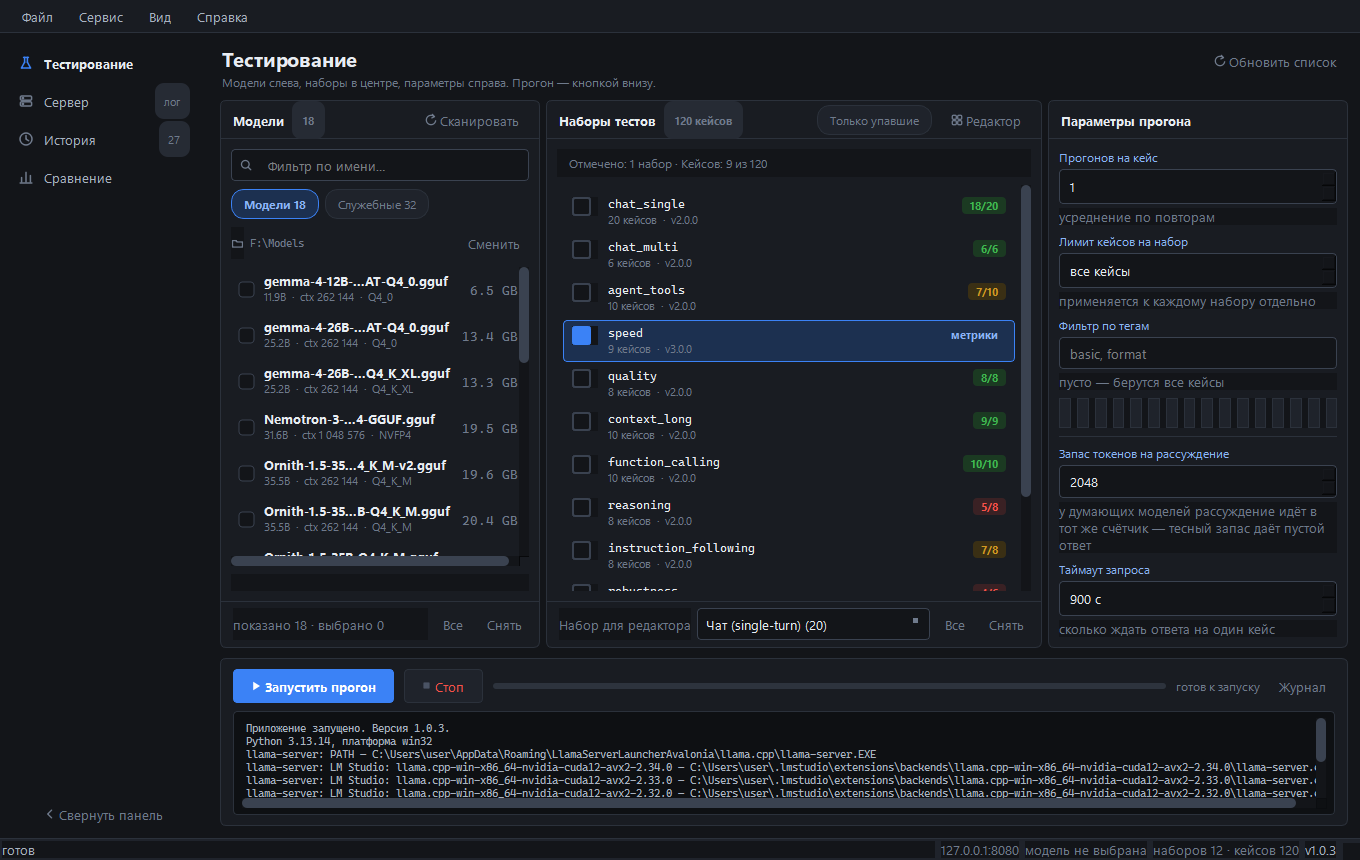
12 suites, 120 cases. Each suite is a separate run, so you can pick one or run all.
| Suite | Cases | What it checks |
|---|
chat_single | 20 | single-turn questions: facts, format, JSON extraction, exact multiplication, an honest "no such thing" |
chat_multi | 6 | context retention, memory through distractor questions, pressure toward a wrong answer, a rule from the first turn |
reasoning | 8 | multi-step chains, order derived from constraints, traps with extra data, a task with no single answer |
instruction_following | 8 | several constraints at once: length, format, order, prohibitions. Every condition is checked (all_of) |
robustness | 6 | instruction hidden inside data, sycophancy, a non-existent method, incomplete and contradictory tasks, refusal |
code | 5 | reading someone else's code: crash cause, slice output, complexity, a broken regex, a function from its description |
agent_tools | 10 | choosing a tool and its arguments, two calls in one answer, an enum argument, and when not to call a tool |
function_calling | 10 | JSON Schema validity: nested object, array, enum, optional argument, negation |
quality | 8 | reference answers by key facts (judge stage) |
context_long | 10 | needle in a haystack from 2K to 128K, two similar code blocks where only one is right, code at the edges, no code at all |
speed | 9 | prefill from 100 to 32 000 tokens and long generation: tok/s, prefill tok/s, TTFT, total time |
russian | 20 | Russian spelling by rules, morphology (cases, numerals, gender, stress), meaning and idioms, translation both ways, format discipline |
Checks are defined in llmtestbench/checks.py: contains_any, contains_all,
not_contains, regex, exact_match, json_schema, tool_call, no_tool_call,
all_of, word_count, set_equal. Deferred checks (llm_judge, embedding)
return "skipped", not "failed".
Results on one GPU
RTX 5060 Ti 16 GB, 12 suites, 120 cases, context 32768. 112 cases counted — six
speed cases have no pass criteria, part of the long-context cases do not fit into 32k.
| Model | Size | Score | Generation | Prefill | VRAM |
|---|
| Qwen3.8-27B · IQ3_S | 11.3 GB | 102/112 · 91.1% | 57.5 t/s | 692 t/s | — |
| gemma-4-26B-A4B · UD-Q4_K_XL | 13.3 GB | 101/112 · 90.2% | 96.0 t/s | 2524 t/s | 13 885 MiB |
| Ornith-1.5-35B · Q4_K_M | 20.2 GB | 97/112 · 86.6% | 62.1 t/s | 454 t/s | — |
| gemma-4-12B · QAT Q4_0 | 6.5 GB | 93/112 · 83.0% | 54.2 t/s | 1923 t/s | — |
| Qwen3.6-27B · IQ3_XXS | 11.4 GB | 93/112 · 83.0% | 32.5 t/s | 748 t/s | — |
Three things stand out:
- 12B matched 27B. gemma-4-12B (6.5 GB) and Qwen3.6-27B (11.4 GB) both scored
93 out of 112. Five extra gigabytes bought nothing.
- 35B lost to 27B. Ornith-1.5-35B in Q4 takes 20.2 GB and scores below both
26–27B models, with prefill five times slower.
- The version decides. On reasoning Qwen3.6 takes 50%, Qwen3.8 takes 100% —
same eight cases, same model family.
Honest about the setup: Qwen3.8 ran with a 49152 context, the rest with 32768;
Qwen3.6 is IQ3_XXS while Qwen3.8 is IQ3_S, so part of that gap may come from the
quant type. Speed figures are a single measurement per model, not an average: a second run of gemma-4-26B scored the same 101/112 but 121 t/s generation instead of 96 — the score repeats, the speed wobbles. VRAM is measured only for gemma-4-26B-A4B: that run went through a server the app started itself, and the load log reports 13 885 MiB on the GPU (13 574 weights + 84 KV cache + 226 compute), 454 MiB of host buffers, zero mmap, all 31 layers on the card — nvidia-smi agrees once the CUDA context overhead is counted. The other four were benchmarked against externally started servers, so the app had no load log for them and the cell stays empty.
Download
Windows 10/11. Free, MIT, no sign-up.
Python is not required for the installer or the portable build.
Run from source
Python 3.13 (not 3.14 — PySide6 may have no wheels for it).
py -3.13 -m venv .venv
.venv\Scripts\python.exe -m pip install -r requirements.txt

:: check without the GUI: scan models and build the launch command
.venv\Scripts\python.exe main.py --selfcheck "F:\Models"

:: start the GUI
Запустить.bat
Run a suite from the console against an already running server:
Прогнать-тесты.bat chat_single --report
Прогнать-тесты.bat speed,chat_multi --runs 2 --report
Прогнать-тесты.bat chat_single --dry-run
What you get
- History — one row per run, not per file. Expand it to see the cases, open a
case card to see the prompt, the answer, the reasoning and the check breakdown.
- Comparison — runs as columns, metrics as rows, the best value marked. Expand
a row to see which suite made the difference; double-click to compare case by
case. A warning appears if the suite versions differ.
- Reports — HTML report per run, dark and light themes, CSV export.
- Memory — VRAM, RAM and mmap taken from the
llama-server load log, not
guessed. If the log has no data, the report says "no data" instead of zeros.
Why another benchmark?
lm-evaluation-harness answers "how smart is this model in general", on academic
datasets. llama-bench measures speed and knows nothing about quality. Promptfoo
tests prompts inside an application and lives in CI.
This one answers a different question: how does this particular quant behave on
your GPU, right now, on the tasks you care about — and keeps the answer.
Requirements
- Windows 10/11
- a running
llama-server on 127.0.0.1:8080 (the app can also start one itself)
- for the memory block: the server started with
-v, so the load log has the layer
layout
Links
License
MIT. Built by one person.