
EncodingChecker v3.15.1
EncodingChecker is a Windows tool for finding, checking, and safely converting text-file encodings. Use the GUI for everyday work or the command line for repeatable jobs.
Requires the .NET 10 Desktop Runtime. Releases provide both a small framework-dependent build and a self-contained build.
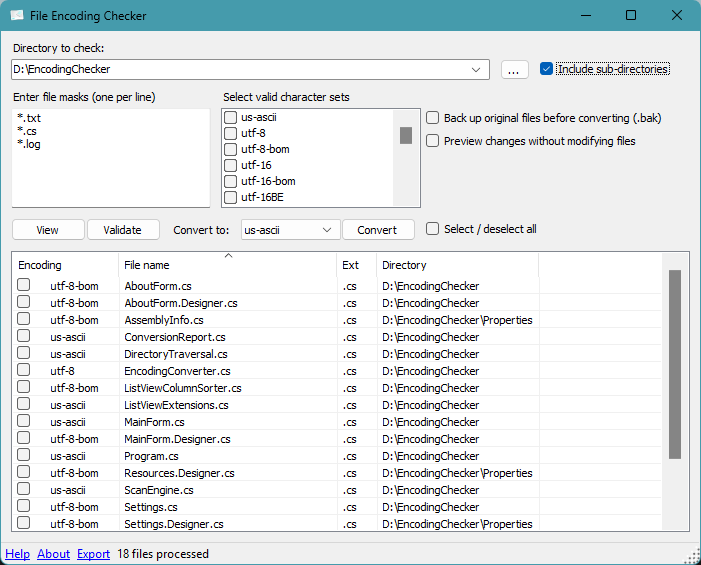
Start here
GUI
- Open the folder and select file patterns.
- Choose View to inspect the files.
- Select rows and choose Convert.
- Read the review, then confirm the files that are safe to convert.
Nothing is changed until the final confirmation. The GUI enables backups by default.
Use the single Export results menu to export selected rows as text, the displayed
results as CSV, or the most recent completed conversion's immutable journal as JSON.
> [!TIP]
> Safe workflow: View → review → choose a legacy source encoding if needed → Convert → keep the resulting .bak and .ecmeta.json files.
How conversion works
View → review → confirm → verified conversion
Read the conversion workflow
Conversion rule
| File type | Automatic action |
|---|
| ASCII, Unicode with a BOM, or text whose encoding EC can prove from its bytes | Convert automatically |
| Legacy text or BOM-less Unicode whose encoding cannot be proven safely | Do not convert; ask you to choose the original encoding |
If you choose a source encoding, EC uses it only to read the original bytes. It
does not bypass strict decoding, output verification, backup checks, or safe
installation.
Command line
For a small job you are reviewing and converting in the same session, direct
conversion is easiest:
EncodingChecker.exe -BasePath "C:\Files" -Target utf-8 -Backup
For an important batch, automation, or review that happens later, plan/apply is
the safest workflow:
EncodingChecker.exe -BasePath "C:\Files" -Target utf-8 -Backup -Plan plan.json
EncodingChecker.exe -Apply plan.json
The saved plan is tied to the selected files and their hashes. If a scheduled
source file changes after review, nothing is converted.
For direct conversion, previews, CI validation, exit codes, and every switch,
read Command-line reference.
Documentation
The independent audit harness and reproducible per-file evidence live in
CorpusTesters.
Supported charsets
Unicode detection is implemented by EC's own UnicodeDetector, including
BOM-less UTF-8, UTF-16, and UTF-32 checks. UtfUnknown
is used for legacy-charset detection. The supported legacy names are those that
UtfUnknown can report and .NET can encode/decode:
- ASCII
- UTF-8 (with or without a BOM)
- UTF-16 BE or LE (with or without a BOM)
- UTF-32 BE or LE (with or without a BOM)
- Arabic: iso-8859-6, windows-1256.
- Baltic: iso-8859-4, windows-1257.
- Central European: ibm852, iso-8859-2, windows-1250, x-mac-ce.
- Chinese (Traditional and Simplified): big5, GB18030, hz-gb-2312, x-cp50227.
- Cyrillic (primarily Russian): IBM855, cp866, iso-8859-5, koi8-r, windows-1251, x-mac-cyrillic.
- Estonian: iso-8859-13.
- Greek: iso-8859-7, windows-1253.
- Hebrew: iso-8859-8, windows-1255.
- Japanese: euc-jp, iso-2022-jp, shift_jis.
- Korean: euc-kr, iso-2022-kr, ks_c_5601-1987 (cp949).
- Thai: windows-874 (aliases TIS-620 and iso-8859-11 in .NET)
- Turkish: iso-8859-3, iso-8859-9.
- Western European: iso-8859-1, iso-8859-15, windows-1252.
- Vietnamese: windows-1258.
UTF-7 is not supported. .NET disables its UTF-7 encoder/decoder by default for security reasons (see SYSLIB0001) — UTF-7 content can be crafted to evade validation that assumes a different encoding.
Credits
The original EncodingChecker project was written by Jeevan James.
For legacy-encoding detection, EncodingChecker uses UtfUnknown, a C# port of uchardet. EC's own UnicodeDetector handles Unicode detection. See THIRD-PARTY-NOTICES.txt for license details.
License
Mozilla Public License 2.0