LoFeline

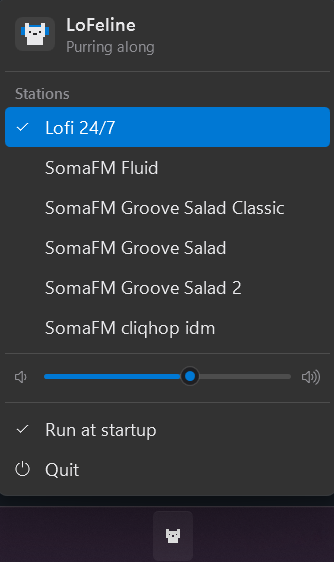
A pixel cat that naps in your Windows notification area. Click it for lofi
beats, click again for silence. Right click for the station list and a volume
slider.
The player opens on Lofi 24/7 and also carries a handful of
SomaFM channels. Remember to support them!
Requirements
Windows 11.
Install
Download the latest setup from
Releases and run it.
The cat lands in the notification area. Windows 11 hides new icons in the
overflow menu, so click the ^ arrow the first time and drag the cat onto the
taskbar to keep it there.
LoFeline is not code signed, so Windows may object the first time. SmartScreen
offers More info → Run anyway. Smart App Control, on by default on new
Windows 11 machines, may block it outright instead. Building from source avoids that.
Usage
Left click starts and stops playback. Right click opens the menu with the
station list, a volume slider, run at startup, and quit.
Stations
| Station | Sound |
|---|
| Lofi 24/7 | Round-the-clock lofi hiphop beats |
| Fluid | Instrumental hip-hop, future soul, liquid trap |
| Groove Salad Classic | The original chilled ambient beats and grooves |
| Groove Salad | Chilled ambient beats and grooves |
| Groove Salad 2 | More chilled beats and grooves |
| cliqhop idm | Blips and bleeps backed by beats |
Build from source
Needs the .NET 10 SDK.
git clone https://github.com/anttiak/lofeline-windows.git
cd lofeline-windows
dotnet run --project src\LoFeline
Uninstall
Quit from the menu, then remove LoFeline from Settings → Apps → Installed
apps. That also clears the run-at-startup entry.
The remembered volume and station are left behind, in case you come back:
Remove-Item -Recurse "$env:LOCALAPPDATA\LoFeline"
License
MIT. See LICENSE.