 QuickBib
This is a cross platform app that enables you to get the bibtex entry from a DOI number, arXiv ID, article url (supports Nature journals, APS journals, ACS journals, AMS journals, Science, PNAS, ScienceDirect, IOP Science, SciPost and more) or article title. It uses doi2bib3 as its backend. Written in Python, QuickBib is licensed under GPLv3.
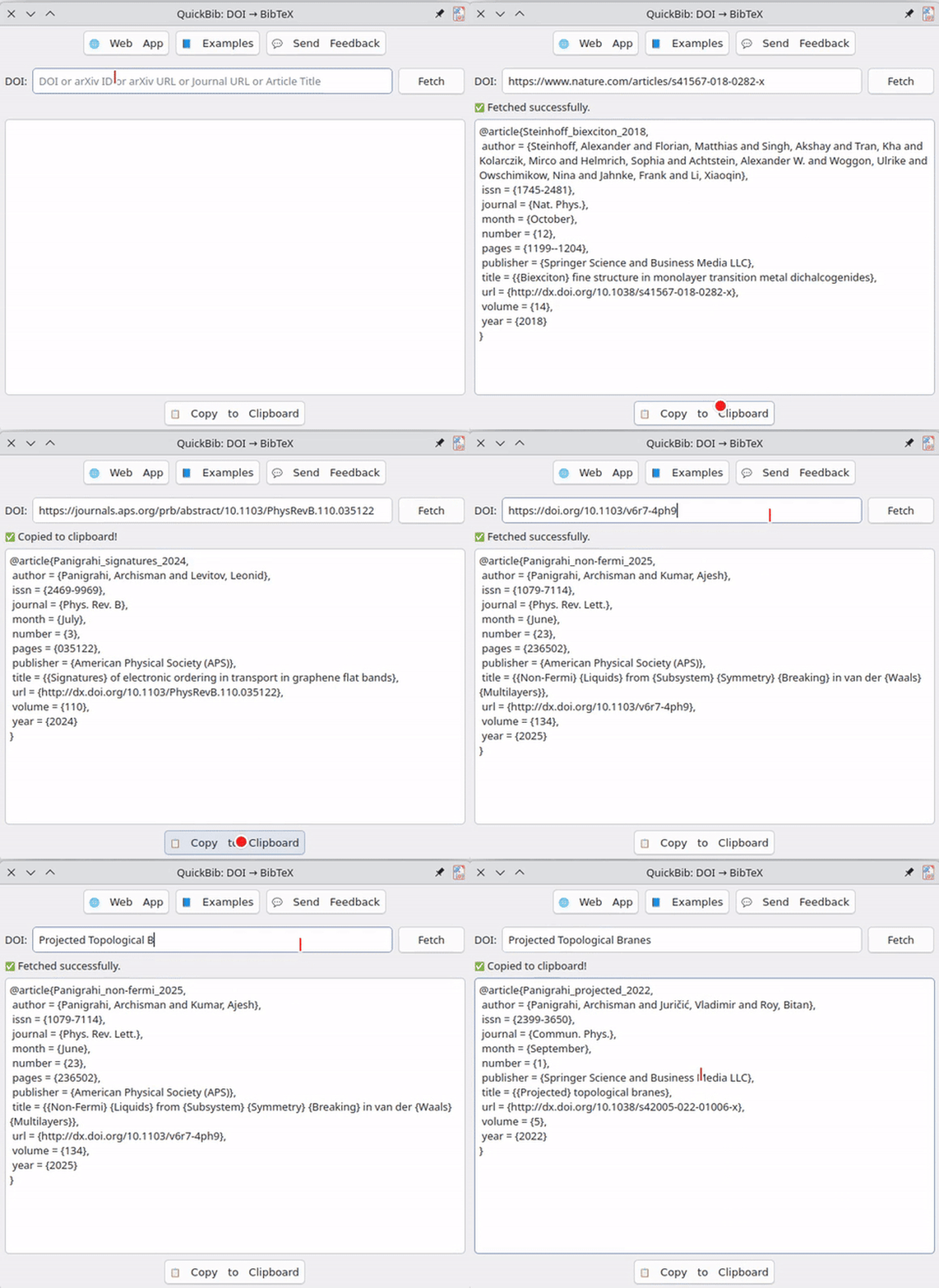
Metadata from Crossref and arXiv (no AI/ML). Here is how it works.
Star History


How to install?
GNU/Linux
  <img src="https://img.shields.io/github/v/release/archisman-panigrahi/QuickBib" alt="GitHub Release" />


  <a href="https://repology.org/project/quickbib/versions">
    <img src="https://repology.org/badge/vertical-allrepos/quickbib.svg" alt="Packaging status" />
  </a>


  <a href="https://flathub.org/apps/details/io.github.archisman_panigrahi.QuickBib">
    <img src="https://img.shields.io/flathub/v/io.github.archisman_panigrahi.QuickBib?color=67bed9" alt="Flathub version" />
  </a>


  <img src="https://img.shields.io/winget/v/archisman-panigrahi.QuickBib" alt="WinGet Package Version" />
Ubuntu/Mint
You can use our official PPA
sudo add-apt-repository ppa:apandada1/quickbib
sudo apt update
sudo apt install quickbib
On Debian,you can download and install the prebuilt .deb package from the PPA (or, use Flatpak/Snap).
Arch Linux/EndeavourOS/Manjaro
You can get it from the AUR
yay -S quickbib
Omarchy
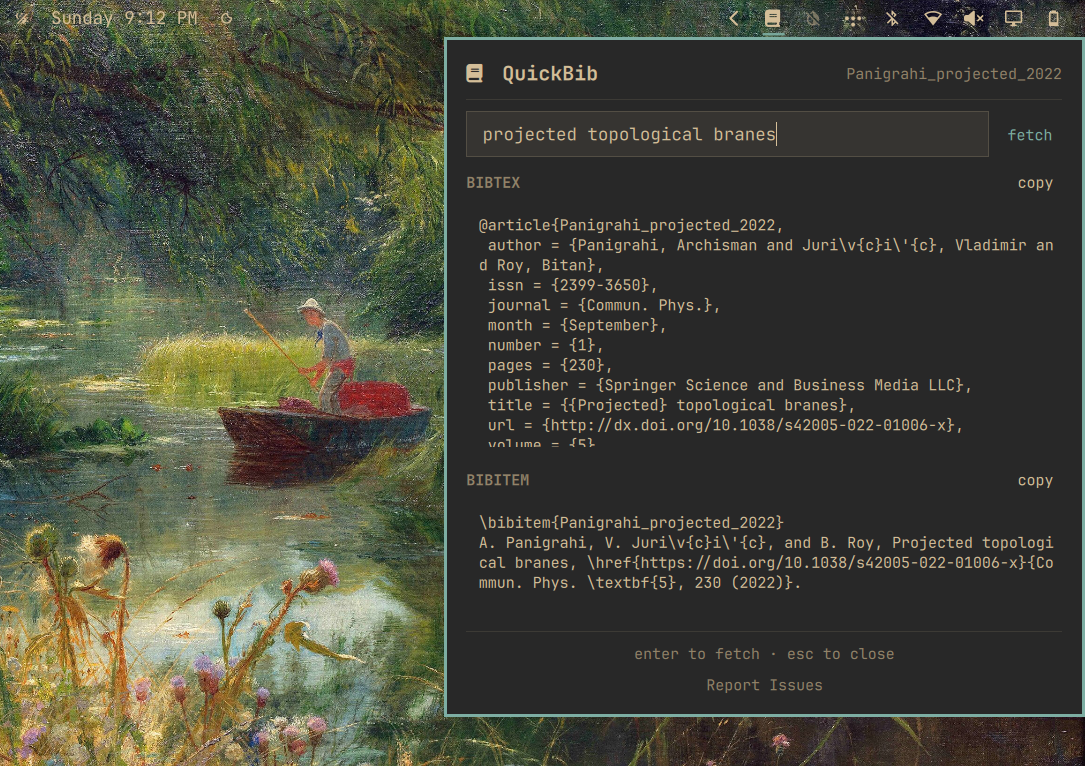
An Omarchy plugin is available in here:
omarchy plugin add https://github.com/archisman-panigrahi/QuickBib-omarchy-plugin.git --enable
Distro agnostic method
QuickBib is available on Flathub and Snap Store.


Install from source with meson in GNU/Linux
Install the required dependencies, pyqt6 and doi2bib3. Afterwards, you can use meson to install quickbib.
git clone https://github.com/archisman-panigrahi/QuickBib.git
cd QuickBib
meson setup builddir --prefix="$HOME/.local"
meson install -C builddir
To uninstall,
meson uninstall -C builddir
Windows
QuickBib is available on Microsoft Store.

It can be also installed via winget. Open Windows Terminal/Powershell and run
winget install -e --id archisman-panigrahi.QuickBib
Alternatively, prebuilt installers are available to download from GitHub Releases. Note that Windows smartscreen might complain because it doesn't know about this app and you would have to manually bypass it.
Web App
A web app is available at https://archisman-panigrahi.github.io/QuickBib/webapp.
macOS
It is recommended that on macOS you use the web app instead. Continue reading to learn why.
No prebuilt macOS installers: Distributing an app that users can graphically install and run seems to require paying Apple perpetually (US$99/year) to sign and notarize the app even if the app is free — that’s plain extortion — so we ship the source instead. You can run QuickBib from source or build a macOS app using the packaging scripts on GitHub. If you have a better idea about how to package the macOS app in a more convenient way (without perpetually paying Apple), please let us know in GitHub Issues.
You can install the app's dependencies with pip and run from source (see below).
How to run from source? (works in GNU/Linux or macOS and perhaps also Windows with a little bit of tweaking)
- Clone the repo and enter it
git clone https://github.com/archisman-panigrahi/QuickBib.git
cd QuickBib
- Create and activate a virtual environment (recommended)
python3 -m venv .venv
source .venv/bin/activate
- Upgrade pip and install dependencies
python3 -m pip install --upgrade pip
pip install -r requirements.txt
- Run QuickBib from source
You can run the package module directly:
python3 -m quickbib
Or run the convenience script in bin/quickbib:
./bin/quickbib
Translations
QuickBib uses gettext-style PO translations in quickbib/po/. All translations
were initially done with AI and only some were later modified by native speakers.
Therefore there may be some mistakes/bad translation.
PRs for modifications and addition of new languages are welcome!
Each language has one PO file:
quickbib/po//LC_MESSAGES/quickbib.po
For example:
quickbib/po/fr/LC_MESSAGES/quickbib.po
quickbib/po/pt_br/LC_MESSAGES/quickbib.po
quickbib/po/zh_cn/LC_MESSAGES/quickbib.po
In each entry, msgid is the English source text and msgstr is the
translation. Translate only msgstr; keep msgid unchanged.
Improve an existing translation
- Open the PO file for the language you want to improve.
- Edit the
msgstr values.
- Validate the PO files:
python3 validate_po.py --validate
- Open a pull request.
Add a new language
- Choose a language code, such as
de, es, fr, pt_br, or zh_cn.
- Create a new directory using that language code:
mkdir -p quickbib/po//LC_MESSAGES
- Copy the English PO file:
cp quickbib/po/en/LC_MESSAGES/quickbib.po quickbib/po//LC_MESSAGES/quickbib.po
- Edit the new file and translate the
msgstr values. Keep msgid unchanged.
- Update the
Language: header in the new file to match the language code.
- Validate the PO files:
python3 validate_po.py --validate
- Open a pull request.
Update PO files after source changes
When adding or removing calls like tr("Text to translate") in the source code,
refresh the PO files before validating:
python3 validate_po.py --extract
python3 validate_po.py --validate
--extract adds new English strings, removes unused strings, and refreshes
source line references while keeping existing translations.
To test a specific locale locally, set LANG (or LC_ALL if your environment
already sets it), for example:
LANG=es python3 -m quickbib