Vayu is a free, open-source desktop app for Windows, macOS, and Linux that combines a full REST and GraphQL request builder - with collections, environments, and scripting - and a high-throughput load tester powered by a C++20 engine, with all data staying on your machine.
README
Vayu - REST/GraphQL Client and Native Load Tester, in One Desktop App
Build a request like you do in Postman. Load test the same endpoint at tens of thousands of requests per second - driven by a native C++ engine. Fully local. No account, no cloud, no quotas.
Vayu is a free, open source desktop app for Windows, macOS, and Linux that merges two tools API teams normally split: a full REST + GraphQL request builder with collections, environments, and scripting, and a high-throughput load tester powered by a C++20 engine. The request UI will feel familiar coming from Postman or Insomnia - but underneath, a native event loop pushes load-test throughput that Electron + Node.js clients cannot reach, with every byte staying on your machine.
See it in action
The load-test dashboard: 52,738 req/s at concurrency 64, 738,406 requests, 100% success. Throughput, latency percentiles, and error counters stream live from the C++ engine while the UI stays responsive, with every run kept in the history sidebar.
REST and GraphQL request builder with collections, layered environments, and Postman-compatible scripting.
Why Vayu exists
Most API teams run two tools side by side. Postman, Bruno, or Insomnia to build and send requests during development. k6, JMeter, or wrk when it is time to load test. Two UIs, two config formats, two places to keep endpoints in sync - and a context switch every time you want to confirm a change still holds under real traffic.
Vayu collapses that workflow into one app. Build a request once, point the load tester at the same endpoint, and watch a live dashboard while the engine drives traffic - no second config, no separate CLI, no leaving the workspace. Because the entire stack runs on your machine with no account, no telemetry, and no cloud round-trips, it also works behind corporate firewalls and on air-gapped networks where SaaS clients simply cannot.
Performance
The HTTP core is a multi-worker libcurl event loop in C++20, isolated from the Electron UI by a local HTTP sidecar so rendering never blocks on the request load. In practice that lets a single laptop saturate a gigabit link while the dashboard keeps streaming metrics frame-by-frame - well past what Node.js-backed Electron tools manage on the same hardware.
Proof - head-to-head vs wrk and vegeta. Same mock server, same machine, same session, matched concurrency (64), measured from a standalone engine:
Client
req/s
vs wrk
Vayu
56,880
105%
wrk
54,280
100%
vegeta
51,847
96%
Vayu matches wrk and edges past vegeta - all three converge on the same ~57k system throughput ceiling, and at that ceiling the machine is still 79% idle, so it is the target saturating, not the client. Full methodology, the concurrency sweep, the workers A/B, tuning notes, and a one-command reproduction script are in Engine Benchmarks.
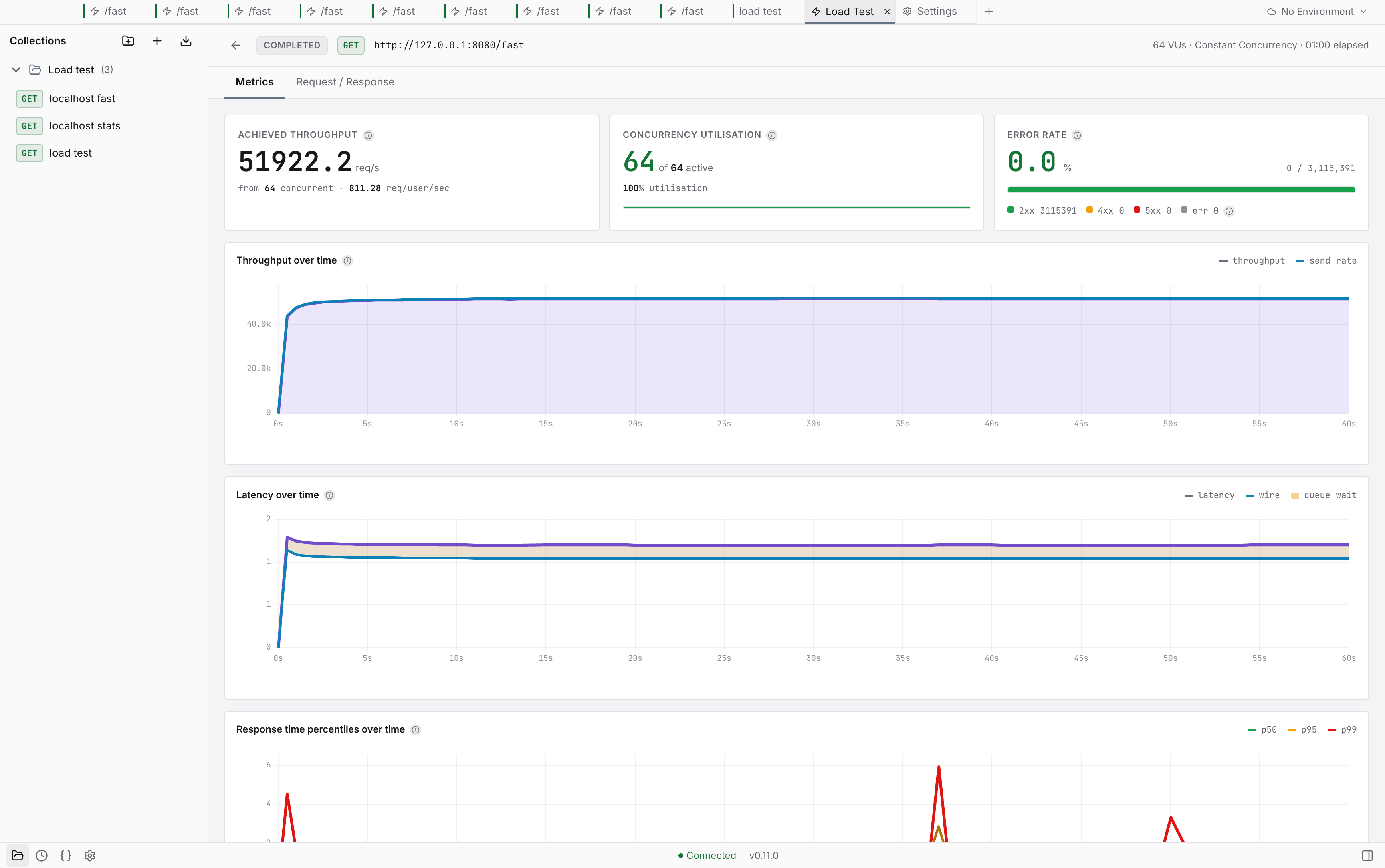
And from the UI, not just the CLI. A 60-second run started from the app's own Load Test panel sustained 51,922 req/s - 3,115,391 requests, zero errors, zero dropped, p50 1.20 ms / p99 1.52 ms, with the charts streaming live throughout:
A broader comparison against k6, JMeter, and the Postman collection runner is in progress - follow the issues board to track it.
Vayu vs. Postman, Bruno, k6, JMeter
Feature
Vayu
Bruno
k6
Apache JMeter
Postman
Execution Engine
C++ (Native)
Node.js / Electron
Go
Java (JVM)
Node.js / Electron
API Client + Load Test
Both, one app
Client only
Load test only
Load test only
Client only
Load Test Throughput
Tens of thousands RPS
Limited by JS runtime
High (Go routines)
Moderate (thread-heavy)
Requires separate tool
Scripting
QuickJS (pm.* syntax)
JavaScript (ES6)
JavaScript (ES6)
Groovy / BeanShell
JavaScript
UI
Native desktop app
Native desktop app
CLI only
Java Swing (dated)
Native desktop app
UI Responsiveness
High (sidecar arch)
Good
N/A
Laggy under load
Slows with large collections
Memory Usage
Low (direct memory)
Low–Moderate
Low–Moderate
High (RAM-intensive)
High (Electron + Chrome)
Privacy / Offline
100% local, no account
100% local
Local / cloud hybrid
100% local
Cloud-heavy (optional local)
Postman Collection Import
Yes (v2.0 + v2.1)
Yes (via converter)
Limited
No
Native
OpenAPI Import
Yes (2.0 + 3.0)
No
No
No
Yes
Open Source
Yes (dual-license)
Yes (MIT)
Yes (AGPL v3)
Yes (Apache 2.0)
Partial
Coming from Postman, Insomnia, or an OpenAPI spec?
Migrating takes seconds. Drop an existing export onto Vayu and the workspace is rebuilt as a native collection - folders, variables, auth, and pre/post-request scripts all carry across, plus environments - from an Insomnia workspace, or from the separate file Postman exports them as.
Postman - Collection v2.0 and v2.1 JSON exports, plus environment and globals exports
Insomnia - v4 exports
OpenAPI / Swagger - 3.0 and 2.0 specs (JSON or YAML); generates a ready-to-use collection from the spec
Features
Native load testing - multi-worker C++ event loop sustains tens of thousands of req/s with metrics streamed over SSE in real time; no second tool needed
REST + GraphQL request builder - GET, POST, PUT, PATCH, DELETE and more; JSON, form-data, URL-encoded, raw text, and GraphQL bodies
Collections & folder hierarchy - nested collections with per-collection variables, auth, and pre/post scripts
Layered environments - variable resolution flows from globals → collection chain → active environment, with overrides at any level
Auth, the way you expect it - Bearer token, Basic auth, API key (header or query), and OAuth 2.0 (client credentials, password, and interactive authorization code with PKCE); resolved engine-side and inherits down the collection tree
Postman-compatible test scripts - QuickJS engine implementing pm.test(), pm.expect(), pm.environment.set(), pm.response.* - most Postman scripts run unmodified
Composable scripting - pre/post-request scripts compose down the hierarchy (root → folder → request)
Private by default - 100% offline execution; no telemetry, no account, no cloud sync
Cross-platform - native installers for Windows (x64), macOS (universal), and Linux (AppImage)
Installs the latest release to /Applications. You will be prompted for your password once. Vayu is distributed unsigned - the installer ad-hoc signs it and clears the quarantine flag so it opens without the "damaged app" warning.
To update, run the same command again. It is also how Vayu updates itself on macOS - the app checks for releases and hands you this command rather than patching itself, because an ad-hoc signature is not something macOS can verify. Updating replaces the app in place and keeps your collections, history, and settings. If Vayu is running it offers to quit it first (and reopens it afterwards); if you are already on the latest version it does nothing. Add --force to reinstall anyway, or set VAYU_ASSUME_YES=1 to skip the prompt.
If you already have Vayu in your own ~/Applications folder (from dragging it out of a .dmg), the update goes there rather than installing a second copy in /Applications.
The same command as macOS. On Linux it installs the AppImage to ~/.local/share/vayu and registers a launcher entry, so Vayu appears in your applications menu instead of sitting in ~/Downloads as an executable file. No root - everything it writes is under your home directory. If ~/.local/bin is on your PATH, you also get a vayu command.
Re-run it to update; add -- --uninstall (plus --purge for your data) to remove it. x86_64 only, matching the published builds.
Or download the AppImage yourself from the latest release (Vayu--x86_64.AppImage), chmod +x it and run it - it is self-contained, with no wizard and no root either way.
> If Vayu doesn't start, your system may be missing FUSE 2, which AppImages need: sudo apt install libfuse2 on Debian/Ubuntu, or run it once with APPIMAGE_EXTRACT_AND_RUN=1.
Vayu runs as two cooperating processes: a lightweight Electron UI (the Manager) and a native C++ daemon (the Engine) sitting next to it as a local sidecar. The Manager owns the workspace - collections, environments, the request builder, the dashboard - and the Engine owns the wire: connection pooling, the event loop, script execution, and metrics. Keeping them split is what lets the UI stay smooth while the engine is hammering an endpoint at full tilt; the renderer never has to share a thread with the request load.
Contributions are welcome - from bug reports and feature ideas to documentation and code. The Contributing Guide covers local dev setup, code style, testing requirements, the PR process, and the release/versioning workflow.
FAQ
Is Vayu free?
Yes. Vayu is fully free and open source. The engine is licensed AGPL-3.0; the UI is Apache-2.0. There is no paid tier, no subscription, and no feature gating.
What makes Vayu different from Bruno or Insomnia?
Those are excellent API clients, but they do not load test - for that, you reach for k6 or JMeter as a second tool. Vayu does both in one app: build the request, then load test the same endpoint with a native C++ engine.
How fast is the load testing?
The C++ engine sustains tens of thousands of requests per second on modern hardware; see the Performance section. Exact numbers depend on your machine, the target server, and network conditions.
Does Vayu work offline?
Yes. All execution happens locally. Vayu never contacts external servers during normal use - no telemetry, no license checks, no cloud sync.
Does Vayu require an account?
No. Download, install, and use it immediately with no sign-up.
Can I import my Postman collections?
Yes - Postman Collection v2.0 and v2.1 JSON exports, including folders, collection variables, auth settings, and pre/post-request scripts. Postman environments live in a separate export file; drop that in too and it imports as a Vayu environment. A Postman globals export imports the same way, merging into Vayu's globals scope. Insomnia workspace environments import as well.
Can I import OpenAPI / Swagger specs?
Yes. Drop in an OpenAPI 3.0 or Swagger 2.0 file (JSON or YAML) and Vayu generates a ready-to-use collection from the spec.
What scripting syntax does Vayu support?
QuickJS implementing the pm.* API (pm.test(), pm.expect(), pm.environment.get/set(), pm.response.*), so most Postman test scripts run without modification.
Which platforms does Vayu support?
Windows (x64), macOS (Apple Silicon + Intel universal), and Linux (x86_64 AppImage).
License
Vayu is dual-licensed:
Engine (/engine) - GNU AGPL v3: if you modify the engine and offer it as a network service, you must publish your changes.
UI (/app) - Apache 2.0: permissive; use freely in any project.
You are free to use Vayu for any purpose, commercial or personal, at no cost.









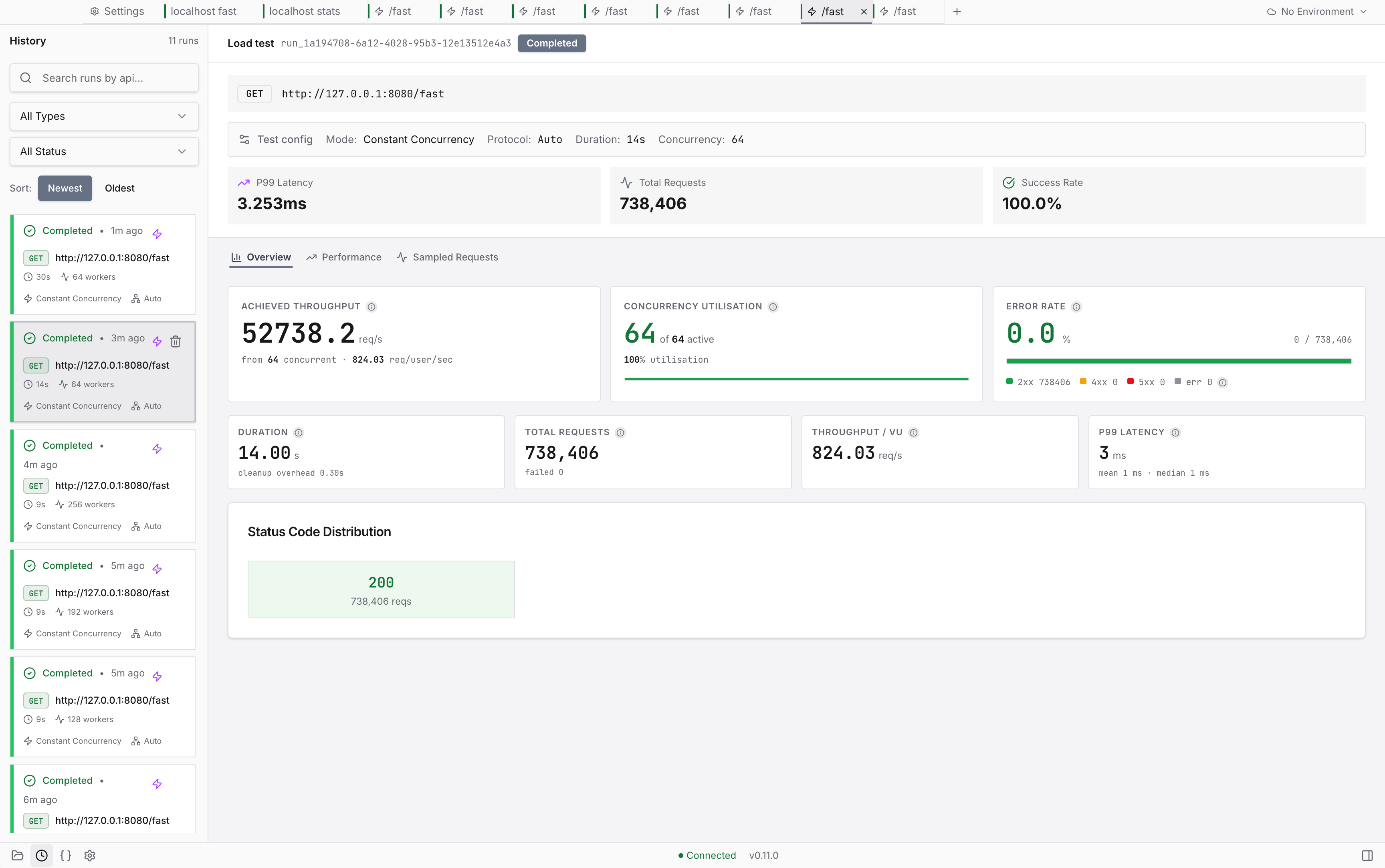 The load-test dashboard: 52,738 req/s at concurrency 64, 738,406 requests, 100% success. Throughput, latency percentiles, and error counters stream live from the C++ engine while the UI stays responsive, with every run kept in the history sidebar.
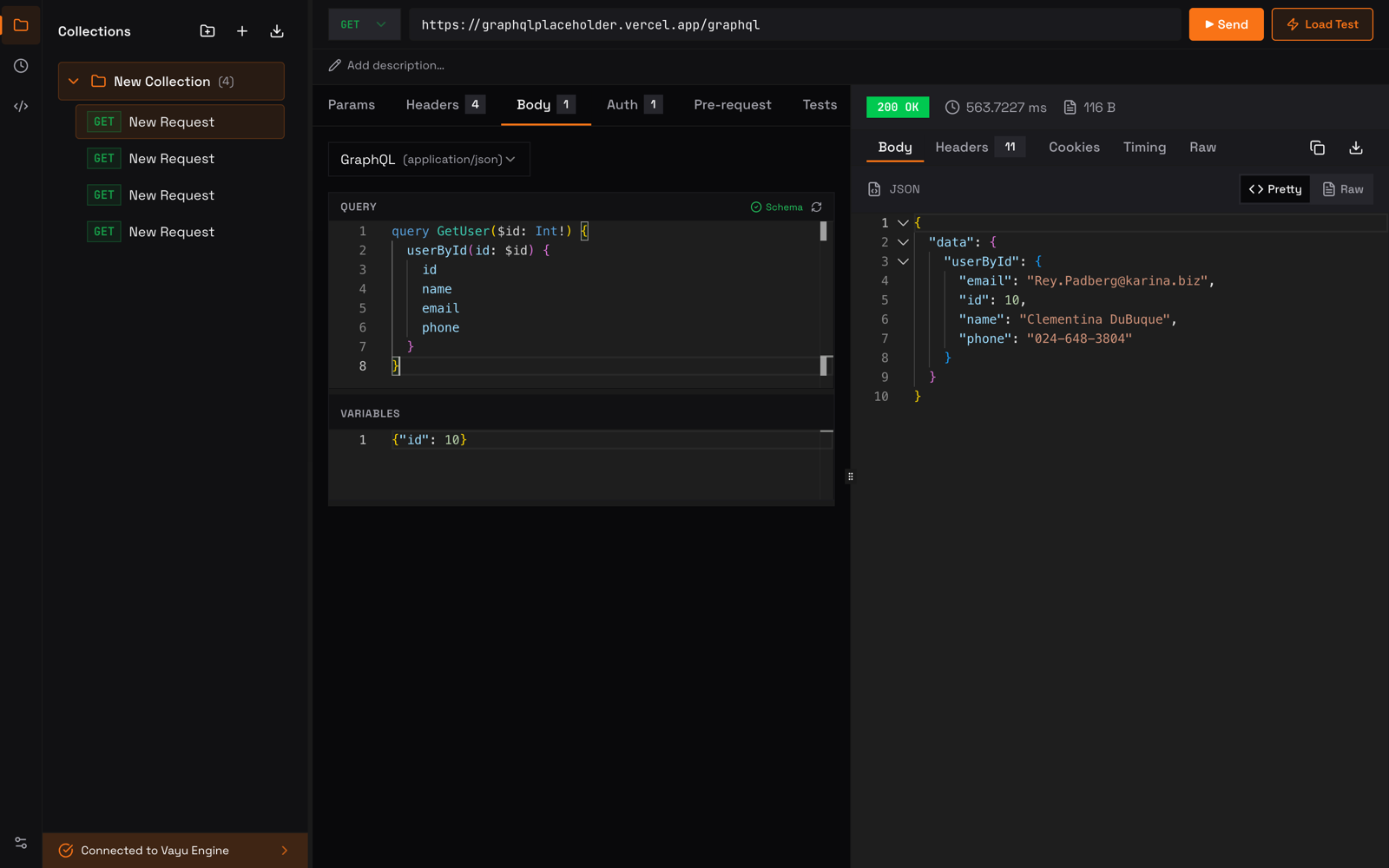 REST and GraphQL request builder with collections, layered environments, and Postman-compatible scripting.