sfvbrr autobrr
Use this command to install sfvbrr:
winget install --id=autobrr.sfvbrr -e sfvbrr is a Golang tool to validate scene releases
winget install --id=autobrr.sfvbrr -e sfvbrr is a Golang tool to validate scene releases
 Scene. Smart. Fast.
sfvbrr is a Golang tool to validate scene releases.
Scene. Smart. Fast.
sfvbrr is a Golang tool to validate scene releases.


sfvbrr (pronounced "es-ef-wee-brrrrrr") is a simple yet powerful tool for:
*.sfv) and *.zip file(s) integrityKey Features:
Upon the first validation run (sfvbrr validate /path/to/folder), the binary will automatically create a default in your folder, such as:
$HOME/.config/sfvbrr/---
schema_version: 1
rules:
app:
deny_unexpected: true
rules:
- pattern: "*.nfo"
min: 1
max: 1
description: "Requires only one .nfo file"
- pattern: "file_id.diz"
min: 1
max: 1
description: "Requires exactly one file_id.diz file"
- pattern: "*.diz"
max: 1
description: "Requires no other .diz files besides file_id.diz"
- pattern: "*.zip"
min: 1
description: "Requires at least one .zip file"
audiobook:
deny_unexpected: true
rules:
- pattern: "*.m3u"
min: 1
description: "Requires at least one .m3u file"
- pattern: "*.sfv"
min: 1
description: "Requires at least one .sfv file"
- pattern: "*.nfo"
min: 1
max: 1
description: "Requires only one .nfo file"
- pattern: "*.mp3"
min: 1
description: "Requires at least one .mp3 file"
- pattern: "*.jpg"
description: "Allows any amount of .jpg files"
book:
deny_unexpected: true
rules:
- pattern: "*.nfo"
min: 1
max: 1
description: "Requires only one .nfo file"
- pattern: "file_id.diz"
min: 1
max: 1
description: "Requires exactly one file_id.diz file"
- pattern: "*.diz"
max: 1
description: "Requires no other .diz files besides file_id.diz"
- pattern: "*.zip"
min: 1
description: "Requires at least one .zip file"
comic:
deny_unexpected: true
rules:
- pattern: "*.nfo"
min: 1
max: 1
description: "Requires only one .nfo file"
- pattern: "file_id.diz"
min: 1
max: 1
description: "Requires exactly one file_id.diz file"
- pattern: "*.diz"
max: 1
description: "Requires no other .diz files besides file_id.diz"
- pattern: "*.zip"
min: 1
description: "Requires at least one .zip file"
education:
deny_unexpected: true
rules:
- pattern: "*.rar"
min: 1
max: 1
description: "Requires only one .rar file"
- pattern: "*.sfv"
min: 1
max: 1
description: "Requires only one .sfv file"
- pattern: "*.nfo"
min: 1
max: 1
description: "Requires only one .nfo file"
- pattern: ".*\\.[r-z]\\d{2}$"
regex: true
min: 1
description: "It usually contains one or more .r?? files"
episode:
deny_unexpected: true
rules:
- pattern: "*.rar"
min: 1
max: 1
description: "Requires only one .rar file"
- pattern: "*.sfv"
min: 1
max: 1
description: "Requires only one .sfv file"
- pattern: "*.nfo"
min: 1
max: 1
description: "Requires only one .nfo file"
- pattern: "Sample"
type: dir
min: 1
max: 1
description: "Requires only one Sample folder"
# Syntax {mkv,mp4} handles the "OR" logic for extensions
- pattern: "Sample/*.{mkv,mp4}"
min: 1
max: 1
description: "Requires only one *.{mkv,mp4} file inside the Sample folder"
- pattern: ".*\\.[r-z]\\d{2}$"
regex: true
min: 1
description: "Requires at least one .r?? file"
- pattern: "Proof"
type: dir
max: 1
description: "Allows Proof folder, but not required"
- pattern: "Proof/*.jpg"
description: "Allows any amount of .jpg files in the Proof folder"
game:
deny_unexpected: true
rules:
- pattern: "*.rar"
min: 1
max: 1
description: "Requires only one .rar file"
- pattern: "*.sfv"
min: 1
max: 1
description: "Requires only one .sfv file"
- pattern: "*.nfo"
min: 1
max: 1
description: "Requires only one .nfo file"
- pattern: ".*\\.[r-z]\\d{2}$"
regex: true
min: 1
description: "Requires at least one .r?? file"
magazine:
deny_unexpected: true
rules:
- pattern: "*.nfo"
min: 1
max: 1
description: "Requires only one .nfo file"
- pattern: "file_id.diz"
min: 1
max: 1
description: "Requires exactly one file_id.diz file"
- pattern: "*.diz"
max: 1
description: "Requires no other .diz files besides file_id.diz"
- pattern: "*.zip"
min: 1
description: "Requires at least one .zip file"
movie:
deny_unexpected: true
rules:
- pattern: "*.rar"
min: 1
max: 1
description: "Requires only one .rar file"
- pattern: "*.sfv"
min: 1
max: 1
description: "Requires only one .sfv file"
- pattern: "*.nfo"
min: 1
max: 1
description: "Requires only one .nfo file"
- pattern: "Sample"
type: dir
min: 1
max: 1
description: "Requires only one Sample folder"
- pattern: "Sample/*.{mkv,mp4}"
min: 1
max: 1
description: "Requires only one *.{mkv,mp4} file inside the Sample folder"
- pattern: ".*\\.[r-z]\\d{2}$"
regex: true
min: 1
description: "Requires at least one .r?? file"
- pattern: "Proof"
type: dir
max: 1
description: "Allows Proof folder, but not required"
- pattern: "Proof/*.jpg"
description: "Allows any amount of .jpg files in the Proof folder"
music:
deny_unexpected: true
rules:
- pattern: "*.m3u"
min: 1
description: "Requires at least one .m3u file"
- pattern: "*.sfv"
min: 1
description: "Requires at least one .sfv file"
- pattern: "*.nfo"
min: 1
max: 1
description: "Requires only one .nfo file"
- pattern: "*.{mp3,flac}"
min: 1
description: "Requires at least one .mp3 or .flac file"
- pattern: "*.jpg"
description: "Allows JPEG files"
series:
deny_unexpected: true
rules:
- pattern: "*"
type: dir
min: 2
description: "Requires at least two subfolders"
It provides the rulesets for the most common 0day scene categories - built on autobrr/rls library allowing you to confirm its checksums, validate your data and make sure there is no garbage in them. The category can be manually -- overwritten, if required.
With little to no time, you can adjust these out-of-the-box scene rules for your specific use-case.
wget $(curl -s https://api.github.com/repos/autobrr/sfvbrr/releases/latest | grep browser_download_url | grep linux_x86_64 | cut -d\" -f4)
tar xvzf sfvbrr_*
sudo mv sfvbrr /usr/local/bin/
wget $(curl -s https://api.github.com/repos/autobrr/sfvbrr/releases/latest | grep browser_download_url | grep _windows_x86_64 | cut -d\" -f4)
unzip sfvbrr_*
move sfvbrr %windir%/system32
wget $(curl -s https://api.github.com/repos/autobrr/sfvbrr/releases/latest | grep browser_download_url | grep darwin_x86_64 | cut -d\" -f4)
tar xvzf sfvbrr_*
sudo mv sfvbrr /usr/local/bin/
presets.yamlThe presets.yaml file is the configuration file that defines validation rules for different scene release categories (it can be customized for any content validation, including P2P folders). It allows you to specify what files and directories are required, allowed, or forbidden for each category of release. Rules are individual validation checks that are applied to a folder. Each rule specifies:
The pattern field specifies what files or directories to match. It supports 3 matching modes:
regex: true is set: The pattern is treated as a regular expression/ to match files inside directoriesThe deny_unexpected option is a required boolean flag (by default true) for each pattern that controls strictness - only files/directories that match at least one rule pattern are allowed. Any file or directory that doesn't match any rule will cause validation to fail.
Minimum/Maximum is another required field for each pattern (it has no default - 0). If specified, the count of matching files/directories must be greater than or equal (min) / less than or equal (max) to this value.
Type is an optional parameter. It specifies whether the pattern matches files or directories. When type: dir is used, the pattern matches directory names, not file names.
Glob patterns use standard file matching syntax:
* - matches any sequence of characters (except path separators)? - matches any single character[abc] - matches any character in the set*.ext - matches all files with extension .extYou can use brace expansion for "OR" logic:
*.{mkv,mp4} - matches files ending in .mkv OR .mp4*.{zip,rar} - matches files ending in .zip OR .rarWhen regex: true, the pattern uses Go's regexp package syntax:
.* - matches any sequence of characters\d - matches a digit\d{2} - matches exactly two digits^ - start of string$ - end of stringExample: .*\.r\d{2}$ matches filenames ending with .r followed by exactly two digits (this matches files like file.r00, file.r01, file.r99, etc.).
Patterns can include a path separator / to match files inside directories:
Sample/*.{mkv,mp4} - matches .mkv or .mp4 files inside a Sample directory (such as Sample/sample.mkv)| Property | Default Value | Notes |
|---|---|---|
type | file | Matches files by default |
regex | false | Uses glob patterns by default |
min | 0 | No minimum requirement |
max | 0 | No maximum limit |
description | "" | Optional, for documentation only |
deny_unexpected | Required | Must be explicitly set (no default) |
rules:
  app:
    deny_unexpected: true
    rules:
      - pattern: "*.nfo"
        min: 1
        max: 1
        description: "Requires exactly one .nfo file"
This rule requires exactly one .nfo file in the folder of an "app" type.
rules:
  music:
    deny_unexpected: true
    rules:
      - pattern: "*.{mp3,flac}"
        min: 1
        description: "Requires at least one .mp3 or .flac file"
This rule requires at least one file that is either .mp3 OR .flac.
rules:
  game:
    deny_unexpected: true
    rules:
      - pattern: ".*\\.[r-z]\\d{2}$"
        regex: true
        min: 1
        description: "Requires at least one .r?? file"
This rule requires at least one file matching the pattern .r00, .r01, .r02, etc.
rules:
  episode:
    deny_unexpected: true
    rules:
      - pattern: "Sample"
        type: dir
        min: 1
        max: 1
        description: "Requires exactly one Sample folder"
      - pattern: "Sample/*.{mkv,mp4}"
        min: 1
        max: 1
        description: "Requires exactly one video file in Sample folder"
This example shows:
Sample.mkv or .mp4 file inside that Sample directoryrules:
app:
deny_unexpected: true
rules:
- pattern: "*.nfo"
min: 1
max: 1
description: "Requires only one .nfo file"
- pattern: "file_id.diz"
min: 1
max: 1
description: "Requires exactly one file_id.diz file"
- pattern: "*.diz"
max: 1
description: "Requires no other .diz files besides file_id.diz"
- pattern: "*.zip"
min: 1
description: "Requires at least one .zip file"
This example shows multiple rules working together:
.nfo filefile_id.diz file.diz files (the *.diz pattern matches file_id.diz too, so max: 1 ensures only one total).zip filedeny_unexpected: This is required and helps ensure releases don't contain unexpected/unwanted/unrelated files.file_id.diz and *.diz), put the more specific pattern first.regex: true.$ sfvbrr
sfvbrr is a high-performance scene release validation tool.
Usage:
sfvbrr [command]
Available Commands:
completion Generate the autocompletion script for the specified shell
help Help about any command
sfv Validate SFV CRC-32 checksums
update Update sfvbrr
validate Validate scene release folders
version Print version information
zip Validate ZIP file integrity
Flags:
-h, --help help for sfvbrr
Use "sfvbrr [command] --help" for more information about a command.
$ sfvbrr validate --help
Validate scene release folders against category-specific rules.

The command detects the release category from the folder name and validates
the folder contents against the rules defined in the preset configuration file.

When the recursive option (-r) is used, the command will search for valid
release folders in all subdirectories of the specified folder(s).

The --overwrite flag allows you to bypass automatic category detection and
manually specify a category for validation.

Examples:
  # Validate a single folder
  sfvbrr validate /path/to/release

  # Validate multiple folders
  sfvbrr validate /path/to/release1 /path/to/release2

  # Validate recursively
  sfvbrr validate -r /path/to/releases

  # Override category detection
  sfvbrr validate --overwrite app /path/to/release

Usage:
  sfvbrr validate [folder...] [flags]

Flags:
      --cpuprofile string   Write CPU profile to file
  -h, --help                help for validate
      --json                Output results in JSON format
      --overwrite string    Override category detection with specified category (bypasses automatic detection)
  -p, --preset string       Path to preset YAML file (default: auto-detect)
  -q, --quiet               Quiet mode - only show errors
  -r, --recursive           Recursively search for release folders in subdirectories
  -v, --verbose             Show detailed validation results for each rule
      --yaml                Output results in YAML format
$ sfvbrr sfv --help
Validate SFV (Simple File Verification) CRC-32 checksums for files in the specified folder(s).

The command will search for an SFV file (case insensitive) in each specified folder
and validate all files listed in the SFV file against their CRC-32 checksums.

When the recursive option (-r) is used, the command will search for SFV files in all
subdirectories of the specified folder(s).

Examples:
  # Validate a single folder
  sfvbrr sfv /path/to/release

  # Validate multiple folders
  sfvbrr sfv /path/to/release1 /path/to/release2

  # Validate recursively
  sfvbrr sfv -r /path/to/releases

Usage:
  sfvbrr sfv [folder...] [flags]

Flags:
  -b, --buffer-size int     Buffer size for file reading in bytes (0 = auto, default 64KB)
      --cpuprofile string   Write CPU profile to file
  -h, --help                help for sfv
      --json                Output results in JSON format
  -q, --quiet               Quiet mode - only show errors
  -r, --recursive           Recursively search for SFV files in subdirectories
  -v, --verbose             Show detailed validation results for each file
  -w, --workers int         Number of parallel workers (0 = auto-detect)
      --yaml                Output results in YAML format
$ sfvbrr zip --help
Validate ZIP file integrity by testing all entries in ZIP files (equivalent to zip -T).

The command will search for ZIP files (case insensitive) in each specified folder
and validate all entries in each ZIP file by reading them and verifying their CRC-32 checksums.

When the recursive option (-r) is used, the command will search for ZIP files in all
subdirectories of the specified folder(s).

Examples:
  # Validate ZIP files in a single folder
  sfvbrr zip /path/to/release

  # Validate ZIP files in multiple folders
  sfvbrr zip /path/to/release1 /path/to/release2

  # Validate ZIP files recursively
  sfvbrr zip -r /path/to/releases

Usage:
  sfvbrr zip [folder...] [flags]

Flags:
  -b, --buffer-size int     Buffer size for file reading in bytes (0 = auto, default 64KB)
      --cpuprofile string   Write CPU profile to file
  -h, --help                help for zip
      --json                Output results in JSON format
  -q, --quiet               Quiet mode - only show errors
  -r, --recursive           Recursively search for ZIP files in subdirectories
  -v, --verbose             Show detailed validation results for each entry
  -w, --workers int         Number of parallel workers (0 = auto-detect)
      --yaml                Output results in YAML format
$ sfvbrr completion bash --help
Generate the autocompletion script for the bash shell.

This script depends on the 'bash-completion' package.
If it is not installed already, you can install it via your OS's package manager.

To load completions in your current shell session:

	source <(sfvbrr completion bash)

To load completions for every new session, execute once:

#### Linux:

	sfvbrr completion bash > /etc/bash_completion.d/sfvbrr

#### macOS:

	sfvbrr completion bash > $(brew --prefix)/etc/bash_completion.d/sfvbrr

You will need to start a new shell for this setup to take effect.

Usage:
  sfvbrr completion bash

Flags:
  -h, --help              help for bash
      --no-descriptions   disable completion descriptions
In Qui, go to "Settings" -> "External Programs" -> "Create External Program" and add the following:
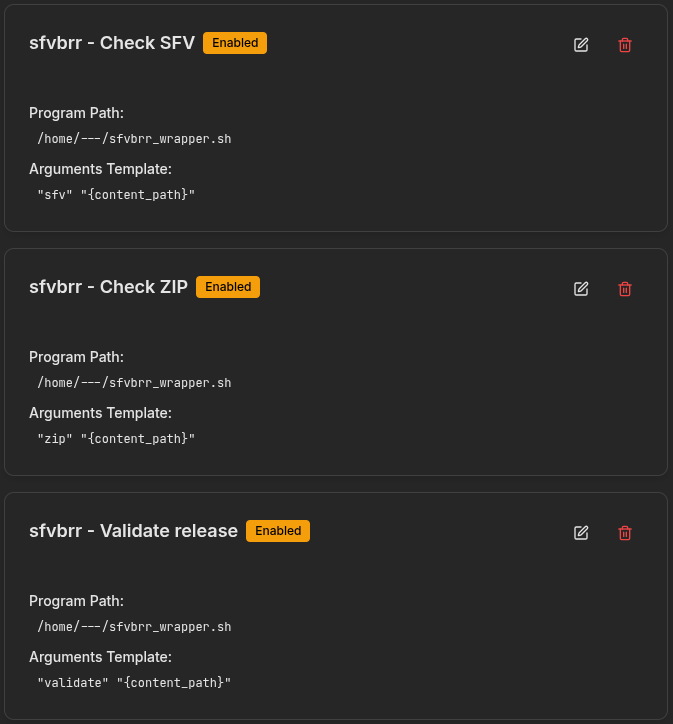
The sfvbrr_wrapper.sh could look something like this:
#!/bin/bash

# 1 - method (sfv, validate, zip)
# 2 - content path

/usr/bin/sfvbrr ${1} ${2} 2>&1 | logger -t sfvbrr
There is an entire dataset in test/validate which you can test the functionality against some hypothetical scenarios. The results are typically published in test/TESTS_RUNSHEET.md.
This program is free software; you can redistribute it and/or modify it under the terms of the GNU General Public License as published by the Free Software Foundation; either version 2 of the License, or (at your option) any later version.
See LICENSE for the full license text.