Video Viewer
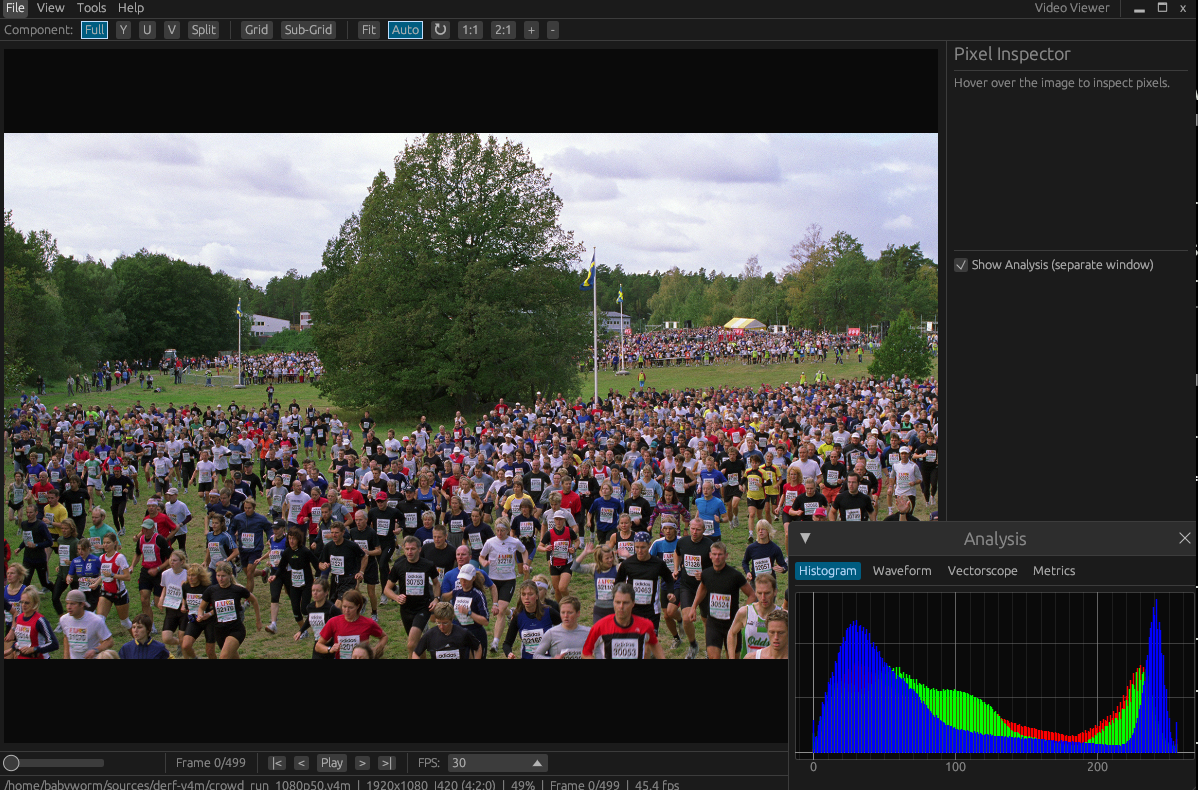
Raw/YUV/RGB video viewer built with Rust + egui. Supports 75+ pixel formats for inspecting uncompressed video data.
Features
- 75+ pixel formats: YUV (I420, NV12, NV21, YUY2, UYVY, P010, ...), RGB (RGB24, BGR24, RGB565, RGBA32, ...), Bayer (8/10/12/16-bit), Grayscale
- Auto-detection: Read parameters from Y4M headers and Image files (PPM, PNG, JPEG, etc.) automatically
- Smart auto-detection: Resolution guessing from file size, filename metadata extraction (resolution, format, fps patterns)
- BT.601 / BT.709: Selectable YUV-RGB color matrix
Viewing & Navigation
- Channel separation: View individual Y/U/V or R/G/B channels with false color display
- Split view: 2x2 grid showing Full + 3 channels simultaneously (key
4)
- Zoom: Mouse wheel zoom (anchored to cursor), +/- buttons, 1:1 and 2:1 presets
- Pan: Middle-click drag to pan the image
- Auto-fit: Automatically fit image when window resizes
- Center image: Reset pan offset (key
C)
Pixel Inspector
- 8x8 neighborhood grid: Hover over the image to see a grid of surrounding pixel values with cursor highlight and crosshair
- Grid boundary visualization: When grid/sub-grid overlays are active, the neighborhood grid shows colored boundary lines matching the canvas overlay (green for grid, yellow for sub-grid)
- Component values: Displays Y/U/V or R/G/B values and raw hex bytes at the cursor position
- Magnifier: Toggleable 8x magnifier overlay following the cursor (key
M)
- Histogram: RGB and luma intensity distribution with interactive zoom and drag
- Waveform: Luma waveform monitor showing pixel value distribution by column
- Vectorscope: BT.709 Cb vs Cr scatter plot centered at origin with ±128 boundary box
- Metrics: PSNR, SSIM, and frame difference between consecutive frames
- Video Diff: Load a reference and current video side-by-side with signed luma diff,
MS-PSNR, MS-SSIM, and a dependency-free VMAF-NEG proxy heatmap; main grid size drives
per-region values when enabled; frame stepping and zoom/pan are synchronized across panes
- Zoom controls: +/- buttons and scroll zoom on all analysis plots, with Reset View
Grid Overlay
- Main grid: Directly selectable block boundary overlay (Off/128/64/32/16 pixels), cycled with
G
- Sub-grid: Secondary overlay (4/8/16 pixels) for finer block structure inspection
- Pixel inspector integration: Grid/sub-grid boundaries are visualized in the 8x8 neighborhood display
Comparison & Export
- A/B comparison: Three-pane reference/current/diff view for comparing two videos
- Format conversion: Convert between formats with background progress tracking
- Frame export: Save frames as PNG
Other
- Bookmarks & scene detection: Mark frames and auto-detect scene changes
- Test video download: Download standard test sequences (foreman, akiyo, bus, etc.) from the derf YUV collection
- Keyboard shortcuts: Comprehensive shortcuts for all operations (see table below)
- Dark/Light theme: Toggle with menu
- Custom title bar: Integrated menu bar as window title bar
Installation
Pre-built binaries
Download the latest release for your platform from the Releases page:
| Platform | File |
|---|
| Linux x86_64 | video-viewer-vX.Y.Z-linux-x86_64.tar.gz |
| macOS Apple Silicon | video-viewer-vX.Y.Z-macos-aarch64.tar.gz |
| macOS Intel | video-viewer-vX.Y.Z-macos-x86_64.tar.gz |
| Windows x86_64 | video-viewer-vX.Y.Z-windows-x86_64.zip |
Extract and run — no installation required.
Windows (winget)
winget install babyworm.VideoViewer
Build from source
Prerequisites
Rust toolchain (1.75+):
curl --proto '=https' --tlsv1.2 -sSf https://sh.rustup.rs | sh
System dependencies:
# Ubuntu / Debian
sudo apt install libxcb-render0-dev libxcb-shape0-dev \
  libxcb-xfixes0-dev libxkbcommon-dev libssl-dev libgtk-3-dev

# Fedora
sudo dnf install libxcb-devel libxkbcommon-devel openssl-devel gtk3-devel

# Arch Linux
sudo pacman -S libxcb libxkbcommon openssl gtk3

# macOS (no extra dependencies needed)
Build
cd rust
cargo build --release

# Binary at rust/target/release/video-viewer
Run directly
cd rust
cargo run --release -- input.y4m
Usage
GUI mode
# Auto-detect parameters (Y4M)
video-viewer input.y4m

# Specify parameters (raw YUV)
video-viewer input.yuv -W 1920 -H 1080 --format I420
Headless conversion
video-viewer input.yuv -W 1920 -H 1080 --vi I420 --vo NV12 -o output.nv12
CLI Options
| Option | Description |
|---|
| `` | Input file path |
-W, --width | Video width |
-H, --height | Video height |
-f, --format | Pixel format (e.g., I420, NV12) |
--vi | Input format (for conversion) |
--vo | Output format (for conversion) |
-o, --output | Output file path (triggers headless mode) |
Keyboard Shortcuts
| Key | Action |
|---|
Space | Play / Pause |
Left / Right | Previous / Next frame |
Home / End | First / Last frame |
0 | Full (all channels) |
1 | Channel 1 (Y/R) |
2 | Channel 2 (U/G) |
3 | Channel 3 (V/B) |
4 | Split view (2x2) |
F | Fit to view |
C | Center image |
G | Cycle grid overlay (off/128/64/32/16); toolbar selector can set it directly |
M | Toggle magnifier |
B | Toggle bookmark |
| Scroll wheel | Zoom in/out (anchored to cursor; synchronized across comparison panes) |
| Middle-click drag | Pan image (drag any comparison pane to pan all panes together) |
Ctrl+O | Open file |
Ctrl+S | Save frame as PNG |
Ctrl+C | Copy frame to clipboard |
Ctrl+Q | Quit |
YUV Planar
I420, YV12, YUV422P, YUV411P, YUV444P, YUV410, YVU410, YUV420M, YUV422M
YUV Semi-Planar
NV12, NV21, NV16, NV61, NV24, NV42, P010, P016, NV12M, NV21M
YUV Packed
YUYV, UYVY, YVYU, VYUY, Y41P, AYUV, VUYA, Y210
RGB
RGB332, RGB444, ARGB444, XRGB444, RGB555, ARGB555, XRGB555, RGB565, RGB555X, RGB565X, BGR24, RGB24, BGR32, RGB32, ABGR32, ARGB32, BGRA32, RGBA32, XBGR32, XRGB32, BGRX32, RGBX32, HSV24, HSV32
Bayer
RGGB, BGGR, GBRG, GRBG (8/10/10-packed/12/16-bit variants = 20 formats)
Grayscale
Greyscale 8-bit, 10-bit, 12-bit, 16-bit
PPM (P6), PNG, JPEG, BMP, GIF, TIFF, WebP
Dependencies
| Crate | License | Purpose |
|---|
| eframe / egui | Apache-2.0 OR MIT | GUI framework |
| egui_plot | Apache-2.0 OR MIT | Plot widgets (histogram, waveform, vectorscope) |
| clap | Apache-2.0 OR MIT | CLI argument parsing |
| memmap2 | Apache-2.0 OR MIT | Memory-mapped file I/O |
| rayon | Apache-2.0 OR MIT | Parallel processing |
| image | Apache-2.0 OR MIT | Image encoding (PNG export) |
| arboard | Apache-2.0 OR MIT | Clipboard support |
| lru | MIT | Frame cache |
| ndarray | Apache-2.0 OR MIT | N-dimensional array operations |
| parking_lot | Apache-2.0 OR MIT | Synchronization primitives |
| crossbeam | Apache-2.0 OR MIT | Concurrent data structures |
| serde / toml | Apache-2.0 OR MIT | Settings persistence |
| log / env_logger | Apache-2.0 OR MIT | Logging |
All dependencies are compatible with the MIT license.
The Bitstream Analysis window (--catb CLI option) reads .catb telemetry
files produced by codec-analyzer:
- codec-analyzer is an optional, separately installed external tool. It is
licensed under GPL-3.0-or-later and is not bundled with, linked into,
or distributed as part of video-viewer. video-viewer never invokes it; it
only reads
.catb files you generate with it yourself.
- The
.catb reader in this repository is an independent implementation
written from the CC0-1.0 (public domain) format specification
(docs/catb-v4-format.md in the codec-analyzer repository). No GPL code
was consulted or copied; the reader is covered by this project's MIT
license.
test_data/bitstream/ fixtures are the output of a GPL program
(codec-analyzer's instrumented FFmpeg). The GPL does not extend to a
program's output, so these data files are not GPL-covered. See
test_data/bitstream/README.md for
provenance, checksums, and regeneration steps.
Development
cd rust

# Run all tests
cargo test

# Run CI-equivalent lint locally
cargo clippy -- -D warnings

# Run specific test
cargo test test_pixel_info_yuyv

# Build in debug mode (faster compile)
cargo build

# Check without building
cargo check
Project Layout
rust/
├── src/
│   ├── main.rs          # CLI entry point (clap)
│   ├── lib.rs           # Library root, GUI launch
│   ├── app.rs           # Main app state, shortcuts, frame logic
│   ├── core/            # Format definitions, reader, cache, hints, Y4M, pixel
│   ├── ui/              # Canvas, toolbar, sidebar, dialogs, comparison
│   ├── analysis/        # Histogram, waveform, vectorscope, metrics, scene
│   └── conversion/      # Format converter, chroma resampling
├── tests/               # Integration tests (250+ tests)
scripts/
└── generate_test_data.py  # Test data generator (Python)
test_data/                 # Sample QCIF files (I420, NV12, RGB565, YUYV)
Contributing
Contributions are welcome! Please follow these guidelines:
- Fork & branch: Create a feature branch from
main.
- Build & test: Ensure
cargo build and cargo test pass with no failures.
- Code quality: Keep touched code formatted consistently and ensure
cargo clippy -- -D warnings passes.
- Commit messages: Use concise, descriptive messages (e.g., "Add YVYU pixel inspector support").
- One concern per PR: Keep pull requests focused on a single feature or fix.
- Add a
FormatEntry to FORMAT_DEFS in rust/src/core/formats.rs.
- Handle decoding in
rust/src/core/reader.rs (convert_to_rgb, get_channels).
- Handle pixel inspection in
rust/src/core/pixel.rs (get_pixel_info).
- If needed, add conversion support in
rust/src/conversion/converter.rs.
- Add tests in
rust/tests/ covering frame_size, pixel info, and conversion.
Reporting issues
Open an issue on GitHub with:
- Steps to reproduce
- Input file format and resolution
- Expected vs actual behavior
- OS and Rust version (
rustc --version)
License
MIT License. See LICENSE for details.