Ntilde is a cross-platform terminal emulator built on a cell-based virtual-terminal
engine with strong VT/ANSI conformance, deterministic session recording and replay, and a
native SSH client (profiles, jump hosts, port forwarding). It is self-contained: this package
is a portable build extracted from the official release archive and runs without an installer.
README
Ntilde
Ntilde is a modern, cross-platform terminal emulator focused on
correctness, performance, and predictability.
Built with:
.NET 10
Avalonia UI
Skia (GPU-accelerated rendering)
Rust-based PTY backend
Supported platforms: Windows · Linux · macOS
✨ Why Ntilde?
Most terminal emulators optimize for speed or features. Ntilde focuses on something different:
🧪 Deterministic rendering
Same input → same output. Always. Enables reliable testing and replay.
📼 Replay-driven debugging
Record terminal sessions and replay them with pixel-level consistency.
✅ VT correctness first
Built with conformance and standards in mind---not best-effort rendering.
⚡ GPU-accelerated rendering
Smooth, modern rendering pipeline using Skia.
🧩 Extensible architecture
Designed for future workflows (cloud, automation, AI-assisted tooling).
🤖 Built for AI agents
An opt-in MCP server lets Claude Code and other agents observe your live terminal sessions --- and, behind a separate opt-in, drive them.
🔁 Persistent sessions
Shells keep running when you close the window, reattach when you reopen, and SSH tabs survive network drops.
> Terminal correctness is enforced by automated tests, not guesswork.
That principle shows up everywhere: VT behavior is measured against a
conformance matrix, the renderer is gated by performance contracts, and
replay parity prevents silent behavioral drift.
Install
GitHub release assets are produced as Native AOT bundles for win-x64,
linux-x64, linux-arm64 and osx-arm64. Every release runs the gating unit-test
lane on all three OSes before any bundle is published.
Coming from NovaTerminal
Ntilde is NovaTerminal renamed. 0.10.0 is the first release under the new name. What that
means for an existing install:
Settings carry over. On first launch Ntilde copies settings, themes, connection profiles,
workspaces, snippets, backups and history from NovaTerminal into its own data folder
(%LOCALAPPDATA%\ntilde on Windows, ~/Library/Application Support/ntilde on macOS,
~/.local/share/ntilde on Linux). The old folder is
left untouched; delete it when you are happy.
Saved passwords do not. Keychain, Credential Manager and Secret Service entries are stored
under the new name. Re-enter SSH passwords once; the profiles themselves are already there.
An installed NovaTerminal updates itself into Ntilde. The Windows installer and the macOS
.pkg keep checking the same update feed, and the next update they find is Ntilde. It is applied
in place: the install folder stays where it was, the shortcuts are renamed to Ntilde, and the app
comes back as Ntilde with your settings migrated. The portable zip has no updater: download
Ntilde from the links below and delete the old copy. Debian and Arch packages supersede
novaterminal automatically.
Package names changed: the .deb package is ntilde and the Arch package is
ntilde-bin; both supersede the novaterminal names. The command is now ntilde
(was nova).
Old files still open..novabackup bundles, .novaws.json workspace exports and .rec
recordings from NovaTerminal import and replay unchanged.
Remote shell integration: re-run the installer from Settings on each host; it writes
~/.ntilde-shell-integration.sh (or, on PowerShell hosts, ~/.ntilde-shell-integration.ps1).
Remove the old ~/.nova-shell-integration.sh loader line from your rc file by hand, or the old
. ~/.nova-shell-integration.ps1 loader line from $PROFILE.
Environment overrides are renamed NOVATERM_* to NTILDE_* (for example
NTILDE_APPDATA_ROOT).
Windows
Installer — download ntilde-Setup-win-x64-.exe from the
latest release. Installs per-user
(no admin prompt), adds Start Menu and Desktop shortcuts, and checks for updates in the
background — a new version downloads quietly and is applied when you accept the prompt and
restart. Never a surprise restart. Automatic checks can be turned off in Settings → General.
The installer also adds Ntilde's folder to your user PATH, so ntilde works in PowerShell
and cmd.
Portable — download ntilde-win-x64-.zip and extract it anywhere. No updater.
There is no winget package yet; the manifests live in packaging/winget
for when there is.
The installer and the executables are not code-signed yet (#91),
so SmartScreen will warn on first run. Choose More info → Run anyway.
macOS
macOS (Apple Silicon) — download ntilde-Setup-osx-arm64-.pkg from the
latest release and run it;
it installs into /Applications (or ~/Applications) as a proper Ntilde.app
bundle. Alternatively grab ntilde-osx-arm64-.zip, open it, and drag
Ntilde.app to /Applications.
There is no Homebrew tap yet; the cask lives in packaging/homebrew
for when there is.
macOS builds installed via the .pkg check for updates in the background and apply them
on restart, same as Windows. If the app lives in /Applications, macOS will ask for your
password once per update.
Release builds are signed and notarized. Ones built while the macOS signing secrets are unset (see
packaging/macos, tracking
#91) are not code-signed or
notarized, so Gatekeeper blocks their first launch. On macOS 13+:
Try to open Ntilde once (it will be blocked — that's expected).
Open System Settings → Privacy & Security, scroll down, and click Open Anyway.
Confirm — macOS remembers the approval for subsequent launches and updates.
From a terminal, the one-liner equivalent is
xattr -cr /Applications/Ntilde.app.
Linux
Requires glibc 2.35 or newer — Ubuntu 22.04+, Debian 12+, Fedora 36+, or a current
rolling distro. Debian 11 and RHEL 8/9 are not supported.
AppImage (recommended — updates itself):
# Replace  with the latest release, and x64 with arm64 on ARM machines.
curl -LO https://github.com/benyblack/ntilde/releases/download//ntilde-linux-x64-.AppImage
chmod +x ntilde-linux-x64-.AppImage
mkdir -p ~/Applications && mv ntilde-linux-x64-.AppImage ~/Applications/
~/Applications/ntilde-linux-x64-.AppImage
Keep it somewhere you can write, such as ~/Applications — the app updates itself by
rewriting the AppImage, which it cannot do from a root-owned path like /opt.
Ubuntu 22.04 and later ship no FUSE 2 by default, which AppImages need. Either
install it (sudo apt install fuse, which pulls in libfuse2 — libfuse2 alone
supplies only the library, not the fusermount binary the mount step needs) or
run with --appimage-extract-and-run.
Debian / Ubuntu package (system integration; update via your package manager):
The .deb filename is not the release tag substituted into a template, unlike
every other asset on this page. build-deb.sh always appends a Debian revision
(-1), and for a prerelease tag it also turns the - before the prerelease
label into ~ — dpkg reads the last- in a version as the revision
separator, so a prerelease left as -beta.1 would parse as upstream 0.5.0
revision beta.1 and sort above the eventual 0.5.0-1 final release; ~
sorts before everything, so ~beta.1-1 correctly sorts below it. v0.5.3 ships
as ntilde_0.5.3-1_amd64.deb; v0.5.0-beta.1 is built as
ntilde_0.5.0~beta.1-1_amd64.deb, but GitHub replaces ~ with . in
release asset names, so the file you'll actually see on the releases page for a
prerelease is named ntilde_0.5.0.beta.1-1_amd64.deb — the package's
internal Version: field (what dpkg reads) still carries the ~, so
installation works either way; stable tags have no ~ to sanitize, so this
doesn't affect them. That's exactly why you shouldn't construct the filename
yourself — copy it verbatim from the releases page:
On ARM machines, grab the arm64 asset instead of amd64 — the .deb uses
Debian architecture names (amd64/arm64), not the x64/arm64 RID names the
AppImage and tarball below use.
Installs ntilde on your PATH, an app-menu entry, and man ntilde. The in-app updater is
inactive for package installs by design.
Portable tarball (no integration):
# Replace  with the latest release, and x64 with arm64 on ARM machines.
curl -LO https://github.com/benyblack/ntilde/releases/download//ntilde-linux-x64-.tar.gz
tar -xzf ntilde-linux-x64-.tar.gz && ./Ntilde
Ntilde is not registered as your default terminal. To do that yourself after
installing the .deb, see man ntilde.
For details on what each Linux package contains and its known limitations, see
packaging/linux.
VT / ANSI parsing measured against a conformance matrix
Alternate screen support (vim, less, htop)
Scrollback buffer
Stable resize & reflow
Cell-based buffer model
Thread-safe, crash-resistant PTY backend
UI
Tabs and split panes, reorderable by drag or by Ctrl+Shift+PageUp / Ctrl+Shift+PageDown
Vertical tab sidebar (Ctrl+Shift+L) with per-tab status, agent-activity chips, and a live output preview
Agent Output panel — renders a command's output as markdown beside the pane, streaming as it arrives
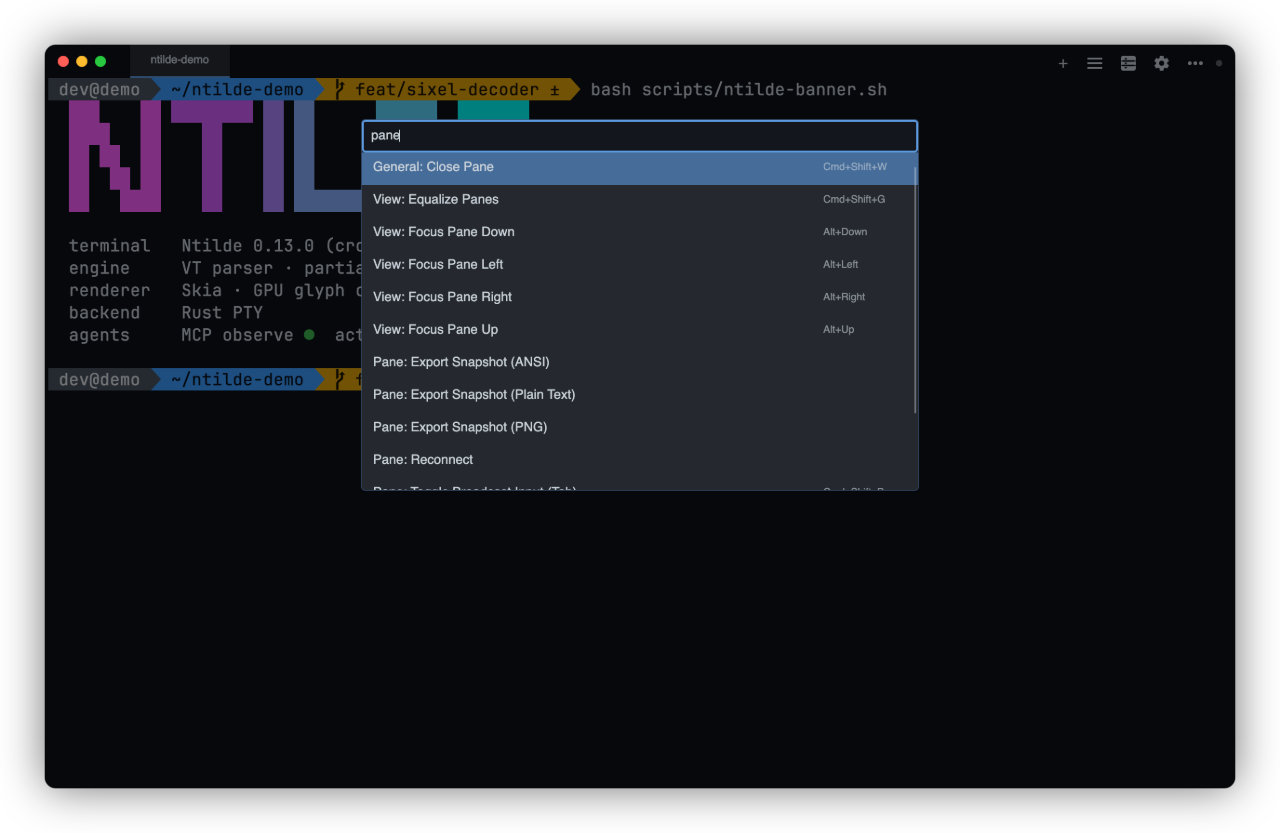
Command palette
Search overlay
Settings window with ten pages in a sidebar (General, Appearance, Terminal, Tabs & title bar,
Shells & Profiles, Shortcuts, Command Assist, Agent Access, SSH, Backup & Restore) and a search
box (Ctrl+F, Cmd+F on macOS) that jumps straight to the setting
Title-bar editor: put each action in the bar, in the … menu, or hide it, with a live preview
Program notifications (OSC 9) as toasts when you aren't looking at the pane (opt-in), and
progress (OSC 9;4) on the tab and the Windows taskbar button
Profiles (local & SSH)
Bundled themes (Dracula, Nord, Gruvbox, Tokyo Night, Catppuccin Mocha, Solarized, GitHub, Monokai, OneHalf, Cobalt2), custom themes, and font configuration
Bundled fonts, so a fresh install renders correctly with no system font installed: JetBrains Mono NL by default,
Cascadia Mono PL alongside it, and a symbols-only Nerd Font loaded as a fallback so prompt icons work under
whichever face you pick
Live settings (no restart)
Interface scale (Settings → Appearance → Window, 80%–200%): one zoom for the whole window,
separate from the terminal font size, with terminal text rasterized sharp at the scale
Command Assist
Suggestions anchored to what the shell actually reports, rather than to a guess
about where the prompt ends — built on OSC 133 shell-integration marks.
Reads the live command line from the terminal grid, not a shadow copy
History search, snippet management, and a tldr-derived command catalogue
Fix mode proposes a correction from a failed command's own output
Passive suggestion bubble with rebindable shortcuts
One-line shell-integration installer for remote hosts, with mark detection over SSH
Still captures commands in sessions that emit no marks at all
Configuration backup & restore
Export settings, themes, connections, workspaces, policy and snippets to a
single portable .ntildebackup file, and import it on another machine
Six independently selectable categories; import merges or replaces
Automatic background snapshots, deduplicated by content hash and retention-capped
A snapshot is taken before every import and restore, so both are reversible
Available from Settings → Backup & Restore, the command palette, and the CLI
(backup export|import|list|restore); agents get read-only export and list MCP tools
> Connection passwords are not included in a bundle. They live in the OS
> credential store, not in the config folder, so imported SSH profiles need their
> passwords re-entered on first connect. See
> docs/CONFIG_STORAGE_CONTRACT.md.
Graphics & inline images
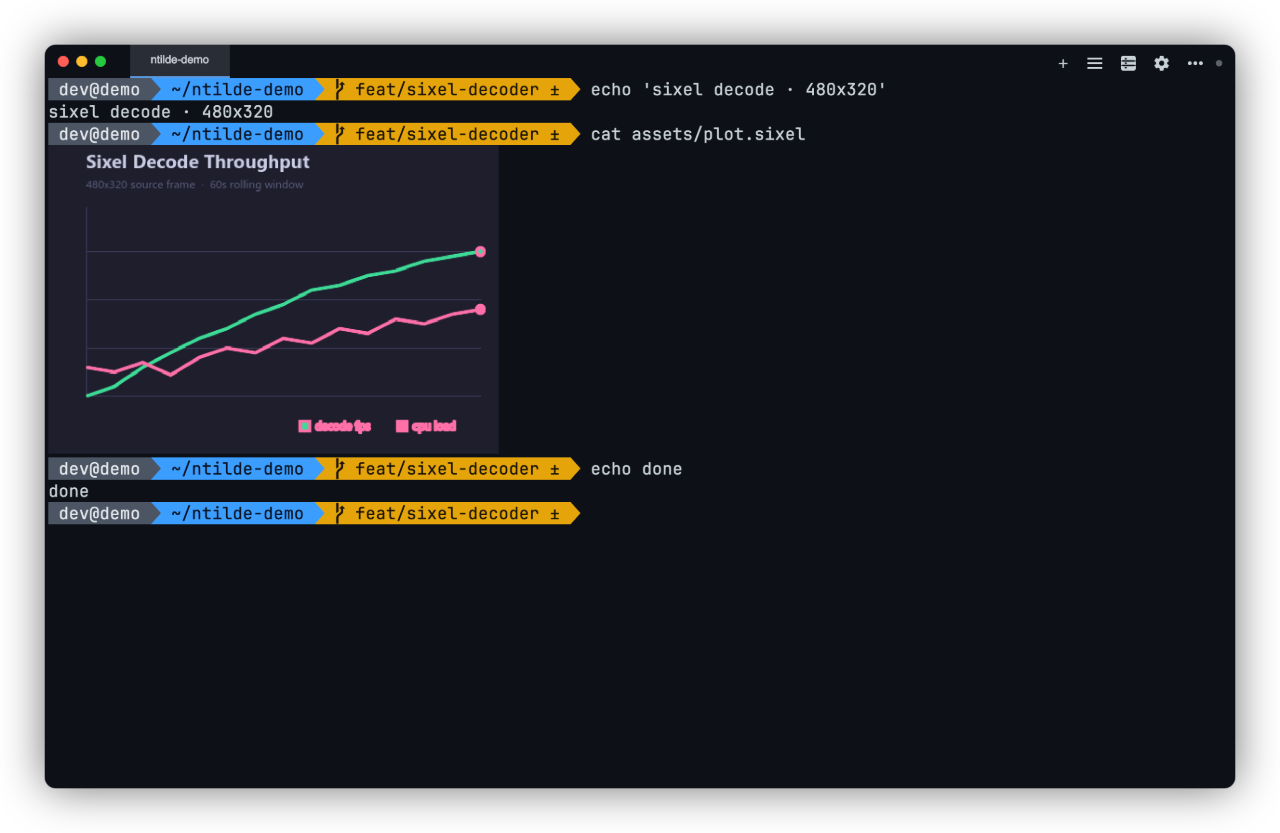
Sixel Graphics (verified with libsixel, lsix, gnuplot)
iTerm2 Inline Images (verified with imgcat, test_iterm2.py)
Kitty Graphics Protocol (native on Linux/macOS; tunneled mode on Windows)
Proper ConPTY synchronization — images render inline with prompts
Native SSH
The in-process SSH client is the default backend for new profiles; OpenSSH
remains selectable per profile, and stays the default for profiles that predate
the flip.
SSH profiles with platform-vault credential storage (Windows Credential Manager, macOS Keychain, Linux Secret Service)
Password, identity-file, and ssh-agent authentication
Multi-hop jump chains of any length
Local, remote, and dynamic port forwarding
Keepalive
Coalesced resize handling for fullscreen TUIs (vim, htop, tmux)
Disconnect state surfaced in the terminal pane
Runtime password memory (opt-in, session-scoped)
Native SFTP transfers and a pane-local remote-files sidebar
Persistent sessions
With persistent sessions on, shells run in a background process, Ntilde's own multiplexer, instead
of in the window (user guide).
Closing the window, a crash or an update leaves your shells running; reopening Ntilde reattaches
every tab to its shell, screen and scrollback included
The first close asks whether the shells keep running; Quit and close all shells ends them all
After a restart of the computer, tabs start fresh shells where they were, without a warning
Several windows can share one shell; Attach to session… reopens a detached shell, local or on a
remote host
Persistent SSH tabs: the shell runs on the host in ntilde-mux, which Ntilde installs there for
you, so it survives network drops, a sleeping laptop and a closed window; the tab reconnects by
itself when it can sign in without you (keys, agent or a saved password), and otherwise on Enter
(Linux x64/arm64 hosts with glibc 2.34+, and Apple-silicon macOS)
ntilde mux ls [--all], attach, kill and kill-server from any terminal
Agents (MCP) can also see and, with the act opt-in, drive shells no window shows
On by default for local shells: Settings → General → Keep shells running when the window
closes turns it off; SSH tabs opt in per connection
On Windows, ntilde typed in PowerShell or cmd runs the console launcher ntilde.com, which
waits for a command-line mode such as ntilde mux ls and returns its exit code
Cross-platform parity
Ntilde guarantees identical terminal behavior across operating systems
for VT interpretation, buffer state, wrapping & reflow, and search semantics.
Platform-specific differences are limited to window chrome, blur/transparency,
global hotkeys, and credential storage backends.
Agent access (MCP)
A local, stdio Model Context Protocol server
(Ntilde.McpServer) exposes Ntilde to AI coding agents (Claude Code, Claude
Desktop, VS Code, …):
Observe (opt-in, default off) — list_sessions, read_screen, read_scrollback,
get_session_status, wait_for_events, export_replay, capture_screen: read live sessions
deterministically, as text or as a PNG - re-rendered offscreen from the buffer, or photographed
from the screen with mode=live.
Act (a separate opt-in, on top of observe) — send_input, spawn_session,
close_session: type into, open, and close sessions. SSH targets additionally require a
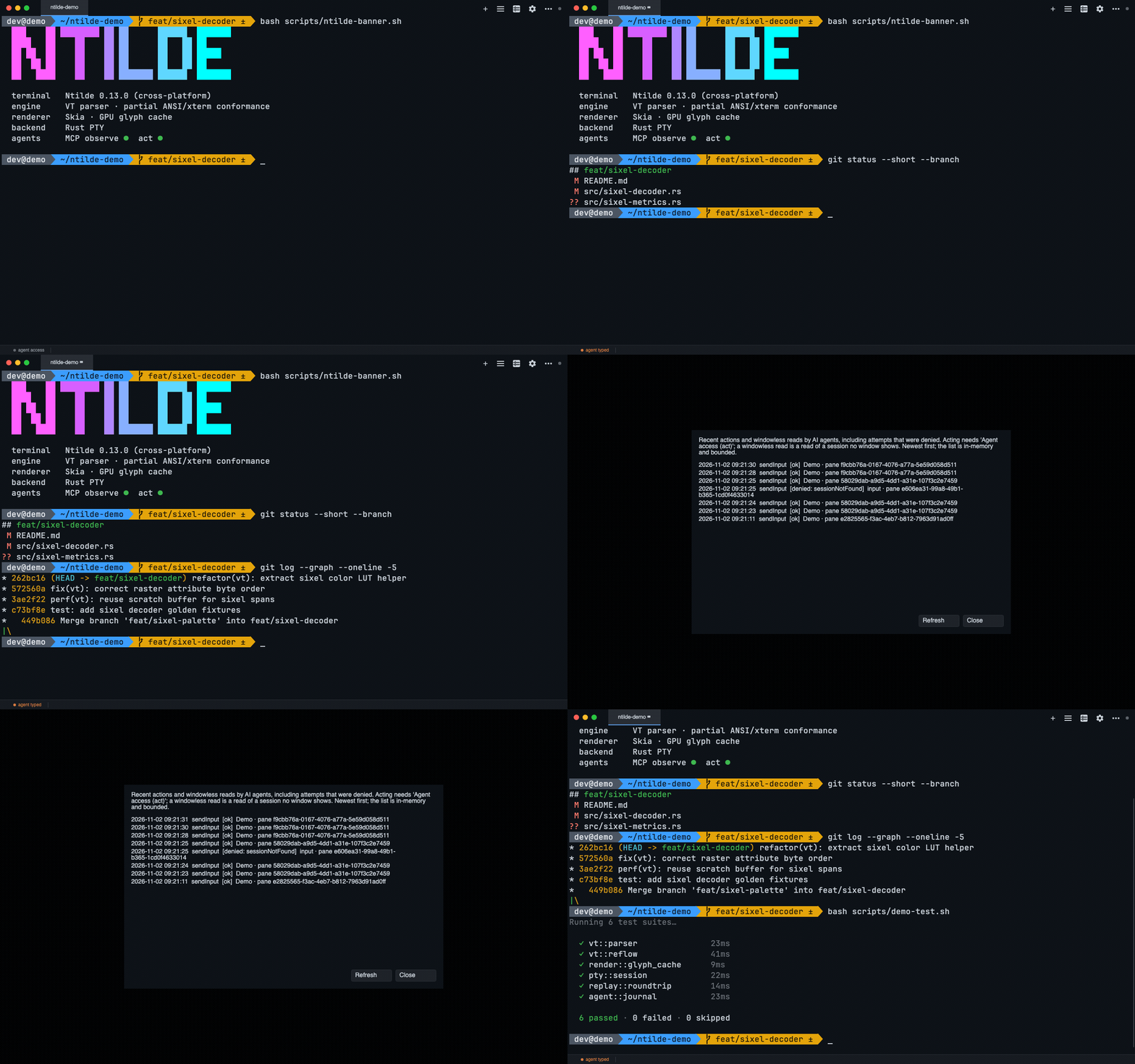
per-profile allowlist, and every acting call — allowed or denied — is recorded in an in-app
activity journal.
Every release bundle includes the MCP server as ntilde-mcp (ntilde-mcp.exe on Windows), a
native binary that needs no .NET installed. Register it with Claude Code:
claude mcp add ntilde -- ntilde-mcp
ntilde-mcp is on your PATH after installing with the Windows Setup.exe (open a new terminal
first), the .deb, the AUR package or Homebrew. Otherwise give its full path:
The AppImage carries it too, but inside the image, where an agent cannot launch it: use the
.deb or the tarball for agent access. For Claude Desktop / VS Code, use the same path as the
server's command, with no arguments.
The validators and VT tools work immediately. The project-docs tools (list_docs, read_doc,
get_architecture_map, get_vt_conformance_summary) read a source checkout: set
NTILDE_REPO_ROOT to one to use them. To expose live sessions, enable
Agent access (observe) under Settings → Agent Access in Ntilde; to let an agent type
into, spawn, or close sessions, also enable the Agent access (act) sub-toggle (and allowlist
any SSH profiles you want reachable). Both are off by default.
From source: build with scripts/build.ps1 build -c Release src/Ntilde.McpServer (or
scripts/build.sh) and register the built DLL -
claude mcp add ntilde -- dotnet "/src/Ntilde.McpServer/bin/Release/net10.0/Ntilde.McpServer.dll".
Launch the compiled DLL, never dotnet run, which corrupts the stdio stream.
src/Ntilde.CommandAssist — Command Assist domain, ranking, history/snippet storage, and shell integration. Avalonia-free by design; the App owns only its views.
src/Ntilde.Backup — .ntildebackup export/import, automatic snapshots, and the category-to-path catalogue. A leaf, so the MCP server can reference it without reaching into the app.
src/Ntilde.VtContract — the machine-readable VT capability catalogue (vt-capabilities.json) and its schema validation, shared by the conformance tool, the parser tests, and the MCP dev tools.
src/Ntilde.Cli — console-subsystem twin of the (WinExe) app for headless tooling: vt-report, headless replay (--replay ), and the SSH askpass helper.
src/Ntilde.AgentHost.Contracts — zero-dependency wire contracts for the agent-host observe channel (shared by App and McpServer).
src/Ntilde.McpServer — stdio-only MCP server exposing project docs, config validators, VT conformance data, and (opt-in) live terminal sessions to AI tooling: observe by default, and — behind a separate explicit opt-in — act (type into / open / close sessions).
Validation:
tests/Ntilde.App.Tests — primary unit and integration suite (Avalonia Headless UI), including replay, render-metrics, golden-PNG, and shell-integration lanes.
tests/Ntilde.Architecture.Tests — the key invariants of the graph below are enforced, not aspirational: NetArchTest checks at IL, csproj, and namespace level.
CommandAssist, Backup, VtContract and AgentHost.Contracts are leaves with
zero project references, and that is what lets McpServer share code with the
app without acquiring a path into App, VT, Pty or Rendering.
Enforced invariants (Ntilde.Architecture.Tests): VT is a leaf with zero project references; Pty must not depend on VT (the PTY layer delivers raw bytes only); Replay and Rendering reference exactly VT; no production assembly references test libraries. The remaining edges above are documented from the csproj references but not individually asserted.
Engineering programs
Active work
Agent host program — the accepted strategic direction
(docs/agent-host/DIRECTION.md): a
session-facing MCP surface so AI agents can observe, query status of, and
— with explicit, separate permission — act inside live terminal sessions
(send_input / spawn_session / close_session, gated by an "Agent access
(act)" opt-in on top of observe, a per-profile SSH allowlist, and a visible
activity journal; threat model in
docs/agent-host/2026-07-12-acting-threat-model.md),
with deterministic replay as the debugging story. Debug what your agent did,
frame by frame: with both opt-in toggles enabled, an agent can call
ntilde.export_replay to save a session's recent output (never
input — typed keys are not retained) as a standard .rec file, and anyone
can re-render it deterministically with
Ntilde.Cli --replay [--attributes]. When the pixels are what
matter — inline images, TUI layout, a rendering bug — ntilde.capture_screen
renders a pane to a PNG offscreen from its buffer, so a minimized or occluded
window captures identically and nothing outside the pane can appear in the
image - with a caller-named scale for text large enough to read back, and a
mode=live that photographs the pane as drawn when that is what you need.
Ghostty gap tracking (regression gate) — comparison against Ghostty's
behavior is maintained as a regression gate; remaining matrix gaps are
closed when real TUI or agent workflows hit them. See
docs/ghostty-gaps/ and
docs/vt_ghostty_gap_matrix.md.
Native SSH — an in-process, cross-platform SSH client, now the default
backend for new profiles, with VT correctness, resize coalescing, multi-hop
jump chains, local/remote/dynamic forwarding, ssh-agent authentication,
keepalive, and runtime password memory. See
docs/SSH_ROADMAP.md and
docs/native-ssh/.
Ongoing guardrails
Rendering performance contract — snapshot-only rendering boundary,
replay parity, seam safety under fractional DPI, and conservative perf
ceilings enforced by CI. See
docs/RENDERING_PERF_CONTRACT.md.
Historical design context:
docs/gpu-hardening/.
Configuration storage contract — where user state lives, what an update
versus an uninstall deletes, why the Velopack packId deliberately differs
from the app name, and why secrets are not in the config folder. Read before
building anything that reads or writes user configuration (backup/restore,
export/import, sync, migrations). See
docs/CONFIG_STORAGE_CONTRACT.md.
Build & test
Prerequisites:
.NET 10 SDK. The solution targets net10.0.
Rust stable toolchain installed via rustup. Both native crates use Rust edition 2024, so rustc and cargo must be on PATH.
macOS: Xcode Command Line Tools (xcode-select --install) so Cargo has an available system linker.
Windows: Rust's default stable-x86_64-pc-windows-msvc toolchain expects the MSVC build tools to be installed.
Verify the toolchain before building:
dotnet --version
rustc --version
cargo --version
Notes:
dotnet build for src/Ntilde.App triggers cargo build --release for the native PTY and native SSH libraries automatically.
The CLI project references the app project, so dotnet build and dotnet test both require the Rust toolchain unless you explicitly set SKIP_RUST_NATIVE_BUILD=1 for a downstream job that already has the native artifacts.
If a clean clone fails during Cargo's build-script-build step on macOS, first confirm rustc/cargo are installed and that Xcode Command Line Tools are available. If the failure happened after a partial build, remove src/Ntilde.App/native/target and src/Ntilde.App/native/rusty_ssh/target and retry.
Build — always through the wrapper scripts, never raw dotnet build:
# Windows / PowerShell
scripts\build.ps1 build -c Release
The wrappers pass -nodeReuse:false and set DOTNET_CLI_USE_MSBUILD_SERVER=0.
Without them, MSBuild leaves daemons holding the caller's stdout/stderr handles,
and any build whose output is captured by a parent process (CI runners, agents,
test harnesses) hangs indefinitely — usually looking stuck in BuildCliShim.
Details in CLAUDE.md.
Run tests (same filter as the gating CI unit lane):
scripts/build.sh test -c Release --filter "Category!=Replay&Category!=RenderMetrics&Category!=PtySmoke&Category!=Stress&Category!=GoldenSharedPng"
CI applies that filter per test project rather than across the solution, and
runs the App.Tests Lane=PlatformBoot tests in a separate process (it also splits
App.Tests across three jobs to save time; see
CONTRIBUTING.md). Per-project
runs are also the fast local loop — a whole-solution run takes tens of minutes
because of the headless Avalonia suite.
Use ci/run.sh (Linux/macOS) or ci/run.ps1 (Windows) for the full local
CI-style sequence. Both scripts assume the .NET and Rust toolchains are already installed.
Native AOT publish
Ntilde is configured for Native AOT publish in
src/Ntilde.App/Ntilde.App.csproj.
The project supports win-x64, linux-x64, linux-arm64 and osx-arm64 publish targets.
The release workflow publishes Native AOT bundles for those targets to the
corresponding GitHub Release.
Swap win-x64 for linux-x64, linux-arm64 or osx-arm64 as needed.
Running GitHub CI locally with act
Ntilde workflows exchange artifacts between jobs (native binaries and
test results). When running via act, enable its artifact server or
artifact upload/download steps will fail.
Contributions are welcome. Ntilde has a strong correctness culture —
terminal core invariants are enforced and automated tests gate changes. See
CONTRIBUTING.md for details, and
docs/reviews/ for periodic deep code reviews with the
current known-issues backlog.
Acknowledgements
Thanks to CodeRabbit for granting Ntilde
free access to their AI code review as an open source project. It reviews every
pull request here, and that extra pair of eyes is a real help on a codebase
where correctness is the whole point.