VS Recent Caleb Robinson
Use this command to install VS Recent with WinGet:
winget install --id=calebrob6.VSRecent -e Instantly filter and open local or remote folders from VS Code's Open Recent history.
winget install --id=calebrob6.VSRecent -e Instantly filter and open local or remote folders from VS Code's Open Recent history.
VS Recent is an instant native Windows picker for folders in VS Code's Open Recent history. Pin it to the taskbar and press the matching Win+1 through Win+9 shortcut, type a few characters, and press Enter.
Download VS Recent and read how it starts so quickly.
A tiny tool in the spirit of Scott Hanselman's Tiny Tool Town — made for an audience of one, shared in case it is useful to anyone else.
| Light | Dark |
|---|---|
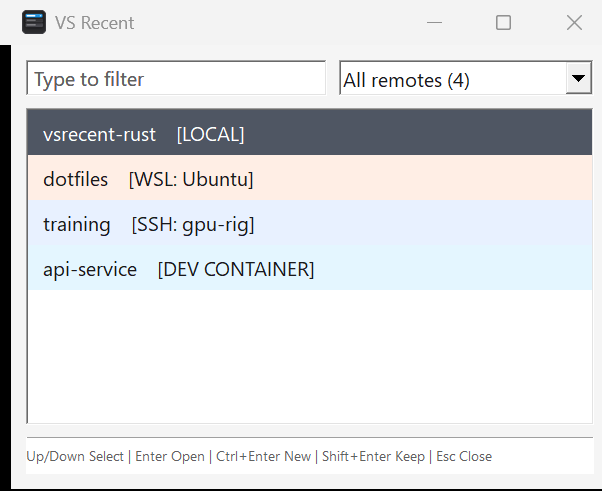 | 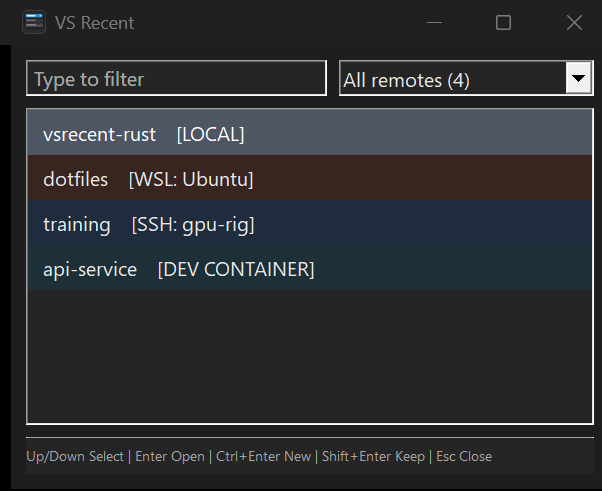 |
Install the latest x64 or ARM64 release with Windows Package Manager:
winget install --id calebrob6.VSRecent --exact
%USERPROFILE%\.vscode-shared\sharedStorage\state.vscdb through Windows' built-in winsqlite3.dll.vsrecent.exe for x64 and ARM64.Install Rust and the Visual Studio C++ build tools on Windows:
winget install --id Rustlang.Rustup --exact
winget install --id Microsoft.VisualStudio.2022.BuildTools --exact --override "--wait --passive --add Microsoft.VisualStudio.Workload.VCTools --includeRecommended"
Build the optimized executable:
build.cmd
The result is publish\vsrecent.exe. For a UI smoke test that does not depend on local VS Code history:
cargo run --release -- --demo
Use --demo --light or --demo --dark to force a theme when updating screenshots. Normal launches follow the user's Windows app theme.
CI builds both supported architectures on native GitHub-hosted runners:
| Artifact | Rust target | Runner |
|---|---|---|
vsrecent-win-x64.exe | x86_64-pc-windows-msvc | windows-latest |
vsrecent-win-arm64.exe | aarch64-pc-windows-msvc | windows-11-arm |
The matrix runs for every pull request and manual workflow dispatch. Pushing a v* tag builds both executables and attaches them to a GitHub Release.
Compare startup-to-first-window performance between two optimized builds on the same machine:
.\scripts\benchmark-startup.ps1 `
    -BaselineExecutable .\artifacts\main\vsrecent.exe `
    -CandidateExecutable .\publish\vsrecent.exe
The benchmark checks that both executables have the same architecture, performs warmups, and reports median and p95 startup times. Close any running VS Recent window before starting it.
| Key | Action |
|---|---|
| Type | Filter recent folders |
Ctrl+A | Select all filter text |
Up / Down | Move the selection |
PgUp / PgDn | Move by eight rows |
Ctrl+Home / Ctrl+End | Select the first or last result |
Enter | Open the selected folder and close |
Ctrl+Enter | Open in a new VS Code window and close |
Shift+Enter | Open and keep the picker visible |
Esc | Close |
Copy vsrecent.exe to a stable location, launch it once, right-click its taskbar icon, and select Pin to taskbar. Move it to the first taskbar position to launch it with Win+1.
The included install.ps1 installs release artifacts and creates a Start Menu shortcut. vsrecent_hotkey.ahk remains available for a dedicated global shortcut.
Startup deliberately performs only native window-class registration and control creation on the UI thread. Once the first paint is requested, a worker thread opens the VS Code database read-only, parses its recent-folder JSON, builds the search index, and posts the completed list to the UI thread. If the live WAL database cannot be read, it snapshots the database and its -wal and -shm files into a process-specific temporary directory and retries.
See How VS Recent starts quickly for a detailed comparison with the former C# WinForms implementation.