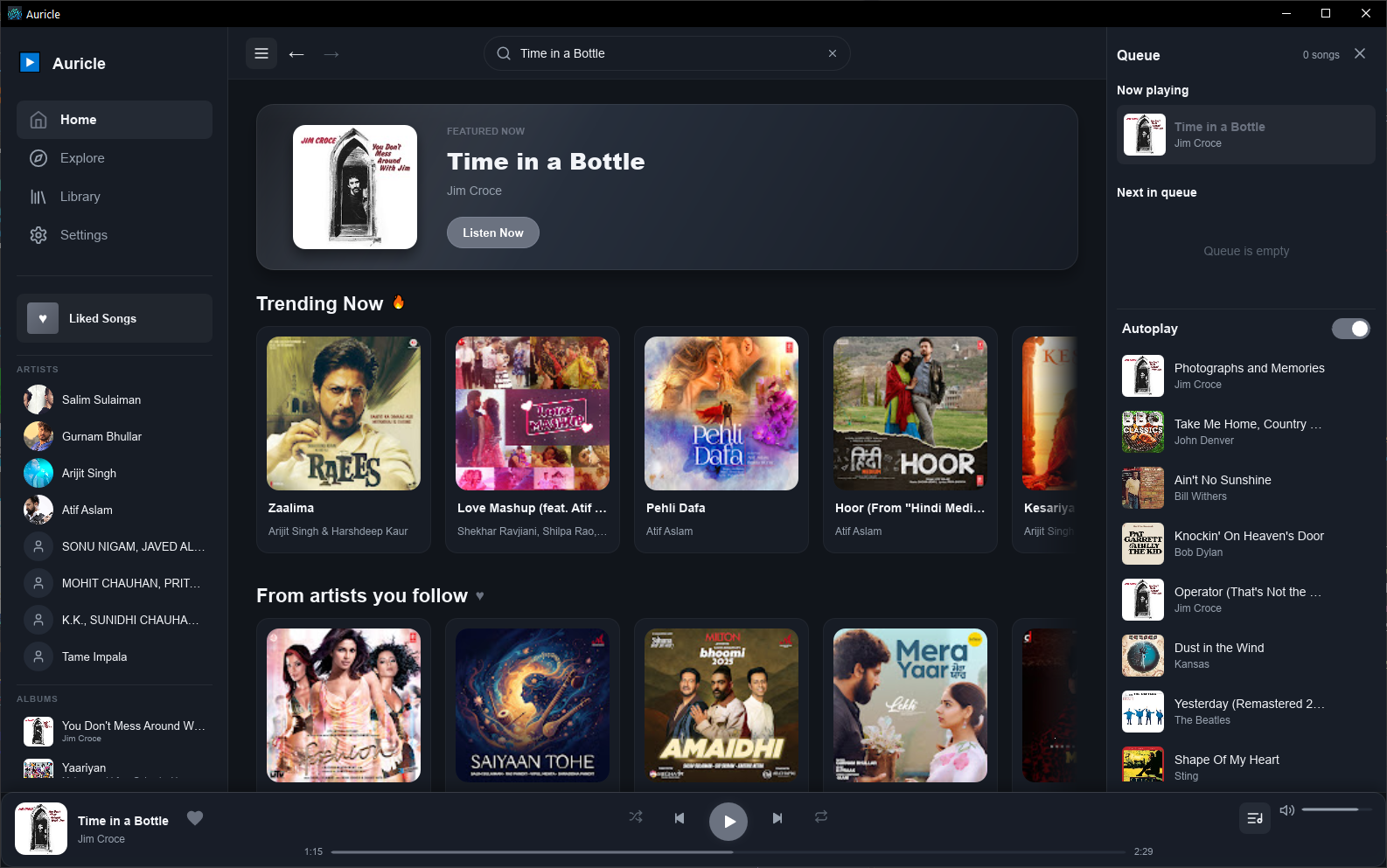
Auricle is a native desktop music player for Windows, built with Rust and the
Slint UI toolkit. Search the YouTube Music catalogue, organize your local
library, and keep listening without Electron or an embedded web view.
Features:
- Search songs, albums, artists, and playlists with suggestions and mixed previews.
- Browse artist and album pages, save albums and playlists, and follow artists locally.
- Explore artist and album credits and manage the queue through right-click menus.
- Play, pause, seek, adjust volume, and continue listening with queue and autoplay controls.
- Keep liked songs and listening history on your device.
- Reuse recently played audio with a size-limited local cache, set to 500 MB by default.
- Minimize to the Windows system tray while playback continues.
Auricle does not bundle yt-dlp, ffmpeg or Deno. Audio extraction relies on
yt-dlp, some cache operations use ffmpeg, and yt-dlp can use Deno as a
JavaScript runtime. On first run, an optional add-on step offers to download
these tools from their official GitHub releases into a per-user application
directory. You can also install them yourself and make them available on PATH.
Once yt-dlp is installed, Auricle updates it automatically in the background
at most once a week (and once per session if playback fails because it is out
of date). Browser cookies are never used by default; only if you turn on
"Use browser cookies for YouTube" in Settings and accept the explanation does
yt-dlp load cookies from Edge, Chrome or Firefox and send the YouTube ones to
YouTube over verified HTTPS. You can turn it off at any time.
Auricle has no accounts, telemetry or analytics. It keeps a local diagnostic
log and offers a user-initiated "Report a problem" GitHub issue; see the
privacy policy for what is stored locally and what is sent to YouTube, Google
and GitHub.
This is an early Windows release. Streaming depends on external services and
optional add-ons, and availability and regional restrictions can vary.
Auricle is not affiliated with YouTube or Google.
README
Auricle
Auricle is a native desktop music player for Windows, built with Rust and the
Slint UI toolkit. Search the YouTube Music catalogue,
organize your local library, and keep listening with a queue, autoplay, and an
audio cache. The app runs in a native shell with no Electron or embedded web view.
Features
Search songs, albums, artists, and playlists with suggestions and mixed previews.
Browse artist and album pages, save albums and playlists, and follow artists locally.
Use right-click menus to navigate artist and album credits or manage the queue.
Play, pause, seek, adjust volume, and keep listening with queue and autoplay controls.
Keep liked songs and listening history on your device.
Reuse recently played audio with a size-limited local cache (500 MB by default).
Minimize to the Windows system tray while playback continues.
Download
Get the Windows installer or portable ZIP from GitHub Releases.
Downloads are also mirrored on SourceForge.
Status
Version 0.1.7 is an early Windows release. It restores search, artwork and streaming
after recent YouTube changes, and songs that aren't cached start faster again. Browser
cookies are strictly opt-in, yt-dlp always verifies TLS certificates, and Auricle keeps a
local diagnostic log with a Report a problem option. No Visual C++ Redistributable is required. Streaming depends on external services
and optional add-ons, and availability can change. Auricle is not affiliated with
YouTube or Google. The only supported UI is the native Slint shell.
Essential add-ons (yt-dlp, ffmpeg & Deno)
Auricle does not bundle or redistribute third-party media tools. Audio
extraction relies on yt-dlp, some cache
operations use ffmpeg, and yt-dlp can use
Deno as a JavaScript runtime for YouTube. On first run, Auricle
offers an optional "Install essential add-ons" step that can download these tools
from their official GitHub releases into %LOCALAPPDATA%\auricle\bin.
Installing them is entirely at your own discretion and choice. You may also install
them yourself and make them available on your PATH. Auricle will detect existing
installations and skip them.
Once yt-dlp is installed, Auricle keeps it current automatically: it runs
yt-dlp -U in the background at most once a week (falling back to downloading the
latest release), and once per session if playback starts failing because yt-dlp is out
of date.
By default Auricle never uses your browser cookies. If YouTube asks you to sign in to
confirm you're not a bot, you can turn on Use browser cookies for YouTube in
Settings > Privacy & diagnostics. After you accept the explanation, yt-dlp may read your
YouTube cookies from Edge, Chrome or Firefox and send them only to YouTube; you can turn
it off again at any time.
These tools are licensed by their respective authors; Auricle is not affiliated with
them and does not distribute them.
Privacy
Auricle has no accounts, telemetry, analytics or automatic crash reporting, and keeps your
library, history and logs on your PC. See the privacy policy
for what is stored locally and what is sent to YouTube, Google and GitHub.
Troubleshooting
Auricle writes a diagnostic log to %LOCALAPPDATA%\auricle\logs\auricle.log. If it
can't start, it shows an error with an option to report it. You can also use
Settings > Privacy & diagnostics > Report a problem, which opens a prefilled GitHub
issue for you to review and submit, plus the log folder so you can attach the log.
auricle.exe --version and auricle.exe --help print to the console and exit.
src/core/menu_metadata.rs — artist/album credit resolution for context menus.
Technologies
UI: Slint
Language / runtime: Rust, Tokio
Audio: rodio + symphonia (decode/playback)
Music API: ytmapi-rs
Local storage: JSON metadata and an on-disk audio cache
Contributing
Contributions follow a feature → release/x.y.z → main branch model with
CI-enforced versioning and protected branches. Before opening a pull request,
read CONTRIBUTING.md for the branch model, release process,
and rules. Developers using GitHub Copilot can rely on
.github/copilot-instructions.md for project
conventions.
License
Auricle is free software, licensed under the GNU General Public License v3.0.
See LICENSE for the full text.
Auricle uses the Slint UI toolkit under its GPLv3 licensing option. Third-party
tools such as yt-dlp and ffmpeg are not distributed with Auricle and remain
under their own respective licenses.