Entra Emulator





A local, MSAL-compatible emulator of Microsoft Entra ID (Azure AD), in a single Go
binary. The OIDC/OAuth 2.0 v2.0 endpoints MSAL talks to, a minimal read-only
Microsoft Graph, and an unauthenticated admin REST API, so you can develop sign-in,
token acquisition, and protected-API calls offline with no cloud tenant.
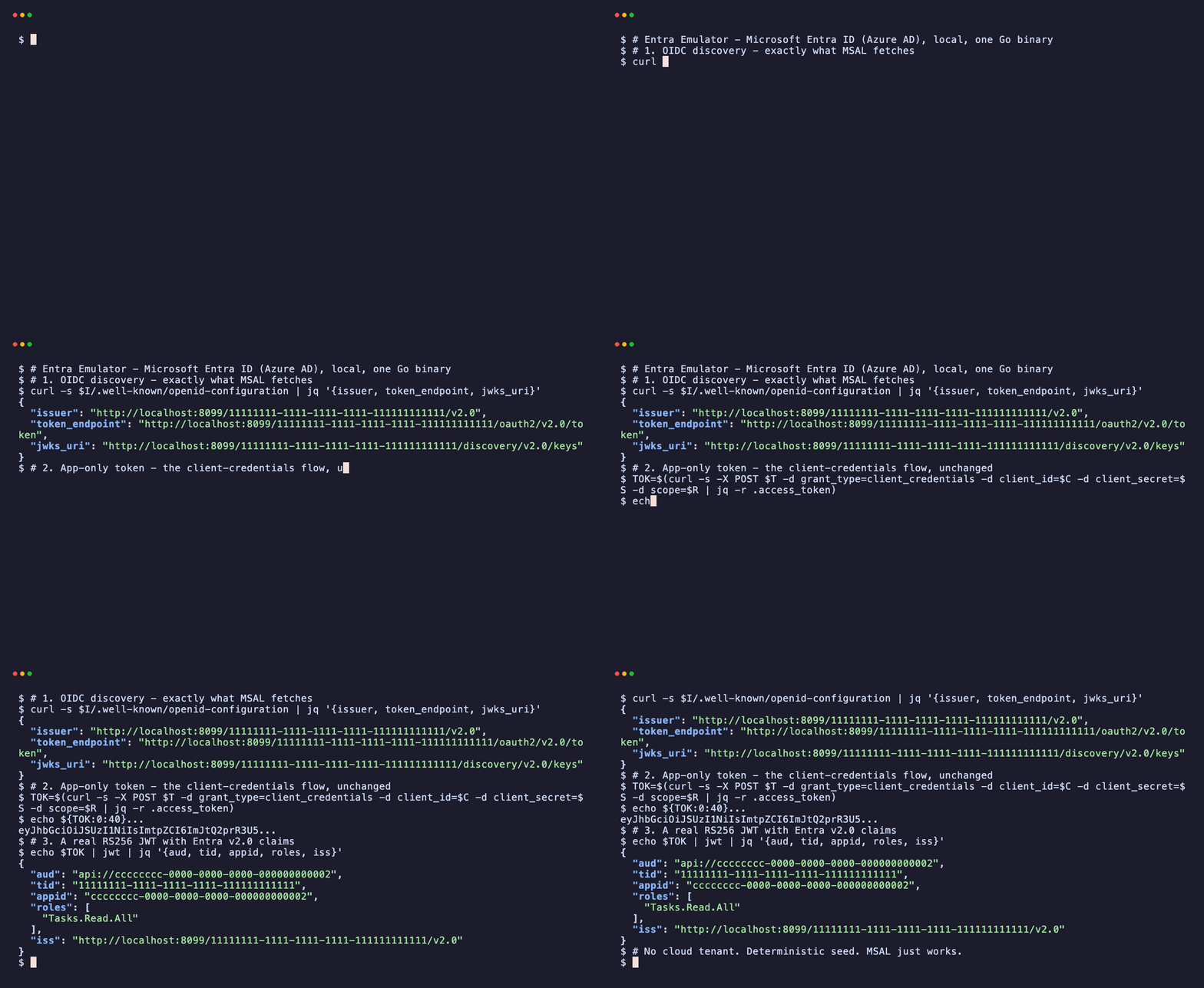
🌐 calvinchengx.github.io/entra-emulator
— what it does, what proves it, and what it deliberately will not do.
📖 Documentation — the full
reference, also browsable as Markdown in docs/.
> ⚠️ Local development tool only — intentionally insecure. Open admin API,
> publicly known seeded users/secrets, self-signed TLS, signing key stored unencrypted.
> Run it on localhost only. Never point real users or secrets at it.
Quick start
With GNU Make — same three verbs on Linux, macOS
and Windows, and run needs no container runtime at all:
make doctor   # toolchain check — run this first
make run      # build and serve natively at https://localhost:8443
make status   # is it actually serving? (probes discovery, JWKS, a real token mint)
The rest:
make help     # every target with a one-line description
make build    # compile the binary without running it
make up       # containerised instead of native (ENTRA_PORT=8443 by default)
make ps       # container state
make logs     # tail the container's logs
make down     # stop and remove that container
make clean    # remove the built binary and the local ./data store
make test     # go build, vet and unit tests
make smoke    # quick end-to-end sanity check
make e2e      # the full external-client suite
Or directly:
go build ./cmd/entra-emulator
./entra-emulator
# Health:    https://portal.entra.localhost:8443/health   (compat: https://localhost:8443/health)
# Discovery: https://login.entra.localhost:8443/6f89cf12-978b-4d23-ac18-9ef0c127cf87/v2.0/.well-known/openid-configuration
First run creates ./data/ with the SQLite store, a persisted self-signed wildcard TLS
certificate (stable fingerprint), a persisted RSA signing key (stable kid), and a
deterministic seed directory. Subdomain names need hosts entries
(./entra-emulator hosts --apply), or set ORIGIN_MODE=compat to keep everything on
https://localhost:8443.
Docker
A ~13 MB distroless image (pure-Go, no cgo) with a built-in HEALTHCHECK:
docker run -p 8443:8443 -v entra-emulator-data:/app/data \
  ghcr.io/calvinchengx/entra-emulator:latest
The image defaults to ORIGIN_MODE=compat and binds 0.0.0.0; mount a volume at
/app/data to persist the store and cert. Tagged releases also publish cross-platform
binaries (linux/darwin/windows × amd64/arm64) via GoReleaser.
Homebrew
macOS and Linux (Intel/Apple Silicon), from the tap:
brew install calvinchengx/tap/entra-emulator
entra-emulator version
Each tagged release refreshes the cask automatically. brew upgrade picks up new versions.
winget (Windows)
winget install calvinchengx.entra-emulator
entra-emulator version
Available once a release's manifest PR merges into microsoft/winget-pkgs
(validation can take a day or two); until then, use the release archive or
go install. Every install method — Homebrew, winget, Docker, pre-built
binaries, go install, source — is in
docs/02-installation.md.
Parity at a glance
| Rows | Meaning |
|---|
| 🟢 Real | 58 | Genuine work — real RS256 signatures, real ceremonies, real directory state |
| 🟡 Emulated | 5 | Faithful API contract and persisted state, but no engine behind it |
| 🟠 Bring-your-own-engine | 3 | Real when you attach a real engine or companion; a toy stands in otherwise |
| 🔴 Not implemented | 16 | Mostly the policy engine (Conditional Access, MFA, Identity Protection) — what would turn a dev-loop emulator into an IdP |
Real MSAL in five languages, the Graph SDK and a SCIM connector drive it as
borrowed oracles. Full detail: parity map.
What works
- Flows: Authorization Code + PKCE (S256/plain), Client Credentials
(
/.default, app-role auto-grant), rotating Refresh Tokens with
family-revocation-on-reuse, Device Code (RFC 8628, with the human approval page),
front-channel logout, OIDC UserInfo.
- Federation: SAML 2.0 SP-initiated SSO (
/{tid}/saml2) and WS-Federation
passive sign-in (/{tid}/wsfed, SAML 2.0 wresult to a registered
wsfed-reply). Both advertised on the existing FederationMetadata URL.
Unmodified node-saml and Microsoft.AspNetCore.Authentication.WsFederation
complete those paths.
- Sign-in methods: account-picker / password (
amr: ["pwd"]) and
passkeys (FIDO2/WebAuthn) — register + assert ceremonies yielding
amr: ["fido"], with the relying party built per-request from the Host header
(so passkeys work on any origin). See
How-to: passkey sign-in.
- Tokens: real RS256-signed JWTs with Entra v2.0 claim shapes (
tid, oid,
scp/roles, pairwise sub, ver: "2.0", client_info), verifiable against the
live JWKS (kid = RFC 7638 thumbprint). Optional claims + group claims (with the
Entra-style overage payload) per app registration.
- Graph:
/v1.0/me, /users, /users/{id-or-upn}, /groups, /groups/{id},
/groups/{id}/members with @odata envelopes and $top/$skiptoken paging.
- Admin API: full CRUD for users, groups (+membership), app registrations
(+redirect URIs, show-once secrets, scopes, app roles),
seed/reset, health,
certificate download.
- Surfaces: one HTTPS listener,
Host-routed — login. / portal. /
graph.entra.localhost, with localhost as the serve-everything compat origin.
Point MSAL at it
{
  "auth": {
    "clientId": "189c7070-78a3-4c13-aa18-20a2ca5755ca",
    "authority": "https://login.entra.localhost:8443/6f89cf12-978b-4d23-ac18-9ef0c127cf87",
    "knownAuthorities": ["login.entra.localhost:8443"],
    "redirectUri": "https://localhost:3000"
  }
}
Trust the self-signed cert (./entra-emulator trust prints the platform command;
NODE_EXTRA_CA_CERTS=$( ./entra-emulator cert-path ) for Node clients).
Seed data (fixed GUIDs, reproducible CI)
| What | Value |
|---|
| Tenant | 6f89cf12-978b-4d23-ac18-9ef0c127cf87 |
| Users | alice@entraemulator.dev, bob@entraemulator.dev (password Password1!), group Engineering |
| Public SPA app | 189c7070-…-55ca, redirect https://localhost:3000, scope access_as_user |
| Confidential daemon | 00d88624-…-8928, secret daemon-app-secret, app role Tasks.Read.All |
Configuration
Environment > entra-emulator.config.json > defaults; invalid config aborts naming the
offending key. Key settings: PORT (8443), TENANT_ID, ORIGIN_MODE
(subdomains|compat), PUBLIC_ORIGIN, REQUIRE_PASSWORD, DB_PATH,
TOKEN_LIFETIME_*. Full reference: docs/04-configuration.md.
Design & development
The full design lives in docs/ — architecture, configuration, data model +
seed, token service, endpoint contracts, Graph, admin API, TLS/origins, testing, and
the post-parity roadmap (embeddable Go test library, token forge, fault injection…).
go build ./...   # everything, including the CLI
go test ./...    # integration tests drive the full handler stack
go vet ./...
python3 e2e/run.py     # real-SDK e2e: @azure/msal-node, MSAL Go + azidentity, MSAL Python
The e2e suites prove unmodified Microsoft SDKs complete real flows against the
emulator (see docs/16-e2e-sdk-matrix.md): client
credentials, Authorization Code + PKCE with client_info account identity, silent
refresh, and device code with headless approval — in TypeScript, Go, and Python.
Embed it in Go tests
The emulator package runs the whole thing in-process — no external server, no fixed
ports — so a Go test can point MSAL Go / azidentity straight at it:
import "github.com/calvinchengx/entra-emulator/emulator"

func TestMyAPI(t *testing.T) {
    emu := emulator.StartT(t, emulator.WithTLS()) // auto-closed at test end
    cred, _ := confidential.NewCredFromSecret(emulator.DaemonSecret)
    client, _ := confidential.New(emu.Authority(), emulator.DaemonClientID, cred,
        confidential.WithHTTPClient(emu.HTTPClient()),      // trusts the instance cert
        confidential.WithInstanceDiscovery(false))
    tok, _ := client.AcquireTokenByCredential(ctx, []string{"api://…/.default"})
    // …drive your resource API with tok.AccessToken
}
emu exposes Authority(), Issuer, JWKSURL(), the seeded client IDs/secrets, and
Store() for direct fixture setup. WithTLS() is required for MSAL clients (they
reject non-HTTPS authorities); plain HTTP is fine for direct API calls.
Dependencies: modernc.org/sqlite (pure-Go SQLite, no cgo) and golang.org/x/crypto
(scrypt). Cross-compiles to a single static binary on all platforms.
Implementation notes
Protocol surface, claim shapes, and error bodies follow Microsoft's published
Entra ID v2.0 behavior. Internals: Go stdlib net/http, hand-rolled RS256 JWS,
SQLite via a pure-Go driver, and a Svelte portal embedded with go:embed.
Emulator family
entra-emulator is the STS the rest of the family validates against:
azure-keyvault-emulator,
arm-emulator,
fabric-emulator,
databricks-emulator and
azure-apim-emulator
all verify the tokens this one issues.
databricks-emulator
joins them as an optional federated STS consumer: it authenticates with its own
PATs by default and takes this issuer when configured to.
To run them together, see azure-emulators: a
composition-only repo holding the family docker-compose.yml, the shared
issuer wiring, and the pinned image versions the members are tested against.
Disclaimer
An independent developer tool, not affiliated with or endorsed by Microsoft.
"Microsoft Entra ID", "Azure AD", "Microsoft Graph", and "MSAL" are Microsoft
trademarks. This project emulates publicly documented protocol behavior for local
development and testing only.
License
Apache License 2.0. See NOTICE for acknowledgments.