fabric-emulator









> Coverage measures the unit suites. What catches consumer-facing defects is
> the e2e fleet, which no percentage scores — hence parity claims witnessed
> beside it: every claim of support names a test that exists and ran.
A clean-room, local emulator of Microsoft Fabric, built to compose with
entra-emulator — the control
plane (workspaces, items, RBAC, git, LROs, Fabric Core MCP) plus a real
OneLake ADLS/Blob data plane, a T-SQL warehouse over TDS, native
Livy sessions on a real Spark engine, Data Factory pipelines (Web,
REST, Salesforce, and Azure Batch Custom on by default), Apache Airflow
jobs on a real Airflow scheduler, KQL eventhouses, and Eventstream
on a real Apache Kafka broker (Lakehouse and Reflex destinations included).
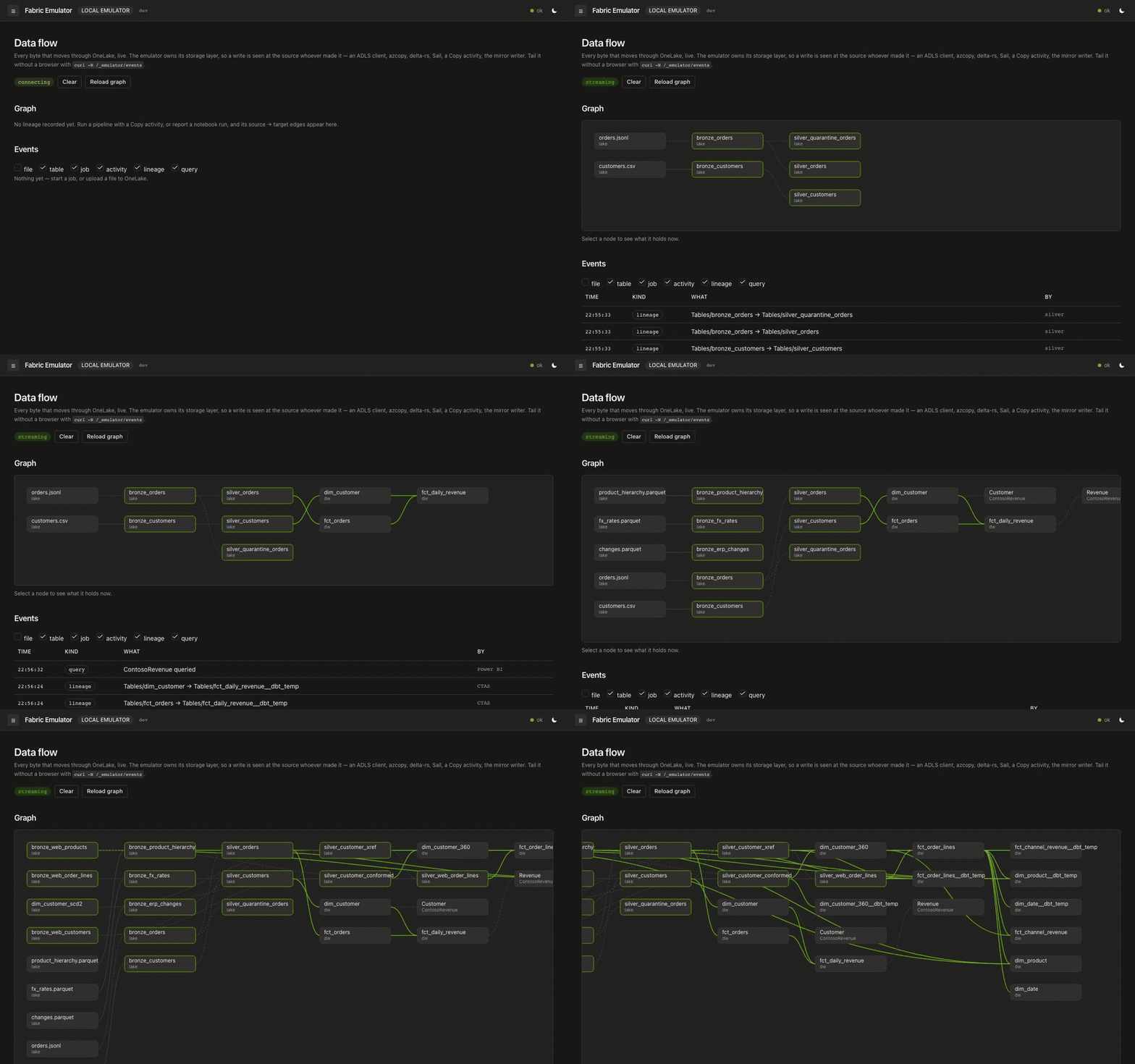
That is not a mock-up — it is the example below, filmed. Three source
systems land, get conformed, resolve into one customer identity, and reach a
Warehouse star that Power BI queries: PySpark on a real engine for
bronze → silver, dbt-fabric over real TDS for gold. The run then publishes
itself to OpenMetadata — domain, glossary, metrics, contracts and lineage,
all derived from what it already knows rather than typed in twice. Every lineage
edge records how it is known, so you can tell what the emulator watched from
what a step merely claimed.
The recording is regenerated by one script
driving that same example, which asserts its own results — so a recording that
completes is also a passing test, and the hero image cannot quietly drift from
the product. Played at 16×; the run itself takes about five minutes.
Run it yourself:
make up
cd examples/medallion-advanced-pyspark && uv sync --frozen && uv run python pipeline.py
Then open for the live flow, and
for the catalog. Twenty-three steps, about five
minutes, and the run asserts its own results — it is a test, not a demo
script. (the example ·
flow observability ·
governance)
How it fits together
Real Fabric layers two independent systems: Entra ID issues the bearer
tokens, and the Fabric control plane (https://api.fabric.microsoft.com/v1/…)
serves workspaces, item CRUD, RBAC, git integration and long-running operations.
entra-emulator already emulates the first. fabric-emulator emulates the
second — and validates every incoming token against entra-emulator's JWKS,
exactly as real Fabric validates against Entra.
 client / SDK ──Bearer(aud=api.fabric.microsoft.com)──▶ fabric-emulator
                                                          │  validates token
                                                          ▼
                                                     entra-emulator  (JWKS, issuer)

Why
Delivering a data product, source system to landing to medallion to a served
analytics layer, needs three inputs: the source systems' metadata (schema,
semantics), the business goal the stakeholder actually needs answered, and
sample or synthetic data (often derivable from the metadata alone). Proving that
delivery against real Fabric has meant a paid tenant, slow round trips, and
state that is expensive to reset between attempts.
The same pipeline runs unmodified against fabric-emulator and against real
Fabric, one environment variable apart: see FABRIC_TARGET in
docs/21 and the four
medallion examples. An AI coding agent, Claude, Codex, Grok, Kimi
K3, whichever you use, iterates offline against the emulator at the speed it
actually works, then proves the result against a real tenant with no code
changes. What used to take a data engineering team months of tenant-bound
trial and error becomes a day, or a week, driven end to end by the agent.
Concretely, that also unlocks:
- Test Fabric CI/CD with no capacity.
fabric-cicd, git integration, and
deployment pipelines drive item getDefinition/updateDefinition and
git/commitToGit/updateFromGit. Point them at localhost instead of a paid
tenant.
- Test service-principal automation. SP → Fabric client-credentials against a
real (emulated) issuer, deterministic and offline.
- Deterministic long-running operations. Every Fabric mutation is async
(
202 → poll /v1/operations/{id}). The emulator's clock control makes an LRO
complete instantly or pins it in Running — impossible against real Fabric.
See fabric-platform-notebook-pipelines
for what this looks like end to end: four real vendor sources, a full medallion,
a semantic model serving Power BI, all catalogued in OpenMetadata, running
against a published release of this emulator.
Status
Working — the contract spine (P0–P3) and the real-compute track (R0–R5)
are shipped and CI-verified on Linux, macOS, and Windows.
- Contract plane: workspaces, items, RBAC, deterministic LROs; the CI/CD
surface (definitions, typed aliases, connections + credential model, git
integration, jobs — the real
fabric-cicd tool publishes unmodified); the
workspace-identity handshake with entra-emulator; and the OneLake ADLS-Gen2 +
Blob data plane (managed folders, Delta put-if-absent commits, shortcuts).
- Real compute (attached by default): real Spark over a native Livy agent
(interactive + high-concurrency sessions, notebook cell execution, Delta via
ABFS); real T-SQL over TDS with Entra FedAuth terminated and the
session byte-spliced to a SQL Server sidecar — driven by
go-mssqldb,
Microsoft ODBC Driver 18, and Microsoft mssql-python (the real
dbt-fabric 1.11 adapter passes end-to-end); DuckDB SQL over lakehouse Delta; and a pure-Go pipeline
interpreter with real leaf activities. Real clients (delta-rs, the Azure Blob
SDK, azcopy, PySpark, dbt) drive it in CI as borrowed oracles.
- Four orchestration surfaces, the ones real Fabric offers. Data pipelines
— a pure-Go interpreter for Fabric's own activity model, with
Copy moving
real bytes, Lookup reading real rows, Script running real T-SQL, plus the
control-flow set and per-activity retry/timeout. Notebook orchestration —
notebookutils.notebook.run returns the child's exit value as Fabric
documents, and runMultiple runs a DAG in dependency order with per-activity
retry, a per-cell timeout, validateDAG, and Fabric's failure contract
(RunMultipleFailedException carrying partial results). Fabric's reference-run
lakehouse rule is enforced, and concurrency is honoured when asked for —
sequential by default, a divergence recorded in parity.md.
Schedules — .../jobs/{jobType}/schedules on any item. And Apache Airflow
jobs, below. Pipeline Web activities make the real HTTP call (stub only
if you set FABRIC_WEB_ACTIVITY=stub). Custom (Azure Batch) runs the
command on the Spark agent by default (FABRIC_CUSTOM_ACTIVITY=off refuses
it). RestSource/RestSink and Salesforce Bulk API 2.0 are real too.
- Real-Time Intelligence (opt-in sidecars): Eventhouse / KQL Database
execute on Microsoft's
kustainer (--profile rti). Eventstream items
provision a Kafka topic; Custom HTTP produce writes real key/value bytes;
notebooks read with format("kafka") + eventstream.*. Bind a Lakehouse
destination to append those events as Delta, a Reflex destination to
start a real EventTriggered item job
(Microsoft.Fabric.Eventstream.EventReceived), or an Eventhouse
destination to ingest via Kusto .create-merge + .ingest inline.
Operators (Filter, GroupBy, tumbling Window) run on the produce batch
before destinations. See 51.
- Fabric Core MCP (
POST /v1/mcp/core) — Streamable HTTP over the same
Core REST handlers, witnessed by the unmodified Python mcp SDK.
- Fabric IQ MCP (
POST /v1/mcp/fabriciq) — the six read-only tools over
Power BI reports and semantic models, as the signed-in user, with row- and
object-level security applied; witnessed by the mcp SDK as two users.
- Optional full DAX oracle — empty
FABRIC_DAX_URL keeps the in-process
bounded evaluator. Point it at a pump in front of Power BI Desktop's
msmdsrv on a machine you own (52). Not a
compose default and not GitHub macos-latest / ubuntu-latest.
- Real orchestration (Airflow):
ApacheAirflowJob items run on
genuine Apache Airflow — Fabric's own code-first orchestrator is upstream
Airflow, so the sidecar pins the versions Microsoft documents (2.10.5 on
Python 3.12). DAG sources are stored as item definitions in OneLake, synced
into the scheduler's DAG folder, and driven through Airflow's REST API for
discovery, unpause, trigger and terminal-state polling. Real scheduler, real
executor, real DAG semantics — no orchestration emulation at all.
On by default in make up; make up PROFILE="--profile governance" leaves it
out, and without the wiring the routes answer AirflowNotConfigured rather
than pretending. See
14-real-compute.md and e2e/airflow.
The bare binary runs none of the engines (clock-derived, milliseconds) — but
docker compose up auto-loads the override that attaches them, so the
documented path is engine-backed by default. Heavier services (KQL,
Eventstream, OpenMetadata, the terminal, an optional msmdsrv DAX oracle)
sit behind profiles or a host you own; make up enables governance for
you and the others are opt-in. Coverage floor is 90% (currently ~90%).
Docs:
Start with the end-to-end tutorial: Entra →
Key Vault → landing → bronze/silver → gold with dbt → semantic model, walking
through examples/medallion-pyspark and executed
in CI. The four medallion examples scale it to three source systems
and both gold engines. Reference:
architecture, the
control-plane API, OneLake,
real compute, the
warehouse over TDS,
flow observability,
running modes,
Eventstream,
the DAX oracle, the roadmap, and
the parity map.
Parity at a glance
| Claims | Meaning |
|---|
| 🟢 Real | 137 | Witnessed — check_witnesses.py --strict fails CI if a supported claim loses its witness. Genuine work: real signed JWTs, real bytes, a real engine or client computes |
| 🟡 Emulated | management / clock | Faithful API contract and persisted state, but no engine — LROs and generic item jobs on purpose |
| 🟠 Non-default engine | JVM overlay or a profile | Real on the JVM Spark overlay, --profile rti, or --profile eventstream — not "bring your own": docker compose up already starts Sail and the SQL Server sidecar |
| 🔴 Not implemented | honest 501 | Deliberately out of scope — Dataflow exec, Purview system classifiers, Fabric Eventhouse streaming ingest / queued Kusto.Ingest. The parity map argues where the boundary sits and why |
Every 🟢 claim names the witness that proves it. Full detail: parity map.
What docker compose up gives you
The two projects are decoupled — fabric-emulator depends on entra-emulator
only over HTTP (JWKS + issuer, plus a token-mint call for workspace
identities), so it could equally point at a real Entra tenant.
| Command | You get |
|---|
docker compose up | seven services — the emulators plus real engines: Sail behind the Livy statement agent, and a SQL Server sidecar, via the auto-loaded override. Livy sessions, notebook cells and the T-SQL/TDS warehouse run for real |
docker compose -f docker-compose.yml up | the lite, contract-only four — honest 501s on the engine surfaces. Naming the base file is what makes Compose skip the override |
--profile rti | Microsoft's own KQL engine behind Eventhouse / KQL Database (docs/25) |
--profile eventstream | Apache Kafka KRaft behind Eventstream items — needs -f docker-compose.eventstream.yml (docs/51). Custom HTTP produce, Lakehouse Delta dest, Reflex job dest. Works on Sail (default) and the JVM overlay |
FABRIC_DAX_URL | Optional pump in front of msmdsrv on a machine you own — not a compose profile (docs/52) |
--profile governance | OpenMetadata over the same state your pipelines write (docs/22) |
--profile terminal | a shell in the Flow view beside the graph — needs -f docker-compose.terminal.yml too (docs/31) |
-f docker-compose.spark-jvm.yml | swaps Sail for JVM Spark, buying the RDD API, structured streaming, OPTIMIZE/VACUUM and Java/Scala UDFs at the cost of image size (docs/20) |
Profiles pull nothing unless asked for — but make up asks for governance
and airflow on your behalf, so it starts 15 services rather than 7.
make up PROFILE= gives the lean stack. (Counts are what docker compose config --services resolves, not an estimate.)
How much machine you need. Give the container runtime 8 GB for the
default seven, 13 GB with governance and Airflow, 2 GB for the
contract-only four, 17 GB for everything at once. Four cores is ample; six to eight if you run
PySpark or warehouse queries.
Those numbers are for working, and idle is nowhere near them — a freshly booted
lite stack is 65 MB, and the whole default set about 1 GB. The spread is the
work, not the container count: Sail costs 36 MB to start and ~1.9 GB to run
PySpark through. So starting an engine you do not drive is nearly free, and
the per-service measurements
are what to size against.
Getting started on Linux, macOS or Windows
Docker is how you run this. Clone the repo and bring the stack up — the
compose files are the wiring, so the clone is the install:
git clone https://github.com/calvinchengx/fabric-emulator
cd fabric-emulator
docker compose up
That is seven services with Sail already attached — the auto-loaded
override gives you a real Spark engine and the
T-SQL warehouse without a flag. A container runtime with Compose v2 is the
entire prerequisite list. Then open .
The make targets wrap exactly those commands; they are a convenience, not a
second way to run things. The workflow is the same on all three platforms —
only the prerequisites differ:
make doctor   # toolchain, docker context, memory, ports — run this first
make up       # 15 services incl. OpenMetadata + Airflow; `make up PROFILE=` for the lean 7
make status   # "stack OK" is the real verdict; `make up` only means containers exist
Everything else, once it is running:
make help     # every target with a one-line description
make up-lite  # contract-only pair — no compute sidecars, honest 501s
make up-jvm   # swap the default Sail engine for JVM Spark
make status-spark  # status, plus a real Livy session executing Spark — the
              # only target that proves the engines are attached and computing
make seed     # catalog the emulator into OpenMetadata (governance profile)
make ps       # container states for this project
make logs     # tail logs (SVC= to narrow to one)
make down     # stop and remove containers — volumes SURVIVE
make clean    # stop and remove containers AND delete the data volumes
make restart  # clean, then up
make test     # go build, vet and unit tests
Install the prerequisites once. Only the container runtime is required —
GNU Make buys you the targets above, and Python 3 is optional (make spark,
make seed):
# Linux
curl -fsSL https://get.docker.com | sh && sudo usermod -aG docker "$USER" && newgrp docker
# macOS  (Make and Python ship with the Xcode CLT; Docker Desktop / OrbStack work too)
xcode-select --install && brew install colima docker docker-compose && colima start --memory 8
# Windows  (Git supplies sh.exe + grep/awk/curl; ezwinports supplies make)
winget install Git.Git; winget install ezwinports.make
make doctor is the entry point on every platform: it names what is missing
rather than letting it surface later as a broken recipe or a ? in a status
column. Per-platform detail (the docker group, VM memory, Apple-silicon
sidecars, Rancher Desktop contexts):
docs/26-platform-setup.md.
Packages, dev dependencies and e2e clients live in the root uv workspace
(pyproject.toml, uv.lock). Use frozen named
groups so local, CI and container runs resolve identically:
uv sync --frozen --group test
uv run --frozen --group test pytest
uv run --frozen --group governance python e2e/governance/run.py
The Docker Python runtimes build from the same locked groups. Add a dependency
with uv add --group and commit both files.
Emulator family
fabric-emulator is a consumer of its siblings rather than a peer of them:
entra-emulator issues and signs every token it validates,
and azure-keyvault-emulator resolves the secret
behind a vault-backed connection credential.
arm-emulator runs by default in this repo's compose:
Fabric capacities are ARM resources, so capacities created over
Microsoft.Fabric/capacities appear on GET /v1/capacities without any extra
configuration. Set FABRIC_ARM_URL= explicitly empty to opt back out, which
keeps only the seeded local capacity — fabric-cicd still works either way.
azure-apim-emulator can place this emulator behind
its gateway as a protected backend, and
databricks-emulator is a sibling workspace this one
can consume through FABRIC_DATABRICKS_URL.
To run them together, see azure-emulators: a composition-only repo
holding the family docker-compose.yml, the shared issuer wiring, and the
pinned image versions the members are tested against, which is where a
consumer should take its versions from rather than pinning each by hand.
License
Apache-2.0. Clean-room: built only from public documentation
(MicrosoftDocs/fabric-docs) and
public REST references — no Microsoft source.