ManagedDrive









English | 中文
English
A Windows RAM disk manager built on .NET 10 and WinFsp.
Create, mount and manage in-memory volumes that appear as normal drive letters in Explorer.
Screenshots
Features
Core
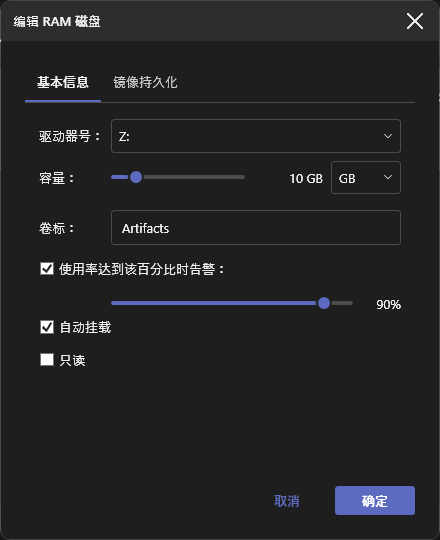
- Mount multiple RAM disks at once, each with its own drive letter, capacity, volume label and read-only flag
- Dynamic memory allocation — capacity is a ceiling, not a reservation; anything that actually allocates memory (writing data, loading an image or archive on mount, restoring a snapshot, cloning a disk) is also rejected once it would leave the host machine critically low on physical memory, independent of the disk's own configured capacity
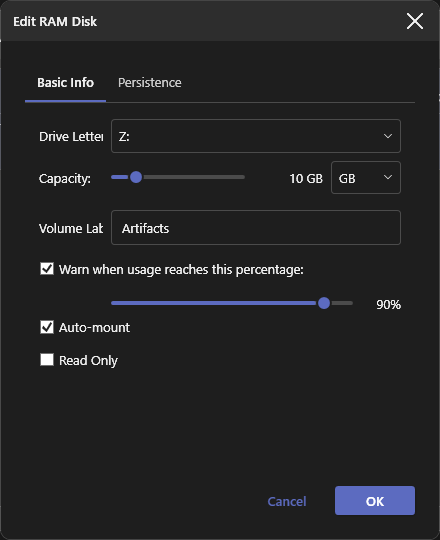
- Live-edit a mounted disk (label, capacity, auto-mount, image path); changing the drive letter or read-only flag remounts it
- NTFS-compatible, so RAM disks work with tools that require NTFS (WinGet, Windows Update staging, BITS)
- Symbolic links and directory junctions (as used by pnpm,
git worktree and build caches), and alternate data streams such as Zone.Identifier; both are kept in saved images and snapshots. Hard links are not supported (WinFsp has no hook for them)
- Auto-mount saved profiles on startup
- Format instantly clears a disk's contents (read-only disks are protected)
Persistence, snapshots & cloning
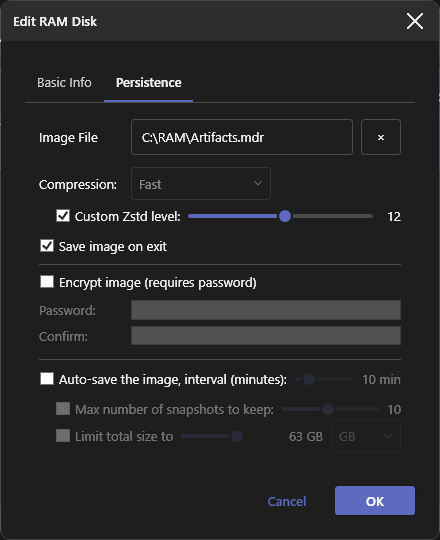
- Save to a
.mdr image and restore it on next mount, or import an existing image directly (Import Disk...)
- Import an archive (zip, 7z, rar, tar, or anything SharpCompress reads) as a read-only disk (Import Archive...), with capacity/label derived automatically
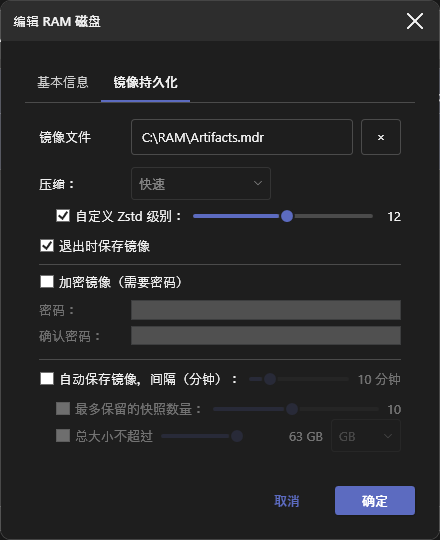
- Optional auto-save plus a final save before unmount/exit; incremental, so periodic auto-save on a large, mostly-unchanged disk stays fast
- Selectable image compression (Off / Fast / Balanced / Max, default Fast)
- Snapshot / version history capped by count and/or size, deduplicated by content hash; restore via Restore Snapshot...
- Clone a disk onto another mounted disk or export it to a new
.mdr file (Clone Disk...)
- Optional
.mdr password protection (AES-256-GCM); changing the password never re-encrypts file data
- Progress bar overlay for long operations (image save, archive import, export)
CLI
mdrive (ships alongside ManagedDrive.exe) scripts create/mount/unmount/format/save/set-password/export/list/ls/snapshot/exit against the running app over a named pipe, auto-launching it if needed- Mount to a drive letter or the path of an existing empty directory (WinFsp's directory mount-point support), validated up front with a clear error instead of a raw driver status code
Convenience & safety
- Optional Explorer right-click integration: "Mount as RAM disk (ManagedDrive)" for zip/7z/rar/tar archives
- Tray icon with a hover tooltip (per-disk usage + available memory), quick menu with a per-disk submenu (open in Explorer / save image / unmount), and optional start-minimized mode; balloon notifications (while the window is hidden) for a nearly full disk, a refused write (disk full / low memory), low system memory and failed or recovered saves
- Live status bar: available system memory and most recently accessed file
- Per-disk high-usage warning with a configurable threshold
- Temp directory redirection to a disk's
Temp folder (the Temp preset): TEMP and TMP get their previous values back on unmount, exit or after a crash, and a startup warning appears if TEMP is left on a RAM disk
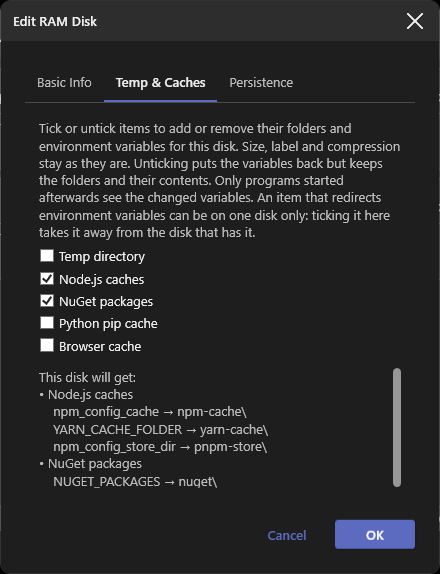
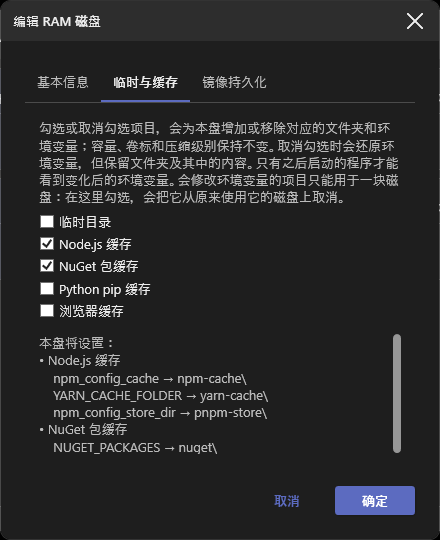
- Temp & Caches presets (Temp, Node.js, NuGet, pip, Go, C/C++ compiler caches, browser cache) that can be combined on one disk: they create their folders on every mount and point the matching per-user environment variables (
TEMP/TMP, npm_config_cache, NUGET_PACKAGES, PIP_CACHE_DIR, GOCACHE, CCACHE_DIR, ...) into the disk, restoring your previous values on unmount, exit or when you untick them. Tick them when creating a disk (which also fills in size and label), in the edit dialog, or from the Temp & Caches submenu of a disk's right-click menu, which stays open so you can toggle several at once; what is ticked follows what your environment variables really point at. A preset that redirects variables can be on one disk only: choosing it on another disk takes it from the first (the browser cache only creates a folder and can be on several)
- Restore environment variables (toolbar button and tray submenu): lists the groups that are redirected right now (Temp, Node.js, NuGet, pip, Go, C/C++, other variables) and puts one group, or all of them, back to your previous values without unmounting anything. The mounted disks that had those presets turn them off too (their folders and files stay), so they do not redirect the variables again on the next mount; only programs started afterwards see the change
- Exit confirmation with a saving overlay while pending saves finish
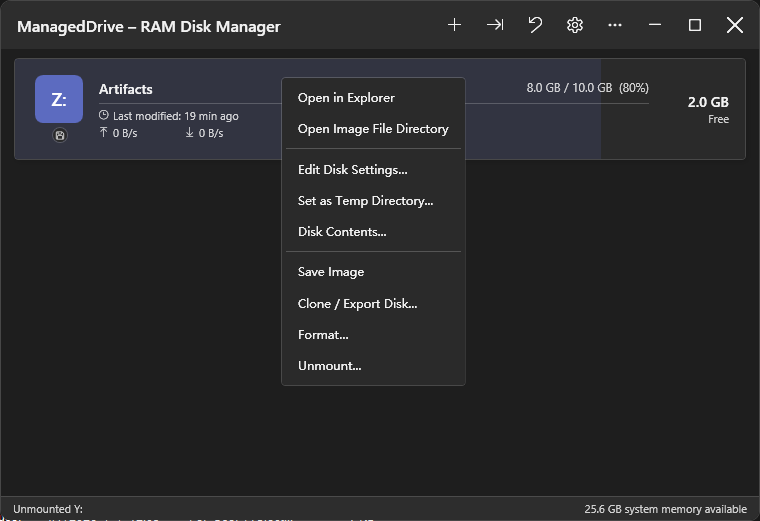
- Double-click to open a disk in Explorer; right-click for shortcuts, View Disk Contents... or Space Usage... (a treemap of what fills the disk, colored by file type, with top folder/file/type lists)
UI
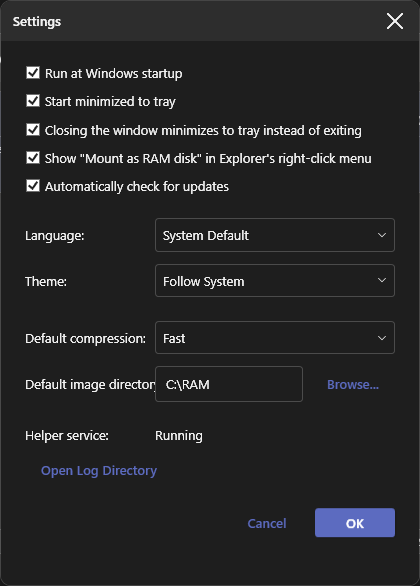
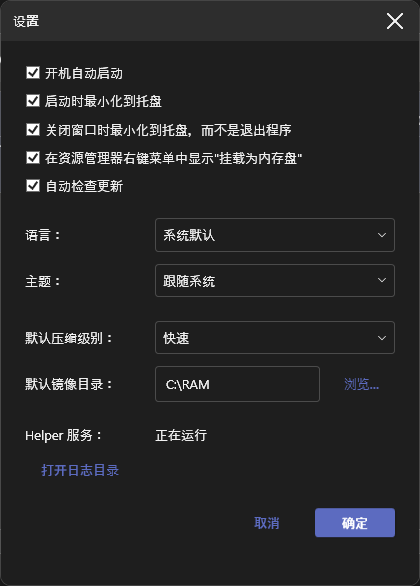
- Bilingual (English / Simplified Chinese) and light/dark themes, auto-detected with manual override
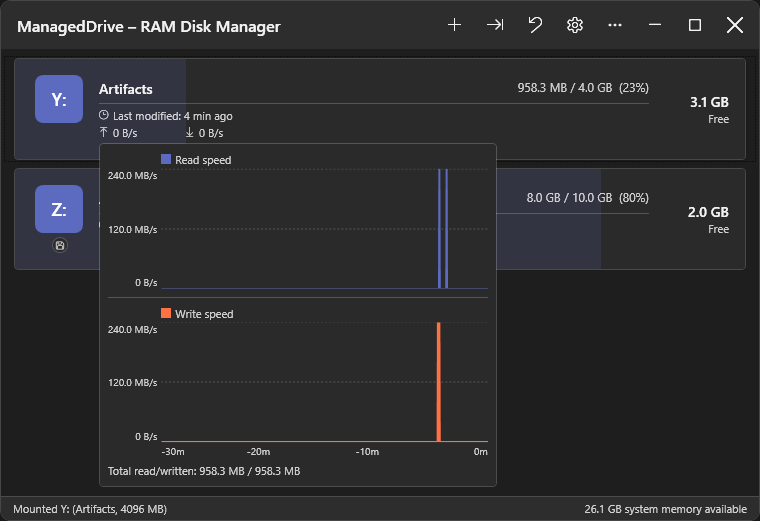
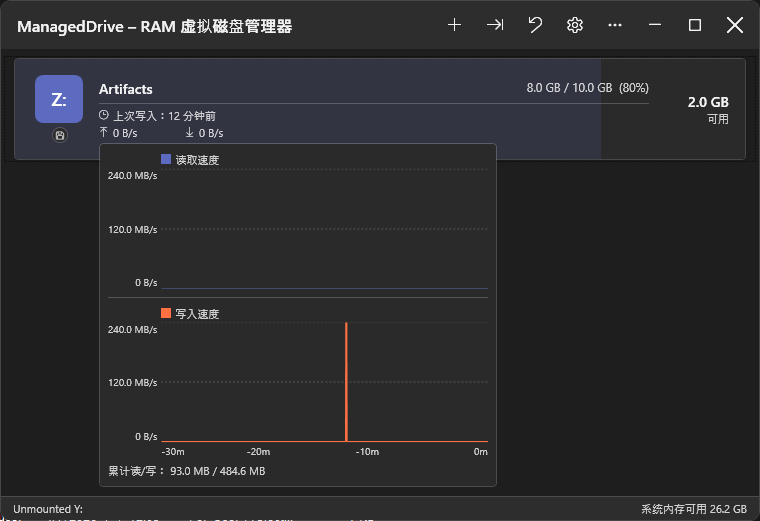
- Disk cards with status badges (read-only, current-TEMP, backing image, password-protected), a usage bar and a live read/write throughput chart
- Freely resizable window
- About dialog with version, GitHub link, and an "update available" link
- Optional daily update check against GitHub Releases, with a notification on a new release
Installation
winget install coldhighsun.ManagedDrive
Or download an artifact directly from the Releases page — pick one:
ManagedDrive-Setup-X.Y.Z.exe — a guided installer. It detects whether WinFsp and the .NET 10 Desktop Runtime are already installed, silently installs the bundled WinFsp MSI if missing, prompts you to install the .NET Desktop Runtime if missing, and installs ManagedDrive into Program Files with Start Menu/desktop shortcuts. Recommended for most users.ManagedDrive-vX.Y.Z-win-x64-portable.zip — small download; requires WinFsp and the .NET 10 Desktop Runtime to be installed separately.
If using the ZIP, extract it anywhere and run ManagedDrive.exe directly. ManagedDrive.exe is a single-file executable — the ZIP contains it plus one small companion winfsp-msil.dll (the managed WinFsp interop assembly, which can't be embedded in the single-file bundle) that must stay next to it. The only registry write is the optional "Run at startup" setting; nothing else touches the registry. WinFsp must be installed separately first with the ZIP (see Prerequisites below); the installer handles this automatically.
The ZIP also includes mdrive.exe, a companion CLI (see CLI Usage below), and wingetx.exe, a winget wrapper (see wingetx: winget wrapper below). Add the extraction folder to your PATH to run mdrive/wingetx from any shell. The installer adds both to the machine-wide PATH automatically.
Prerequisites
| Requirement | Notes |
|---|
| Windows 10 / 11 (64-bit) | ARM64 is not currently tested |
| WinFsp 2.2.26286 (2026 Beta5) | The installer bundles it, and the app offers to download and install it when it is missing or older (a newer version is accepted); the portable ZIP also carries the installer in prerequisites\. To install it manually, download the installer directly: winfsp-2.2.26286.msi — do not use winget install WinFsp.WinFsp, as the winget package lags behind the latest release. The managed assembly winfsp-msil.dll is installed to C:\Program Files (x86)\WinFsp\bin\ and is referenced by the project automatically. |
| .NET 10 Desktop Runtime | Required for the -portable ZIP (framework-dependent). |
| .NET 10 SDK | Required to build. |
CLI Usage
mdrive.exe ships alongside ManagedDrive.exe and forwards commands to the running app over a named pipe, so scripts can drive ManagedDrive without opening the UI. If the app isn't already running, mdrive launches it and retries for up to 10 seconds before giving up.
mdrive create R: --capacity-mb 512 --label Scratch --image C:\disks\scratch.mdr
mdrive create R: --preset node --preset nuget
mdrive preset list
mdrive clone R: S:
mdrive edit R: --capacity-mb 1024 --auto-save-minutes 10
mdrive mount C:\disks\scratch.mdr R: --auto-mount --compression Optimal --custom-zstd-level 19
mdrive mount C:\disks\scratch.mdr C:\Mounts\Scratch
mdrive list
mdrive list --json
mdrive ls R: \Projects
mdrive ls R: \Projects --json
mdrive info R:
mdrive usage R: --top 20
mdrive save R:
mdrive set-password R: --password-file C:\secrets\scratch.pwd
mdrive export R: C:\backups\scratch.mdr
mdrive export R: C:\backups\scratch.zip --format Zip
mdrive format R: --yes
mdrive snapshot create R:
mdrive snapshot list R:
mdrive snapshot diff R: 1
mdrive snapshot extract R: 1 \Projects\notes.txt C:\restore\notes.txt
mdrive snapshot restore R: 1
mdrive watch --json
mdrive unmount R:
mdrive exit
| Command | Description |
|---|
create [--capacity-mb ] [--preset ]... [options] | Creates a brand-new, empty RAM disk. --capacity-mb is required unless at least one --preset is given; repeat --preset to combine presets on one disk (capacities add up, folders and environment variables are merged, and an explicit --capacity-mb/--label overrides them). Options: --label (defaults to "RAM Disk"), --image (path to persist the disk to; omit for a memory-only disk discarded on unmount), --password, --password-file (encrypt --image with a password; requires --image; mutually exclusive with each other). The temp preset also points your user TEMP/TMP at the disk's Temp folder, and a preset that redirects variables is taken from the disk that had it. |
preset list | Lists the presets create --preset accepts: id, name, capacity and the environment variables each one sets. Supports --json. |
clone | Replaces the target disk's contents with a copy of the source disk's current contents. The target must already be mounted and writable, with capacity at least the source's used bytes. Fails, leaving the target unchanged, if the host doesn't have enough free memory for the copy. |
edit [options] | Applies non-destructive changes to a mounted disk. Options: --capacity-mb, --label, --auto-save-minutes, --disable-auto-save (mutually exclusive with --auto-save-minutes). At least one option is required. Drive-letter and read-only changes, which require a full remount, are not supported by this command. |
mount [options] | Mounts an existing .mdr image. drive-letter may be a drive letter (R:) or the path of an existing, empty directory. Options: --read-only, --auto-mount, --auto-save-minutes, --compression , --custom-zstd-level <1-22> (overrides the preset Zstd level mapped from --compression; only takes effect when the compression level is not None), --max-snapshot-count, --max-snapshot-size-mb, --high-usage-warn-percent, --password, --password-file (mutually exclusive; needed only if the image is encrypted — --password-file reads the first line of a file and is recommended over --password to avoid exposing it in shell history or the process list). Any option left unset keeps the image's saved profile value (or its default). |
mount-archive [drive-letter] | Imports an archive (zip/7z/rar/tar/...) as a read-only disk and opens it in Explorer once mounted. drive-letter may be a drive letter or the path of an existing, empty directory; if omitted entirely, the first free letter from Z: down to D: is used. Used internally by the Explorer right-click menu entry. |
unmount | Unmounts a mounted disk. |
format --yes | Deletes all files on a mounted disk. Requires --yes/-y to confirm. |
save | Saves a mounted disk's contents to its backing image immediately. |
set-password [options] | Sets or removes a mounted disk's encryption password, taking effect on the next save. Exactly one of --password, --password-file (reads the first line of a file; recommended over --password to avoid exposing it in shell history or the process list), or --remove (removes password protection) must be given. |
export [options] | Exports a mounted disk to a standalone .mdr image or archive file, without touching the disk's own persistence settings. Options: --format (exports an archive instead of a .mdr image), --compression , --password, --password-file (encrypt the exported .mdr image; not valid together with --format, since archive formats don't support encryption), --force/-f (overwrite an existing output file; without it an existing file is an error). The output path must not be a mounted disk's own image, a snapshot file name, or on a RAM disk. |
list | Lists currently mounted disks with usage and capacity. |
ls [path] | Lists the immediate children (name, type, size) of a directory on a mounted disk. path (e.g. \Folder) defaults to the root. |
info | Shows a mounted disk's configuration and state: usage, read-only, image path, encryption, auto-save interval, compression, snapshot limits and count, last save time. |
usage [--top N] [--by dir|file|ext] | Shows what uses the memory of a mounted disk: the biggest directories (each counting everything below it), the biggest files (alternate data streams counted with their file) and the biggest file extensions, with each one's share of the used memory. --top (1-1000, default 10) sets the list length; --by prints just one list. With --json all three lists are printed. |
watch | Prints disk events as they happen — mounted, unmounted, save-completed, save-failed, high-usage — until interrupted with Ctrl+C. Does not block other mdrive commands; at most two watches run at once. With --json, prints one JSON object per line. |
snapshot create | Writes a timestamped snapshot of a mounted disk right now, independent of a regular save. Requires an image path and snapshot retention (--max-snapshot-count/--max-snapshot-size-mb) to be configured. |
snapshot list | Lists a mounted disk's snapshots, newest first (index 1 = newest). |
snapshot diff | Compares a snapshot against the disk's current live contents, listing added/removed/modified files and directories. |
snapshot extract [--force] | Copies a file, or a whole directory tree, out of a snapshot to the host without touching the disk. A file goes to output-path (or into it, if that is an existing directory); a directory's contents go into output-path. Nothing is written if an existing file would be replaced, unless --force/-f is given. Alternate data streams and symbolic links/junctions are not copied. The whole snapshot is loaded into memory while it runs. |
snapshot restore | Restores a mounted disk's contents from the given snapshot, replacing its current contents. |
snapshot delete | Deletes a single snapshot of a mounted disk. |
exit | Exits the running ManagedDrive application. |
Every command accepts the global --json option, which prints the result as JSON instead of text: ls, list, info, snapshot list and snapshot diff print their data, the others print { "Success", "Message" }. The exit code is unchanged. Argument errors and --help are always plain text.
Run mdrive --help or mdrive --help for the full option list.
wingetx: winget wrapper
wingetx.exe is a transparent wrapper around winget that ships alongside ManagedDrive.exe/mdrive.exe. Use it as a drop-in replacement for winget:
wingetx install
wingetx upgrade
If %TEMP% isn't currently on a ManagedDrive volume, or the requested subcommand isn't install/upgrade, wingetx just forwards the call to winget.exe unchanged — so it's always safe to alias winget to wingetx.
When %TEMP% is set to a ManagedDrive volume, wingetx install/wingetx upgrade routes MSI- and exe-based packages through winget download followed by a manual launch of the downloaded installer (msiexec for MSI/WiX, the installer exe directly otherwise), instead of a plain winget install. This sidesteps both failure modes described in Known Issues below: msiexec's Mount-Manager source-volume check, and the cross-session exit-code-1 issue affecting exe installers. Installer types it can't confidently handle this way (msix, appx, zip, portable, ...) are forwarded to plain winget install/upgrade automatically.
- The installer's UI stays visible (
SilentWithProgress switches) unless --silent or --disable-interactivity is passed, matching winget's own behavior.
- The downloaded installer is staged in
%LOCALAPPDATA%\Temp\wingetx — a real, non-WinFsp volume — before it's launched.
Known Issues
Certain installers may fail when TEMP is set to a RAM disk
WinFsp mounts a drive letter into the current logon session's device namespace, so processes in another session or logon (a session-0 system service, or an elevated process under the linked admin token) can't resolve it. Two distinct failure modes result:
- Cross-session drive-letter visibility — a system-level process (e.g. winget's Package Manager service) launching from
Z:\Temp\...\setup.exe fails with 0x800704b3 (The network path was not found). Known affected: WeChatWin_*.exe, 7z*.exe, Git-*.exe. Fixed by the optional SYSTEM helper service below, which publishes a global (\GLOBAL??) symlink for the drive.
- MSI installers via the Windows Installer service —
msiexec's SYSTEM/session-0 half does a Mount Manager volume-identity query on the source volume before reading it; WinFsp's per-session mount isn't Mount-Manager-registered, so the query fails with system error 1005 → MSI error 2755/1603. The helper service's symlink doesn't fix this — the volume still isn't Mount-Manager-registered. Affects winget MSI installs and standalone .msi files sourced from the RAM disk; a proper fix would need a larger Mount-Manager-based mount rearchitecture, out of scope for the helper service.
Optional SYSTEM helper service (ManagedDriveHelper) resolves failure mode 1 by publishing a cross-session global symlink for whichever disk is the current TEMP target; it does not address failure mode 2.
Fixing MSI installs: restore TEMP (toolbar Restore environment variables button, then Temp directory; or untick Temp in the disk's Temp & Caches menu) before installing MSI-based software, then retry — or download the installer from the vendor and run it manually. Or use wingetx in place of winget, which works around both failure modes without touching TEMP.
ManagedDrive warns once when TEMP is set to a RAM disk, and again on every startup while it stays that way.
Settings & Persistence
- Settings are stored as JSON at
%APPDATA%\ManagedDrive\settings.json, including each disk's own high-usage warning threshold (or its disabled state).
- Windows startup registration uses
HKCU\SOFTWARE\Microsoft\Windows\CurrentVersion\Run (no elevation required).
- Version is derived from git tags (
v-prefixed, e.g. v0.1.0) via MinVer.
For Developers
Building from source, solution structure, internals, and performance benchmarks live in DEVELOPMENT.md.
License
MIT
This project bundles WinFsp and SharpCompress; see THIRD-PARTY-NOTICES.md for their copyright and license information.
中文
基于 .NET 10 和 WinFsp 构建的 Windows RAM 虚拟磁盘管理器。
创建、挂载并管理内存盘,它们在文件资源管理器中以普通驱动器号的形式呈现。
软件截图
功能特性
核心功能
- 同时挂载多个 RAM 磁盘,各自拥有独立的驱动器号、容量、卷标和只读标志
- 动态内存分配——容量为上限而非预分配;当真正需要分配内存的操作(写入数据、挂载时加载镜像或压缩包、恢复快照、克隆磁盘)会导致宿主机物理内存严重不足时,即使磁盘自身配置的容量还有余量,也会被拒绝
- 实时编辑已挂载磁盘(卷标、容量、自动挂载、镜像路径);更改盘符或只读标志会自动重挂
- NTFS 兼容,可作为需要 NTFS 卷的工具(WinGet、Windows Update 暂存、BITS)的目标路径
- 支持符号链接和目录联接(pnpm、
git worktree、构建缓存会用到)以及 Zone.Identifier 这类备用数据流;二者都会随镜像和快照保存。不支持硬链接(WinFsp 没有对应的回调)
- 启动时自动挂载已保存的磁盘配置
- 格式化立即清空磁盘内容(只读磁盘受保护)
持久化、快照与克隆
- 保存为
.mdr 镜像并在下次挂载时还原,或直接导入已有镜像(导入磁盘...)
- 导入压缩包(zip/7z/rar/tar 等 SharpCompress 支持的格式)为只读磁盘(导入压缩包...),容量/卷标自动推算
- 可选自动保存及卸载/退出前的收尾保存;保存采用增量方式,大容量、内容基本未变的磁盘做周期性自动保存依然很快
- 可选镜像压缩级别(不压缩/快速/均衡/最高,默认快速)
- 按数量/大小上限保留的快照版本历史,内容去重存储;通过**还原快照...**还原
- 克隆磁盘到另一已挂载磁盘,或导出为新
.mdr 文件(克隆磁盘...)
- 可选
.mdr 密码保护(AES-256-GCM);改密码无需重新加密文件
- 长耗时操作(保存镜像、导入/导出压缩包)显示带进度条的忙碌遮罩
便利与安全
- 可选资源管理器右键集成:**"挂载为内存盘 (ManagedDrive)"**菜单项,用于 zip/7z/rar/tar
- 托盘图标带悬浮提示(各盘用量+可用内存)、带每盘子菜单(在资源管理器中打开/保存映像/卸载)的快捷菜单、可选最小化启动;窗口隐藏时通过气泡通知提示磁盘将满、写入被拒绝(磁盘已满/内存不足)、系统内存偏低以及保存失败和恢复
- 状态栏实时显示可用系统内存和最近访问的文件
- 每磁盘可配置高用量警告阈值
- 临时目录重定向到某磁盘的
Temp 文件夹(临时目录预设):卸载、退出或崩溃后重启时,TEMP 和 TMP 会恢复为原来的值;TEMP 遗留在内存盘上时启动提示
- 临时与缓存预设(临时目录、Node.js、NuGet、pip、Go、C/C++ 编译缓存、浏览器缓存),可在同一块盘上叠加:每次挂载时创建对应文件夹,并把相应的用户级环境变量(
TEMP/TMP、npm_config_cache、NUGET_PACKAGES、PIP_CACHE_DIR、GOCACHE、CCACHE_DIR 等)指向本盘,卸载、退出或取消勾选时还原为你原来的值。可在创建磁盘时勾选(同时自动填入容量和卷标)、在编辑对话框中勾选,或在磁盘右键菜单的临时与缓存子菜单里直接勾选(菜单不会关闭,可连续勾选多项);勾选状态以环境变量的实际指向为准。会修改环境变量的预设只能用于一块磁盘:在另一块盘上选用它,会把它从原来的磁盘上取消(浏览器缓存只创建文件夹,可用于多块盘)
- 还原环境变量(工具栏按钮和托盘子菜单):列出当前被重定向的分组(临时目录、Node.js、NuGet、pip、Go、C/C++、其他变量),可单独还原某一组或全部还原为你原来的值,无需卸载磁盘。拥有这些预设的已挂载磁盘会同时关闭对应预设(磁盘上的文件夹和文件保留),因此下次挂载不会再次重定向这些变量;只有之后新启动的程序才会看到变化
- 退出确认并显示保存遮罩直至待处理保存完成
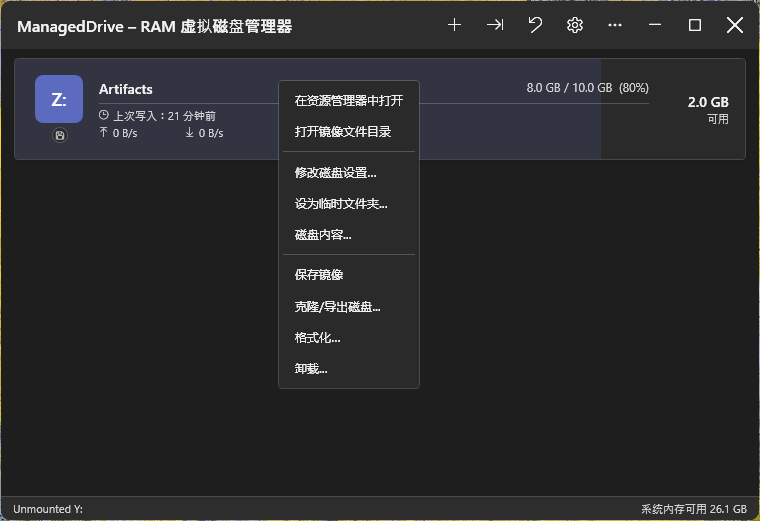
- 双击在资源管理器中打开磁盘;右键提供快捷方式、磁盘内容... 或空间占用分析...(以矩形树图显示磁盘空间被什么占用,按文件类型着色,并附带占用最大的文件夹/文件/类型列表)
界面
- 双语(中/英)及浅色/深色主题,均可自动检测或手动切换
- 磁盘卡片带状态角标(只读、当前临时目录、绑定镜像、密码保护)、使用率进度条,以及实时读写速度曲线图
- 窗口可自由拖拽调整大小
- 关于对话框显示版本、GitHub 链接,有新版本时显示更新链接
- 可选每日检查更新,发现新版本时通知提醒
命令行
mdrive(随 ManagedDrive.exe 发布)通过命名管道对运行中的应用执行 create/mount/unmount/format/save/set-password/export/list/ls/snapshot/exit,应用未运行时自动启动- 可挂载到盘符,也可挂载到已存在的空目录(WinFsp 的目录挂载点支持),挂载前会先校验并给出清晰错误提示,而不是原始的驱动状态码
安装
winget install coldhighsun.ManagedDrive
或前往 Releases 页面手动下载,每个版本发布了两种安装方式,任选其一:
ManagedDrive-Setup-X.Y.Z.exe —— 引导式安装程序。会自动检测 WinFsp 和 .NET 10 桌面运行时是否已安装,若缺少 WinFsp 会静默安装内置的 WinFsp 安装包,若缺少 .NET 桌面运行时会提示安装,并将 ManagedDrive 安装到 Program Files,创建开始菜单/桌面快捷方式。推荐大多数用户使用。ManagedDrive-vX.Y.Z-win-x64-portable.zip —— 体积较小;需要单独安装 WinFsp 和 .NET 10 桌面运行时。
若使用 ZIP,解压到任意目录后直接运行 ManagedDrive.exe 即可。ManagedDrive.exe 是单文件可执行程序——ZIP 中还附带一个体积很小的 winfsp-msil.dll(WinFsp 托管互操作程序集,无法打包进单文件中),需与 exe 保持在同一目录下。唯一会写入注册表的操作是可选的"开机自启"设置,除此之外不会写入注册表。使用 ZIP 时仍需提前单独安装 WinFsp(见下方环境要求);安装程序会自动处理这一步。
ZIP 中还包含 mdrive.exe(配套命令行工具,见下方命令行用法)和 wingetx.exe(winget 包装工具,见下方wingetx: winget 包装工具)。将解压目录加入 PATH 后即可在任意终端中运行 mdrive/wingetx。安装程序会自动将两者加入系统级 PATH。
环境要求
| 要求 | 说明 |
|---|
| Windows 10 / 11(64 位) | 暂未测试 ARM64 |
| WinFsp 2.2.26286(2026 Beta5) | 安装程序已内置,应用在检测到缺失或版本过旧时也会提示自动下载安装(更新版本可直接使用),便携版压缩包的 prerequisites\ 目录同样附带安装包。如需手动安装,请直接下载安装包:winfsp-2.2.26286.msi——不要使用 winget install WinFsp.WinFsp 安装,因为该 winget 包更新不及时,落后于最新发布版本。托管程序集 winfsp-msil.dll 将安装至 C:\Program Files (x86)\WinFsp\bin\,项目会自动引用。 |
| .NET 10 桌面运行时 | "绿色版"(框架依赖型)ZIP 需要。 |
| .NET 10 SDK | 编译所需。 |
命令行用法
mdrive.exe 随 ManagedDrive.exe 一同发布,通过命名管道将命令转发给正在运行的应用,因此脚本无需打开界面即可操作 ManagedDrive。若应用尚未运行,mdrive 会自动启动它,并在最长 10 秒内重试。
mdrive create R: --capacity-mb 512 --label Scratch --image C:\disks\scratch.mdr
mdrive create R: --preset node --preset nuget
mdrive preset list
mdrive clone R: S:
mdrive edit R: --capacity-mb 1024 --auto-save-minutes 10
mdrive mount C:\disks\scratch.mdr R: --auto-mount --compression Optimal --custom-zstd-level 19
mdrive mount C:\disks\scratch.mdr C:\Mounts\Scratch
mdrive list
mdrive list --json
mdrive ls R: \Projects
mdrive ls R: \Projects --json
mdrive info R:
mdrive usage R: --top 20
mdrive save R:
mdrive set-password R: --password-file C:\secrets\scratch.pwd
mdrive export R: C:\backups\scratch.mdr
mdrive export R: C:\backups\scratch.zip --format Zip
mdrive format R: --yes
mdrive snapshot create R:
mdrive snapshot list R:
mdrive snapshot diff R: 1
mdrive snapshot extract R: 1 \Projects\notes.txt C:\restore\notes.txt
mdrive snapshot restore R: 1
mdrive watch --json
mdrive unmount R:
mdrive exit
| 命令 | 说明 |
|---|
create <盘符> [--capacity-mb <数值>] [--preset ]... [选项] | 新建一块全新的空白 RAM 盘。未指定任何 --preset 时必须给出 --capacity-mb;重复 --preset 可在同一块盘上叠加多个预设(容量相加,文件夹和环境变量合并,显式的 --capacity-mb/--label 优先)。可选项:--label(默认 "RAM Disk")、--image(持久化镜像路径;省略则为仅内存磁盘,卸载后即丢弃)、--password、--password-file(为 --image 加密;需配合 --image 使用;二者互斥)。temp 预设还会把你的用户 TEMP/TMP 指向该磁盘的 Temp 文件夹;会修改环境变量的预设会从原来使用它的磁盘上取消。 |
preset list | 列出 create --preset 可用的预设:id、名称、容量以及各自设置的环境变量。支持 --json。 |
clone <源盘符> <目标盘符> | 用源磁盘的当前内容替换目标磁盘的内容。目标磁盘必须已挂载且可写,容量须不小于源磁盘已用字节数。若宿主机可用内存不足以容纳复制的数据,克隆会失败,目标磁盘保持不变。 |
edit <盘符> [选项] | 对已挂载磁盘应用非破坏性更改。可选项:--capacity-mb、--label、--auto-save-minutes、--disable-auto-save(与 --auto-save-minutes 互斥)。至少须指定一项。盘符或只读标志的更改需要完整重挂,本命令不支持。 |
mount <镜像路径> <盘符> [选项] | 将已有的 .mdr 镜像挂载。盘符可以是一个盘符(R:),也可以是一个已存在的空目录路径。可选项:--read-only、--auto-mount、--auto-save-minutes、--compression 、--max-snapshot-count、--max-snapshot-size-mb、--high-usage-warn-percent、--password、--password-file(二者互斥;仅当镜像已加密时需要——推荐使用 --password-file(读取文件首行作为密码)而非 --password,以避免密码出现在 shell 历史或进程列表中)。未指定的选项沿用该镜像已保存的配置值(或其默认值)。 |
mount-archive <压缩包路径> [盘符] | 将压缩包(zip/7z/rar/tar 等)作为只读磁盘导入挂载,挂载完成后会自动在资源管理器中打开该盘符。盘符可以是一个盘符,也可以是一个已存在的空目录路径;完全省略时自动从 Z: 向下查找第一个可用盘符。资源管理器右键菜单项内部即调用此命令。 |
unmount <盘符> | 卸载已挂载的磁盘。 |
format <盘符> --yes | 清空已挂载磁盘上的所有文件,须加 --yes/-y 确认。 |
save <盘符> | 立即将已挂载磁盘的内容保存到其绑定的镜像文件。 |
set-password <盘符> [选项] | 设置或移除已挂载磁盘的加密密码,下次保存时生效。--password、--password-file(读取文件首行作为密码,推荐使用以避免密码出现在 shell 历史或进程列表中)、--remove(移除密码保护)三者须指定且只能指定一个。 |
export <盘符> <输出路径> [选项] | 将已挂载磁盘导出为独立的 .mdr 镜像或压缩包文件,不影响该磁盘自身的持久化配置。可选项:--format (导出为压缩包而非 .mdr 镜像)、--compression 、--password、--password-file(为导出的 .mdr 镜像加密;与 --format 互斥,因为压缩包格式不支持加密)、--force/-f(覆盖已存在的输出文件;不加时目标文件已存在会报错)。输出路径不能是已挂载磁盘自身的镜像、快照文件名,也不能位于 RAM 盘上。 |
list | 列出当前已挂载的磁盘及其用量与容量。 |
ls <盘符> [路径] | 列出已挂载磁盘上某目录的直接子项(名称、类型、大小)。路径(如 \Folder)省略时列出根目录。 |
info <盘符> | 显示已挂载磁盘的配置与状态:用量、是否只读、镜像路径、是否加密、自动保存间隔、压缩级别、快照上限与数量、上次保存时间。 |
usage <盘符> [--top N] [--by dir|file|ext] | 显示已挂载磁盘的内存都用在了哪里:占用最大的目录(含其下全部内容)、最大的文件(备用数据流计入所属文件)和占用最大的扩展名,并给出各自占已用内存的比例。--top(1-1000,默认 10)设置列表长度;--by 只输出其中一个列表;加 --json 时输出全部三个列表。 |
watch | 实时输出磁盘事件——mounted、unmounted、save-completed、save-failed、high-usage——直到按 Ctrl+C 中断。不会阻塞其他 mdrive 命令;同时最多运行两个 watch。加 --json 时每行输出一个 JSON 对象。 |
snapshot create <盘符> | 立即为已挂载磁盘写入一个带时间戳的快照,独立于常规保存。需要该磁盘已配置镜像路径及快照保留策略(--max-snapshot-count/--max-snapshot-size-mb)。 |
snapshot list <盘符> | 列出已挂载磁盘的快照,按时间倒序排列(序号 1 为最新)。 |
snapshot diff <盘符> <序号> | 将指定快照与磁盘当前实际内容进行比较,列出新增/删除/修改的文件和目录。 |
snapshot extract <盘符> <序号> <快照内路径> <输出路径> [--force] | 把快照中的某个文件或整个目录树复制到宿主机,不影响磁盘本身。文件写到输出路径(若它是已存在的目录则写入其中);目录则把其内容写入输出路径。若会覆盖已有文件则一个也不写,除非加 --force/-f。备用数据流和符号链接/联接不会被复制。执行期间会把整个快照载入内存。 |
snapshot restore <盘符> <序号> | 用指定序号的快照恢复已挂载磁盘的内容,会替换当前内容。 |
snapshot delete <盘符> <序号> | 删除已挂载磁盘的某个快照。 |
exit | 退出正在运行的 ManagedDrive 应用。 |
所有命令都接受全局选项 --json,以 JSON 而非文本输出结果:ls、list、info、snapshot list、snapshot diff 输出其数据,其余命令输出 { "Success", "Message" },退出码不变。参数错误和 --help 始终是纯文本。
运行 mdrive --help 或 mdrive <命令> --help 可查看完整的选项列表。
wingetx: winget 包装工具
wingetx.exe 是 winget 的透明包装工具,随 ManagedDrive.exe/mdrive.exe 一同发布。可直接把它当作 winget 的替代品使用:
wingetx install <包名>
wingetx upgrade <包名>
如果 %TEMP% 当前不在 ManagedDrive 内存盘上,或所调用的子命令不是 install/upgrade,wingetx 会原样把调用转发给 winget.exe——因此把 winget 直接别名为 wingetx 始终是安全的。
当 %TEMP% 确实设为 ManagedDrive 内存盘时,wingetx install/wingetx upgrade 会将 MSI 及 exe 类型的包改为先执行 winget download,再手动启动下载好的安装程序(MSI/WiX 用 msiexec,其余直接运行安装包本身),而不是直接执行 winget install。这样可以绕开下方已知问题中描述的两种失败模式:msiexec 的卷装载管理器(Mount Manager)源卷检查,以及影响 exe 安装包的跨会话退出码 1 问题。它无法确信处理的安装包类型(msix、appx、zip、便携版等)会自动转发给普通的 winget install/upgrade。
- 除非传入
--silent 或 --disable-interactivity,安装程序界面默认保持可见(SilentWithProgress 开关),与 winget 自身行为一致。
- 下载的安装包会先暂存到
%LOCALAPPDATA%\Temp\wingetx(一个真实的、非 WinFsp 的卷)再启动。
已知问题
将 TEMP 设为内存盘后,某些安装包可能报错
WinFsp 把盘符挂载在**当前登录会话(logon session)**的设备命名空间中,因此其他会话或登录令牌下的进程(session 0 的系统服务、或提权后跑在链接管理员令牌下的进程)无法解析该盘符,由此产生两种失败模式:
- 跨会话盘符可见性——系统级进程(如 winget 的软件包管理器服务)从
Z:\Temp\...\setup.exe 启动时看不到该盘,报 0x800704b3(网络路径未找到)。已知受影响:WeChatWin_*.exe(微信)、7z*.exe(7-Zip)、Git-*.exe(Git)。可由下方可选的 SYSTEM 辅助服务解决——它会为该盘发布一个全局(\GLOBAL??)符号链接。
- 通过 Windows Installer 服务安装的 MSI——
msiexec 以 SYSTEM 身份跑在 session 0 的那一半,在读取源文件前会对源卷做一次卷身份查询(询问 Mount Manager);WinFsp 的 per-session 挂载没有在 Mount Manager 里注册,所以该查询以系统错误 1005 失败 → MSI 错误 2755/1603。辅助服务的符号链接修不了这个——卷依然不是 Mount-Manager 注册的系统卷。影响 winget 安装 MSI 包及源文件位于内存盘上的独立 .msi 文件;根治需要改为通过 Windows Mount Manager 挂载(更大的服务化挂载重构),不在辅助服务的能力范围内。
可选 SYSTEM 辅助服务(ManagedDriveHelper)通过为当前 TEMP 目标盘发布跨会话全局符号链接来解决失败模式 1,对失败模式 2 无效。
MSI 安装的解决办法: 安装 MSI 类软件前,先点工具栏的还原环境变量按钮并选择临时目录来恢复 TEMP(或在该磁盘右键菜单的临时与缓存里取消勾选临时目录)再重试;或直接前往官网下载安装包手动安装;也可以用 wingetx 代替 winget——它无需重置 TEMP 即可绕开上述两种失败模式。
ManagedDrive 会在 TEMP 被设为内存盘时提示一次,此后只要 TEMP 仍指向内存盘,每次启动都会再次提示——恢复默认值即可停止。
配置与持久化
- 配置以 JSON 格式存储于
%APPDATA%\ManagedDrive\settings.json,包括每个磁盘各自的高用量告警阈值(或已禁用状态)。
- 开机自启通过
HKCU\SOFTWARE\Microsoft\Windows\CurrentVersion\Run 注册表项实现(无需提升权限)。
- 版本号由 MinVer 从 git 标签派生(
v 前缀,例如 v0.1.0)。
开发者内容
构建说明、解决方案结构、内部实现和性能基准见 DEVELOPMENT.md。
许可证
MIT
本项目内置了 WinFsp 和 SharpCompress,其版权与许可证信息见 THIRD-PARTY-NOTICES.md。