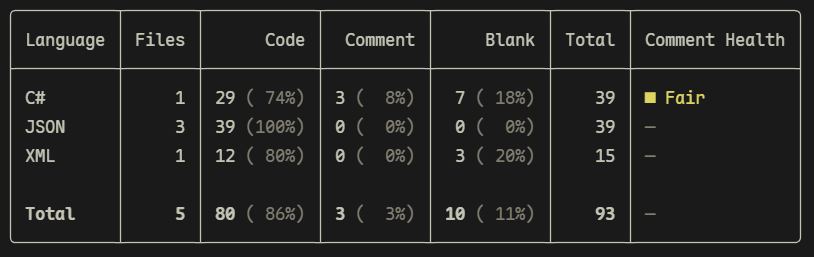
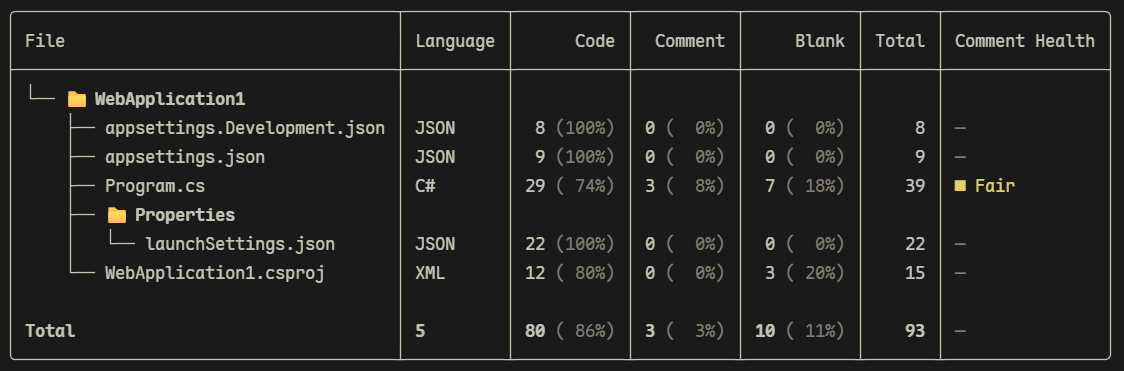
A command-line tool for counting lines of source code. It supports 23 auto-detected languages, three output formats (table, JSON, HTML), per-file detail view, and comment health indicators.
Sloc (Source Lines Of Code) is a .NET global command-line tool for counting lines of source code. It analyzes files individually, distinguishing code lines, comment lines, and blank lines, then aggregates results by programming language. It supports 34 auto-detected languages, three output formats (table, JSON, HTML), per-file detail view, and comment health indicators.
Features
Count code / comment / blank / total lines
Correctly handles single-line comments, block comments, and multi-line block comments
Built-in comment rules for 34 common languages (auto-detected by file extension)
Recursive directory scanning with --include / --exclude glob filters
Automatically excludes bin, obj, artifacts, .git, .vs, .vscode, .idea, node_modules, and similar directories by default
Three output formats: colored table (default), JSON, and HTML
Comment Health column in table output showing comment-density indicator (None / Low / Fair / Good / High / Dense)
Format auto-detected from the --output file extension (.json → JSON, .html / .htm → HTML)
Honors .gitignore files (including nested ones) by default; --no-gitignore disables it
Parallel analysis across CPU cores (), with deterministic output
CI-friendly: JSON to stdout for piping (e.g. | jq), meaningful exit codes, and a --min-comment-pct threshold gate
Compare against a saved JSON report with --baseline to see how line counts changed
Sort and limit the language summary with --sort / --top
Files or directories that cannot be read, and binary files (detected by NUL bytes), are skipped gracefully; a summary of skipped paths and reasons is shown at the end
# Count current directory (recursive)
sloc

# Count a specific directory
sloc ./src

# Count a single file
sloc ./src/Program.cs

# Only count C# files
sloc ./src --include "**/*.cs"

# Exclude test directories
sloc . --exclude "**/tests/**"

# Show per-file details
sloc ./src --by-file

# Output as JSON
sloc ./src --format json

# Save results as HTML report (opens in a browser)
sloc ./src --format html --output report.html

# Auto-detect format from file extension
sloc ./src --output sloc-report.json

# Include files with unknown extensions
sloc . --all

# Do not recurse into subdirectories
sloc ./src --no-recursive

# Pipe JSON to jq
sloc . --format json | jq .total

# Fail CI if comments are below 10% of lines
sloc . --min-comment-pct 10

# Save a baseline, then diff a later run against it
sloc . --format json --output baseline.json
sloc . --baseline baseline.json

# Sort by comment lines and show only the top 5 languages
sloc . --sort comment --top 5
Options
Option
Short
Description
path (argument)
File or directory to analyze, defaults to current directory .
--include
-i
File glob pattern to include, can be specified multiple times
--exclude
-e
File glob pattern to exclude, can be specified multiple times
--format
-f
Output format: Table (default), Json, or Html
--output
-o
Output file path for Json / Html formats; use - to write to stdout; format is inferred from the file extension when --format is not specified
--no-recursive
Do not recurse into subdirectories
--no-health
Hide the Comment Health column and percentage breakdowns
--by-file
Show per-file details in addition to the language summary
--paged
-p
Show paged output
--all
Include files with unknown extensions (grouped as Other)
--quiet
-q
Suppress the banner, progress UI, and Saved to message
--no-progress
Suppress the live table and progress bar
--min-comment-pct
Fail (exit code 2) if the overall comment percentage is below this value
--jobs
-j
Max files to analyze in parallel (default: processor count; 1 = sequential)
--no-gitignore
Do not honor .gitignore files (they are respected by default)
--baseline
Compare against a previously saved JSON report and show the line-count diff
--sort
Order the language summary by Total (default), Code, Comment, Blank, Files, or Name
--top
Show only the top N languages in the summary
--no-update-check
Do not check GitHub for a newer release (checked by default, with a 2 second timeout)
--help
-h
Show help
--version
Show version
Json output is written to stdout by default (so it can be piped, e.g. sloc . -f json | jq); pass --output to write a file instead.
.gitignore files (including nested ones) are honored by default; pass --no-gitignore to disable. Save a JSON report and pass it to --baseline on a later run to see how line counts changed.
> Files with unknown extensions are grouped as Other when using --all, with only code lines and blank lines distinguished.
Building from Source
# Restore and build
dotnet build

# Run tests
dotnet test

# Pack as a NuGet tool package (output to ./nupkg)
dotnet pack src/Sloc.Cli/Sloc.Cli.csproj -c Release -o ./nupkg

# Install from local package and verify
dotnet tool install --global --add-source ./nupkg Sloc
sloc ./src
Known Limitations
Line classification is based on text matching of comment symbols, not a full lexer.
String literals are recognized for most languages, so comment markers inside strings (e.g. "// not a comment") are counted as code, and escaped quotes are handled. Verbatim/doubled-quote escaping (e.g. C# @"…""…") is not modeled, and interpolation expressions inside strings are not analyzed.
Python triple-quoted strings are counted as comments only when they begin a statement (docstrings); used as a value (e.g. x = """…""") they are counted as code.