QtRvSim–RISC-V CPU simulator for education
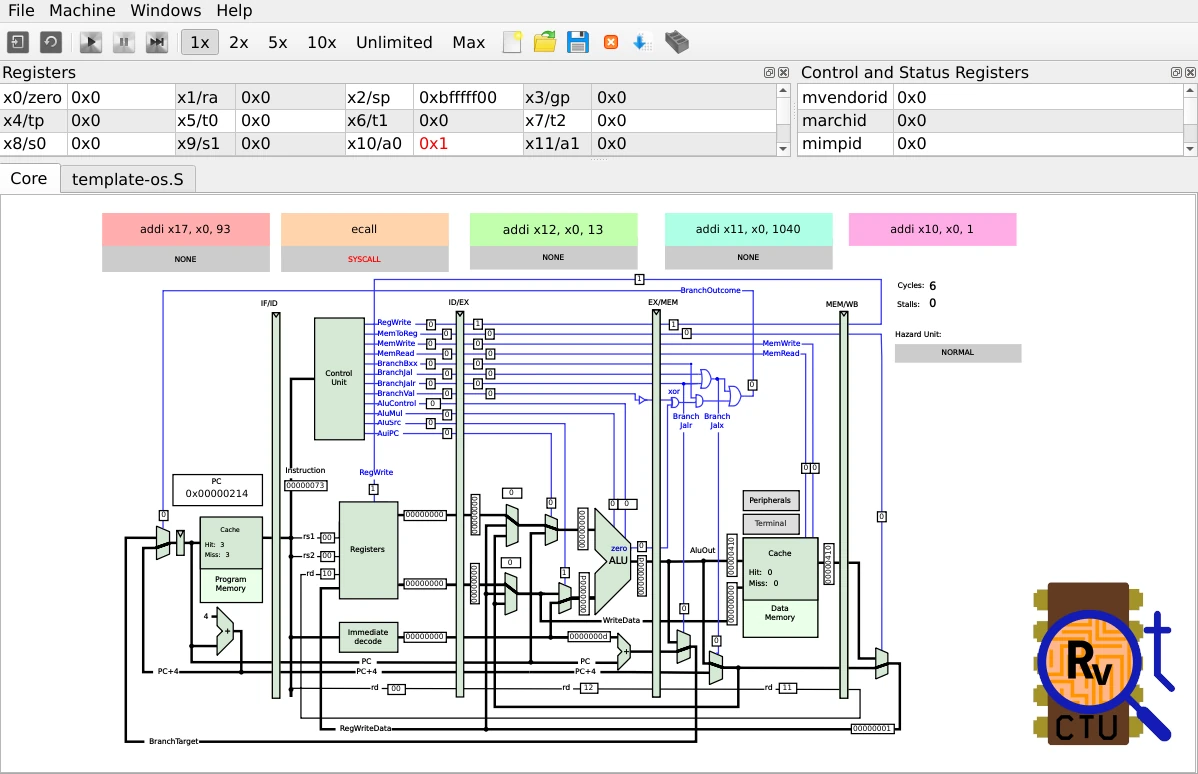
Developed by the Computer Architectures Education project
at Czech Technical University.
Are you using QtRvSim at your organization? Please, let us know in the discussion!
Table of contents
Try it out! (WebAssembly)
QtRVSim is experimentally available for WebAssembly and it can be run in most browsers
without installation. QtRVSim online
Note, that WebAssembly version is experimental.
Please, report any difficulties via GitHub issues.
Build and packages


Build Dependencies
- Qt 6 or Qt 5 (minimal tested version is 5.9.5)
Clone the repository with its recursive submodules:
git clone --recurse-submodules https://github.com/cvut/qtrvsim.git
For an existing checkout, initialize or repair the dependencies by running next command in the source tree:
git submodule update --init --recursive
For update in already existing GIT clone run:
git pull --recurse-submodules
Quick Compilation on Linux
On Linux, you can use a wrapper Makefile and run make in the project root directory. It will create a build directory
and run CMake in it. Available targets are: release (default) and debug.
Note for packagers: This Makefile is deleted by CMake when source archive is created to avoid any ambiguity. Packages
should invoke CMake directly. The generated source archive vendors all submodule contents and can be built without Git
metadata or network access.
General Compilation
cmake -DCMAKE_BUILD_TYPE=Release /path/to/qtrvsim
make
Where /path/to/qtrvsim is path to this project root. The built binaries are to be found in the directory targetin
the build directory (the one, where cmake was called).
-DCMAKE_BUILD_TYPE=Debug builds development version including sanitizers.
If no build type is supplied, Debug is the default.
Building from source on macOS
Install the latest version of Xcode from the App Store. Then open a terminal and execute xcode-select --install to
install Command Line Tools. Then open Xcode, accept the license agreement and wait for it to install any additional
components. After you finally see the "Welcome to Xcode" screen, from the top bar
choose Xcode -> Preferences -> Locations -> Command Line Tools and select an SDK version.
Install Homebrew and use it to install Qt. (macOS builds must use the bundled libelf)
brew install qt
Now build the project the same way as in general compilation (above).
Download Binary Packages
sudo add-apt-repository ppa:qtrvsimteam/ppa
sudo apt-get update
sudo apt-get install qtrvsim
Nix package
QtRVSim provides a Nix package as a part of the repository. You can build and install it by a command bellow. Updates
have to be done manually by checking out the git. NIXPKGS package is in PR phase.
nix-env -if .
Tests
Tests are managed by CTest (part of CMake). To build and run all tests, use this commands:
cmake -DCMAKE_BUILD_TYPE=Release /path/to/QtRVSim
make
ctest
Documentation
Main documentation is provided in this README and in subdirectories docs/user
and docs/developer.
The project was developed and extended as theses of Karel Kočí, Jakub Dupak and Max Hollmann. See section Resources and Publications for links and references.
The simulator accepts statically linked little-endian ELF executables compiled for
the RISC-V target, either 32-bit (GCC options -mabi=ilp32 -march=rv32i to rv32ima_zicsr)
or 64-bit (-mabi=lp64 -march=rv64i to rv64ima_zicsr).
Simulation will execute them as XLEN=32 or XLEN=64 according to the ELF file header.
There is even initial support for endianness selection based on the ELF file header.
Source-level navigation and --trace-source need -g -gdwarf-4. DWARF5 binaries
still run, but source tracing is unavailable and a warning is shown.
- 64-bit RISC-V ISA RV64IM and 32-bit RV32IM ELF executables are supported.
- Compressed instructions are not yet supported.
You can use compile the code for simulation using specialized RISC-V GCC/Binutils toolchain (riscv32-elf) or using
unified Clang/LLVM toolchain with LLD. If you have Clang installed, you don't need any
additional tools. Clang can be used on Linux, Windows, macOS and others...
clang --target=riscv32 -march=rv32g -nostdlib -static -fuse-ld=lld test.S -o test
llvm-objdump -S test
riscv32-elf-as test.S -o test.o
riscv32-elf-ld test.o -o test
riscv32-elf-objdump -S test
or
riscv32-elf-gcc test.S -o test
riscv32-elf-objdump -S test
Multilib supporting 64-bit embedded toolchain can be used for to build executable
riscv64-unknown-elf-gcc -march=rv32i -mabi=ilp32 -nostdlib -o test test.c crt0local.S -lgcc
The global pointer and stack has to be set to setup runtime C code conformant environment. When no other C library is
used then next simple crt0local.S can be used.
example code
/* minimal replacement of crt0.o which is else provided by C library */

.globl main
.globl _start
.globl __start

.option norelax

.text

__start:
_start:
        .option push
        .option norelax
        la gp, __global_pointer$
        .option pop
        la      sp, __stack_end
        addi    a0, zero, 0
        addi    a1, zero, 0
        jal     main
quit:
        addi    a0, zero, 0
        addi    a7, zero, 93  /* SYS_exit */
        ecall

loop:   ebreak
        beq     zero, zero, loop

.bss

__stack_start:
        .skip   4096
__stack_end:

.end _start
Integrated Assembler
Basic integrated assembler is included in the simulator. Small subset of
GNU assembler directives is recognized as well. Next directives are
recognized: .word, .orig, .set
/.equ, .ascii and .asciz. Some other directives are simply ignored: .data, .text, .globl, .end and .ent.
This allows to write code which can be compiled by both - integrated and full-featured assembler. Addresses are assigned
to labels/symbols which are stored in symbol table. Addition, subtraction, multiplication, divide and bitwise and or are
recognized.
Support to call external make utility
The action "Build executable by external make" call "make" program. If the action is invoked, and some source editors
selected in main windows tabs then the "make" is started in the corresponding directory. Else directory of last selected
editor is chosen. If no editor is open then directory of last loaded ELF executable are used as "make" start path. If
even that is not an option then default directory when the emulator has been started is used.
Advanced functionalities
Peripherals
Emuated LCD, knobs, buttons, serial port, timer...
The simulator implements emulation of two peripherals for now.
The first is simple serial port (UART). It support transmission
(Tx) and reception (Rx). Receiver status register (SERP_RX_ST_REG)
implements two bits. Read-only bit 0 (SERP_RX_ST_REG_READY)
is set to one if there is unread character available in the receiver data register (SERP_RX_DATA_REG). The bit 1
(SERP_RX_ST_REG_IE) can be written to 1 to enable interrupt request when unread character is available. The
transmitter status register (SERP_TX_ST_REG) bit 0
(SERP_TX_ST_REG_READY) signals by value 1 that UART is ready and can accept next character to be sent. The bit 1
(SERP_TX_ST_REG_IE) enables generation of interrupt. The register SERP_TX_DATA_REG is actual Tx buffer. The LSB byte
of written word is transmitted to the terminal window. Definition of peripheral base address and registers
offsets (_o) and individual fields masks (_m) follows
#define SERIAL_PORT_BASE   0xffffc000

#define SERP_RX_ST_REG_o           0x00
#define SERP_RX_ST_REG_READY_m      0x1
#define SERP_RX_ST_REG_IE_m         0x2

#define SERP_RX_DATA_REG_o         0x04

#define SERP_TX_ST_REG_o           0x08
#define SERP_TX_ST_REG_READY_m      0x1
#define SERP_TX_ST_REG_IE_m         0x2

#define SERP_TX_DATA_REG_o         0x0c
The UART registers region is mirrored on the address 0xffff0000 to enable use of programs initially written
for SPIM or MARS
emulators.
The another peripheral allows to set three byte values concatenated to single word (read-only KNOBS_8BIT register)
from user panel set by knobs and display one word in hexadecimal, decimal and binary format (LED_LINE register). There
are two other words writable which control color of RGB LED 1 and 2
(registers LED_RGB1 and LED_RGB2).
#define SPILED_REG_BASE    0xffffc100

#define SPILED_REG_LED_LINE_o           0x004
#define SPILED_REG_LED_RGB1_o           0x010
#define SPILED_REG_LED_RGB2_o           0x014
#define SPILED_REG_LED_KBDWR_DIRECT_o   0x018

#define SPILED_REG_KBDRD_KNOBS_DIRECT_o 0x020
#define SPILED_REG_KNOBS_8BIT_o         0x024
The simple 16-bit per pixel (RGB565) framebuffer and LCD are implemented. The framebuffer is mapped into range starting
at LCD_FB_START address. The display size is 480 x 320 pixel. Pixel format RGB565 expect red component in bits 11..
15, green component in bits 5..10 and blue component in bits 0..4.
#define LCD_FB_START       0xffe00000
#define LCD_FB_END         0xffe4afff
The basic implementation of RISC-V Advanced Core Local Interruptor
is implemented with basic support for
- Machine-level Timer Device (MTIMER)
- Machine-level Software Interrupt Device (MSWI)
#define ACLINT_MSWI        0xfffd0000 // core 0 machine SW interrupt request
#define ACLINT_MTIMECMP    0xfffd4000 // core 0 compare value
#define ACLINT_MTIME       0xfffdbff8 // timer base 10 MHz
#define ACLINT_SSWI        0xfffd0000 // core 0 system SW interrupt request
More information about ACLINT can be found in RISC-V Advanced Core Local Interruptor Specification.
Interrupts and Control and Status Registers
Implemented CSR registers and their usage
List of interrupt sources:
| Irq number | mie / mip Bit | Source |
|---|
| 3 | 3 | Machine software interrupt request |
| 7 | 7 | Machine timer interrupt |
| 16 | 16 | There is received character ready to be read |
| 17 | 17 | Serial port ready to accept character to Tx |
Following Control Status registers are recognized
| Number | Name | Description |
|---|
| 0x300 | mstatus | Machine status register. |
| 0x301 | misa | Machine ISA Register. |
| 0x302 | medeleg | Machine exception delegation register. |
| 0x303 | mideleg | Machine interrupt delegation register. |
| 0x304 | mie | Machine interrupt-enable register. |
| 0x305 | mtvec | Machine trap-handler base address. |
| 0x340 | mscratch | Scratch register for machine trap handlers. |
| 0x341 | mepc | Machine exception program counter. |
| 0x342 | mcause | Machine trap cause. |
| 0x343 | mtval | Machine bad address or instruction. |
| 0x344 | mip | Machine interrupt pending. |
| 0x34A | mtinsr | Machine trap instruction (transformed). |
| 0x34B | mtval2 | Machine bad guest physical address. |
| 0x100 | sstatus | Supervisor status register. |
| 0x104 | sie | Supervisor interrupt-enable register. |
| 0x105 | stvec | Supervisor trap-handler base address. |
| 0x140 | sscratch | Scratch register for supervisor trap handlers. |
| 0x141 | sepc | Supervisor exception program counter. |
| 0x142 | scause | Supervisor trap cause. |
| 0x143 | stval | Supervisor bad address or instruction. |
| 0x144 | sip | Supervisor interrupt pending. |
| 0x180 | satp | Supervisor address translation and protection |
| 0xB00 | mcycle | Machine cycle counter. |
| 0xB02 | minstret | Machine instructions-retired counter. |
| 0xF11 | mvendorid | Vendor ID. |
| 0xF12 | marchid | Architecture ID. |
| 0xF13 | mimpid | Implementation ID. |
| 0xF14 | mhartid | Hardware thread ID. |
csrr, csrw, csrrs , csrrs and csrrw are used to copy and exchange value from/to RISC-V control status registers.
Sequence to enable serial port receive interrupt:
Decide location of interrupt service routine the first. The address of the common trap handler is defined by mtvec register and then PC is set to this address when exception or interrupt is accepted.
Enable bit 16 in the machine Interrupt-Enable register (mie). Ensure that bit 3 (mstatus.mie - machine global interrupt-enable) of Machine Status register is set to one.
Enable interrupt in the receiver status register (bit 1 of SERP_RX_ST_REG).
Write character to the terminal. It should be immediately consumed by the serial port receiver if interrupt is enabled
in SERP_RX_ST_REG. CPU should report interrupt exception and when it propagates to the execution phase PC is set to
the interrupt routine start address.
System Calls Support
Syscall table and documentation
The emulator includes support for a few Linux kernel system calls. The RV32G ilp32 ABI is used.
| Register | use on input | use on output | Calling Convention |
|---|
| zero (x0) | — | - | Hard-wired zero |
| ra (x1) | — | (preserved) | Return address |
| sp (x2) | — | (callee saved) | Stack pointer |
| gp (x3) | — | (preserved) | Global pointer |
| tp (x4) | — | (preserved) | Thread pointer |
| t0 .. t2 (x5 .. x7) | — | - | Temporaries |
| s0/fp (x8) | — | (callee saved) | Saved register/frame pointer |
| s1 (x9) | — | (callee saved) | Saved register |
| a0 (x10) | 1st syscall argument | return value | Function argument/return value |
| a1 (x11) | 2nd syscall argument | - | Function argument/return value |
| a2 .. a5 (x12 .. x15) | syscall arguments | - | Function arguments |
| a6 (x16) | - | - | Function arguments |
| a7 (x17) | syscall number | - | Function arguments |
| s2 .. s11 (x18 .. x27) | — | (callee saved) | Saved registers |
| t3 .. t6 (x28 .. x31) | — | - | Temporaries |
The all system call input arguments are passed in register.
Supported syscalls:
void exit(int status) __NR_exit (93)
Stop/end execution of the program. The argument is exit status code, zero means OK, other values informs about error.
ssize_t read(int fd, void *buf, size_t count) __NR_read (63)
Read count bytes from open file descriptor fd. The emulator maps file descriptors 0, 1 and 2 to the internal
terminal/console emulator. They can be used without open call. If there are no more characters to read from the
console, newline is appended. At most the count bytes read are stored to the memory location specified by buf
argument. Actual number of read bytes is returned.
ssize_t write(int fd, const void *buf, size_t count) __NR_write (64)
Write count bytes from memory location buf to the open file descriptor
fd. The same about console for file handles 0, 1 and 2 is valid as for read.
int close(int fd) __NR_close (57)
Close file associated to descriptor fd and release descriptor.
int openat(int dirfd, const char *pathname, int flags, mode_t mode) __NR_openat (56)
Open file and associate it with the first unused file descriptor number and return that number. If the
option OS Emulation->Filesystem root
is not empty then the file path pathname received from emulated environment is appended to the path specified
by Filesystem root. The host filesystem is protected against attempt to traverse to random directory by use of ..
path elements. If the root is not specified then all open files are targetted to the emulated terminal. Only TARGET_AT_FDCWD (dirfd = -100) mode is supported.
void * brk(void *addr) __NR_brk (214)
Set end of the area used by standard heap after end of the program data/bss. The syscall is emulated by dummy
implementation. Whole address space up to 0xffff0000 is backuped by automatically attached RAM.
int ftruncate(int fd, off_t length) __NR_truncate (46)
Set length of the open file specified by fd to the new length. The length
argument is 64-bit even on 32-bit system and it is passed as the lower part and the higher part in the
second and third argument.
ssize_t readv(int fd, const struct iovec *iov, int iovcnt) __NR_Linux (65)
The variant of read system call where data to read are would be stored to locations specified by iovcnt pairs of
base address, length pairs stored in memory at address pass in iov.
ssize_t writev(int fd, const struct iovec *iov, int iovcnt) __NR_Linux (66)
The variant of write system call where data to write are defined by iovcnt
pairs of base address, length pairs stored in memory at address pass in iov.
Limitations of the Implementation
- See list of currently supported instructions.
QtRvSim limitations
- Only very minimal support for privileged instruction is implemented for now (mret).
- Only machine mode and minimal subset of machine CSRs is implemented.
- TLB and virtual memory are not implemented.
- No floating point support
- Memory access stall (stalling execution because of cache miss would be pretty annoying for users so difference between
cache and memory is just in collected statistics)
- Only limited support for interrupts and exceptions. When
ecall
instruction is recognized, small subset of the Linux kernel system calls
can be emulated or simulator can be configured to continue by trap handler
on mtvec address.
List of Currently Supported Instructions
- RV32I:
- LOAD:
lw, lh, lb, lwu, lhu, lbu
- STORE:
sw, sh, sb, swu, shu, sbu
- OP:
add, sub, sll, slt, sltu, xor, srl, sra, or, and
- MISC-MEM:
fence, fence.i
- OP-IMM:
addi, sll, slti, sltiu, xori, srli, srai, ori, andi, auipc, lui
- BRANCH:
beq, bne, btl, bge, bltu, bgtu
- JUMP:
jal, jalr
- SYSTEM:
ecall, mret, ebreak, csrrw, csrrs, csrrc, csrrwi, csrrsi, csrrci
- RV64I:
- LOAD/STORE:
lwu, ld, sd
- OP-32:
addw, subw, sllw, srlw, sraw, or, and
- OP-IMM-32:
addiw, sllw, srliw, sraiw
- Pseudoinstructions
- BASIC:
nop
- LOAD:
la, li,
- OP:
mv, not, neg, negw, sext.b, sext.h, sext.w, zext.b, zext.h, zext.w, seqz, snez, sltz, slgz
- BRANCH:
beqz, bnez, blez, bgez, bltz, bgtz, bgt, ble, bgtu, bleu
- JUMP:
j, jal, jr, jalr, ret, call, tail
- Extensions
- RV32M/RV64M:
mul, mulh, mulhsu, div, divu, rem, remu
- RV64M:
mulw, divw, divuw, remw, remuw
- RV32A/RV64A:
lr.w, sc.w, amoswap.w, amoadd.w, amoxor.w, amoand.w, amoor.w, amomin.w, amomax.w, amominu.w, amomaxu.w
- RV64A:
lr.d, sc.d, amoswap.d, amoadd.d, amoxor.d, amoand.d, amoor.d, amomin.d, amomax.d, amominu.d, amomaxu.d
- Zicsr:
csrrw, csrrs, csrrc, csrrwi, csrrsi, csrrci
- Sv32 and Sv39:
sret, sfence.vma
For details about RISC-V, refer to the ISA specification:
https://riscv.org/technical/specifications/.
Links to Resources and Similar Projects
Resources and Publications
Please reference above article, if you use QtRvSim in education or research related materials and publications.
Projects
Copyright
- Copyright (c) 2017-2019 Karel Koci
- Copyright (c) 2019-2025 Pavel Pisa
- Copyright (c) 2020-2025 Jakub Dupak
- Copyright (c) 2020-2021 Max Hollmann
License
This project is licensed under GPL-3.0-or-later. The full text of the license is in the LICENSE file. The
license applies to all files except for directories named external and files in them. Files in external directories
have a separate license compatible with the projects license.
> This program is free software: you can redistribute it and/or modify it under the terms of the GNU General Public License as published by the Free Software Foundation, either version 3 of the License, or (at your option) any later version.
>
> This program is distributed in the hope that it will be useful, but WITHOUT ANY WARRANTY; without even the implied warranty of MERCHANTABILITY or FITNESS FOR A PARTICULAR PURPOSE. See the GNU General Public License for more details.
>
> You should have received a copy of the GNU General Public License along with this program. If not, see https://www.gnu.org/licenses/.