gh-wanted
Find where you're needed.
A terminal app for catching up on watched GitHub repositories and finding issues to contribute to.
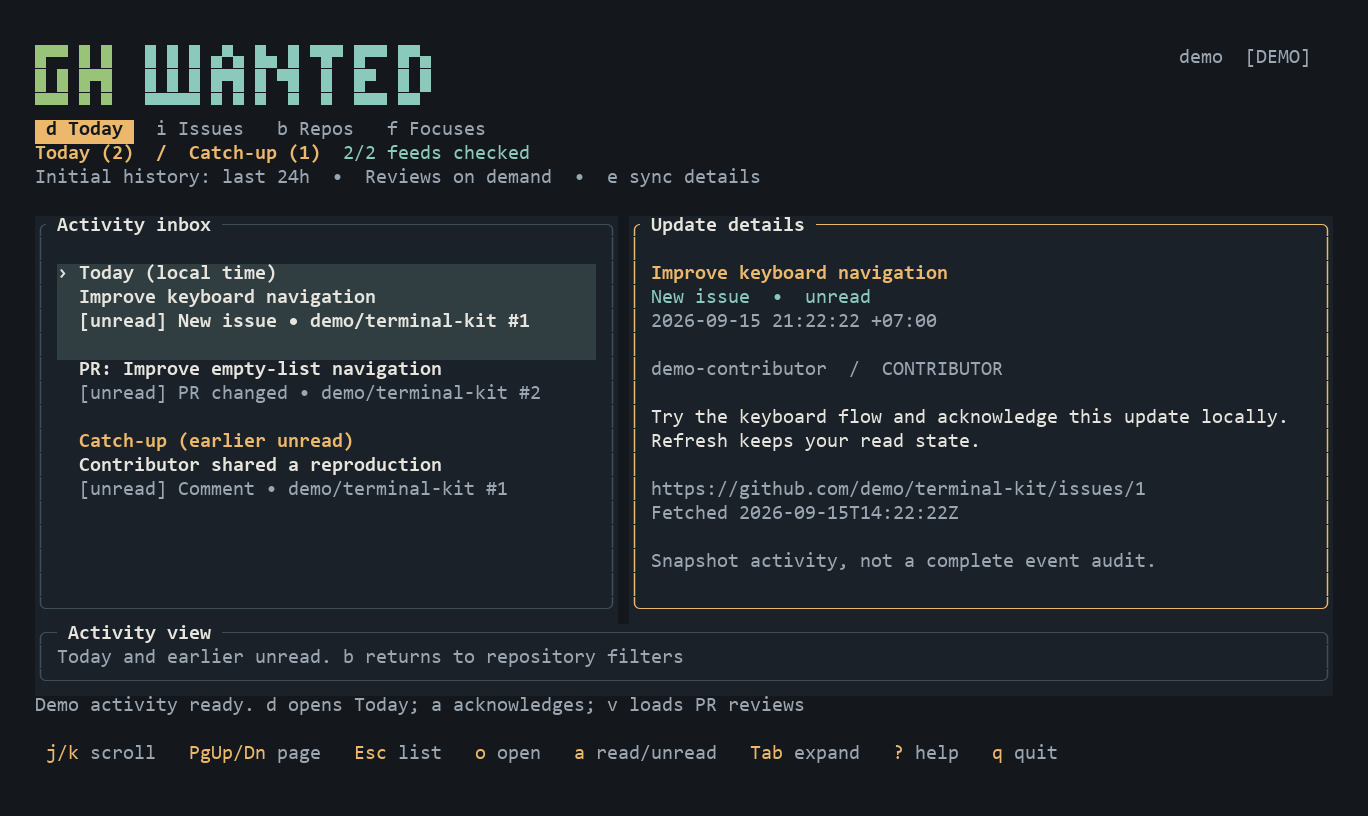
What it does
- Today: catch up on issues, comments, PR changes, and reviews. Keep track of what you've read.
- Issues: find work by label, keyword, or assignee, updated in the last 7 or 30 days.
- Repos & Focuses: organize repositories with private tags and save your favorite filters.
Refresh follows the active tab, pausing and resuming as you move. GitHub access is read-only; tags, saved filters, and read state stay on your machine.
Get started
Windows x86_64 (WinGet):
winget install --id cyprx.gh-wanted --exact --source winget
macOS Apple Silicon (14+) or Linux x86_64 (Homebrew):
brew install cyprx/tap/gh-wanted
Both install GitHub CLI as a dependency. Linux requires glibc 2.35+. These packages currently provide v0.1.0; for v0.1.1 with manual repository tracking, use Cargo below or GitHub Releases. Newly merged WinGet packages may take time to appear in its index.
Alternatively, download an archive from GitHub Releases for your platform:
| Platform | Archive suffix |
|---|
| Windows x86_64 | x86_64-pc-windows-msvc.zip |
| Linux x86_64 (GNU) | x86_64-unknown-linux-gnu.tar.gz |
| macOS Apple Silicon | aarch64-apple-darwin.tar.gz |
Extract it and put gh-wanted (Windows: gh-wanted.exe) in a directory on your PATH. No Rust installation is needed. Install GitHub CLI separately, then:
# Try fictional data without an account
gh-wanted --demo

# Connect to GitHub
gh auth login --hostname github.com
gh-wanted
With Rust installed, you can also install from crates.io:
cargo install --locked gh-wanted
GitHub CLI is still required separately. To build a local checkout, run cargo install --locked --path . from this repository.
A terminal of 100 × 30 or larger is recommended.
Controls
| Key | Action |
|---|
d / i / b / f | Today / Issues / Repos / Focuses |
j/k or arrows | Move through lists or scroll focused details |
| Enter / Esc | Focus details / return to list |
| PgUp / PgDn | Scroll details by page |
Tab / o | Expand details / open in browser |
/ / t / s | Filter / edit local tags / save focus |
+ / x | Track a repo in Repos / remove local tracking from Repo Details |
a / u | Mark activity read or unread / show unread only |
r / e | Refresh / show Today sync details |
? / q | All shortcuts / quit |
Example filters:
# Repos
topic:rust tag:priority

# Issues
label:"good first issue" unassigned
days:30 label:bug state:open
Newly watched repository missing? Press b, then r. For custom GitHub subscriptions or any accessible repository, press + in Repos and enter owner/repo or its GitHub URL. Local tracking survives refreshes. Press Enter, then x to remove local tracking; GitHub subscriptions stay unchanged, so watched repos remain visible. Adding repositories and browser opening are disabled in demo mode. Releases aren't tracked yet.
Development
cargo fmt --check
cargo clippy --locked --all-targets -- -D warnings
cargo test --locked
CI checks Linux, Windows, and macOS. To publish, commit the version in Cargo.toml and Cargo.lock, then push a matching tag:
git tag v0.1.0
git push origin v0.1.0
The workflow checks the version, tests, builds, and publishes the GitHub Release with binary archives and checksums. Existing releases are never replaced. Manual runs of the Release workflow validate builds without publishing.
Contributions welcome—see CONTRIBUTING.md. Licensed under MIT.