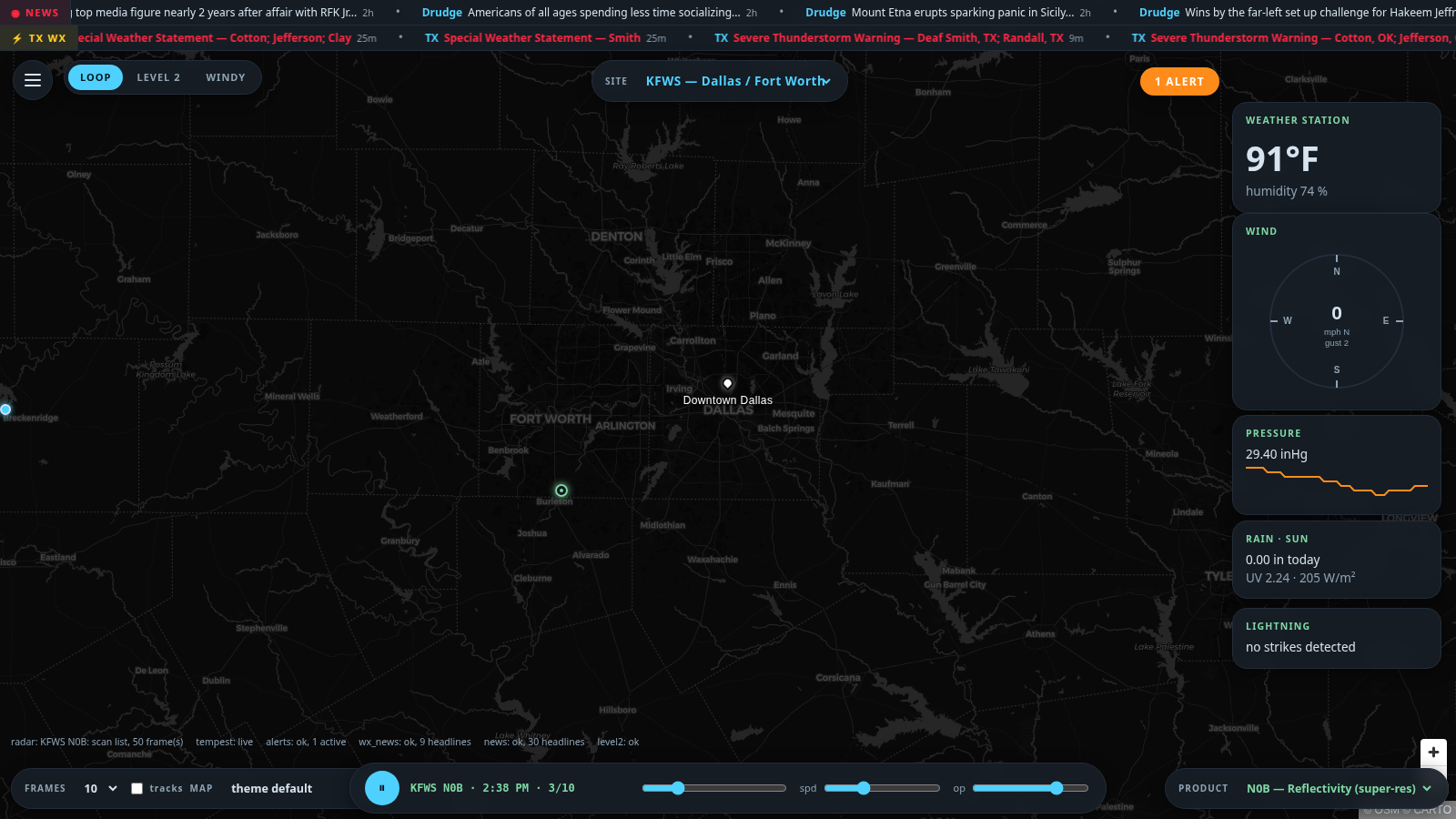
A self-hosted severe-weather console that combines your WeatherFlow Tempest station, NEXRAD radar (tile loops and raw Level 2 with WebGL rendering), NWS alerts, and news tickers in one themeable web dashboard. The v2 interface is a full-bleed MapLibre GL console — floating control dock, bottom timeline, collapsible telemetry drawer — with the radar rendered as a native GPU custom layer driven by the map's own projection matrix (architecture modeled on the RadarOmega platform design: server-side decode → binary polar artifacts → catalog API → client WebGL with LUT color tables and a prefetching timeline). Runs anywhere Docker runs; open it from any browser on your network at http://<host>:5555.
README
Tempest Radar
A self-hosted severe-weather console that combines your WeatherFlow Tempest
station, NEXRAD radar (tile loops and raw Level 2 with WebGL
rendering), NWS alerts, and news tickers in one themeable web
dashboard. The v2 interface is a full-bleed MapLibre GL console —
floating control dock, bottom timeline, collapsible telemetry drawer — with
the radar rendered as a native GPU custom layer driven by the map's own
projection matrix (architecture modeled on the RadarOmega platform design:
server-side decode → binary polar artifacts → catalog API → client WebGL
with LUT color tables and a prefetching timeline). Runs anywhere Docker runs; open it from any browser on your
network at http://:5555.
Radar architecture inspired by the excellent
Supercell Wx.
Live Tempest observations over WebSocket: wind dial (~3 s updates),
temperature, humidity, pressure trend, rain, UV/solar, real-time lightning
Click any card title for station history charts (24 h / 3 d / 7 d)
Tile radar loops (IEM) for any NEXRAD site with product switching, up
to 50 frames, opacity/speed controls, click-to-switch site markers
Level 2 mode: raw Archive II volumes decoded server-side with MetPy
into compact binary polar artifacts, served through a catalog API and
rendered client-side by a standalone WebGL core (static/radar-core.js)
drawn live in sync with the map — Mercator-correct per-pixel projection,
instant palette swaps, a smoothing toggle, every tilt and moment
(REF/VEL/SW/ZDR/RHO/PHI), a prefetching frame ring-buffer for animation,
and GR2Analyst-compatible .pal color tables in data/colortables/
Storm tracks: Level III storm-cell attributes (via IEM) plotted with
15/30/45/60-minute extrapolated motion tracks; TVS cells red, mesocyclones
orange — click any cell for motion, max dBZ, VIL, and hail
probabilities, with meso/TVS warning banners
Weather alert settings: per-event-type filtering across category tabs
(Storm Based / Tropical / Winter / Non-Precip / Hydro / Watches) — hidden
types vanish from the badge, banner, map, and sounds
Data overlays (free feeds, no API keys): SPC severe-weather outlooks
(today + tomorrow), mesoscale discussions, SPC watch outlines, local storm
reports, and METAR surface obs colored by flight category — all clickable
Custom locations: unlimited named pins added by address search or map
click, with optional photo pins (images stored server-side); click to
fly to any of them
Windy mode with a 40+ layer picker (radar, satellite, thunderstorms,
air quality, waves, fires, EFI indices) and altitude levels up to 150 hPa
Selectable color palettes per radar moment (NWS Classic, Viridis,
Grayscale built in) with instant recolor, plus GR2Analyst-compatible
.pal files in data/colortables/ that appear in the picker by filename
17 basemaps: CARTO dark/light (± labels), a dark · streets + towns
hybrid (black canvas with bright roads and labels drawn above the
radar), Esri gray canvases, streets, topo, National Geographic, USGS
topo/imagery, OpenTopoMap, OpenStreetMap, satellite, satellite + roads
Fully customizable layout: every panel is movable, resizable, and
hideable via edit mode (✎) with UI scale, panel opacity, and layout
export/import — nothing on screen is static
NWS alerts with severity banner, map polygons, and optional sounds
Two configurable tickers: breaking news (RSS) + severe weather scoped to the selected radar site's state (NWS alerts, with RSS fallback)
Weather wall (TV mode) at /wall: a fullscreen grid dashboard —
Windy embeds (radar, satellite, wind, gusts, waves, rain, temp, clouds,
pressure), live aircraft (ADS-B Exchange), ships (VesselFinder), your
station's live data, clock, moon phase, NOAA tide curve, and an alert
status strip; tiles and column count are configurable and persist
Five built-in themes + custom themes via data/themes.json
Draggable sidebar cards, resizable radar pane, many basemaps
(dark/light/satellite/streets/terrain)
Privacy by default: your station's real name is never displayed, the
map/alerts can use any address you type instead of your exact coordinates,
and the station marker can be hidden
Quick start
git clone
cd tempest-radar
docker compose up -d --build
Open http://localhost:5555 — the settings menu (⚙) opens automatically on
first run. Enter your Tempest station ID (from your station's URL at
tempestwx.com) and a personal access token
(tempestwx.com → Settings → Data Authorizations). Optionally type an address
for alerts/map centering, set a display label, and customize the ticker
feeds. Everything persists in the data/ volume; no rebuild needed.
Windows (no Docker needed)
Download TempestRadar.exe from the
Releases page and double-click it. The app runs from the
system tray (green radar icon): right-click it to open the console, the
wall, your data folder, or to quit. Your settings and radar cache live in
%LOCALAPPDATA%\TempestRadar.
First-run notes:
SmartScreen may warn about an unsigned app — click More info → Run
anyway.
Allow the Windows Firewall prompt if you want to open the wall from a
TV or another device on your network (http://:5555/wall).
To build the exe yourself: pip install -r windows/requirements-win.txt
then pyinstaller windows/TempestRadar.spec (also runs automatically in
GitHub Actions on every v* tag).
Configuration
All settings live in the in-app menu. Power users can also edit
data/config.json directly (see data-example/), add custom themes in
data/themes.json, and drop radar color tables into data/colortables/.