
Rebased
A git client based on the IntelliJ platform.
Motivation
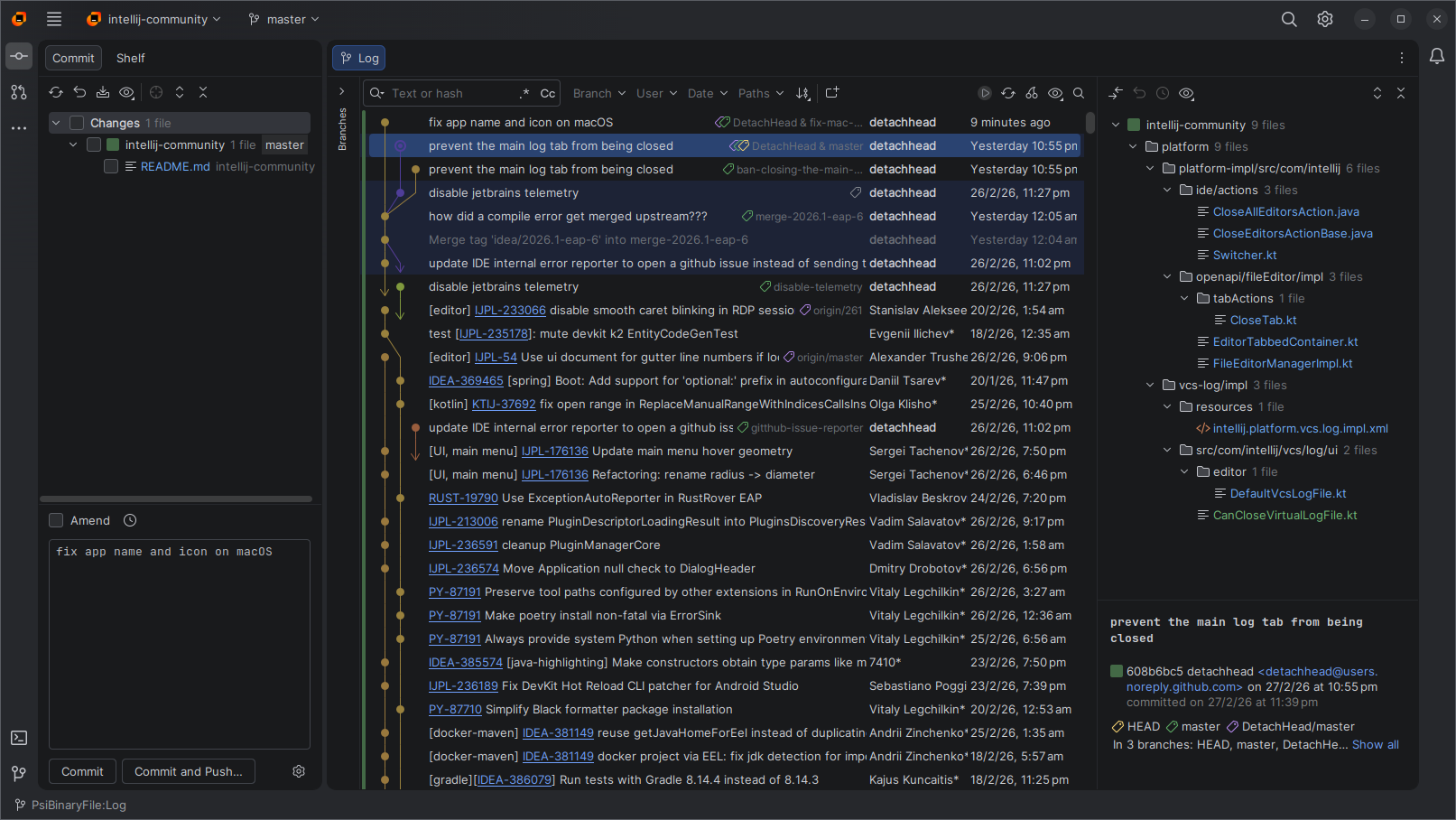
Rebased is an open-source remake of the short-lived jetbrains git client.
It's basically just a JetBrains IDE with all the bundled plugins removed except the git integration, with some additional UI tweaks.
See this youtrack issue for the many reasons people have been requesting this for almost a decade. At the time of writing, it's the #3 most upvoted open issue on YouTrack.
Installation
Linux
We recommend installing the AppImage with with AppManager to install it to your applications menu, and for automatic updates:
Alternatively you can download the .tar.gz from GitHub Releases
Windows
Alternatively you can install via winget:
winget install detachhead.rebased --source winget
<a href="https://signpath.io/"><img src="https://signpath.org/assets/favicon-50x50.png" alt="SignPath" width="32" /></a>
Free code signing on Windows provided by <a href="https://signpath.io/">SignPath.io</a>, certificate by <a href="https://signpath.org/">SignPath Foundation</a>
macOS
Install with homebrew:
brew install detachhead/tap/rebased
Alternatively you can download the .dmg manually:
> [!WARNING]
>
> When installing the .dmg manually, you may see the following error message after copying Rebased.app to your Applications folder:
> > "Rebased.app" is damaged and can't be opened. You should move it to the Bin.
>
> This is Apple lying to you. Nothing is "damaged", it's just not code-signed with an Apple Developer certificate. To fix it, run the following command:
> bash > xattr -rd com.apple.quarantine /Applications/Rebased.app >
Exclusive Features
In addition to all the git-related features from IntelliJ IDEA Community Edition, Rebased has some additional features which aren't available in any of the official JetBrains IDEs.
Customizable git log location
By default, the git log in Rebased is located in the main editor window, as the graph is typically the main focus of a git GUI client.
However, if you prefer it to be in the tool window at the bottom like in JetBrains IDEs, you can disable this behavior:
- Go to Settings > Version Control > Log
- Uncheck "Show the log in the editor window"
Option to disable the .idea directory
Unlike the .vscode directory, most of the config files generated by JetBrains IDEs are unfortunately not suitable to commit, as they often contain device-specific file paths that don't work if shared with other members of your team.
Rebased is intended to be used with a wider variety of projects, which means you're more likely to use it with repos that weren't intended to be opened in a JetBrains IDE. This means .idea config files aren't committed nor are they excluded in .gitignore. This results in Rebased generating unwanted config files most of the time.
To address this problem, Rebased allows you to disable the creation of the .idea directory in the project root:
- Go to Settings > Appearance and Behavior > System Settings
- Uncheck "Store project settings in the project root directory"
> [!NOTE]
> This does not disable project-level config. Instead, Rebased will store each project's config inside a single centralized .idea directory in the same place as the IDE's global settings.
Option to disable indexing
In order for the search feature to work reliably, JetBrains IDEs will scan and index all the files in your project. You can disable the indexing if you don't need to search your project with Rebased, if for example you use a separate IDE that has its own search functionality:
- Go to Settings > Appearance and Behavior > System Settings
- Uncheck "Enable indexing files for search"
> [!NOTE]
> This does not entirely disable project analysis, as some scanning is still needed in order for Rebased to be able to track unversioned files to show in the git changes list.
Additional TextMate bundles
IntelliJ Community Edition includes syntax highlighting for many languages, even when their corresponding language plugin is not installed, thanks to the TextMate Bundles plugin.
Unfortunately however, syntax highlighting is only available for some languages in their respective paid plugins/IDEs.
One of the goals of Rebased is to prevent users from having to install bloated plugins when they only want basic editor/git functionality, so we ship some additional TextMate bundles that aren't present in IntelliJ:
(currently only one language, but feel free to open an issue or PR for others)
Plugins
Compatibility disclaimer
While installing plugins from the marketplace is supported, note that many of the core components otherwise present in every JetBrains IDE are disabled in Rebased. This means some plugins may not work properly (or at all) if they depend on such components.
If you encounter any problems with a git-related plugin, you may open an issue, but keep in mind:
- issues about language specific-plugins or other plugins that aren't related to git functionality are likely to be considered out-of-scope for Rebased, but will be assessed on a case-by-case basis
- if fixing an issue with a git-related plugin requires re-enabling bloated IDE features that should otherwise not be required in a git client, it may still be considered out-of-scope
For plugin developers
If you need to debug your plugin in Rebased, the IntelliJ platform gradle plugin supports debugging with a local instance of the IDE. You can configure it to use Rebased.
> [!NOTE]
> If you're on linux using the AppImage, you'll have to either extract or mount it first. If you're using AppManager, you can click "Extract AppImage". Alternatively you can run ./Rebased.AppImage --appimage-mount to mount it instead.
>
> Once mounted/extracted, set the local path to the usr directory inside the AppImage's filesystem, for example:
> kts > dependencies { > intellijPlatform { > local("/tmp/.mount_Rebaseccgcph/usr") > } > } >
Contributing
See CONTRIBUTING.md
Credits