deskHPSDR by DL1BZ for OpenHPSDR protocol 1 & 2
Do you like software from developers who can really code instead of just relying on "vibe coding"?
Do you want to use your SDR with an app that doesn't force you to register online just because you want to operate your SDR radio?
Then welcome to the right place - the good old world with an app made by human, not by machines.
deskHPSDR by DL1BZ is an mature Open Source desktop application for Hamradio OpenHPSDR SDR transceivers that has been under active development for years. SDR devices based on the OpenHPSDR protocol P1 or P2 are fully supported and both protocol versions are fully supported. It is designed and built as an advanced SDR transceiver front-end application for macOS, Linux and WINDOWS for "every-day-use" and runs now extremely stable and reliable. deskHPSDR is largely based on the WDSP software library by Warren C. Pratt (NR0V) - by using the same WDSP functions (e.g. PureSignal, Broadcast Quality CFC Audio Tools) and get the same results in comparison with other WDSP-driven Apps like Thetis.
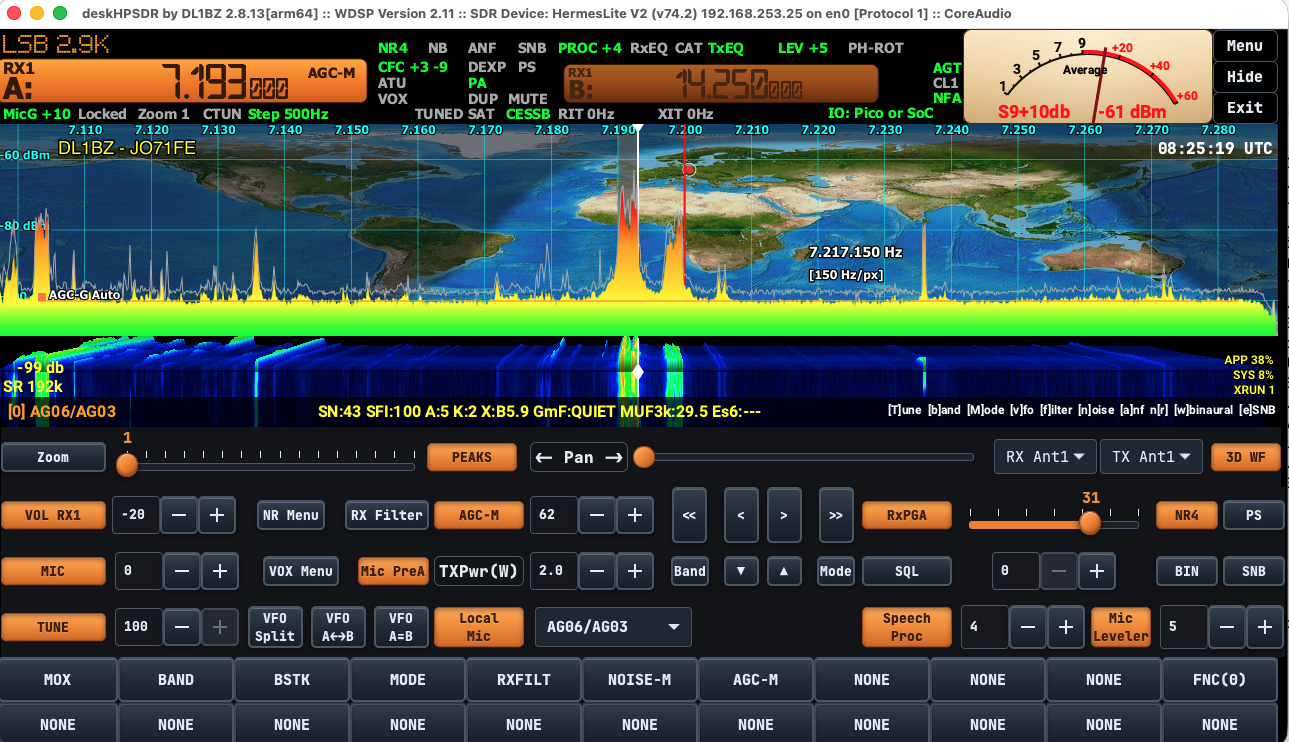
What you get with deskHPSR and what you don't get
deskHPSDR is a solid, long-term developed SDR application for SDR devices, which work with OpenHPSDR protocols P1 and P2, mostly via Ethernet. The codebase go back until 2016, when John Melton/G0ORX was publishing the first version of pihpsdr. deskHPSDR isn't "new, AI generated hot stuff" - it's a solid, handmade application written in C. Written from people, they understand a lot of programming, are licensed ham-operators and have a huge knowledge in SDR technology. They known the supported SDR hardware very good for which this application is written. Means, the developer think always as hamradio operator, how could the app work at best in hamradio as SDR transceiver frontend. For that - exactly for that - deskHPSDR is made and thought. Clear concept with a clear focus as SDR application for use in hamradio.
What isn't deskHPSDR and what will it never be?
This app is not made as a "super-duper all-in-one I can all in hamradio" application. If you want such an app, your are here at the wrong place - then you have to move on and look around elsewhere. The base concept of deskHPSDR is modular, not compact. No integrated logbook, no integration of digimodes and other things, where we have yet much better applications since long time for that. However, there are the necessary interfaces to connect such specialized programs to deskHPSDR, which serves as the transceiver application. This gives every user the option and freedom to use their favorite apps with deskHPSDR. Everything is possible, nothing is mandatory. deskHPSDR will never have support for any kind of SOAPY-API driven SDR devices, RTL based SDR devices or similar SDR devices. Only SDR devices with TX functionality running OpenHPSDR protocol P1 or P2 and based on the well-known OpenHPSDR platforms like HERMES, ORION, ANGELIA, SATURN etc. are supported. You don't get a measurement tool with deskHPSDR, you get a SDR transceiver frontend app.
Last but not least - deskHPSDR is Open Source and a pure hobby project, means, you can use it without any costs, you can take and modify this app as you want. Not included is any kind of personal app support.
deskHPSDR ≠ pihpsdr: new app, revised concept, new name
The very first codebase of deskHPSDR was forked ONCE from DL1YCF's pihpsdr codebase in October 2024 without any backward dependencies to pihpsdr.
A large part of the old pihpsdr code is rewritten now and/or replaced with my new own code. That means, today deskHPSDR can no longer be described as a fork of pihpsdr. The "pi" was removed from the app's name consciously, the reason why is explained later.
The concept behind - what it's make for and what it isn't for
My goal was to make an more optimzed version running with focus on Desktop-OS like Linux and macOS, what means I don't support small displays less as 1280x600.
⚠️☝️ Single-board computers such as the Raspberry Pi and similar platforms are not within the scope of deskHPSDR development. Hardware-specific features such as GPIO are not available on standard desktop systems. Therefore, I don't want to add functionality that is only usable by a small subset of users. My goal is to keep the application focused on features that are available and useful across all supported desktop platforms. That means there will be no exceptions.
Soapy SDR and GPIO code and support is official REMOVED now.
| Feature | Current deskHPSDR version 2.8 | Notes |
|---|
| TCI CAT | supported ✅ | TCI 2.0 |
| TCI Audio | supported ✅ | TCI 2.0 |
| TCI I/Q | supported (48k/96k/192k/384k) ✅ | TCI 2.0 |
| PTT external | supported (via serial RTS/CTS or MIDI) ✅ | |
| MIDI Control | supported using RTmidi library ✅ | |
| Hamlib | supported (with own included rigctld) ✅ | |
| CW | supported ✅ | via MIDI & TCI |
| OpenHPSDR protocol 1 | supported ✅ | |
| OpenHPSDR protocol 2 | supported ✅ | |
| GPIO | GPIO code removed since V2.7 ❌ | |
| Soapy API / Soapy protocol | Soapy code removed since V2.7 ❌ | |
| Hermes Lite 2 N2ADR IO board | supported ✅ | |
| Use WDSP library ? | yes, current 2.11 ✅ | |
| Pure Signal / Pre-Distortion | supported up to 192k samplingrate ✅ | |
| Noise Reduction | NR1 - NR4 + NNR available ✅ | NNR high CPU load |
| CAT over TCP | supported (TS2000 & PowerSDR emulation) ✅ | |
| integrated Client-Server Mode | not supported ❌ | will never come. |
| IF Mode / Panadapter mode | not supported ❌ | will never come. |
| Hermes Lite 2+ expansion board | supported ✅ | |
| Bright / Dark Theme support | yes ✅ | |
| Screen Resolution | min. 1280x600 or higher 🚨 | |
| Input devices | Touchscreen, Mouse, Keyboard, MIDI | |
| OS support (64bit OS required) | macOS (15 or higher) ✅, Linux ✅, WINDOWS ✅ | |
| using Virtual Environments (VE) | not supported ❌ | use native OS |
| Audio backend | CoreAudio (macOS), miniAudio (macOS & Linux) | |
| Audio devices support | mono,stereo (only 48kHz audio rate supported) | no resampling |
| TX Audio Monitor | supported ✅ (since 2.7.39) | Pre & Post |
| DX Cluster support | yes, inclusive show Spots on RX Panadapter ✅ | |
| RBN support | yes, inclusive show Spots on RX Panadapter ✅ | |
| SDR TX support | yes, fully supported ✅ | |
| Used UI framework | GTK3 | |
| Programming language | C, partially Objective C/Swift (macOS only) | |
| Supported Compiler | clang (recommended), gcc | |
| App Publishing | primarily as Source code only (Linux) except | |
| Setup package (WIN) & App Bundles (macOS) | |
Other useful app features (availability depend from used SDR device):
- Noisefloor adjustment automatic for Panadapter ✅
- SDR device auto-detection ✅
- Autogain adjustment and ADC overflow protection (Hermes Lite 2 only) ✅
- Keyboard shortcuts (pre-defined) ✅
- Open Collector support (RX, TX, Tune) via OpenHPSDR protocol ✅
- Antenna selection (if SDR support this) ✅
- Transverter Support ✅
- External PTT support (e.g. footswitch) via MIDI or Serial port (RTS/CTS) if available ✅
- Full RX- and TX-WDSP Audio chain support (RX/TX-EQ, Leveler, CESSB, Limiter, CFC, Speech Processor, DEXP) ✅
- network optimizations if using WiFi for OpenHPSDR protocol P1 or P2 ✅
- 2 VFO, up to 2 Receiver and 1 Transmitter
- VFO split, swap, RIT/XIT supported ✅
- Save TX DRIVE and TUNE DRIVE per band, Bandstack available
- verified Digimode app compatibility: WSJT-X PLUS Improved, JTDX, JS8CALL, WSJT-Z, MSHV, cwTCI, rttyTCI ✅
- verified Log app compatibility: RumLogNG (using TCI) ✅
- options for display current solar data for propagation and Greyline DX window ✅
- Panadapter refresh rate adjustment (max. 60fps, prevent very high CPU consumption❗)
- 3D history waterfall (higher CPU consumption +10%❗)
- some special SDR device-specific options supported 🔥
The app focus is fonie/SSB & digimodes, less CW. deskHPSDR has more added options integraded from the WDSP library like pihpsdr, especially tools for the WDSP RX and TX audio chain, and they are all user-acessible and user-adjustable (pihpsdr has many things only "hardcoded" without user-access). deskHPSDR support max. two RX and one TX, although some SDR hardware supports more, like the Hermes Lite 2 with up to four RX slices.
⚠️☝️ The support for commercial SDR products is very limited, because I don't accept and reject any kind of NDA aka "Non-Disclosure Agreement" for development deskHPSDR to support such SDR devices.
deskHPSDR need a screen size 1280x600 at minimum or higher for best GUI experiences, that's one of the difference against piHPSDR.
My main focus of deskHPSDR development is macOS, which is my primary development environment for deskHPSDR, but I support Linux and WINDOWS too. The second focus is Fonie/SSB/Digimodes and less CW.
Requirements
I recommend using deskHPSDR on macOS, it's also being focused and developed on this OS platform. It can be build and run under Linux too, but my recommendation remains unequivocally macOS for for stable and stress-free operation with deskHPSDR. macOS will also remain the only platform, where I provide ready-made app bundles without build them first. Same for WINDOWS, a setup package is provided too.
- modern Desktop-OS like macOS (15 or newer), Linux with installed developer tools like compiler, linker etc. or WINDOWS 10/11 64bit (32bit OS is not supported)
- minimum screensize/resolution support by deskHPSDR starts from 1280x600
- basic knowledge: how to use your OS, a shell, a text editor and how to compile applications from source code
- macOS only: please read the
COMPILE.macOS first, app bundles for ARM and Intel available
- Linux only: please read the
COMPILE.linux first
- WINDOWS: no self-compiling required, setup package available
- a SDR device or SDR transceiver, which supports HPSDR protocol 1 (older) like the Hermes Lite 2 or protocol 2 (newer) like the ANAN or similiar devices like Brick2/Brick3 series.
- a very good running network without any issues (Ethernet preferred, WiFi not recommended) and a DHCP server inside (without DHCP is possible too, but more complicated or difficult working with the SDR devices)
- for Hermes Lite 2 specific notes look into the
Notes_if_using_HERMES-Lite-2.md
- if want using a Raspberry Pi: Revision 5 (aka "Pi5") with >= 8GB RAM is strongly recommended, but deskHPSDR is not optimized for such SoC. Older 32bit OS for Raspberry Pi are not supported, the code is designed for 64bit environments
- ⚠️ running deskHPSDR inside Virtual Environments (VE) is not supported, use ever native hardware for running deskHPSDR
I want use now deskHPSDR. What I need to do ?
deskHPSDR is published basically like the most Open Source applications as source code only. You need to clone this Github repository and compile the app before you can use it. Please read all included instructions carefully to avoid installation errors by yourself. Additional notes you can find too under the discussion tab of this project. Please have a look there too from time to time.
Binaries are available for macOS and WINDOWS, but I will never publish any ready-compiled binaries or appimages for Linux. Look into the release section of deskHPSDR.
deskHPSDR follows a clear app concept
deskHPSDR is under my active development.
⚠️☝️ I'm the solo maintainer of this project deskHPSDR, there is no developer team behind. This app is MY OWN interpretation how such an SDR TRX app should work. I alone make all the design decisions.
First I'm creating this app exclusively for my own purposes, not for a community. I am not interested in what other SDR apps might do better, nor do I care how many active users deskHPSDR has. Those who like it are free to use it.
During publishing this app as Open Source, I'm ready to share my own work and development with interested users or interested communities. However, this does not give rise to any demands or claims for anyone, but I'm open for useful user requests. That doesn't mean, that I accept every user request.
Management of user requests - read first before make a user request
I only accept user requests, if they
a) fit the concept and
b) are useful to everyone
c) running with all supported OS (macOS, Linux and WINDOWS).
I decline requests for "only one user" functions and regarding the following questions:
- provide ready-to-run binaries for Linux (regardless of the form) -> NO
- supporting SDR devices, which don't work with OpenHPSDR protcols P1 or P2 -> NO
- add any kind of additonal build-in or special client-server-support like pihpsdr -> NO
- help for solving OS problems, if these in my assessment do not directly concern deskHPSDR -> NO
Especially Linux environments are highly fragmented and differ from distribution to distribution, so I cannot guarantee that deskHPSDR will run on just any Linux distribution. I test only and exclusively Debian-based environments - but I’m not interested in anything else.
macOS is first choice
deskHPSDR is primarily developed for and under macOS. Made as an cross-platform app, it runs on Linux and on WINDOWS too.
Latest Changes
CHANGES are located in the Discussions tab, category CHANGELOG deskhpsdr.
Version 2.6.x (previous version, EOL May 2026)
On March 4, 2025 the first final version 2.6 of deskHPSDR was published.
Version 2.7.x (previous version, EOL mid of September 2026)
First version 2.7 was published in May 2026.
Version 2.8.x (current version)
Current development start from version 2.8 in September 2026.
Most of the new functions need to be activated in the make.config.deskhpsdr as compiling option. Please look in the beginning of the Makefile and set the needed options only in make.config.deskhpsdr, but don't modify the Makefile itself !
Support: Issues and Discussion tab at Github for this project - read carefully !
- the Issues tab is only for reporting issues, bugs or malfunctions of this app !
- for all other things please use necessarily the discussions tab
Known problems if using Git for update the code base at your local computer
From time to time I need rebase the deskHPSDR repository. This can break using git pull for update deskHPSDR.
Please make sure you set:
$ git config pull.rebase true
In the Makefile I add a comment "don't edit this Makefile". That's I mean so. I'm now add the editable, additional file for this called make.config.deskhpsdr.
If git pull failed, you can try this:
$ git pull --all
$ git reset --hard origin/master
$ git pull --all
This overwrite ALL local changes you are made, which are different from my current repo at Github.com and set the status equal between local and remote.
If this not help, please delete the complete codebase of deskHPSDR and clone it again, then you have a fresh current copy.
So far, deskHPSDR has been successfully tested on the following systems:
- Macbook Air M1 running macOS 27 aka Golden Gate
- Mac mini M4 2024 running macOS 26 aka Tahoe
- Intel iMac 21" i5 running macOS 15 Sequoia
- old Macbook Pro i7 & FUJITSU Desktop PC running Linux Mint "Faye" Debian-Edition
- Raspberry Pi5 & CM5 with NVMe SSD running current official 64bit PiOS ("Trixie") and X11 environment (no Wayland!)
- Lenovo Desktop PC i5 16GB 2TB SSD NVIDIA Quadro running WINDOWS 11 Pro
- HUAWEI Notebook 16" i5 16GB 512GB SSD running WINDOWS 11 Pro
- DELL Notebook 13" i7 16GB 512GB SSD running WINDOWS 11 Pro
All radio tests are made with my Hermes Lite 2 SDR-Transceiver using OpenHPSDR protocol P1 and
my two Brick2 14bit SDR transceivers with P2 OpenHPSDR protocol under macOS.
It is not possible for me to check ALL types of OpenHPSDR SDR devices.
Credits
Big thanks and huge respect to all involved developers for their work on pihpsdr and make the application accessible as Open Source under the GPL. Many thanks also to the users who gave me feedback and reported issues which I hadn't noticed by myself.
Special thanks to:
- my lovely wife any my family for her great patience and understanding
- John/G0ORX, Steve/KA6S & Jae/K5JAE, Christoph/DL1YCF: pihpsdr development
- Dr. Warren C. Pratt/NR0V for the great software library WDSP, the "heart" of our deskHPSDR application
- Anton (developer of Brick SDR series) for share his technical documentations with me for add stable Brick SDR support
- OpenAI/ChatGPT for brainstorming, code optimizations and save me a lot of time in development
- all of the active users and contributors for support deskHPSDR
Using Github as mirror
Github.com hold not the primary Git repository of deskHPSDR, it act's only as mirror and support platform. Not all deskHPSDR branches are and will be available at deskHPSDRs Github.com project page.
Exclusion of any Guarantee and any Warrenty and limited Support
This program is free software: you can redistribute it and/or modify it under the terms of the GNU General Public License as published by the Free Software Foundation, either version 3 of the License, or (at your option) any later version.
This program is distributed in the hope that it will be useful, but WITHOUT ANY WARRANTY; without even the implied warranty of MERCHANTABILITY or FITNESS FOR A PARTICULAR PURPOSE. See the GNU General Public License for more details.
All what you do with this code is at your very own risk. The code is published "as it is" without right of any kind of support or similiar services.
This project is not affiliated with or endorsed by Apache Labs, FlexRadio Systems, ramdor/Thetis, mi0bot/Thetis or the OpenHPSDR project.
deskHPSDR is also in no way connected to the current pihpsdr development. Both are independent developments with different concepts and goals.
There are no rights or obligations to get any kind of user support for deskHPSDR from me, I publish only the app source code "as it is".