dygmate
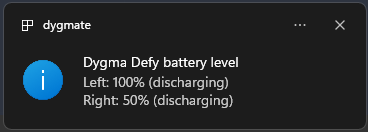
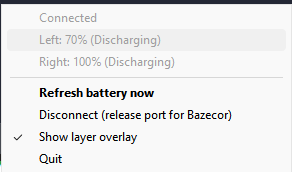
Battery status for Dygma wireless keyboards — the Defy, the Raise 2, and the
Sonsei — right in your system tray, over RF and Bluetooth, on Windows and Linux. Right-click for the menu, and get an optional on-screen overlay when you
switch layers.

Install
Windows
Until dygmate is on winget, paste this in PowerShell — it downloads the latest
release, verifies it against SHA256SUMS.txt, and installs to
%LOCALAPPDATA%\Programs\dygmate.
Download, verify, and extract:
$d="$env:LOCALAPPDATA\Programs\dygmate"; New-Item -Force -ItemType Directory $d | Out-Null
$rel=curl.exe -s https://api.github.com/repos/dlnilsson/dygmate/releases/latest | ConvertFrom-Json
curl.exe -sL -o "$env:TEMP\dygmate.zip" $rel.assets.Where({$_.name -like '*windows-x86_64.zip'}).browser_download_url
$sums=curl.exe -sL $rel.assets.Where({$_.name -eq 'SHA256SUMS.txt'}).browser_download_url
if ((Get-FileHash "$env:TEMP\dygmate.zip").Hash -notin ($sums -split '\s+')) { throw 'SHA256 mismatch' }
tar.exe -xf "$env:TEMP\dygmate.zip" -C $d
To update to the latest release later, just re-run this block.
Add it to your user PATH:
if (([Environment]::GetEnvironmentVariable('Path','User') -split ';') -notcontains $d) { [Environment]::SetEnvironmentVariable('Path', "$([Environment]::GetEnvironmentVariable('Path','User'));$d", 'User') }
Create a Startup shortcut and launch the tray:
$s=(New-Object -ComObject WScript.Shell).CreateShortcut("$env:APPDATA\Microsoft\Windows\Start Menu\Programs\Startup\dygmate-tray.lnk"); $s.TargetPath="$d\dygmate-tray.exe"; $s.Save()
Start-Process "$d\dygmate-tray.exe"
Linux
AUR
yay -S dygmate-bin
The package installs the udev rule and the dygmate-tray user service, so you
can skip the manual steps under Linux setup — just replug the
keyboard and enable the service:
systemctl --user enable --now dygmate-tray.service
Build
Requires Zig 0.16.0.
Build for the host (produces the CLI dygmate and the tray dygmate-tray):
zig build -Doptimize=ReleaseSmall
Cross-build both platforms at once into zig-out/{windows,linux}/:
zig build release
Run the tray directly:
zig build run-tray-linux   # Linux
zig build run-tray         # Windows
Status bar integration (yasb, waybar, ...)
While dygmate-tray runs it serves its latest battery snapshot over local
IPC, one JSON line per connection:
- Windows: named pipe
\\.\pipe\dygmate
- Linux: unix socket
$XDG_RUNTIME_DIR/dygmate/status.sock
# Windows
cmd /c more < \\.\pipe\dygmate
# Linux
socat -u UNIX-CONNECT:$XDG_RUNTIME_DIR/dygmate/status.sock -
{"state":"connected","connected":true,"model":"Dygma Defy","sides":2,
 "left":{"level":80,"status":"discharging","text":"80% (discharging)"},
 "right":{"level":75,"status":"charging","text":"75% (charging)"},
 "level":75,"text":"75%","low":false,"updated":1752669000}
state is missing/available/connected/paused; level/text is the
lower of the visible sides (what the tray icon shows, null/"--" before the
first reading); sides is 1 on the Sonsei; a side awaiting verification after
wake reports level: null and "?% (...)". When every battery-reporting side
is explicitly disconnected (firmware status 4) while connected, each side
keeps its last-known level but the aggregate level/text reads null/"?",
matching the tray icon's ?; the stale per-side number is no longer surfaced as
the headline. On disconnect at the USB level the last-known levels stay, marked
"connected": false. The endpoint disappears when the tray exits, so a missing
read means "tray not running".
Readings come from the tray's plausibility-gated pipeline — the same numbers
the tray shows — and reading the pipe never touches the keyboard's serial
port, so it composes with the running tray (unlike polling dygmate --once,
which needs the exclusive port for itself).
Example
yasb
yasb widget (config.yaml; prefer more <
over type — cmd's type pre-opens the path to probe it, which can race the
pipe server's listener re-arm):
# config.yaml
widgets:
dygma:
type: yasb.custom.CustomWidget
options:
label: " {data[text]}"
label_alt: " L {data[left][text]} R {data[right][text]}"
class_name: dygma-widget
exec_options:
run_cmd: 'cmd /c more < \\.\pipe\dygmate'
run_interval: 30000
return_format: json
hide_empty: true # tray not running -> widget hidden
callbacks:
on_left: toggle_label
/* style.css Dygma keyboard battery (dygmate) */
.dygma-widget:hover {
    background-color: var(--yasb-white-alpha-08);
}
.dygma-widget .icon {
    padding-right: 4px;
}


"custom/dygma": {
    "exec": "socat -u UNIX-CONNECT:$XDG_RUNTIME_DIR/dygmate/status.sock - 2>/dev/null | jq --unbuffered -c '{text: .text, tooltip: (.left.text + \" | \" + .right.text), class: (if .low then \"low\" else \"\" end)}'",
    "return-type": "json",
    "interval": 30
}
Debugging: the events feed
dygmate-tray also serves a live debug events stream — a separate endpoint
from the status snapshot above — so you can watch what the neuron actually
sends without a log file:
- Windows: named pipe
\\.\pipe\dygmate-events
- Linux: unix socket
$XDG_RUNTIME_DIR/dygmate/events.sock
Tail it with the CLI (a read-only client — it never touches the serial port, so
it runs alongside the tray):
dygmate tail          # pretty, hides the 250ms layer poll
dygmate tail --all    # include the layer-state poll traffic
dygmate tail --raw    # NDJSON, one event per line, for jq
20:14:17.139 reading    raw L100/R?  ->  acc L?/R?  [suspect]
20:14:32.708 reading    raw L100/R?  ->  acc L100/R?
20:14:33.001 state      missing -> connected
20:14:41.550 focus_rx   <- wireless.battery.left.level = "87" (1ms)
20:15:02.114 force_read  forceRead issued
Each line is one NDJSON event (envelope {"t","seq","ts", ...}):
focus_tx / focus_rx / focus_err — every Focus command sent to the
neuron and its response (with round-trip ms), i.e. the raw wire.reading — a battery read through the plausibility gate: the raw wire
reading, the accepted (gated) reading, and the verdict (suspect,
needs_verification, authoritative). This is where you see the neuron's
bogus post-wake 100 being held until it's confirmed.state — connection-state transitions (missing/available/connected/paused).force_read — the RF re-poll lifecycle (issued/settled/failed).wake — the machine woke; the sides are re-guarded.dropped — the events ring lapped a slow reader (n events lost).
The endpoint serves one subscriber at a time and replays the last ~1 min of
retained events as backlog on connect, then streams live. Pipe the raw form to
jq to filter, e.g. only battery reads:
dygmate tail --raw | jq -c 'select(.t == "reading")'
Linux setup
Start dygmate-tray from your compositor's autostart, or enable the packaged
user service:
systemctl --user enable --now dygmate-tray.service
The service uses the user manager's session D-Bus and device permissions. If
you want the optional layer-shell OSD on Wayland, make sure the user manager
also receives the Wayland environment. Run this from your compositor's
autostart (or once in a terminal inside the Wayland session), then restart the
service:
systemctl --user import-environment WAYLAND_DISPLAY XDG_RUNTIME_DIR
systemctl --user restart dygmate-tray.service
Serial port permissions
The keyboard shows up as a CDC-ACM serial device (/dev/ttyACM0). By default
it's owned by root and a serial group, so a normal user can't open it and
dygmate reports:
failed to open /dev/ttyACM0 (AccessDenied) ...
Fix it in one of two ways.
Add your user to the serial group (simplest). Check the device's group
first:
ls -l /dev/ttyACM0 # e.g. crw-rw---- root uucp ...
Then join that group — uucp on Arch, dialout on Debian/Ubuntu:
sudo usermod -aG uucp "$USER" # or: dialout
Log out and back in (or run newgrp uucp) for it to take effect.
Or install a udev rule (targeted to the Dygma, no group change, survives
replug). The AUR package already ships this rule — replug the keyboard and
skip this step. Manual install:
printf '%s\n' \
  'SUBSYSTEM=="tty", ATTRS{idVendor}=="35ef", ATTRS{idProduct}=="0012", TAG+="uaccess"' \
  'SUBSYSTEM=="tty", ATTRS{idVendor}=="35ef", ATTRS{idProduct}=="0021", TAG+="uaccess"' \
  'SUBSYSTEM=="tty", ATTRS{idVendor}=="35ef", ATTRS{idProduct}=="0031", TAG+="uaccess"' \
  | sudo tee /etc/udev/rules.d/99-dygmate.rules
sudo udevadm control --reload-rules && sudo udevadm trigger
TAG+="uaccess" grants access to the user of the active login session, so no
group membership is needed and it works for the tray too. Replug the keyboard
after adding or changing the rule.
Close Bazecor before running dygmate either way — the serial port is exclusive.