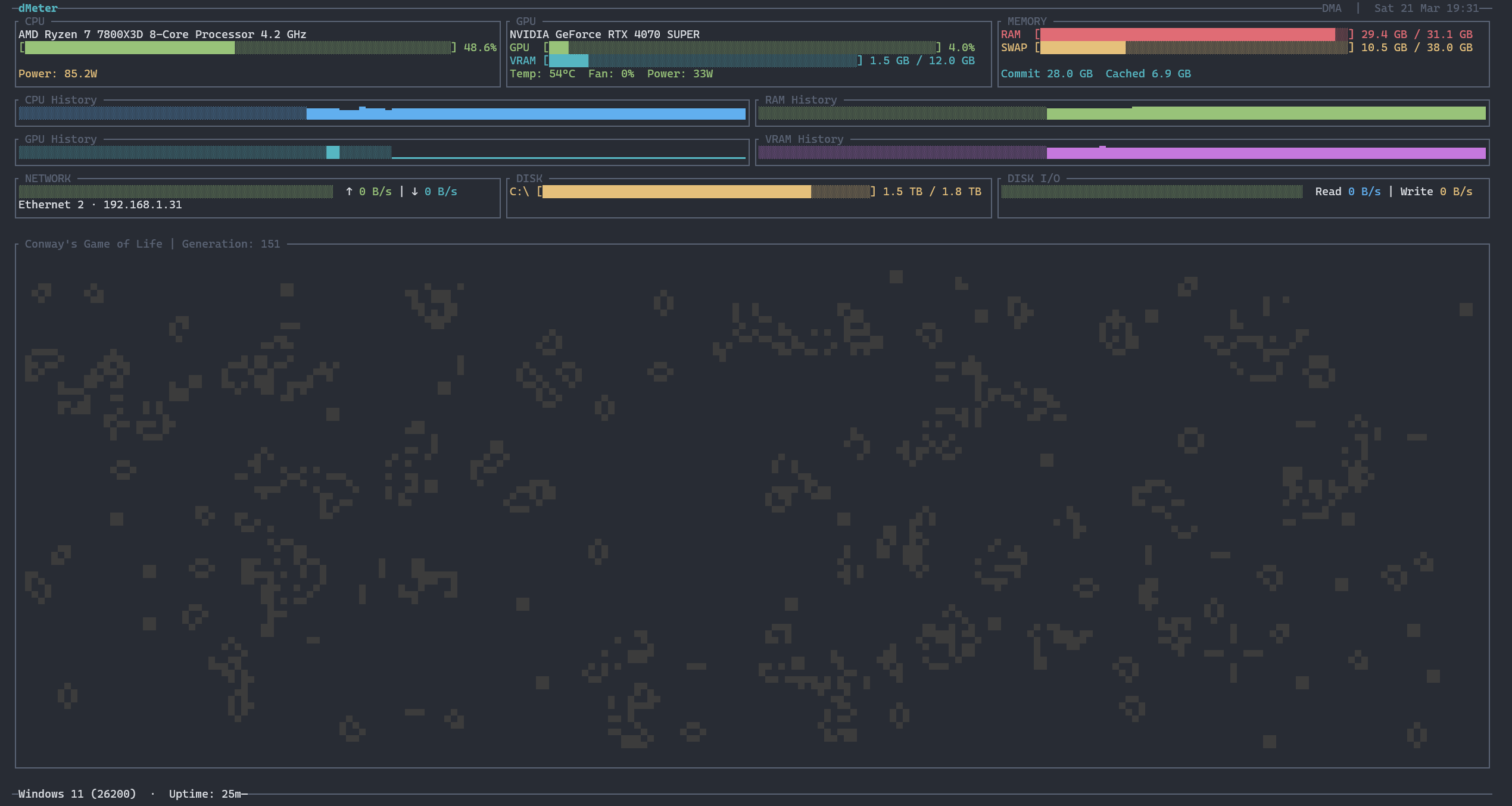
dMeter is a terminal system monitor designed to provide real-time insights into your computer's performance with a visually appealing interface. It includes Conway's Game of Life as its centerpiece, offering both monitoring capabilities and an engaging visual element.
Key Features:
Tracks CPU usage, memory consumption, GPU activity, disk space, network speeds, and disk I/O with detailed metrics.
Displays sparklines for historical data on CPU, RAM, GPU, VRAM, network, and disk I/O to analyze trends over time.
Automatically adjusts the interface when no GPU is detected, ensuring optimal use of space.
Features a process viewer sorted by resource usage, allowing users to switch between Conway's Game of Life and system monitoring.
Target Audience and Benefits:
Ideal for developers, system administrators, and tech enthusiasts seeking a distraction-free way to monitor their systems. dMeter provides essential performance data through its intuitive interface and real-time metrics, making it a reliable tool for those who value both functionality and visual engagement.
Available via the Windows Package Manager, you can install dMeter using the winget command line or deploy it in automated environments with ease.
README
dMeter
A fast, beautiful terminal system monitor built with Rust and Ratatui, featuring Conway's Game of Life as the centerpiece.
Features
Conway's Game of Life <3
System Monitoring
CPU: Real-time usage and effective clock speed (plus temperature, fan speed, and power on Linux)
Memory: RAM usage with progress bars and extended memory tracking (Windows)
GPU: NVIDIA GPU monitoring with VRAM tracking and history graphs
Disk: Multi-disk usage for all mounted volumes with responsive bars
Network: Real-time download and upload speeds with history sparklines
Disk I/O: Read and write speeds with history sparklines
Visualization
History Graphs: CPU, RAM, GPU, VRAM, Network, and Disk I/O sparklines
Game of Life: The star feature - mesmerizing cellular automaton with half-block rendering for 2x vertical resolution
Process Viewer: Toggle to view running processes sorted by resource usage (CPU + Memory) in a three-column layout
Color-coded Metrics: Intuitive color scheme for quick status assessment
Dynamic Layout: Automatically adapts UI when no GPU is detected - widgets expand to fill freed space
Responsive Design: Adapts to terminal size with proper spacing
Installation
Windows (winget)
winget install dramxx.dMeter
From Source
cargo install --path .
This builds and installs the binary to your Cargo bin directory (e.g., ~/.cargo/bin/ on Linux/macOS or %USERPROFILE%\.cargo\bin\ on Windows), making dmeter available globally in your PATH.
Prerequisites
Rust toolchain (1.88+)
For GPU monitoring:
Windows: NVIDIA drivers with NVML support
Linux: nvidia-smi command (NVIDIA drivers)
Usage
dmeter                    # Run with defaults (2-second refresh)
dmeter --interval 5       # Custom refresh interval (seconds)
Controls
q or Ctrl+C - Quit
r - Force refresh
g - Restart Game of Life
Space - Toggle between Game of Life and Process Viewer
Configuration
Config file location: ~/.config/dmeter/config.toml (Linux/macOS) or %APPDATA%\dmeter\config.toml (Windows)