Seek David Shnayder
Use this command to install Seek:
winget install --id=dusrdev.Seek -e A very fast filesystem searcher.
winget install --id=dusrdev.Seek -e A very fast filesystem searcher.
Seek is a cross-platform command-line file searcher built as a faster alternative to find.
It uses a concurrent worklist algorithm that is orders of magnitude faster than conventional file-tree walks. There are no indexes. No daemons. No warm-up ritual. Just point it at a directory and let it rip.
.NET global tool.Seek is for developers, power users, and anyone tired of waiting on filesystem search.
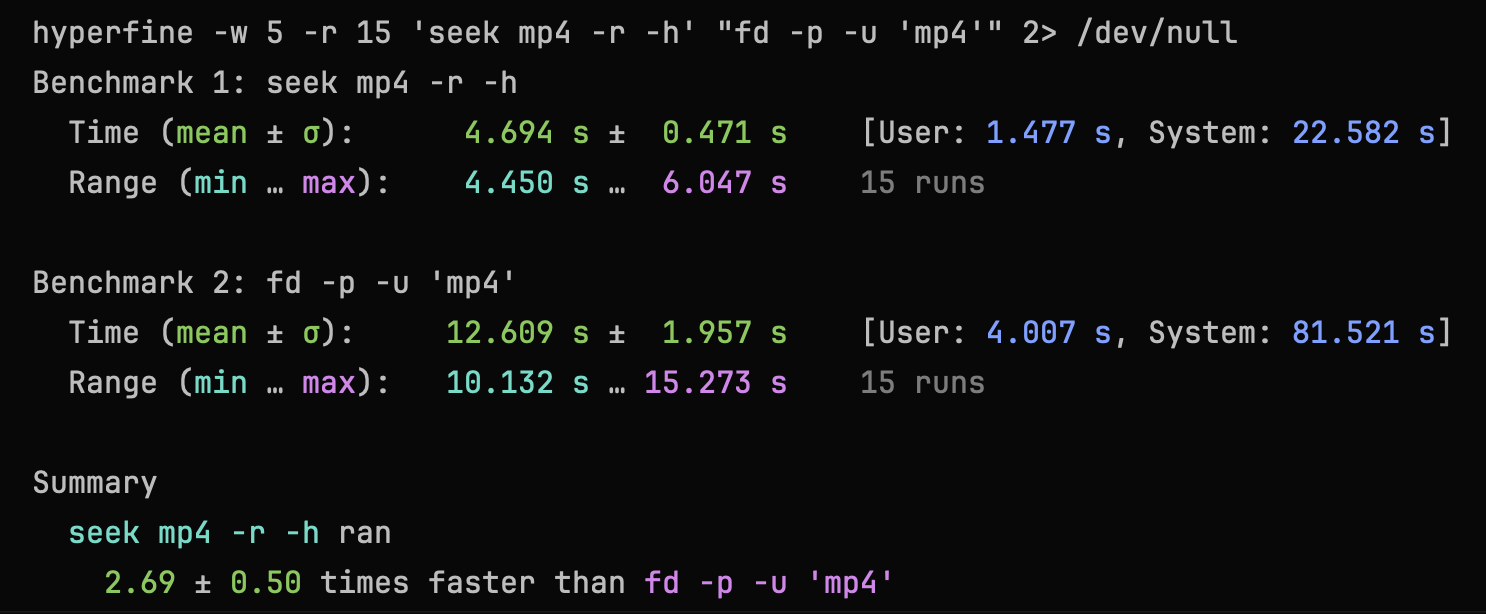
A real-world full-path regex benchmark for mp4 paths under the root directory showed Seek running 2.5-3.5x faster than rust-based fd:
winget install dusrdev.Seekdotnet tool install Seek --globalOn supported runtimes, NuGet resolves Seek's native AOT package for the current machine automatically. A framework-dependent Seek.any fallback package is also published for unsupported or generic environments.
This repo includes a reusable agent skill for path search with seek:
.agents/skills/seek-file-searchThe bundled metadata is directly usable by Codex and other agents that understand the same skill layout. For agents that use a different schema, the skill content can still be copied and adapted.
To install it into a global skills folder, copy that directory into your agent skills directory, for example:
cp -R .agents/skills/seek-file-search ~/.agents/skills/seek-file-search
The skill guides agents to prefer seek for filesystem path lookup instead of find, fd, or ls | grep, and to use rg only for file-content search. Cursor, Claude, and other agents with different skill formats will require user-side customization for now.
The positional argument is the search query.
By default, Seek matches against the path relative to --root and prints results relative to that root.
Search from the current directory:
seek report
Search from a specific root:
seek report --root /path/to/root
Example output:
src/Seek.Cli/Program.cs
tests/Seek.Core.Tests/FileSystemSearchTests.cs
Emit absolute paths instead:
seek report --root /path/to/root --absolute
Regex search:
seek ".*\\.cs$" --regex
Only files:
seek report --files
Only directories:
seek report --directories
Short flags:
seek report -f
seek report -d
Machine-readable output for piping:
seek report --null | xargs -0 rm
--null always emits plain absolute paths terminated by \0, so it is safe for piping even when names contain spaces or newlines.
Built-in delete command:
seek delete report
seek delete report --apply
seek delete ".*\\.tmp$" --regex --apply
seek delete uses the same search-selection options as the default search command: --regex, --case-sensitive, --hidden, --system, --files, --directories, and --root.
Without --apply, seek delete prints the final candidate list and a No changes were made... hint. With --apply, it deletes each candidate sequentially and prints an OK or FAIL status line for each path.
Add --no-progress to disable the live progress bar during apply runs.
Other useful options:
--case-sensitive--absolute to emit absolute paths instead of root-relative paths-f, --files to emit only file matches-d, --directories to emit only directory matches--plain for plain paths without ANSI escape sequences--null for NUL-terminated absolute paths that are safe to pipe into tools like xargs -0seek delete ... --apply for built-in deletion after previewseek delete ... --apply --no-progress for durable status lines without the live progress bar-h, --hidden to include hidden files-s, --system to include system filesdotnet build Seek.slnx
dotnet test --solution Seek.slnx