OpenSSH GUI






A cross-platform desktop application for managing SSH keys, known hosts, and authorized keys — built with Avalonia UI, ReactiveUI, and .NET 10.
The goal of this project is to give users a modern, keyboard-friendly GUI for everything that usually requires ssh-keygen or hand-editing text files. It runs on Windows, Linux, and macOS and works entirely locally — no cloud, no telemetry.
Features
- Browse, inspect, and manage all SSH key files in your configured lookup paths
- Generate new SSH keys (RSA, ECDSA, ED25519) with configurable bit size, comment, password, and format
- Convert keys between OpenSSH and PuTTY v2/v3 formats in one click
- Change or clear the passphrase of any key file
- Rename key files safely (both private and public halves move together)
- Display SHA-256 fingerprints without ever unlocking the private key
- Open a FileInfo window per key to inspect, rename, delete, convert, or copy the password
- Edit the local
known_hosts file; mark individual key entries or whole hosts for deletion
- Edit the local
authorized_keys file
- Connect to a remote SSH server and edit its
known_hosts and authorized_keys in the same UI
- Quick-connect from pre-configured
~/.ssh/config host blocks
- Export public or private key content to the clipboard
- Application settings: log level, theme (dark/light/system), font size, lookup paths, cache cleanup
- Full dark and light theme with a VS Code–inspired teal/amber/red colour palette
Screenshots
Main Window
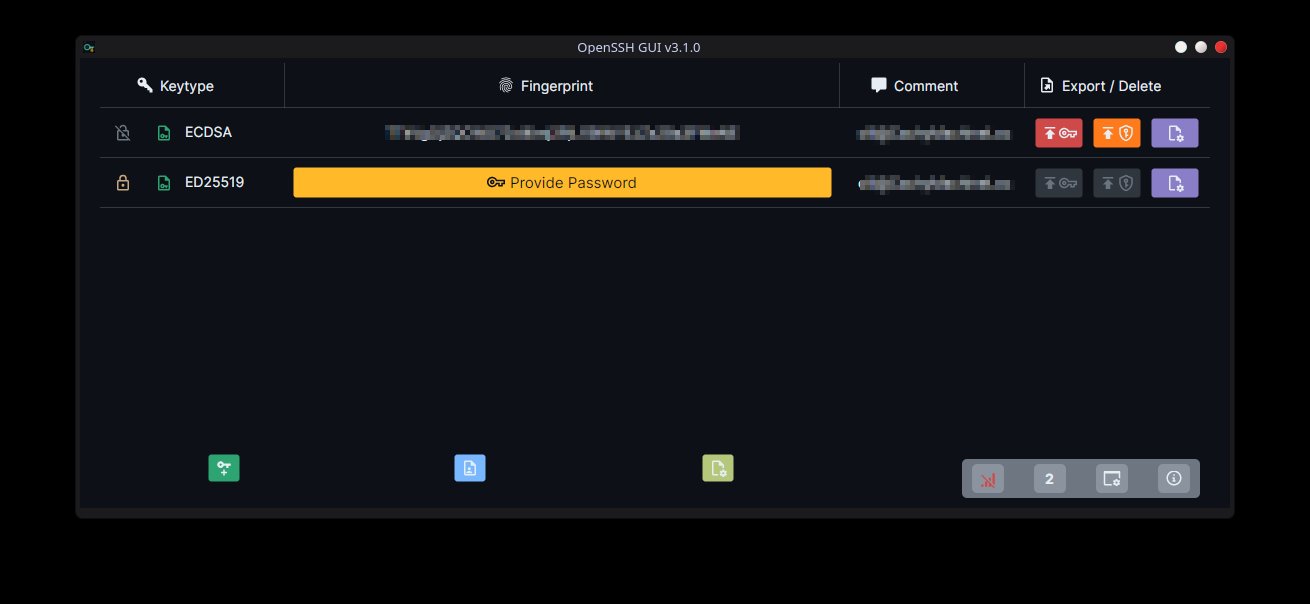
The main window lists all discovered SSH keys in a table. Each row shows:
- Lock/key icon indicating whether the key is encrypted and whether the passphrase has been provided
- Key algorithm (RSA, ECDSA, ED25519) and format (OpenSSH / PuTTY)
- SHA-256 fingerprint; password-protected keys show a Provide Password button inline
- Comment
- Action buttons: export public key, export private key, open FileInfo window
Main Window — Password Entered
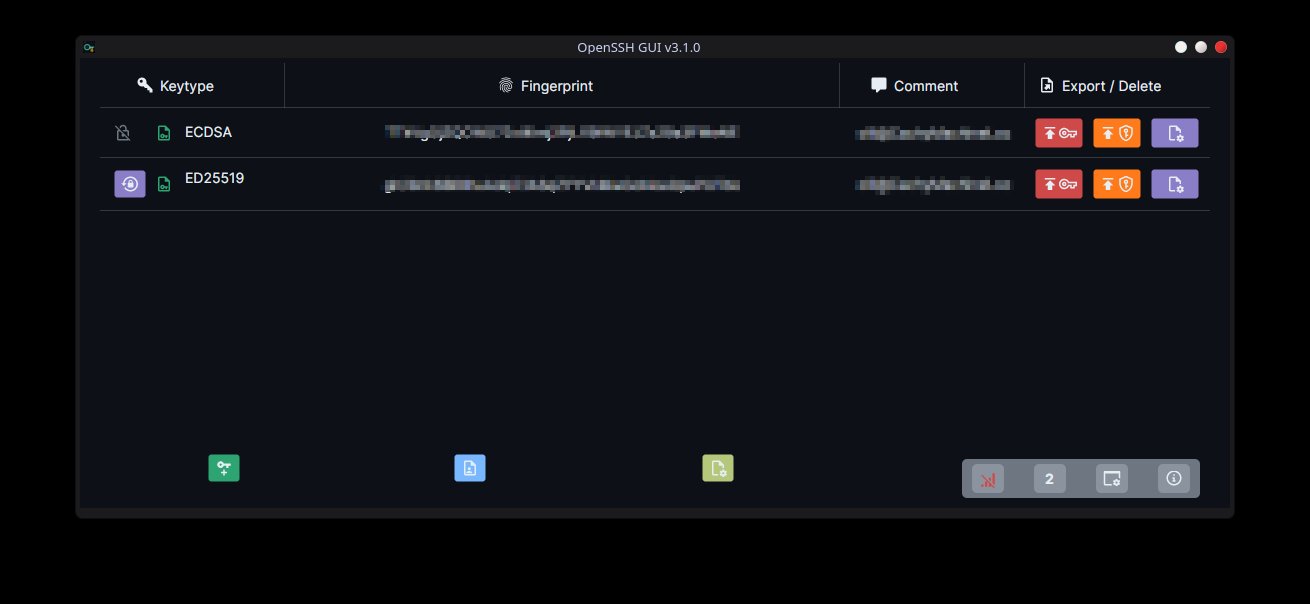
Once a passphrase is provided, the fingerprint column shows the actual hash and a Forget Password button appears.
Add New SSH Key
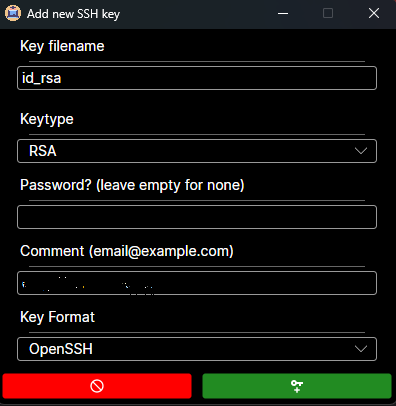
Fields:
| Field | Notes |
|---|
| Key filename | Directory dropdown (from lookup paths) + filename text box |
| Keytype | RSA / ECDSA / ED25519 — default name updates automatically |
| Bitsize | Populated from the cryptographic legal key sizes for the chosen type; hidden for ED25519 |
| Password | Optional; leave blank for an unencrypted key |
| Comment | Defaults to user@hostname |
| Key Format | OpenSSH or PuTTY v2/v3 |
The Add button stays disabled until the filename passes validation (non-empty and not already on disk).
FileInfo Window
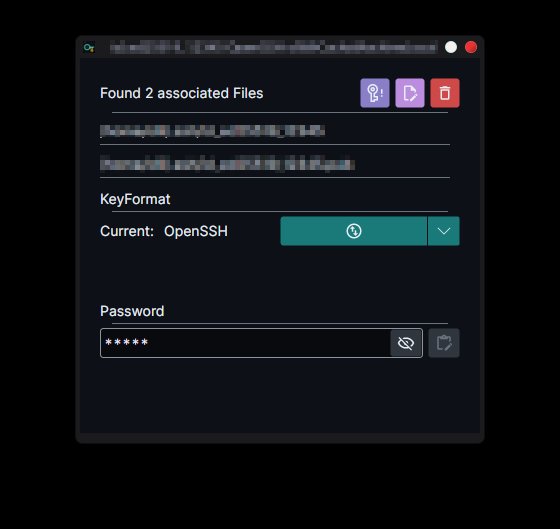
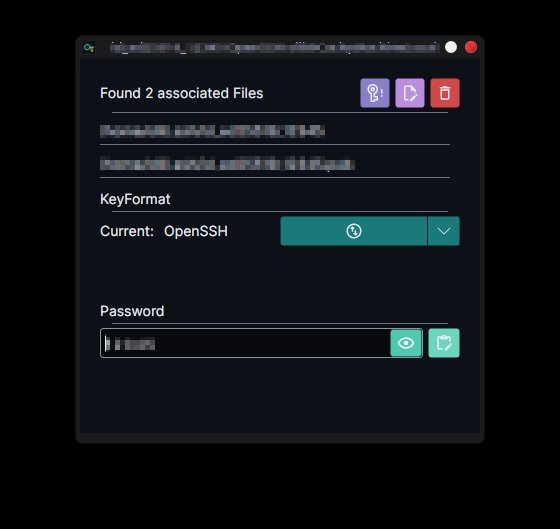
Shows all files associated with the key (e.g. id_ed25519 + id_ed25519.pub). From here you can:
- Change password — prompts for the new passphrase via a secure input dialog
- Rename — moves both halves, prompts for overwrite if a conflict is detected
- Delete — removes all associated files from disk
- Convert format — the SplitButton converts to the default target; the dropdown allows choosing any other available format
- Password field — shows masked passphrase with a toggle-visibility eye button and a copy-to-clipboard button
Application Settings
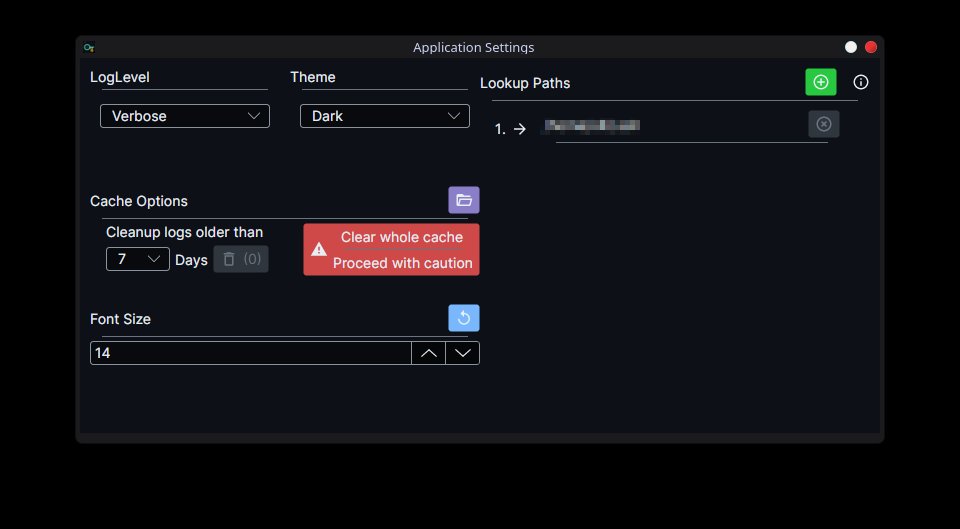
| Section | Options |
|---|
| Log Level | Verbose / Debug / Information / Warning / Error / Fatal |
| Theme | Default (system) / Dark / Light |
| Cache Options | Delete log files older than N days; clear whole application cache |
| Font Size | Numeric up/down; reset button restores the default |
| Lookup Paths | Add/remove directories the key crawler searches |
Connect to Server
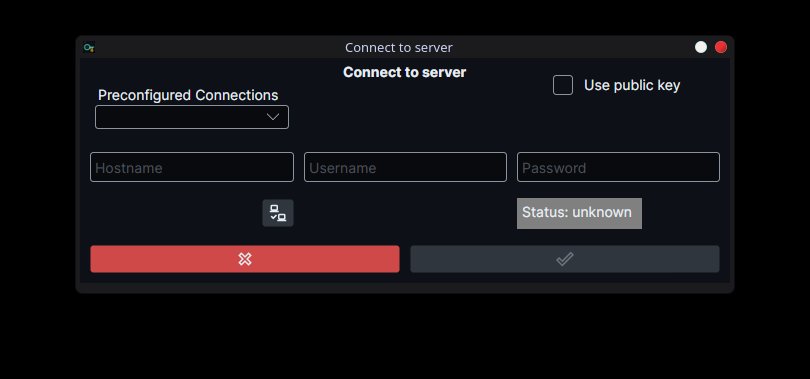
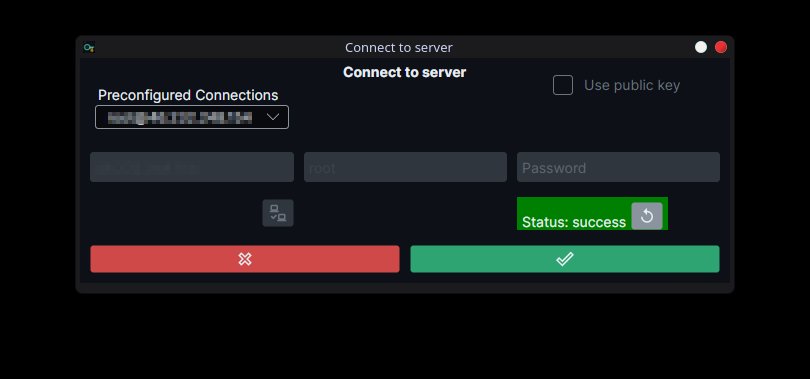
The connection window supports:
- Preconfigured connections — populated automatically from
~/.ssh/config host blocks that carry an IdentityFile directive
- Manual entry of hostname, username, and either a password or a public key from the recognised key list
- Test connection button — attempts a connection and shows a colour-coded status badge (unknown / success / failed)
- After a successful test, the Accept button becomes active and establishes the session for the rest of the UI
Edit known_hosts
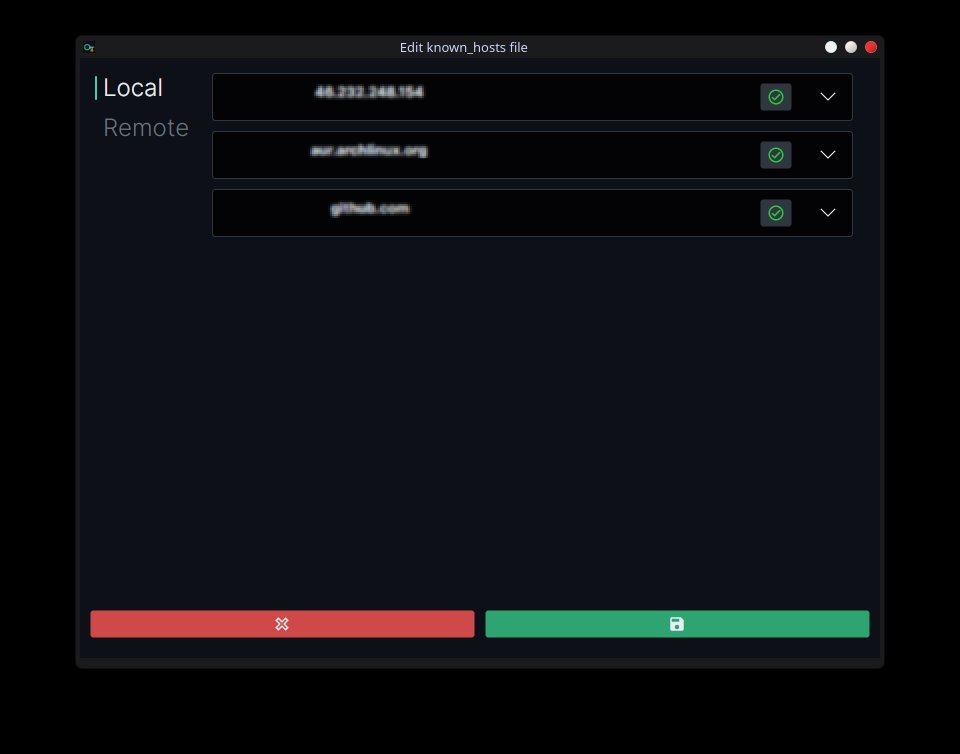
Displays every known host in a collapsible list. Each host shows its individual key entries (algorithm + fingerprint). Toggle buttons mark individual keys or entire hosts for deletion on save. A Remote tab appears when a server connection is active, allowing the same edits on the server's known_hosts.
Architecture Overview
The project is split into four assemblies:
| Assembly | Role |
|---|
OpenSSH_GUI | Avalonia application shell — views, view models, DI wiring, app lifecycle |
OpenSSH_GUI.Core | Domain logic — key management, SSH config crawling, server connections, backup service |
OpenSSH_GUI.SshConfig | SSH ~/.ssh/config parser, serialiser, and IConfiguration provider |
OpenSSH_GUI.Dialogs | Reusable modal dialogs (message box, secure password input, validated text input) |
Key Components
SshKeyManager is the central service. It owns the observable collection of SshKeyFile instances and exposes async operations for generate, rename, change-password, change-format, delete, and reload. Every destructive operation backs up the affected files first and restores them on failure.
SshKeyFile is a reactive record. It uses ReactiveUI.SourceGenerators to expose observable properties for fingerprint, comment, key type, format, password state, and file metadata. The fingerprint is extracted without decrypting the private key by parsing the unencrypted public key blob directly (supports OpenSSH .pub, OpenSSH private key header, and PPK v2/v3 headers).
DirectoryCrawler is an IAsyncEnumerable-based crawler that reads ~/.ssh/config identity files first (marking them as config-provided) and then enumerates the configured lookup directories for any remaining key files.
SshConfigParser is a zero-dependency recursive-descent parser for ssh_config(5) syntax. It handles Host, Match, and Include directives, wildcard patterns, quoted values, and inline comments, and exposes the result as an IConfiguration source so the rest of the app can bind directly via IOptions.
ServerConnection wraps SSH.NET's SshClient and adds OS detection, remote known_hosts/authorized_keys read/write, and environment variable resolution on both Unix and Windows remote shells.
Installation
No installer is required. Download the self-contained binary for your platform and run it directly.
The application creates the following paths on first launch if they do not exist:
~/.ssh/ (mode 700 on Unix)/etc/ssh/ or %PROGRAMDATA%\ssh\ (mode 755 on Unix)~/.ssh/known_hosts and ~/.ssh/authorized_keys%APPDATA%\OpenSSH_GUI\ — configuration and log files
Configuration File
Application settings are stored as JSON at:
- Linux / macOS:
~/.config/OpenSSH_GUI/OpenSSH_GUI.json
- Windows:
%APPDATA%\OpenSSH_GUI\OpenSSH_GUI.json
The file is created automatically on first run. You can also edit it by hand — changes are picked up at runtime via IOptionsMonitor.
{
  "LookupPaths": [ "/home/user/.ssh" ],
  "PreferredTheme": "Dark",
  "LogLevel": "Warning",
  "FontSize": 14,
  "LoggerConfiguration": {
    "LogFileName": "OpenSSH_GUI.log",
    "LogFilePath": "/home/user/.config/OpenSSH_GUI/log"
  }
}
Building from Source
Requirements: .NET 10 SDK.
git clone https://github.com/frequency403/OpenSSH-GUI
cd OpenSSH-GUI
dotnet build
dotnet run --project OpenSSH_GUI
Tests:
dotnet test OpenSSH_GUI.Tests
Security Notes
- Passphrases are handled as raw byte buffers (
SshKeyFilePassword) backed by a ReactiveBufferWriter. The buffer is zeroed via CryptographicOperations.ZeroMemory when cleared or disposed.
- The secure password input dialog (
SecureInputDialog) intercepts TextInputEvent at tunnel phase to avoid Avalonia's default string accumulation in the TextBox internal buffer.
- Private key files are never read unless the user explicitly provides a passphrase. Fingerprints and metadata are always extracted from the unencrypted public portions of the key file.
- All destructive file operations (rename, convert, change password) create backups before modifying any file and restore them automatically on failure.
Known Limitations
- SSH config editing (local
~/.ssh/config and remote sshd_config) is not yet implemented (placeholder menu items exist).
- Remote server operations require the connecting user to have read/write access to
~/.ssh/known_hosts and ~/.ssh/authorized_keys on the remote machine.
Used Libraries
Authors
- Oliver Schantz — idea and primary development — GitHub
See also the contributors list.
License
This project is licensed under the MIT License.