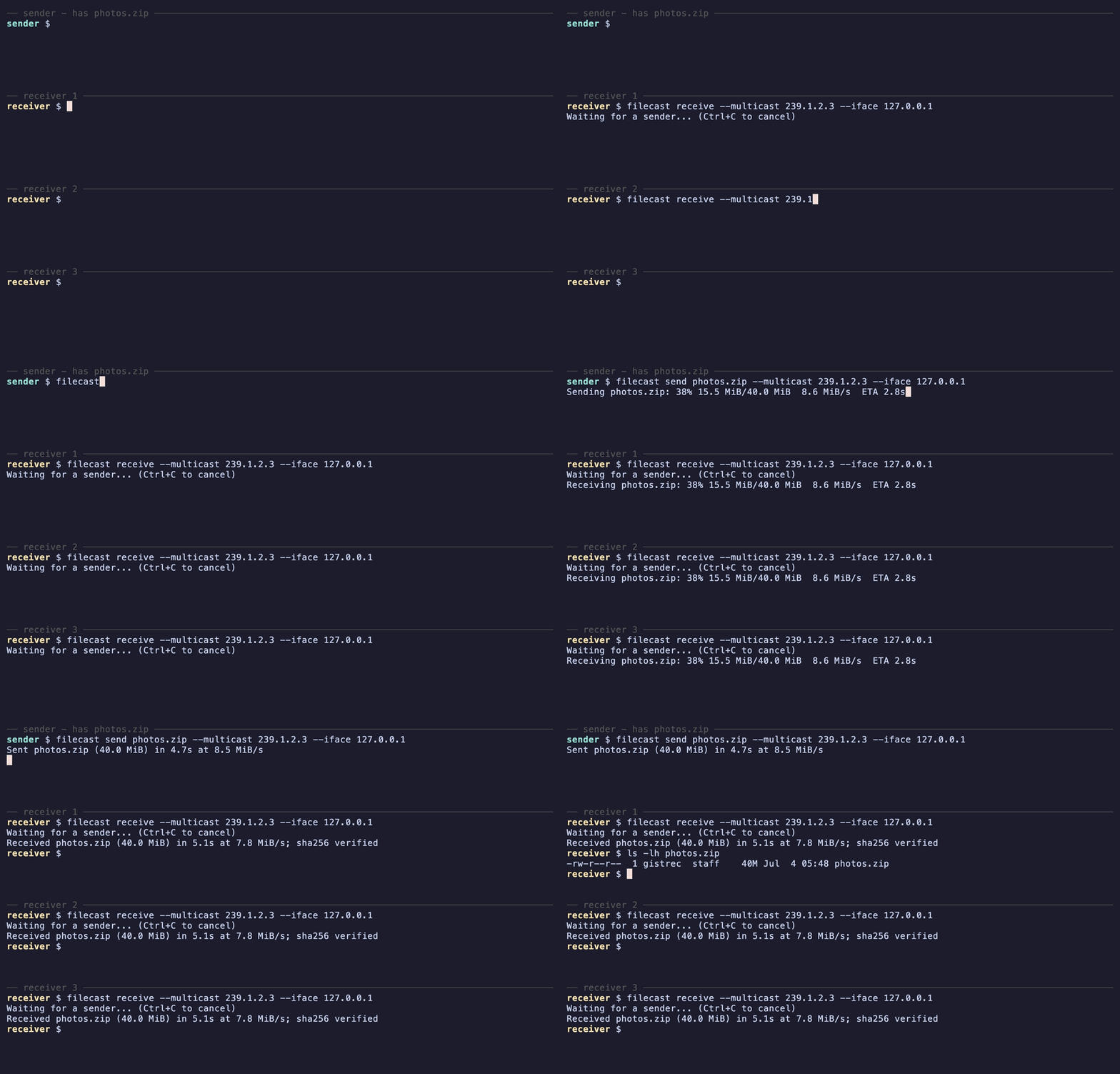
Why filecast
- One-to-many in a single transfer — UDP broadcast or IP multicast; the
network carries each byte once, so 40 machines take about the same time as
one on a wired LAN
- Fully offline — no relay, no rendezvous server, no account; nothing
leaves your network
- Single small binary for Windows, Linux, and macOS — receivers need zero
setup: run
filecast receive, done
- Loss-tolerant — receivers request dropped packets, and one
retransmission repairs every receiver that missed the part
- SHA-256 verified — a corrupted file is rejected, not saved; an existing
file is never overwritten unless you pass
--overwrite
- Resumable — an interrupted receive picks up where it left off with
--resume
- Live progress — speed, ETA, and a tunable target rate in Mbit/s
(
--rate)
- No encryption yet — filecast assumes a trusted LAN; see
Limitations
Quick Start
Sender (host that has the file):
filecast send photo.jpg
Receiver (one or more hosts on the same LAN):
filecast receive
The file is saved under the name the sender announced (pass a path to override
it, e.g. filecast receive my-photo.jpg).
Send to a specific host instead of broadcasting to the whole LAN:
filecast send photo.jpg --to 192.168.1.50
Installation
Homebrew (macOS, Linux):
brew tap gistrec/filecast
brew install filecast
winget (Windows):
winget install gistrec.filecast
One-liner (Linux, macOS):
curl -fsSL https://raw.githubusercontent.com/gistrec/filecast/master/install.sh | sh
The script picks the prebuilt binary for your platform from the latest
GitHub Release, verifies its
SHA-256 against the release's checksums.txt, and installs it to
/usr/local/bin. On Git Bash for Windows (no sudo), point it at a directory
you own:
curl -fsSL https://raw.githubusercontent.com/gistrec/filecast/master/install.sh | BIN_DIR="$HOME/bin" sh
Manual: download a binary from the
releases page — Linux
x86_64/arm64, macOS (universal), Windows x86_64 — and run it directly. No
installation required.
If your platform isn't covered, see
Building from Source.
Use Cases
- Air-gapped and offline networks — distribute files with no cloud, no
server, and no per-machine configuration
- Classrooms and training labs — push exercise files to every student
machine in one go
- Fleet provisioning — drop an installer or a patch onto a rack of
machines simultaneously
- LAN parties — everyone gets the mod in the time of one transfer
One file per run, up to 4 GiB with the current wire format — transfers are
stored on disk as they arrive, not buffered wholly in RAM (see
Limitations).
How It Compares
As far as we know, filecast is the only file-transfer tool that combines
all of the following:
- sends one file to many machines in a single transfer (UDP
broadcast/multicast),
- cross-platform prebuilt binaries — Windows, macOS, and Linux,
- works fully offline — no relay or rendezvous server,
- zero receiver setup — no daemon, no keys, no config file,
- resumes an interrupted receive,
- verifies every file end-to-end with SHA-256.
udpcast, UFTP, croc, LocalSend, and magic-wormhole each cover part of that
list — see the sourced feature table in docs/COMPARISON.md,
including what they do better (encryption, internet transfer, mobile apps).
Usage
filecast send  [options]       # broadcast a file to the LAN
filecast receive [file] [options]    # receive a file (default: name from sender)
Parameters
| Parameter | Default | Range | Description |
|---|
| `` (positional) | — (send) / name from sender (receive) | — | File to send, or where to save it. -f, --file is an alias |
--to | broadcast | IPv4 | Send to one host instead of LAN broadcast |
--multicast | broadcast | IPv4 multicast | Use an IP multicast group (224.0.0.0-239.255.255.255) instead of broadcast |
--iface | system-chosen | IPv4 | Multicast interface — the local NIC's IPv4 to send/receive the group on (--multicast only) |
-p, --port | 33333 | 1..65535 | Destination port for outgoing packets |
--bind-port | 33333 | 1..65535 | Local port to bind on |
--mtu | 1500 | 64..65489 | Max packet size in bytes (18-byte header keeps the datagram within the 65507-byte UDP limit) |
--ttl | 15 | 1..86400 | Seconds of silence before giving up |
--rate | 100 | > 0 | Target send rate in Mbit/s |
--overwrite | off | — | Overwrite an existing output file |
--resume | off | — | Resume an interrupted receive from its .part snapshot |
-v, --verbose | off | — | Log every packet instead of a progress bar |
--delay-ms | — | ≥ 0 | Advanced: fixed inter-packet pause in ms; overrides --rate (0 blasts at full speed, used by tests) |
-h, --help | — | — | Print help |
--version | — | — | Print version |
Environment variables
--iface, --rate and --mtu each fall back to an environment variable when the
flag is omitted, so you can set a default once instead of repeating it on every
command. An explicit flag always wins.
| Variable | Stands in for | Notes |
|---|
FILECAST_IFACE | --iface | Applied only in --multicast mode; ignored for broadcast/unicast |
FILECAST_RATE | --rate | Target send rate in Mbit/s |
FILECAST_MTU | --mtu | Max packet size in bytes |
The demo above uses these to pin the loopback NIC and push line rate while the
shown commands stay just --multicast.
Examples
LAN broadcast (one sender, many receivers):
# On the sender host
filecast send album.zip

# On every receiver host
filecast receive album.zip
Targeted unicast (when broadcast is blocked or you only have one receiver):
# On the sender host (sends data to 10.0.0.42)
filecast send album.zip --to 10.0.0.42

# On 10.0.0.42 (receiver broadcasts its RESENDs by default)
filecast receive album.zip
IP multicast (one-to-many without flooding every host on the VLAN — NICs of
non-members drop the traffic in hardware and IGMP-snooping switches forward it
only to subscribers). Sender and every receiver use the same group:
# On the sender host
filecast send album.zip --multicast 239.1.2.3

# On every receiver host (same group)
filecast receive album.zip --multicast 239.1.2.3
On a multi-homed host (several NICs), pin the group to a specific interface by
its local IPv4 so the kernel doesn't pick the wrong one:
filecast send album.zip --multicast 239.1.2.3 --iface 192.168.1.10
filecast receive album.zip --multicast 239.1.2.3 --iface 192.168.1.10
Loopback test (sender and receiver on the same host — useful for
development):
# Receiver listens on 33401, sends RESEND back to the sender's bind port (33402)
filecast receive out.bin \
         --to 127.0.0.1 --port 33402 --bind-port 33401 &

# Sender listens on 33402, sends data to the receiver's bind port (33401)
filecast send in.bin \
         --to 127.0.0.1 --port 33401 --bind-port 33402
How It Works
The sender announces the file — size, SHA-256, name, and a random session id —
then broadcasts it in MTU-sized chunks. Once the sender signals FINISH, each
receiver requests the chunks it missed, and every retransmission repairs all
receivers that missed that part at once. The file is written out (atomically)
only after its SHA-256 matches the announcement.
The full wire format lives in docs/PROTOCOL.md.
Resuming an Interrupted Transfer
Start the receive with --resume. If it is then interrupted with Ctrl+C, or
times out with parts still missing, the receiver keeps what it has in
.part (plus a .part.idx record of which parts arrived) instead of
discarding it, and a re-run picks up where it left off — the transfer is matched
by the file's SHA-256, so it works even if the sender is restarted (a new
session):
filecast receive album.zip --resume
--resume is what enables the snapshot, so it has to be set on the first run
too, not just the retry: a plain filecast receive deletes its partial file when
it is interrupted. The snapshot is removed once the file completes and its
checksum verifies.
Limitations
- The v3 wire format stores the file size and part index in 4-byte fields. The
receiver enforces a 4 GiB cap on the announced file size; the sender rejects
files that do not fit the current wire-size field.
- The sender streams payload from the source path after announcing its SHA-256.
Do not modify, truncate, replace, or delete the source file until the transfer
has finished, including any resend phase; otherwise receivers will reject the
result with a checksum mismatch or the sender will abort on a read error.
- Receivers need enough free disk space for the in-progress
.part file beside
the final output. With --resume, the .part file and its .part.idx bitmap
are kept after Ctrl+C or a timeout so a later run can continue. A hard kill
(SIGKILL) or power loss mid-transfer can still lose the latest unflushed
progress. The .part/.part.idx files use stable, predictable names in the
working directory. The receiver refuses to write through a symlink or a
pre-planted hardlink at those names, but still run it from a directory only
you can write to.
- No authentication. Any host on the same LAN can announce a transfer and any
receiver bound to the chosen port will accept it. The SHA-256 check catches
accidental corruption, not a deliberately crafted stream.
- No encryption yet. The payload travels as plaintext UDP; treat the LAN as
trusted.
- Designed for wired LANs. Wi-Fi access points transmit broadcast/multicast
frames at a low basic rate without link-layer ACKs, so expect heavy loss
over wireless. The sender's rate limit is open-loop (no congestion
feedback) — pick
--rate with your network in mind.
Building from Source
Requirements
- CMake 3.15+
- A C++17 compiler:
- GCC 7+ or Clang 5+ on Linux/macOS,
- MinGW64 GCC via MSYS2 on Windows,
- or MSVC 2019+ through the Visual Studio CMake generator.
- pthreads (Linux/macOS).
Build
git clone https://github.com/gistrec/filecast.git
cd filecast
git submodule update --init --recursive
cmake -S . -B build
cmake --build build --config Release
The binary lands at build/filecast (or build\Release\filecast.exe with the
multi-config Visual Studio generator).
Tests
ctest --test-dir build --output-on-failure
Runs the unit tests, the loopback end-to-end test, and a lossy variant that
drops packets through a Python UDP proxy to exercise the RESEND branch. Pass
-E e2e to skip the e2e cases on Windows, where Winsock semantics break
two-process loopback.
License
MIT.