git-fire - Multi-Repo Checkpoint CLI




> 🌐 git-fire.com — redirects here. A dedicated site is planned once the community grows.
> In case of fire:
> 1. git-fire
> 2. Leave building
git-fire is one command to checkpoint many repositories: discover, auto-commit dirty work (optional), and push backup branches/remotes with safety rails.
Manual push loops fail more often than we admit (network drops, auth hiccups, shell mistakes). git-fire provides an auditable recovery path when you need one consistent move across many repos.
Invocation note: git-fire and git fire are equivalent when git-fire is on your PATH.
Maintainer note: this project is built for high-stress moments and everyday discipline. Keep it simple, keep it safe, keep moving.
Table of Contents
Beta Status
git-fire is beta software. Core multi-repo backup flows are usable today. A few roadmap items are intentionally not wired yet (--backup-to and USB destination mode).
Project Snapshot
- Project:
git-fire (github.com/git-fire/git-fire)
- Language: Go 1.24.2
- License: MIT
- Status: Beta
- Core promise: one command to discover repos, auto-commit dirty work (unless disabled), and push backups so local-only work is not lost
Detailed product, architecture, safety, testing, and roadmap notes are in docs/PROJECT_OVERVIEW.md.
Quick Start
First run
# preview first (safe)
git-fire --dry-run --path ~/projects

# run default streamed checkpoint
git-fire
One-line emergency mode
> Emergency bootstrap script path is established; package-manager installs are still coming soon.
Use this for urgent situations only. curl | bash executes remote code directly.
Inspect scripts/emergency.sh first and prefer release assets plus checksums when you have time.
# replace RELEASE_TAG with a published release tag (for example v0.2.0)
curl -fsSL https://raw.githubusercontent.com/git-fire/git-fire/RELEASE_TAG/scripts/emergency.sh | bash
Install
| Method | Command | Platform |
|---|
| Homebrew | brew install git-fire/tap/git-fire | macOS, Linuxbrew |
| WinGet | winget install git-fire (or winget install git-fire.git-fire) | Windows |
| Linux install script | curl -fsSL https://raw.githubusercontent.com/git-fire/git-fire/main/scripts/install.sh | bash | Linux |
| Linux package | Download .deb or .rpm from GitHub Releases | Linux |
| Go | go install github.com/git-fire/git-fire@latest | All (Go 1.24.2+) |
| Binary archive | GitHub Releases | All |
Releases use plain SemVer tags (vX.Y.Z).
Release assets always include platform binaries + checksums; package-manager channels are part of the stable release process.
Maintainer runbooks:
Homebrew (macOS/Linuxbrew)
brew tap git-fire/tap
brew install git-fire
WinGet (Windows)
winget install git-fire
If the short form isn't available yet, use the explicit package ID:
winget install git-fire.git-fire
Linux quick install script
curl -fsSL https://raw.githubusercontent.com/git-fire/git-fire/main/scripts/install.sh | bash
Optional environment overrides:
curl -fsSL https://raw.githubusercontent.com/git-fire/git-fire/main/scripts/install.sh | \
  VERSION=v0.2.0 INSTALL_DIR="$HOME/.local/bin" bash
Linux native packages (.deb / .rpm)
# Debian/Ubuntu
sudo dpkg -i ./git-fire__amd64.deb

# Fedora/RHEL/CentOS (dnf)
sudo dnf install ./git-fire__amd64.rpm
Go install
go install github.com/git-fire/git-fire@latest
Or pin an explicit release:
go install github.com/git-fire/git-fire@v0.2.0
Binary archive (manual)
Download and extract the right archive from GitHub Releases, then place the binary on your PATH.
PATH setup (required)
After install, make sure the binary location is on your PATH.
Go install (Linux/macOS):
export PATH="$HOME/go/bin:$PATH"
Add that line to ~/.zshrc or ~/.bashrc to persist.
Manual binary install (Linux/macOS):
chmod +x git-fire
sudo mv git-fire /usr/local/bin/
Manual binary install (Windows PowerShell):
New-Item -ItemType Directory -Force "$env:USERPROFILE\bin" | Out-Null
Move-Item .\git-fire.exe "$env:USERPROFILE\bin\git-fire.exe" -Force
Then add $env:USERPROFILE\bin to your user PATH if not already present.
Verify install
git-fire --version
which git-fire
On Windows PowerShell:
git-fire.exe --version
Get-Command git-fire.exe
Build from source
Cross-platform source build instructions live in docs/BUILD_FROM_SOURCE.md.
Who Is This For
- Anyone using Git across multiple repos: checkpoint before context switches, travel, maintenance, or risky changes.
- Developers and platform/infra engineers: keep code/IaC/config repos consistently backed up.
- Agent workflow users: use it as a stop-hook safety net for AI coding sessions.
- Security/ops practitioners: preserve state before teardown, maintenance, or incident-driven system changes.
- Data/research/documentation teams: checkpoint notebooks, docs, and analysis repos with repeatable behavior.
- Not the target: single-repo users and monorepo teams that already have strict one-repo checkpoint discipline.
Use Cases
- Daily developer checkpoint: end of day, before context switches, before large refactors.
- Non-developer multi-repo checkpoint: docs/content publishing windows, data-environment changes.
- Agent session safety net: preserve uncommitted output and keep logs for review.
- IT/infra maintenance windows: checkpoint tooling/config repos before maintenance.
- Security/operations workflows: red/purple team sync and incident-response state preservation.
Workflow guides:
Key Features
- One-command multi-repo checkpoint: discover repositories and execute a repeatable backup flow from one command.
- Optional dirty-work auto-commit: include uncommitted changes, or use
--skip-auto-commit to push committed work only.
- Safety-first conflict handling: avoid force-push in normal flow;
push-current-branch can create backup branches on divergence.
- Dry-run planning: preview exactly what would happen before making changes.
- Auditable execution logs: structured JSON logs for troubleshooting and post-run review.
- Registry-backed repeatability: discovered repos persist across runs.
Core Commands
# default streamed checkpoint flow
git-fire
git fire

# non-destructive preview
git-fire --dry-run
git-fire --fire-drill

# TUI selector mode
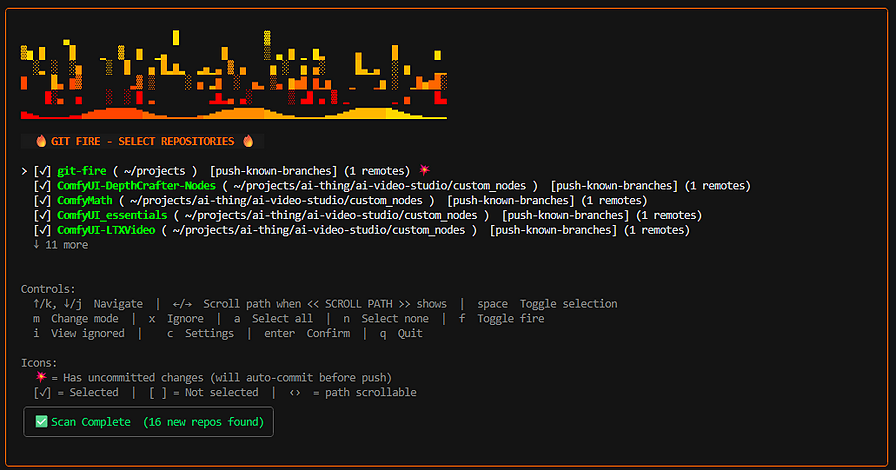
git-fire --fire

# scan specific root
git-fire --path ~/projects

# push existing commits only (no auto-commit)
git-fire --skip-auto-commit

# inspect auth + repo status
git-fire --status

# use explicit config path (project-local opt-in)
git-fire --config ./git-fire.toml

# use only known registry repos for this run
git-fire --no-scan

# generate config template
git-fire --init

# inspect/edit registry entries
git-fire repos list
git-fire repos ignore /abs/path/to/repo
Configuration and Behaviors
- Persistent repo registry: discovered repos are saved in
~/.config/git-fire/repos.toml unless explicitly ignored.
- Status and auth checks:
git-fire --status gives a quick snapshot of SSH/auth and repo readiness.
- Execution-mode control:
--dry-run and --fire choose planning vs execution UI mode; --path selects scan root.
- Registry-only mode:
--no-scan runs against already-known registry repos for that run.
- Config trust boundary: only
~/.config/git-fire/config.toml loads by default; use --config to opt into project-local config.
- Session logging: each run writes structured logs under
~/.cache/git-fire/logs/.
- Workflow composition: pair with hooks, wrappers, task runners, or CI helper scripts.
See docs/REGISTRY.md for details.
TUI
TUI screenshot
Current git-fire TUI: multi-repo selection, per-repo status, and one-screen checkpoint workflow.
TUI color profiles
You can reskin both the fire effect and border/accent colors in git-fire --fire:
| Profile | Style |
|---|
classic | Original orange/yellow fire |
synthwave | 80s neon purple/pink/cyan |
forest | Green ember palette |
arctic | Cool cyan/ice palette |
| Method | How |
|---|
| In-TUI settings | Press c -> Color profile -> space / <- / -> |
| Config file | Set color_profile under [ui] |
[ui]
show_fire_animation = true
color_profile = "synthwave"
Custom hex palettes are planned but not enabled yet.
Release Roadmap
- Now (beta): expanded tester validation, feedback, and stabilization while preparing the first stable SemVer release (
v0.2.0).
- During beta: address critical stabilization issues and keep install and safety documentation current.
- 1.0: ship a stable production release after beta-critical items are closed.
Coming Soon
- USB mode: planned as a first-class destination for repo backups (git-native incremental updates + destination marker/config).
- Integration-first direction: practical integrations and redundancy layers for high-pressure moments.
Plugin docs:
Documentation
Start with docs/README.md.
git-harness
git-fire builds on git-harness, a small Go library of shared primitives (version pinned in go.mod; currently v0.2.0). Like git-fire, it shells out to the system git binary rather than embedding a pure-Go Git implementation.
| Import path | Role in git-fire |
|---|
github.com/git-fire/git-harness/git | Repository discovery and scan helpers, plus git operations (branches, commits, push orchestration) consumed by the CLI, executor, TUI, and demos. |
github.com/git-fire/git-harness/safety | Secret detection (patterns and filename heuristics) and sanitization helpers used when logging errors and running plugin commands. |
Registry loading, planning, rate-limited execution, plugins, Bubble Tea UI, and user config remain in this repository. If you change behavior at the “how we invoke git” or “what counts as a secret warning” layer, the fix may belong in git-harness with a version bump here—see CONTRIBUTING.md and open an issue if you are unsure.
Security Notes
Before running broad backups:
- keep secrets out of tracked files
- rely on
.gitignore and .git/info/exclude for local secret files
- run
git-fire --dry-run regularly to inspect what would be committed
git-fire includes secret detection warnings, but commit responsibility remains with the user.
Security Policy
To report security issues privately, use SECURITY.md.
Contributing
Contributions are welcome — and genuinely wanted. See CONTRIBUTING.md.
Your feedback, feature requests, and ideas matter here. No idea is too small or too ambitious to discuss. If you're thinking about forking to add something, open an issue first. The goal is a tool the community actually relies on, and I'd rather build it with you than have it fragment.
Runtime git and safety behavior is shared with git-harness above. Tests use git-testkit (v0.2.0) for building git repository fixtures and complex multi-repo scenarios programmatically — a companion library released alongside git-fire with a simple, extensible test API. Python and Java interfaces in development.
License
MIT. See LICENSE.