agent-session-cleaner
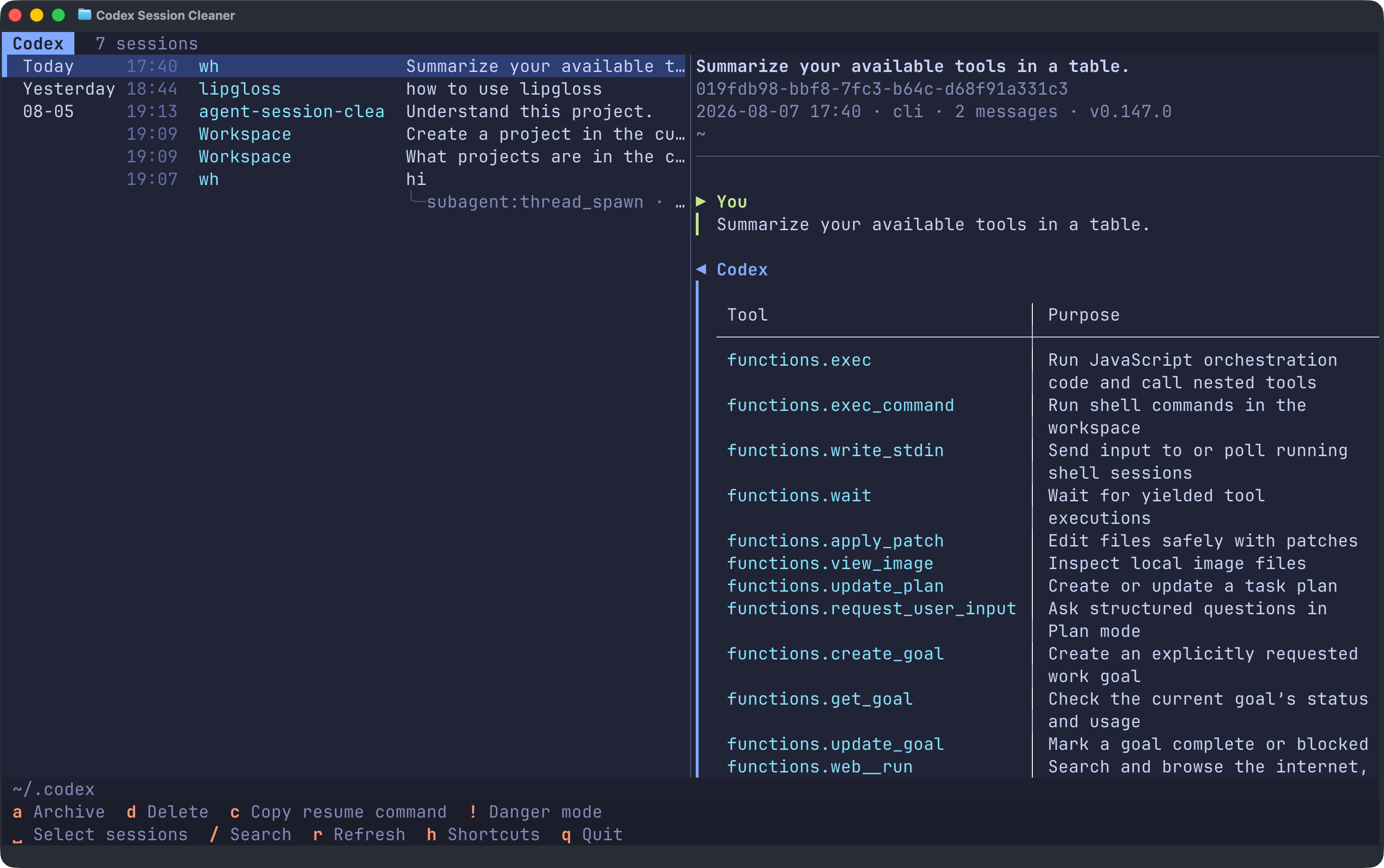
Browse, resume, and clean up all your Codex, Claude Code, OpenCode, and Pi sessions from one terminal.




English · 简体中文
Install
Install or update on macOS and Linux:
curl -LsSf https://raw.githubusercontent.com/haowang02/agent-session-cleaner/main/install.sh | sh
Install or update on Windows from PowerShell:
powershell -ExecutionPolicy Bypass -c "irm https://raw.githubusercontent.com/haowang02/agent-session-cleaner/main/install.ps1 | iex"
The Windows installer adds %LOCALAPPDATA%\Programs\agent-session-cleaner\bin to your user PATH. Open a new terminal after the first install.
Usage
asc
# The full command name agent-session-cleaner is also available.
Run without arguments to choose an agent, or name one directly:
asc codex
asc claude
asc opencode
asc pi
By default, the app uses $CODEX_HOME or ~/.codex for Codex, $CLAUDE_CONFIG_DIR or ~/.claude for Claude Code, $XDG_DATA_HOME/opencode or ~/.local/share/opencode for OpenCode, and $PI_CODING_AGENT_DIR or ~/.pi/agent for Pi. On Windows, ~ is your user profile directory. To override a location explicitly:
asc --codex-home /path/to/codex
asc --claude-home /path/to/claude
asc --opencode-home /path/to/opencode
asc --pi-home /path/to/pi/agent
The OpenCode path must name the opencode data directory itself, not its parent. The opencode.db file, when present, lives directly inside it.
Session discovery and previews read the stored data directly. Codex changes and OpenCode deletions require their respective CLIs; if a CLI is unavailable, that agent opens in browse-only mode. Claude Code and Pi deletions operate directly on their session files.
Language
The interface follows your locale (LC_ALL, LC_MESSAGES, LANGUAGE, or LANG). Chinese locales use Simplified Chinese; all other locales use English. To override detection:
ASC_LANG=en asc
ASC_LANG=zh-CN asc
In PowerShell, use $env:ASC_LANG = "zh-CN" before running asc.
Keyboard shortcuts
The footer shows the shortcuts available for the current agent and installation. Press h for the complete in-app reference.
| Key | Action | Supported by |
|---|
↑ ↓ / j k | Move to the previous / next session | All agents |
g / G | Jump to the top / bottom of the list | All agents |
Tab | Switch between the session list and conversation | All agents |
␣ | Select or deselect the current session | All agents |
/ | Search titles, working directories, session IDs, and clients | All agents |
? | Search backward | All agents |
n / N | Jump to the next / previous match | All agents |
c | Copy the current session ID | All agents |
y | Copy the current session's working directory | All agents |
d | Delete the current session or selected sessions | All agents |
a | Archive the current session or selected sessions | Codex only |
u | Unarchive the current session or selected sessions | Codex only |
D | Delete all archived sessions | Codex only |
O | Delete all orphaned sub-agent sessions | Codex and OpenCode |
E | Delete all empty sessions | Claude Code only |
r | Refresh the session list | All agents |
h | Show keyboard shortcuts | All agents |
! | Toggle danger mode; individual deletions skip confirmation | All agents |
Esc | Exit multi-select, turn off danger mode, or clear the search | All agents |
q | Quit | All agents |
Press Space or double-click to select or deselect a session. Selecting a session includes all of its descendant sub-agent sessions. Actions supported by the current agent apply to every selected session; press Esc to clear the selection.
Resume a session
To resume the current session, press c to copy its ID, then paste it into the corresponding agent command:
codex resume
claude --resume
opencode -s
pi --session
Deletion and archiving
> [!WARNING]
> This tool does not create backups. Deleted sessions cannot be recovered.
- Deleting or archiving a session also includes its descendant sub-agent sessions.
- Codex archive, unarchive, and delete operations are delegated to the Codex CLI.
- Claude Code deletion removes the transcript and its related session data directly.
- OpenCode deletion is delegated to the OpenCode CLI.
- Pi deletion removes the session file directly.
- In danger mode (
!), individual deletions skip confirmation. Bulk deletion still asks for confirmation.
Acknowledgements
- LINUX DO — a community for builders and curious minds