TekuTeku File Merge
Combine multiple files into one, on Windows. A single .exe — nothing to install, no .NET
runtime needed, no registry entries, no background service.
日本語 README
The one thing worth knowing
By default FileMerge does not change your files. At all.
Run it with everything at its defaults and the output is the input files joined byte for byte
— the same result as copy /b a+b out. That holds for text, for CSV, for logs, and for the
.001 / .002 parts of a split archive.
This matters because the alternative is worse. A merge tool that "helpfully" converts
character encodings has to guess what encoding each file is in, and encoding detection is a
heuristic that is sometimes wrong. When it guesses wrong it rewrites your text incorrectly and
the original bytes are gone. FileMerge never reads a file as text, so it never takes that risk.
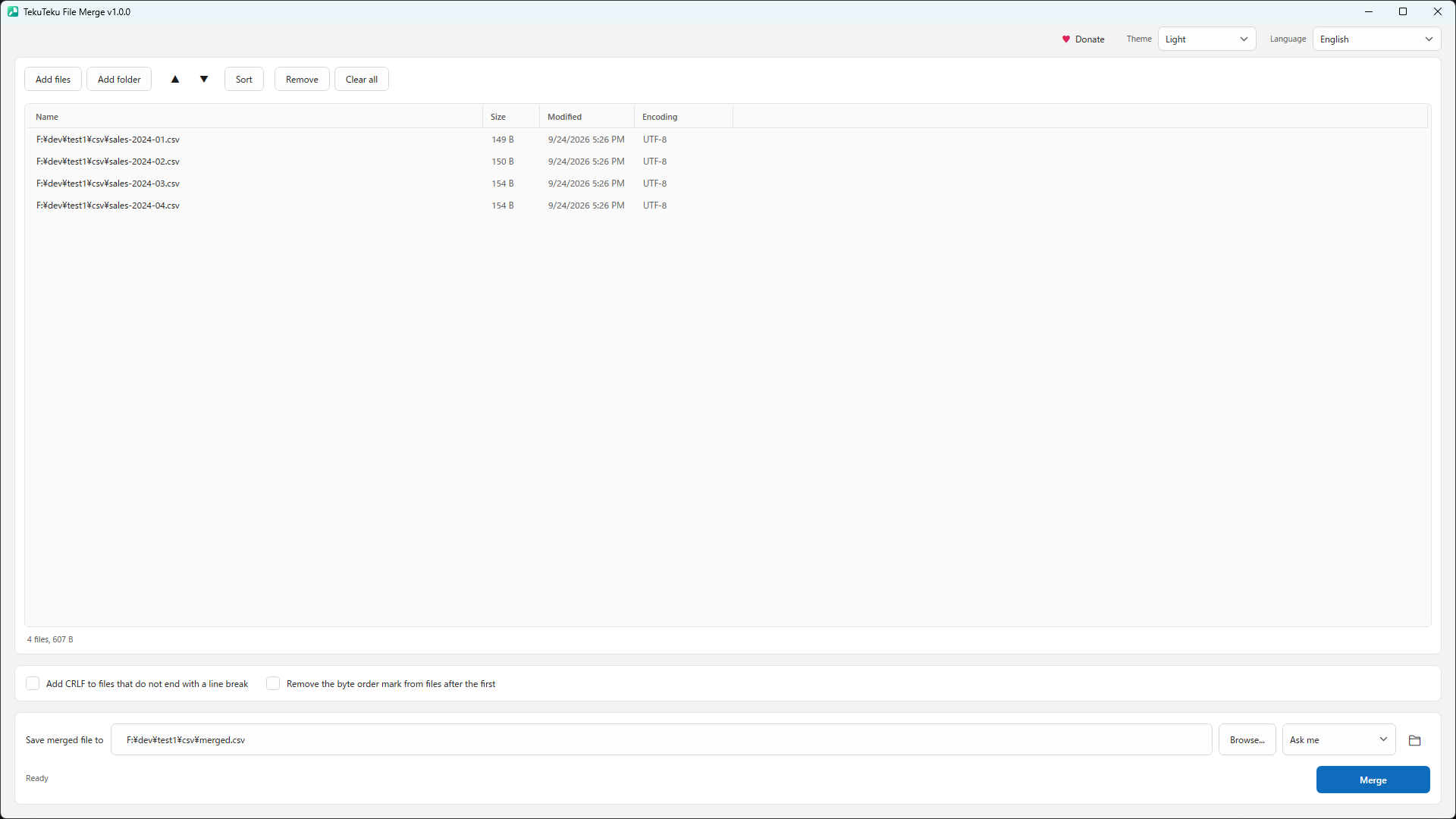
There are two options, both off by default, and both touch only the edges of a file:
| Option | Default | What it does |
|---|
| Add CRLF to files that do not end with a line break | Off | Stops two files running onto the same line |
| Remove the byte order mark from files after the first | Off | Stops a stray BOM landing mid-text |
Neither decodes anything. The first looks only at a file's last character and writes the two
bytes CR and LF (as 2-byte units for UTF-16); the second leaves out the first few bytes of a
file. There is no encoding conversion at all.
There are no warning banners. Joining files that do not share an encoding produces garbled
text, a BOM from a later file stays in the middle of the output, and a file that does not end
with a line break runs into the next one — all of which is the faithful result of not
converting anything. What the window does show is each file's detected encoding, in the list,
as plain information.
Features
- Drag and drop, or Add files, or Add folder with a wildcard filter
(
*.log; *.txt), subfolder recursion, and a live count of what matches
- Reorder by dragging rows, or with the arrow buttons, or sort by name, date, size or path
- Natural sort, so
part2 comes before part10 and .001 before .010 — ordinary
alphabetical sorting silently corrupts split archives, so this is the default everywhere
- Rejoins split archives (
.001, .part01, .r00, .z01) byte-exactly
- Detects and shows each file's encoding before you merge anything
- Progress and cancel for large merges, written to a temporary file first so a cancelled
or failed run never leaves a half-written file where you expect a complete one
- Refuses to write over one of its own inputs
- Light / dark theme, following Windows or pinned
- 21 languages, switchable at runtime, with right-to-left layout for Arabic
Download
Grab the latest from Releases:
| File | Size | Requirements |
|---|
FileMerge--setup-x64.exe | ~43 MB | none — an ordinary installer: Start menu entry, uninstall from Settings |
FileMerge--win-x64.zip | ~54 MB | none — an .exe with .NET built in, plus portable.txt; unzip and double-click |
FileMerge--win-arm64.zip | ~50 MB | none — the same for ARM PCs |
FileMerge--win-x64-netdep.zip | ~0.6 MB | .NET Desktop Runtime 10 |
Windows 10 version 1809 or later. Double-click and it runs.
On first launch the single-file build unpacks its native WPF components into %TEMP%. That is
how single-file WPF works; it needs no administrator rights and happens only once.
The installer needs nothing on the target machine either — no .NET and no Inno Setup. It
installs for the current user without administrator rights (an all-users install into
Program Files is offered on the first page), adds a Start menu entry, and can be removed from
Settings → Apps. It is not code-signed yet, so Windows SmartScreen may warn the first time it
is run.
Also on the Microsoft Store, with automatic updates.
Portable mode
The portable zips come with a file named portable.txt next to the executable. While it is
there, settings are stored beside the executable and nothing is written to your user profile or
the registry, so a copy on a USB stick carries its own configuration. Delete portable.txt to
keep settings in %LOCALAPPDATA%\FileMerge\ instead, as the installer and Store versions do. On read-only media nothing is written and the app still runs.
Languages
English · 日本語 · 简体中文 · 繁體中文 · 한국어 · Español · Português (Brasil) · Français ·
Deutsch · Italiano · Русский · Українська · Polski · Nederlands · Svenska · Türkçe · العربية · हिन्दी ·
Bahasa Indonesia · Tiếng Việt · ไทย
The language is picked from Windows on first run and can be changed at any time from the
header. Every string lives in src/FileMerge/Localization/Strings
as one JSON file per language, embedded into the executable so the portable build stays a
single file. CI fails if any language is missing a key that en.json has.
Build from source
Requires the .NET 10 SDK.
git clone https://github.com/hiro5791/FileMerge.git
cd FileMerge

dotnet test tests/FileMerge.Tests/FileMerge.Tests.csproj   # 44 tests
dotnet run --project src/FileMerge/FileMerge.csproj

./build/Build-Portable.ps1                                  # artifacts/*.exe
| Project | Contents |
|---|
src/FileMerge.Core | Merge engine, encoding detection, folder scanning. No UI dependency. |
src/FileMerge | WPF window, view models, themes, the 21 string tables. |
tests/FileMerge.Tests | xUnit tests, most of them asserting that bytes survive unchanged. |
The icon artwork lives in artwork/: icon.png for 32 px and up, and a simplified
icon-small.png for 16 and 24 px. After replacing either, run ./build/New-Icons.ps1 to
regenerate the .ico and the Store tiles.
Microsoft Store
./packaging/msix/Build-Msix.ps1 `
    -IdentityName '12345Publisher.FileMerge' `
    -Publisher 'CN=ABCDEFGH-1234-5678-9012-ABCDEFGHIJKL' `
    -PublisherDisplayName 'Your Publisher Name'
Those three values come from Partner Center, under Product identity for your reserved app
name. The package is left unsigned on purpose: Partner Center signs Store submissions itself.
See docs/STORE.md for the full submission checklist.
Support
TekuTeku File Merge is free and stays free. If it saves you time and you would like to say
thanks, you can leave a tip. It is entirely optional and unlocks nothing.
License
MIT