GPUpad Albert Kalchmair
winget install --id=houmain.GPUpad -e A lightweight editor for GLSL and HLSL shaders and a fully-featured IDE for developing GPU based algorithms.
Features | Screenshots | Introduction | Installation | Building | Changelog
A lightweight editor for GLSL and HLSL shaders and a fully-featured IDE for developing GPU based algorithms.
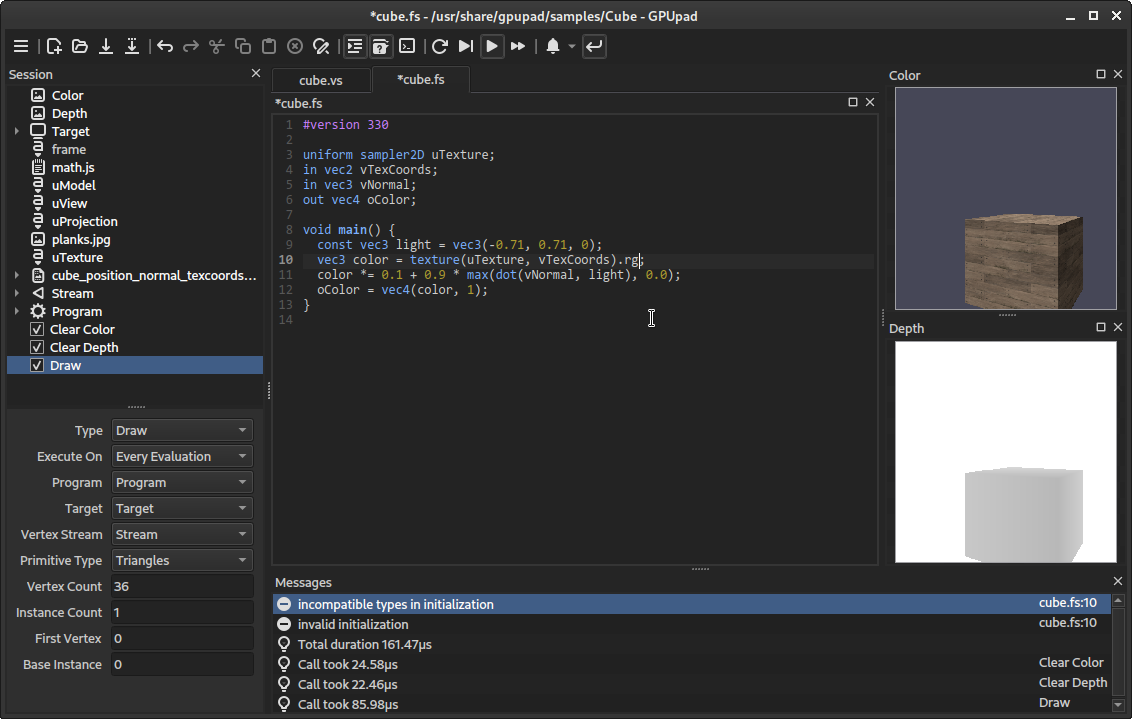
Qt6Multimedia).To get started, you can open and play around with the sample sessions in the menu.
The sample sessions can also be used as templates - saving a session As... copies all the dependencies to the new location.
In order to try out the shaders, the session allows to define draw and compute calls, together with the pipeline state and data the programs should operate on.
It can be populated with items from the Session menu or the context menu. Undo/redo, copy/paste and drag/drop should work as expected (also between multiple instances). It is even possible to drag the items to and from a text editor (they are serialized as JSON).
The session can be evaluated manually [F6], automatically whenever something relevant changes [F7] or steadily [F8], for animations. All items which contributed to the last evaluation are highlighted.
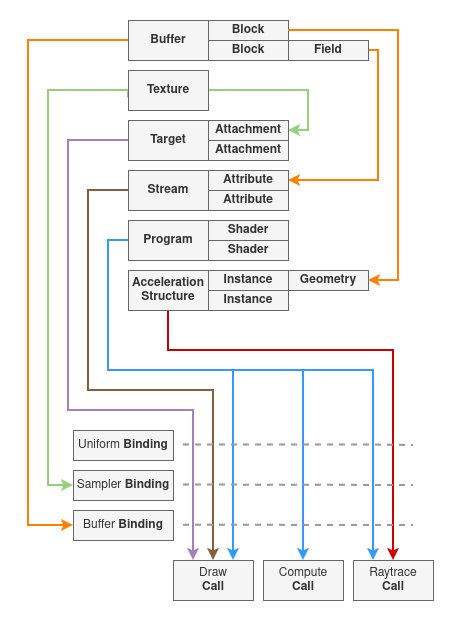
A session is built from the following items:
Call - Most prominently are the draw, compute and ray trace calls. Whenever the session is evaluated, all active calls are evaluated in consecutive order. They can be de-/activated using the checkbox. The elapsed time of each call is output to the Message window (measured using GPU timer queries).
Program - Consists of one or multiple shaders, which are linked together, so they can be used by draw or compute calls.
Texture - All kind of color, depth or stencil textures can be created. They serve as sample sources, image in- and outputs and target attachments. They can be backed by files.
Target - Specifies where draws calls should render to. Multiple images can be attached. Depending on the attached image's type, different render states can be configured.
Binding - Allows to bind data to a program's uniforms, samplers, images and buffers. A binding affects all subsequent calls, until it is replaced by a binding with the same name, or the scope ends (see Groups). The name of a binding needs to match the name of a program's binding point.
Buffer - Buffer blocks define the structure of a region within a binary. They consist of rows with multiple fields of some data type. Buffers can be backed by binary files.
Stream - Serves as the input for vertex shaders. A stream consists of multiple attributes, which get their data from the referenced buffer blocks.
Acceleration Structure - Allows to define the instances and geometry for ray tracing calls.
Group - Allows to structure more complex sessions. They open a new scope unless inline scope is checked. Items within a scope are not visible for items outside the scope (they do not appear in the combo boxes).
Script - Allows to define JavaScript functions and variables in script files, which can subsequently be used in uniform binding expressions. Scripts can also be used to dynamically populate the session and generate buffer and texture data. There is one JavaScript state for the whole session and the scripts are evaluated in consecutive order (Group scopes do not have an effect).

Initial documentation of the available script objects.
:warning: Please use the discussions section for requesting additional information or functionality.
frame: Number
time: Number
timeDelta: Number
date: [year, month, day, time] - The current date
keyboard: Keyboard
mouse: Mouse
session: Item
selection: [Item]
currentEditor - Editor?
clearSession()
findItem(ItemIdent, origin: ItemIdent?, subItems: Bool?) -> Item?
findItems(ItemIdent, origin: ItemIdent?, subItems: Bool?) -> [Item]
trackItems(ItemIdent, origin: ItemIdent?, subItems: Bool?, callback)
getParentItem(ItemIdent) -> Item?
insertItem(parent: ItemIdent?, object) -> Item
insertItemAfter(sibling: ItemIdent, object) -> Item
insertItemBefore(sibling: ItemIdent, object) -> Item
deleteItem(ItemIdent)
clearItems(ItemIdent)
replaceItems(parent: ItemIdent, [Object])
openEditor(fileName | ItemIdent) -> Editor?
setBlockData(ItemIdent, Data)
setBufferData(ItemIdent, Data)
setScriptSource(ItemIdent, Data)
setShaderSource(ItemIdent, Data)
setTextureData(ItemIdent, Data)
processShader(fileName | ItemIdent, processType) -> String/Data
getBufferHandle(ItemIdent) -> Number
getTextureHandle(ItemIdent) -> Number
isUntitled(fileName) -> bool
getFileTitle(fileName) -> String
callAction(id, arguments...) -> result
evaluateScript(fileName)
enumerateFiles(pattern) -> [filename]
loadLibrary(filename) -> Library?
saveEditor(filename) -> bool
openFileDialog(pattern) -> filename: String?
saveFileDialog(pattern) -> filename: String?
readTextFile(filename) -> String?
writeTextFile(filename, String) -> Bool
writeBinaryFile(filename, Data) -> Bool

type: StringfileName: Stringtitle: StringviewportSize: [width, height]button: [State] - The state of each mouse button (0 = Up, 1 = Down, 2 = Pressed, -1 = Released).coord: [x, y]delta: [x, y]fragCoord: [x, y]prevCoord: [x, y]prevFragCoord: [x, y]editorSize: [width, height]keys: [State] - The state of each key (0 = Up, 1 = Down, 2 = Pressed, -1 = Released).An up to date build can be installed from the AUR.
A portable build can be downloaded from the latest release page.
A C++20 conforming compiler is required. A script for the CMake build system is provided. It depends on the following libraries, which can be installed using a package manager like vcpkg or by other means:
On Arch Linux and derivatives
# install dependencies
sudo pacman -S qt6-declarative libdrm vulkan-headers glslang spirv-cross spirv-tools spdlog
# install optional dependencies
sudo pacman -S qt6-multimedia openimageio
# check out source
git clone --recurse-submodules https://github.com/houmain/gpupad
cd gpupad
# install vcpkg
git clone --depth=1 https://github.com/microsoft/vcpkg.git
vcpkg/bootstrap-vcpkg.sh -disableMetrics
# install additional dependencies using vcpkg
vcpkg/vcpkg install "ktx[vulkan]" vulkan-memory-allocator
# build
cmake -B build -DCMAKE_TOOLCHAIN_FILE=vcpkg/scripts/buildsystems/vcpkg.cmake
cmake --build build -j4
On Debian Linux and derivatives
# install dependencies
sudo apt install build-essential git cmake pkg-config qt6-base-dev qt6-declarative-dev libqt6svg6-dev qt6-image-formats-plugins libgl1-mesa-dev libxcb*-dev libx11-dev libxrandr-dev
# install optional dependencies
sudo apt install qt6-multimedia-dev libopenimageio-dev libopenexr-dev libz-dev openimageio-tools
# check out source
git clone --recurse-submodules https://github.com/houmain/gpupad
cd gpupad
# install vcpkg
sudo apt install curl zip unzip tar
git clone --depth=1 https://github.com/microsoft/vcpkg.git
vcpkg/bootstrap-vcpkg.sh -disableMetrics
# install additional dependencies using vcpkg
vcpkg/vcpkg install vulkan "ktx[vulkan]" glslang spirv-cross spirv-tools vulkan-memory-allocator spdlog
# build
cmake -B build -DCMAKE_TOOLCHAIN_FILE=vcpkg/scripts/buildsystems/vcpkg.cmake
cmake --build build -j4
On Microsoft Windows
# install Qt6
# https://doc.qt.io/qt-6/get-and-install-qt.html
# check out source
git clone --recurse-submodules https://github.com/houmain/gpupad
cd gpupad
# install vcpkg
git clone --depth=1 https://github.com/microsoft/vcpkg.git
vcpkg\bootstrap-vcpkg -disableMetrics
# install dependencies using vcpkg
vcpkg\vcpkg install vulkan "ktx[vulkan]" glslang spirv-cross spirv-tools vulkan-memory-allocator spdlog directx-dxc
# generate Visual Studio solution (set correct path to Qt installation)
cmake -B build -DCMAKE_PREFIX_PATH=C:\Qt\6.9.0\msvc2022_64 -DCMAKE_TOOLCHAIN_FILE=vcpkg\scripts\buildsystems\vcpkg.cmake
# build Debug version and copy all dependencies to build directory
cmake --build build --config Debug
cmake --install build --config Debug --component Application --prefix %CD%\build\Debug
# open solution (Visual Studio solutions prior to 2026 have .sln extension)
start build\gpupad.slnx
GPUpad is released under the GNU GPLv3. Please see LICENSE for license details.