Use this command to install CapsNumTray with WinGet:
winget install --id=itsnateai.CapsNumTray -e
CapsNumTray is a system tray utility designed to display indicators for Caps Lock, Num Lock, and Scroll Lock on Windows. This tool provides clear visual cues for the current state of your keyboard's lock keys.
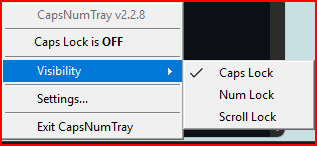
Key features include independent tray icons for each lock key, allowing users to easily monitor their status. Left-clicking any icon toggles its corresponding lock key, while right-clicking opens a menu for additional settings. The utility supports both light and dark themes, automatically adjusting icon brightness for better visibility on different taskbar backgrounds. DPI-aware icons ensure crisp display at various screen scalings.
CapsNumTray offers an on-screen display that shows the state after toggling, enhancing user experience with visual feedback. Optional beep sounds provide audible confirmation of lock key changes, further improving usability.
Ideal for Windows users seeking precise control and visibility over their keyboard's lock keys, CapsNumTray can be installed via winget, making it easy to integrate into your system setup.
README
CapsNumTray
LTR — Long-Term Release · one-click self-update built in.
Caps Lock, Num Lock, and Scroll Lock tray indicators for Windows.
A lightweight system tray utility that shows the current state of your lock keys as independent tray icons. Left-click to toggle, right-click for options. Bright icon = ON, dim icon = OFF.
Features
Independent tray icons for Caps Lock, Num Lock, and Scroll Lock
Left-click to toggle any lock key from the tray
Light theme support: Automatic dim icon variants for light taskbar themes
DPI-aware icons: Crisp at any display scaling
Show/hide individual icons: Scroll Lock hidden by default (opt-in)
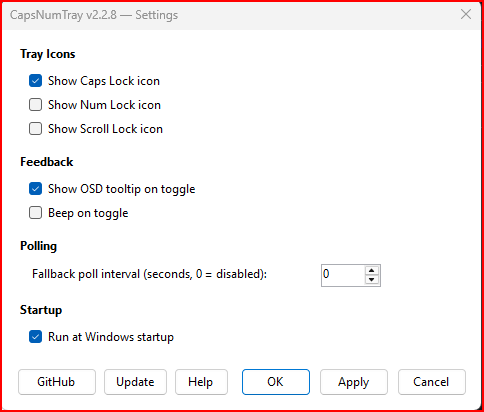
On-screen display: Floating tooltip shows state after toggle
Beep feedback: Optional audible tone (higher pitch = ON)
Run at startup: One-click toggle via Settings
Explorer restart recovery: Icons survive Explorer crashes
Settings dialog: GUI for all options with OK/Apply/Cancel
Screenshots
Tray Icons
Tray Menu
Settings
Requirements
Windows 10/11
Download
Grab CapsNumTray.exe from the latest release — single file, self-contained, no .NET runtime needed.
Code signing
CapsNumTray uses the SignPath Foundation for free code signing of open-source projects. Signed releases carry an Authenticode signature under the publisher name itsnateai and are verified by Windows before execution.
winget install itsnateai.CapsNumTray
winget upgrade itsnateai.CapsNumTray   # later, to update
WinGet installs stay current automatically. The in-app Update button detects WinGet installs and points you back at winget upgrade instead of trying to overwrite the managed binary.
Releases publish a SHA256SUMS file alongside the exe. The in-app Update button downloads it, verifies the hash, and fails closed if anything is missing or doesn't match.
Customization
Settings are stored in CapsNumTray.ini (auto-created next to the exe):
CapsNumTray uses the Win32 Shell_NotifyIconW API directly (not NotifyIcon) to support multiple independent tray icons. A 5-second polling timer via GetKeyState keeps icons in sync even when keys are toggled externally. Icons are DPI-aware via GetDpiForWindow and automatically re-added if Explorer restarts.