MWBToggle





Toggle Mouse Without Borders clipboard and file sharing on/off with a hotkey or tray icon click.
A lightweight system tray companion for PowerToys Mouse Without Borders that lets you quickly disable clipboard/file sharing for privacy (passwords, sensitive data) — for when you're doing a lot of local copy/paste and don't want it constantly going to the MWB watcher. Also helps with large file copies not lagging you when you're not using the feature. Since it runs per-machine, you can also disable sharing on one side to create one-way sharing. MWB stays enabled — this only manipulates the clipboard server in the background.
Features
- Primary hotkey:
Win + Ctrl + Shift + F by default (configurable via menu picker or INI) flips both ShareClipboard and TransferFile at once
- Second hotkey for File Transfer alone: Optional — keep the primary as the "turn everything off" button and bind a separate key to toggle only file sharing
- Tray icon: Green = sharing ON, Red = sharing OFF. Left-click to toggle. Tooltip shows each channel separately (e.g.
Clipboard ON · Files OFF).
- Middle-click: Opens the MWB settings window directly
- Independent Clipboard and File Transfer toggles: Each channel can be flipped individually from the tray menu, not just together
- Pause sharing: Temporarily disable for 5 minutes, 30 minutes, or indefinitely with auto-resume. Survives laptop sleep, and on resume restores the exact pre-pause state instead of turning both back on blindly.
- Hotkey picker: Capturing a new key combo suppresses it from the rest of Windows so you don't fire whatever else happens to be listening
- PowerToys submenu: Quick access to PowerToys MWB settings and the legacy MWB configuration
- Run at startup: One-click toggle to add/remove from Windows Startup folder
- One-way sharing: Disable sharing on one machine while keeping it on another for directional clipboard/file transfer
- Zero polling: Uses OS-level FileSystemWatcher — no CPU usage when idle
- On-screen display: Discreet dark bubble pinned above the system tray with a green/red state dot — no toast notification spam, no cursor tracking
- One-click self-update: Check for new versions from the About dialog — SHA256-verified downloads, rolls back if the new build doesn't start cleanly
Screenshots
| Sharing ON | Sharing OFF | Tray Menu | About |
|---|
 |  | 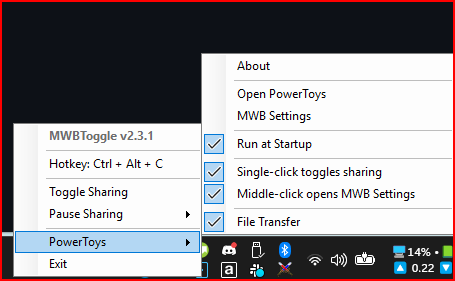 | 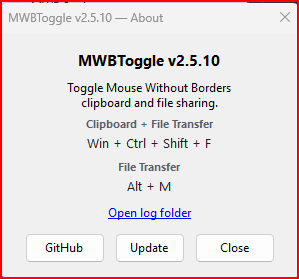 |
Requirements
- Windows 10/11
- PowerToys with Mouse Without Borders enabled
Installation
Option 1: Download
Grab MWBToggle.exe from the latest release — single file, self-contained, no .NET runtime needed.
Option 2: WinGet (recommended)
winget install itsnateai.MWBToggle
winget upgrade itsnateai.MWBToggle   # later, to update
WinGet installs stay current automatically. The in-app Update button detects WinGet installs and points you back at winget upgrade instead of trying to overwrite the managed binary.
Option 3: Build from source
git clone https://github.com/itsnateai/MousewithoutBordersToggle.git
cd MousewithoutBordersToggle

# Framework-dependent (~280KB, requires .NET 8 runtime)
dotnet publish -c Release -r win-x64

# Self-contained single-file (~147MB, no runtime needed) — matches the release exe
dotnet publish -c Release --self-contained true -r win-x64 -p:PublishSingleFile=true
Output: bin/Release/net8.0-windows/win-x64/publish/MWBToggle.exe
Self-update integrity
Releases publish a SHA256SUMS file alongside the exe. The in-app Update button downloads it, verifies the hash, and fails closed if anything is missing or doesn't match. A .ok sentinel rolls back to the prior version if the new exe doesn't successfully start.
Customization
Create a MWBToggle.ini file in the same folder as the exe:
[Settings]
Hotkey=#^+f
FileTransferHotkey=
ConfirmToggle=false
SoundFeedback=false
MiddleClickMwbSettings=true
SingleClickToggles=true
| Key | Default | Description |
|---|
Hotkey | #^+f (Win+Ctrl+Shift+F) | Primary hotkey — flips both Clipboard and File Transfer. AHK-style string: # Win, ^ Ctrl, ! Alt, + Shift. Leave empty to unbind. |
FileTransferHotkey | (empty) | Optional second hotkey that toggles only File Transfer (leaves Clipboard alone). Same AHK-style format. |
ConfirmToggle | false | Prompt before each toggle |
SoundFeedback | false | Beep on toggle (high tone ON, low tone OFF) |
MiddleClickMwbSettings | true | Middle-click tray icon opens MWB settings |
SingleClickToggles | true | Left-click tray icon toggles sharing. Set to false if you want to use the menu or hotkey only — prevents accidental toggles from stray clicks. |
How It Works
MWBToggle reads and writes the PowerToys Mouse Without Borders settings.json file directly:
%LOCALAPPDATA%\Microsoft\PowerToys\MouseWithoutBorders\settings.json
It flips the ShareClipboard and TransferFile values in the JSON, copies the current file to settings.json.bak first (for manual rollback), and then truncate-writes the new content in place. The in-place write matters: PowerToys Mouse Without Borders watches its settings file with a FileSystemWatcher that reacts to LastWrite-type Changed events, which in-place writes emit directly. A .tmp + rename dance would preserve data against a power-cut mid-write but doesn't emit the right event, so MWB would never see the change — settings.json would say one thing while the running MWB module kept sharing on the old state.
If MWB has the file briefly locked, the toggle retries a few times before giving up.
Troubleshooting
"Mouse Without Borders doesn't appear to be running"
- Make sure PowerToys is running and Mouse Without Borders is enabled in PowerToys settings.
"Settings file not found"
- Mouse Without Borders must be run at least once to create its settings file. MWBToggle will detect it automatically once it appears — no restart required.
"Could not write to settings.json"
- The file may be locked by MWB or quarantined by antivirus. Wait a moment and try again.
Nothing happens when I press the hotkey
- Open the About dialog and click Open log folder — MWBToggle writes a small diagnostic log at
%LOCALAPPDATA%\MWBToggle\mwbtoggle.log whenever something goes wrong.
FAQ
How do I uninstall?
- WinGet:
winget uninstall itsnateai.MWBToggle.
- Direct install: exit from the tray menu, then delete the exe and the
%LOCALAPPDATA%\MWBToggle\ folder (which holds the log, INI, and pause sidecar). Also remove the MWBToggle shortcut from shell:startup if you'd enabled run-at-startup.
How do I stop it running at startup without uninstalling?
- Tray menu → uncheck Run at startup. This deletes the shortcut from
shell:startup. Re-check it to restore.
What's the .ok sentinel file I see after an update?
- Self-update safety net. The update downloads the new exe as
MWBToggle.exe.new, swaps it in, and keeps the prior version as MWBToggle.exe.old. On a successful launch of the new version, MWBToggle writes .ok to confirm the new build started cleanly. If that file is missing next launch, the old exe is restored — so a broken update can't leave you unable to run the app.
What about the settings.json.bak next to MWB's settings?
- MWBToggle rewrites
settings.json in place on every toggle — same atomic-write pattern the original PowerToys Settings UI uses. Before each rewrite, the current settings.json is copied to settings.json.bak. That means .bak always holds the state from the previous toggle, not your original pre-MWBToggle config. If you need a "restore my original MWB settings" path, keep your own copy before using MWBToggle — the .bak is for recovering from a bad write, not for undoing the tool entirely.
Does this modify PowerToys itself?
- No. MWBToggle only reads/writes PowerToys' Mouse Without Borders
settings.json — the same file PowerToys already edits when you toggle those switches in its UI. PowerToys keeps running the whole time.
Why does the pause icon stay up after I exit?
- It doesn't — if the tray still shows a pause icon after a proper Exit from the menu, the tray cache is stale. Hover the notification area to force Explorer to refresh.
Project Structure
| Path | Description |
|---|
MWBToggle.csproj | .NET 8 project file |
Program.cs | Entry point — per-session single-instance enforcement |
MWBToggleApp.cs | Main tray app — toggle, sync, pause, OSD, config |
GlobalHotkey.cs | Win32 RegisterHotKey (with MOD_NOREPEAT) + AHK-style parsing |
UpdateDialog.cs | Self-update UI with SHA256 verification and rollback sentinel |
Logger.cs | Tiny rolling log at %LOCALAPPDATA%\MWBToggle\ |
AboutForm.cs | About dialog with GitHub, Update, and Open-log-folder buttons |
IniConfig.cs | Minimal INI file reader |
on.ico / off.ico | Tray icons (embedded as resources) |
Supporting This Project
This app is free and open source. If it saves you time, consider supporting continued development:

You can also build from source for free — see the build instructions above.
License
MIT