
JarkViewer 看图







中文 | English
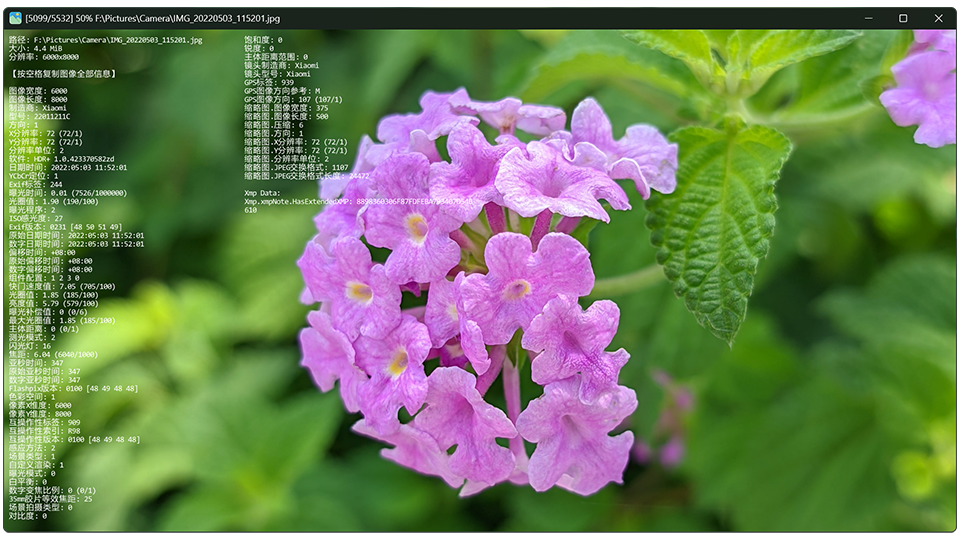
JarkViewer 是一款简约且飞快的看图软件,支持从 JPEG 到 AVIF、HEIC 和 JPEG XL 等最新格式的超多图像格式!即使是 iOS 和 Android 的实况照片也能流畅浏览。
✨ 操作方式
- ⏭ 切换图片:窗口左右边缘
单击/滚轮 / 左/右 方向键
- 🔍 放大缩小:窗口中间滚轮 /
上/下方向键
- 🔄 旋转图片:窗口左上角或右上角
单击/滚轮 / Q/E 键
- 🖱️ 平移图片:鼠标拖动 /
W/A/S/D 键
- ℹ️ 图像信息:点击滚轮 /
TAB / I 键
- 🖥️ 切换全屏:双击窗口 /
F 键 / F11 键
- 📋 复制图像:
Ctrl + C
- 🖨 打印图像:窗口左下角
单击 / Ctrl + P
- 🎞️ 逐帧浏览:窗口顶部控制栏 /
J:上帧 K:暂停/继续 L:下帧
- ⌨️ 空格按键:若当前是静态图则切换下一张,若是动图则暂停/播放
- ✂️ 分解动图:
Ctrl + S 将动图每一帧另存为单独的静态图像文件
🖨 打印/编辑
进入打印功能可以简单调整图像的 对比度、亮度、是否反色 等等,然后再决定 另存为 其他图像文件或 继续打印。
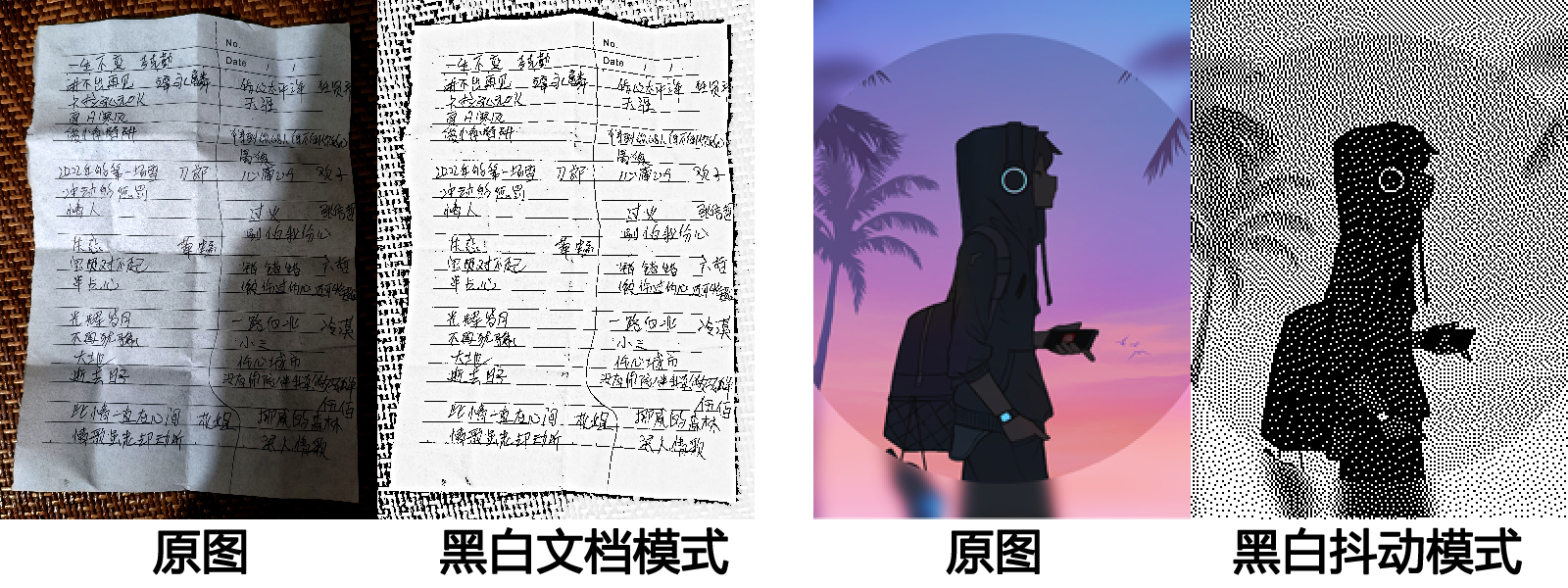
还可以选择颜色模式:彩色、黑白、黑白文档、黑白抖动。
- 黑白文档: 均衡全图亮度,突出字迹,避免局部阴影的观感影响,适合打印拍摄的文字纸张图像。
- 黑白抖动: 使用纯黑像素的分布密度模拟像素灰度值。此模式适合针式打印机和热敏打印机,也能打印出较好的图像效果。
🗃️ 特性
- 🍀 全静态链接编译,原生绿色单文件
- ✅ 自动记忆上次窗口位置/尺寸
- ♟️ 图片透明区域使用国际象棋棋盘背景
- 📖 支持读取开源AI生成图像的提示词信息【StableDiffusion WebUI、ComfyUI输出的图像一般都会内嵌提示词参数或工作流JSON,⚠ 若图像经过各大网络平台传播重新编码,该信息可能会被移除】
📂 格式支持
- 静态:
apng avif avifs blp bmp dib exr gif hdr heic heif ico icon jfif jp2 jpe jpeg jpg jxl jxr livp pbm pfm pgm pic png pnm ppm psd pxm qoi ras sr svg tga tif tiff webp wp2
- 动态:
gif webp png apng jxl avif
- 实况:
livp(IOS LivePhoto) jpg/heic/heif(Android MicroVideo/MotionPhoto) ⚠️ 暂不支持播放声音
- RAW:
3fr ari arw bay cap cr2 cr3 crw dcr dcs dng drf eip erf fff gpr iiq k25 kdc mdc mef mos mrw nef nrw orf pef ptx r3d raf raw rw2 rwl rwz sr2 srf srw x3f
👋 快速上手
-
下载最新版 Releases、蓝奏网盘、百度云盘,提取码:6666
-
使用 winget 安装
winget install jark006.jarkviewer
- 使用
scoop 安装
scoop bucket add extras
scoop install extras/jarkviewer
> ⚠️ 注意:若启动时提示缺失 VCOMP140.DLL 等,请下载并安装 VC++运行库: vc_redist.x64.exe
。自 v1.35 起,不再依赖 VC++运行库,且可在 PE 环境直接运行。如果仍遇到相关错误,请确保下载了正确版本的程序。
🖥️ 系统兼容
✅ 支持 64位 Windows 10 ~ 11 系统。(项目使用 MSVC v145 生成工具只保证兼容 Win 10+)
⚠️ 目前实测可以在 64位 Win 8/8.1 稳定运行,但不保证未来版本也能继续兼容。
❌ 不兼容 32位 Win 7 及以下系统。
🛠️ 对于开发者
下载仓库源码时,只需下载最新提交,历史提交存在较多占空间的冗余文件。
git clone git@github.com:jark006/JarkViewer.git --depth=50
⭐ 建议访问本项目的 DeepWiki 或 Zread 页面,有更详细的说明和开发相关的内容,可快速理解各个模块的实现逻辑。
本项目使用 Visual Studio 2026 进行开发,全部第三方库静态链接,开发者需要在编译前备好所有第三方静态库文件,请在以下链接下载对应版本的第三方静态库文件压缩包,按说明解压到对应位置。
静态库下载: https://github.com/jark006/JarkViewer/releases/tag/static_lib
以上静态库除 OpenCV 外,均使用vcpkg安装的静态库复制而来。OpenCV有以下2个修改:
- 在源码
opencv-4.13.0\modules\imgcodecs\src\loadsave.cpp #68-79 移除图像分辨率限制。
- 在源码
opencv-4.13.0\modules\highgui\src\window_w32.cpp #337 将 IDC_CROSS 改为 IDC_ARROW,即在 cv::imshow() 窗口内不使用十字光标。
若不要以上静态库,可在项目属性页开启vcpkg支持,然后手动安装第三方库 (后续若有新增,此列表可能更新不及时,需开发者自行根据编译缺失信息补充安装)
vcpkg install x265:x64-windows-static
vcpkg install zlib:x64-windows-static
vcpkg install libyuv:x64-windows-static
vcpkg install exiv2[core,bmff,png,xmp]:x64-windows-static
vcpkg install libavif[core,aom,dav1d]:x64-windows-static
vcpkg install libjxl:x64-windows-static
vcpkg install libheif[core,hevc]:x64-windows-static
vcpkg install libraw[core,dng-lossy,openmp]:x64-windows-static
vcpkg install lunasvg:x64-windows-static
vcpkg install directxtex:x64-windows-static
vcpkg install ffmpeg:x64-windows-static
vcpkg install opencv4[core,contrib,freetype,ipp,jasper,jpeg,jpegxl,nonfree,openexr,opengl,openjpeg,png,tiff,webp,world]:x64-windows-static
📜 License
本项目采用 GPL-3.0 许可证开放源代码。了解更多内容,请查看 LICENSE 文件。