Usage Monitor for Claude


Monitor your Claude rate limits in real time - right from your system tray.
A native tray app for Windows and Linux that shows your Claude usage at a glance - lightweight and fully auditable. Rate limits are shared across claude.ai, Claude Code, Claude Code Cowork, and IDE extensions for VS Code and JetBrains - always know how much of your session and weekly limits (Sonnet, Opus, Fable, Cowork, and any future quota types) you have left.
> [!TIP]
> Companion tool: Agent Monitor for Claude
>
> Usage Monitor for Claude tells you how much of your rate limits you have left. Its companion tool, Agent Monitor for Claude, tells you what your agents are actually doing: every running Claude Code agent across all your projects, grouped by project, with the ones that need attention on top - working, waiting for input, blocked, finished, or errored, each with its cost, tokens, model, and host. One click brings an agent's window to the foreground.
>
> You can even launch it straight from the tray icon.
Features
- Portable on Windows - single EXE (~12.5 MB), no installation, no Electron, no runtime required. Download, place anywhere, run. To uninstall, delete the file. On Linux it runs from source against the GTK and WebKit libraries your desktop already ships
- Zero configuration - authenticates through your existing Claude Code login, no API key or manual token entry needed
- Live tray icon with two configurable progress bars (session + weekly by default), or both values as stacked percentages via
icon_style. Plus a configurable tooltip, percentage display, and theme-aware colors for light and dark taskbars
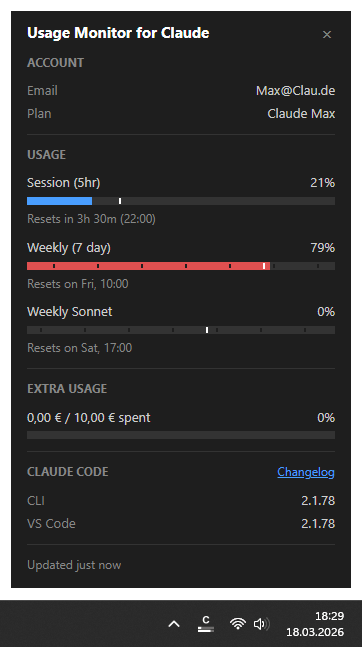
- Detail popup (left-click, or from the tray menu on Linux panels where a left-click opens the menu) with account info, reset countdowns, extra usage including the prepaid credits still available to pay for it, and dynamically detected bars for every active quota type (Session, Weekly, Sonnet, Opus, Fable, Cowork, and whatever Anthropic adds next), selectable per field. A stale-data indicator flags values that may be outdated. Pin it open and drag it anywhere to keep usage visible during long sessions - optionally as a compact view with only the parts you need. Reset times follow your system's clock format
- Claude Code versions - the popup shows which version is installed in each environment (native CLI, VS Code, Cursor, Windsurf), so you can spot when your IDE extension is ahead of or behind the CLI. Installs the app cannot see, such as one inside WSL, are listed alongside the rest via the
cli_command setting
- Smart alerts - configurable threshold notifications per quota type, with time-aware mode that only alerts when usage outpaces elapsed time. Reset notifications when a nearly exhausted quota refills. Extra usage can also alert on absolute spending amounts (e.g. $50 / $100 / $150 spent), the only alert available when it has no monthly limit
- Event commands - run a custom shell command when a quota resets, a usage threshold is crossed, the app starts up, or whenever you want via your quick action on the tray icon. Send push notifications to your phone, resume an AI agent, start a fresh 5-hour session automatically, play an alert sound, launch a companion tool like Agent Monitor for Claude, or trigger any custom workflow
- Time marker on every bar, in the popup and on the tray icon alike, showing how much of the current period has elapsed - so you see at a glance whether your usage is ahead of or behind the clock. Bars that outpace it turn red
- Automatic token refresh - when the OAuth session expires, runs
claude update in the background to renew the token without user intervention. If a CLI update is installed, shows a notification (which you can turn off via the notify_claude_update setting)
- Adaptive polling - speeds up during active usage, slows down to a 15-minute cadence when the computer is idle or locked, aligns to imminent quota resets, and backs off on rate-limit errors. An open detail popup always stays up to date. Quota resets and account switches are picked up as they happen, even on an unattended machine, so the tray never lingers on stale numbers or on the previous account's usage
- Multi-account - monitor several Claude accounts side by side: launch one instance per account with
--config-dir="" pointing at each account's Claude config directory. Each tray icon shows its account's usage, with a [dir-name] tooltip prefix, per-instance settings, and its own autostart entry
- 13 languages (English, German, French, Spanish, Portuguese, Italian, Japanese, Korean, Hindi, Indonesian, Chinese Simplified, Chinese Traditional, Ukrainian) - auto-detected from your system's display language, with optional manual override via the
language setting
- Customizable - optionally override polling intervals, colors, alert thresholds, and more via a JSON settings file
Security & Transparency
This tool handles your Claude Code OAuth token, so you should be able to verify it is safe. The codebase is deliberately structured for easy auditing:
- Single network destination - communicates exclusively with
api.anthropic.com, no other hosts
- Credentials stay local - the OAuth token is used only in HTTP Authorization headers, never logged, stored elsewhere, or transmitted to third parties
- Touches almost nothing - usage data lives in memory only. On Windows the app writes no files at all; its only lasting traces are two
HKEY_CURRENT_USER registry values (the toast notification identity, re-registered on every start, and the autostart entry, written only when you enable autostart). On Linux the same two concerns need files instead: an autostart .desktop entry, again only when you enable it, and a 0600 lock file in the session's runtime directory that keeps a second instance from starting. PRIVACY.md lists every one of them. An expired OAuth token additionally triggers claude update, which may install a newer Claude Code version
- No dynamic code execution - no
eval(), exec(), compile(), or dynamic imports
- No obfuscation - no encoded strings, no hidden URLs, no minified logic
- Modular architecture - small, focused modules with security-critical code (credentials, API calls) isolated in a single file (
api.py)
- Minimal runtime dependencies - only four well-known packages: requests, Pillow, pystray, pywebview
Antivirus Warnings
A few scanners flag UsageMonitorForClaude.exe as a trojan, and Chrome may cancel the download with "Virus found". This is a false positive. Every new release tends to be flagged for a while after publication.
Check that you have the authentic file. The EXE is code signed: open its Properties and look at the Digital Signatures tab, which must name Jens Duttke. Each release additionally lists the SHA256 of its EXE at the end of the release notes. Compare it against your download:
Get-FileHash UsageMonitorForClaude.exe -Algorithm SHA256
A matching hash means the file is exactly the one published here, including the copy WinGet installs.
Where the warning comes from. The app is a Python program shipped as a single portable EXE built with PyInstaller. Such a bundle unpacks itself into a temporary directory on startup and runs the interpreter from there. That is what a self-extracting packer does, and malware is built with the same tool, so heuristic engines react to the packaging rather than to the program.
The detection names say as much. In Trojan:Win32/Wacatac.B!ml the !ml suffix means a machine-learning model produced the verdict instead of a signature match, and Wacatac is a generic bucket for "suspicious, unidentified". How widespread a file already is counts too, and a release published yesterday is nowhere - which is why the identical file is often rated clean a few weeks later.
The signature does not end this. It gives Windows a publisher to name instead of "unknown", and it lets reputation build up on the certificate across releases rather than starting from zero with every new file - but a heuristic engine still reacts to the packaging, and a certificate counts for no more reputation than it has already collected.
Chrome does not add a second opinion. It passes every downloaded executable to the antivirus installed on your machine and shows you that verdict, so the browser message and the scanner alert are one detection, not two.
What you can do.
- Restore the file from quarantine and add an exclusion for it.
- Report it to your vendor as a false positive. For Microsoft Defender, use Submit a file for malware analysis.
- Or skip the packed EXE and run from source instead - nothing is bundled there, and you can read every line before you start it.
Requirements
- Windows 10 or Windows 11 (64-bit), or Linux with a freedesktop desktop environment (see Linux below)
- A Claude subscription (Pro, Max, Team, or Enterprise) - the app displays the session and weekly rate limits that come with your plan. Pay-as-you-go API billing through the Anthropic Console has no such limits and is not supported.
- Claude Code installed and logged in (CLI, VS Code extension, or JetBrains plugin - any variant works). The app reads the OAuth token that Claude Code stores locally (
~/.claude/.credentials.json), or from CLAUDE_CONFIG_DIR when that is set; the --config-dir="" command-line parameter overrides both. To run one instance per Claude account, log each account in via Claude Code with CLAUDE_CONFIG_DIR pointing at its own directory first.
> [!TIP]
> If the token expires, the app automatically runs claude update to refresh it. If the token is missing entirely, the app shows a notification and a "!" icon - run claude auth login and the monitor picks the new token up automatically.
Quick Start
No Python required. Download the latest UsageMonitorForClaude.exe, place it wherever you like, and run it. The EXE is code signed, so Windows names Jens Duttke as its publisher. To remove, disable "Start at login" in the context menu first (if enabled), then delete the file.
Or install it from WinGet, where every release is published automatically:
winget install jens-duttke.usage-monitor-for-claude
> [!NOTE]
> If Windows or your browser reports the download as a virus, see Antivirus Warnings above. It is a false positive from the way the EXE is packaged, and the section shows how to verify that your download is the published file.
Linux
There is no prebuilt binary: PyInstaller cannot bundle GTK and WebKit reliably, so the app runs from
source against the libraries your desktop already ships. Tested on Ubuntu with GNOME.
sudo apt install python3-venv python3-gi gir1.2-webkit2-4.1 \
                 gir1.2-ayatanaappindicator3-0.1 libayatana-appindicator3-1

git clone https://github.com/jens-duttke/usage-monitor-for-claude.git
cd usage-monitor-for-claude

python3 -m venv --system-site-packages .venv
source .venv/bin/activate
pip install -r requirements.txt

python3 -m usage_monitor_for_claude
To start it again later, use the launcher - it needs no activated environment and works from any
directory:
~/usage-monitor-for-claude/usage-monitor-for-claude
Symlink it once to get a global command, available in any shell and in your desktop's run dialog:
ln -s ~/usage-monitor-for-claude/usage-monitor-for-claude ~/.local/bin/usage-monitor-for-claude
Enable Start at login from the tray menu and the app takes care of the rest.
Three notes specific to Linux:
- The virtual environment needs
--system-site-packages. PyGObject is installed by apt, not by
pip; without that flag the app stops at ModuleNotFoundError: No module named 'gi'. If you already
have a .venv created without it, set include-system-site-packages = true in .venv/pyvenv.cfg
rather than recreating it - no reinstall needed.
- The tray icon needs
gir1.2-ayatanaappindicator3-0.1. Without it no icon appears. Ubuntu
enables the required GNOME extension by default; on plain GNOME you need
AppIndicator support.
- The app runs as an XWayland client. Wayland does not let a client place its own windows, so
the detail popup could not be anchored to the tray corner. The app sets
GDK_BACKEND=x11 itself;
set that variable explicitly if you want to try the native backend.
On KDE Plasma a left-click opens the detail popup. Where a left-click opens the menu instead, the
popup is the menu's first entry.
On startup the tray library prints libayatana-appindicator is deprecated. Nothing is broken - the
icon works as it should. pystray still uses that library's GTK-3 API, and the replacement
(libayatana-appindicator-glib) has no pystray support yet, so the message stays until it does.
> [!NOTE]
> Anyone can submit manifests for any package to the WinGet community repository, and its automated validation checks the installer domain (github.com) but not the repository path behind it, so a submission pointing at a different account would have to be caught by a human reviewer. Use that channel at your own risk - the download link above is the authoritative source.
How to Use
| Action | What happens |
|---|
| Hover over the tray icon | Tooltip shows 5h and 7d usage percentages with reset times |
| Left-click the tray icon | Opens the detail popup with account info and all usage bars |
| Double-click the tray icon | Runs your quick action if configured (e.g. launch Agent Monitor for Claude); otherwise does nothing. On Linux the desktop keeps the click, so the quick action sits in the tray menu instead |
| Right-click the tray icon | Context menu: open popup, autostart toggle, test event commands, restart, GitHub link, or quit |
| Escape or click outside | Closes the detail popup |
Tray icon not visible?
Windows may hide new tray icons by default. To keep the icon always visible:
- Right-click the taskbar → Taskbar settings
- Expand Other system tray icons (Win 11) or Select which icons appear on the taskbar (Win 10)
- Toggle UsageMonitorForClaude to On
Reading the progress bars
Each bar in the detail popup has up to four visual elements:
- Blue fill - how much of the limit you have used
- Time dividers - subtle gaps splitting the session bar into equal hour sections and marking local midnights on the weekly bars
- White vertical line - how much time has passed in the current period. The fill turns red when it passes this marker, warning that you may hit the limit before the period resets.
- Reset text - when the limit resets, shown as a countdown with clock time
Configuration
All settings work out of the box - no configuration file is needed. To customize behavior, create a file called usage-monitor-settings.json with only the keys you want to change:
{
  "poll_interval": 180,
  "bar_fg": "#00cc66",
  "bar_fg_warn": "#ff6600"
}
The app searches for this file in these locations (first match wins):
$CLAUDE_CONFIG_DIR/usage-monitor-settings.json (when a custom config directory is set via --config-dir or CLAUDE_CONFIG_DIR) - so each instance can have its own settings- Next to the EXE (or project root when running from source)
~/.claude/usage-monitor-settings.json
The app never creates or modifies this file. See Configuration for all available settings (alert thresholds, polling intervals, colors, language, and more).
Building from Source
For developers who want to build the EXE themselves
Prerequisites
Setup
Windows:
git clone https://github.com/jens-duttke/usage-monitor-for-claude.git
cd usage-monitor-for-claude
python -m venv .venv
.venv\Scripts\activate
pip install -r requirements.txt
Linux - see Linux above for the apt packages this needs first:
git clone https://github.com/jens-duttke/usage-monitor-for-claude.git
cd usage-monitor-for-claude
python3 -m venv --system-site-packages .venv
source .venv/bin/activate
pip install -r requirements.txt
--system-site-packages lets the environment see the distribution's PyGObject; pip install PyGObject would build it from source and needs the GTK development headers.
Run
python -m usage_monitor_for_claude
Test
python -m unittest discover -s tests
The suite runs on both platforms. Tests for the backend of the other operating system skip
themselves at module level, so a green run means everything applicable to your system passed.
Build EXE (Windows)
python build.py
Produces dist/UsageMonitorForClaude.exe (~12.5 MB), a single-file executable that bundles Python and all dependencies.
Your own build is unsigned. To sign it, install the Windows SDK signing tools and put a signing.env next to build.py with SIGNING_THUMBPRINT (a code signing certificate in your Windows certificate store) and SIGNING_TIMESTAMP_URL. Add SIGNING_TIMESTAMP_FALLBACK_URL to have a second timestamp server tried when the first one does not answer. The build then signs the executable and verifies the result, and a failure of either stops it. If the certificate sits on a hardware token, the build stops partway through until you enter the PIN.
There is no equivalent Linux build: PyInstaller cannot reliably bundle GTK and WebKit, so the app is
run from source there.
The popup UI lives in usage_monitor_for_claude/popup/ as separate HTML, CSS, and JS files. To preview and iterate on the UI without running the full app:
start http://localhost:8080/usage_monitor_for_claude/popup/dev.html && python -m http.server 8080
On Linux:
xdg-open http://localhost:8080/usage_monitor_for_claude/popup/dev.html && python -m http.server 8080
This starts a local server and opens the dev preview in your default browser. Use the buttons to switch between data presets (full, minimal, error, loading) and the language dropdown to preview every locale, which is how you spot strings that overflow the popup width.
Create a Release
Before touching a file: run git fetch origin and git rev-list --left-right --count origin/main...HEAD - anything other than 0 on the left means the remote has commits you do not have. Make sure the working tree is clean and the test suite is green. On a stale tree the rolled changelog omits whatever was pushed meanwhile, and the tag describes something you never built.
-
Update dependencies: pip install --upgrade -r requirements.txt
-
Update __version__ in usage_monitor_for_claude/__init__.py and the version in version_info.py (all four fields: filevers, prodvers, FileVersion, ProductVersion)
-
Update _FALLBACK_USER_AGENT in usage_monitor_for_claude/api.py to the current Claude Code version
-
In CHANGELOG.md, rename ## [Unreleased] to ## [1.x.x] - YYYY-MM-DD, add a fresh empty ## [Unreleased] section above it, and update both compare links
-
Run the test suite again, now against the bumped tree: python -m unittest discover -s tests
-
Smoke test from source: python -m usage_monitor_for_claude - verify tray icon, popup, and settings
-
Build the EXE: python build.py. If a signing certificate is configured, the run waits for the token PIN partway through
-
Read the version back out of the artifact - this is what catches an EXE left over from an earlier build:
(Get-Item dist\UsageMonitorForClaude.exe).VersionInfo | Select-Object FileVersion, ProductVersion
Both must read 1.x.x.0.
-
Smoke test the EXE: dist\UsageMonitorForClaude.exe - verify tray icon, popup, and settings
-
Write the release notes to a file: the new CHANGELOG.md section, followed by a [Full changelog]() link and a [README for this version](https://github.com/jens-duttke/usage-monitor-for-claude/blob/v1.x.x/README.md) link. Pass them with --notes-file - the entries contain backticks, which PowerShell treats as escape characters inside --notes "..."
-
Stage the changes from steps 2 to 4, then publish. The commit has to land before the tag, and the WinGet submission needs a current fork:
gh api -X POST repos/jens-duttke/winget-pkgs/merge-upstream -f branch=master
git commit -m "chore: release v1.x.x"
git push origin main
git tag v1.x.x
git push origin v1.x.x
"`n**SHA256 of UsageMonitorForClaude.exe:** $((Get-FileHash dist/UsageMonitorForClaude.exe -Algorithm SHA256).Hash)" | Add-Content
gh release create v1.x.x dist/UsageMonitorForClaude.exe --title "v1.x.x" --notes-file
The SHA256 is appended here rather than written into the notes file, so it is always the hash of the artifact actually being uploaded.
-
Publishing submits the version to WinGet. Nothing reports a failure of that workflow, so check it: gh run list --workflow winget.yml --limit 1. A failed run needs no new release - once the cause is fixed, gh workflow run winget.yml -f release-tag=v1.x.x retries the submission
Contributing
Contributions are welcome - whether it's bug reports, feature ideas, or pull requests. Open an issue to report bugs or ask questions. For feature ideas, browse and vote on existing proposals or submit your own in Ideas.
For developers who want to contribute to the project
This project is developed with Claude Code. The .claude/CLAUDE.md file contains all project conventions, coding standards, and architectural guidelines - Claude Code applies these automatically during development.
Workflow
- Read
.claude/CLAUDE.md to understand the project conventions
- Implement your changes with Claude Code - it will follow the guidelines automatically
- Before committing, run the
/review slash command to perform a systematic quality review of all staged changes (code, tests, documentation)
- Stage remaining fixes if any, then run
/commit-message to generate a properly formatted commit message
Adding features
New features should follow the existing architecture. Key points from the guidelines:
- Security-critical code (credentials, API calls) stays isolated in
api.py
- All user-facing changes need updates in
CHANGELOG.md, README.md, and docs/configuration.md where applicable
- Tests are required - run
python -m unittest discover -s tests before committing
- The app must not write files beyond what
PRIVACY.md documents: nothing at all on Windows, where the only lasting state is two HKEY_CURRENT_USER registry values (notification identity, autostart entry), and on Linux the autostart .desktop entry plus the single-instance lock file. Any new persistent write needs PRIVACY.md and README.md updated in the same change
hybrid2102 used this project as the basis for two tray monitors for other AI coding tools:
> [!IMPORTANT]
> These are independent projects, maintained by their own author. This project neither reviews nor controls their code and takes no responsibility for their content. Nothing this README states about security, privacy, or data handling applies to them. Review them yourself and use them at your own risk.
License
MIT
Disclaimer
This is an independent, community-built project. It is not created, endorsed, or officially supported by Anthropic. "Claude" and "Anthropic" are trademarks of Anthropic, PBC. Use of these names is solely for descriptive purposes to indicate compatibility.