Tributary jm2
Use this command to install Tributary with WinGet:
winget install --id=jm2.Tributary -e Tributary is a high-performance, Rhythmbox-style media manager written in pure Rust with GTK4 and libadwaita.
winget install --id=jm2.Tributary -e Tributary is a high-performance, Rhythmbox-style media manager written in pure Rust with GTK4 and libadwaita.



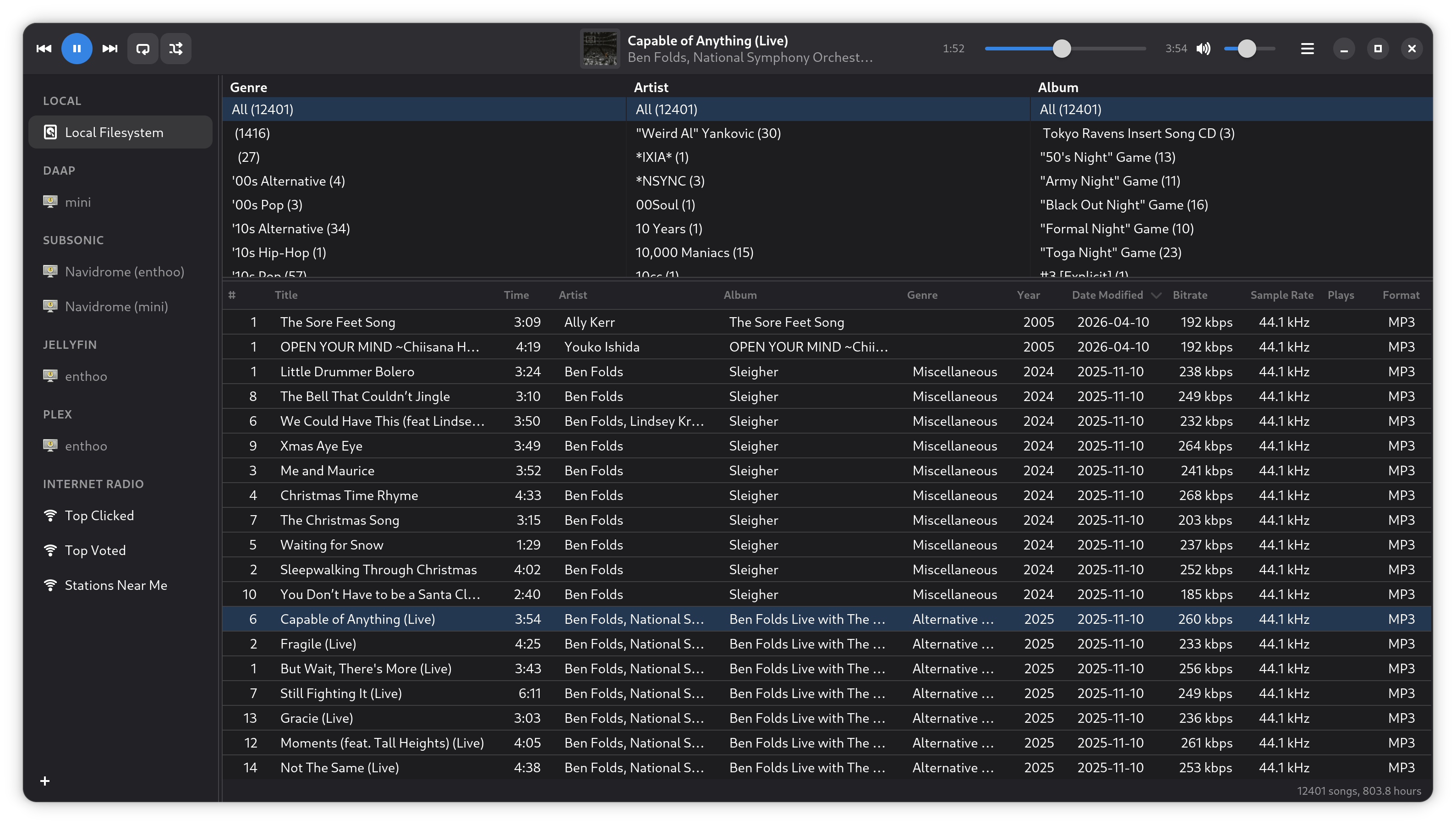
A high-performance, Rhythmbox-style media manager written in pure Rust with GTK4 and libadwaita.
Tributary provides a unified interface for managing and streaming music from multiple sources — local files, Subsonic/Navidrome, Jellyfin, Plex, DAAP/iTunes shares, and internet radio — all through a single, responsive library view.
| Feature | Status |
|---|---|
GTK4 / libadwaita UI (Rhythmbox-style GtkColumnView) | ✅ |
| Browser filtering (Genre → Artist → Album) and folder browsing | ✅ |
| Album artwork in the browser (Small, Medium, or Large) | ✅ Optional, off by default |
Local library with FS date_modified scanning | ✅ |
Real-time filesystem watching (notify) | ✅ |
SQLite persistence (SeaORM) | ✅ |
GStreamer audio playback (playbin3) | ✅ |
MPRIS / SMTC / macOS Now Playing integration (souvlaki) | ✅ |
| Playback controls (play/pause, next/prev, seek, volume) | ✅ |
| Ten-band equalizer with presets, preamp, and clip protection | ✅ Local output only |
| Shuffle & repeat (off / all / one) with persistence | ✅ |
| Column sort persistence | ✅ |
| Subsonic / Navidrome / Nextcloud Music backend | ✅ |
| Jellyfin backend | ✅ |
| Plex backend | ✅ |
| DAAP / iTunes Sharing backend (DMAP binary protocol) | ✅ |
| mDNS zero-config discovery (Subsonic, Plex, DAAP) | ✅ |
| Jellyfin UDP broadcast discovery | ✅ |
| DAAP sidebar eject button (disconnect) | ✅ |
| Password-only auth dialog (DAAP) | ✅ |
| Regular discovery refresh (add/remove servers dynamically) | ✅ |
Manual server addition/deletion with servers.json persistence | ✅ |
| Internet Radio (Top Clicked, Top Voted, Stations Near Me) | ✅ |
| Tiered geo-location (geo-distance → state → country) | ✅ |
| Column drag-and-drop reordering with persistence | ✅ |
| Regular & smart playlists (iTunes-style rules) | ✅ Regular playlists may include remote tracks |
| Drag and drop tracks onto playlists | ✅ |
| Drag tracks out to a file manager | ✅ Copies local library files only |
| Subsonic server playlists (import a copy, or keep a read-only synced mirror) | ✅ |
| Download remote tracks for offline listening | ✅ Saved as ordinary local files — see Downloading Remote Tracks |
| Realtime text search filter (title, artist, album, genre) | ✅ |
| Song metadata editing (Properties dialog with Save/Cancel) | ✅ |
| Batch metadata editing (multi-select) | ✅ |
| MusicBrainz auto-fill lookup | ✅ |
Keyboard shortcut: Ctrl+F / Cmd+F to search | ✅ |
| XDG music directory support (non-English locales) | ✅ |
| Network connection guard (prevents duplicate auth) | ✅ |
| i18n/l10n framework (13 languages, auto locale detection) | ✅ |
| Audio output selector (local + MPD + Chromecast) | ✅ |
| MPD output backend (sink-only, hardened TCP) | ✅ Requires exclusive-control confirmation |
| Output switching (click to swap local ↔ MPD) | ✅ |
| AirPlay 1 (RAOP) output | ⚠️ Listed only when GStreamer provides raopsink; use OS-level routing meanwhile — see AirPlay roadmap |
| AirPlay 2 / HomeKit output | ❌ Not yet supported — see AirPlay roadmap below |
| Chromecast output (Cast V2 — local files + remote sources) | ✅ |
| Album artist sort (preference toggle) | ✅ |
| Smart playlist compound sort (multi-key ordering) | ✅ |
| Geo-distance sorting for Stations Near Me | ✅ |
| USB/removable-media browsing (live sidebar entries + track scan) | ✅ |
| USB file transfer (copy to device with progress) | ✅ Right-click tracks or a playlist → Copy to Device; MTP-only phones are not supported — see Copying Music to a Device |
| Multiple music library directories | ✅ |
| Playlist import/export (XSPF) | ✅ |
| Rhythmbox profile migration | ✅ Preview-first import of ratings, play counts, and playlists |
| Local playback history (play counts and last-played times) | ✅ |
| Default smart playlists (Recently Added, Recently Played, Top 25) | ✅ |
| Track ratings | ✅ Editable for local tracks; Subsonic, Jellyfin, and Plex ratings are read-only |
| Last.fm scrobbling | 🚧 Not available yet |
| Window position persistence | ✅ |
| Windows 11 Snap Layout support | ✅ |
| Linux and macOS file associations | ✅ |
| Cross-platform: Linux, macOS, Windows | ✅ |
| Light & dark mode | ✅ Automatic (libadwaita) |
Last.fm scrobbling isn't available yet. Release builds don't include Last.fm application credentials, so Preferences doesn't show Last.fm settings until they do, and Tributary never contacts Last.fm. The Last.fm design records what exists and what remains. Planned work is tracked in GitHub issues; the roadmap summarizes product direction and current limitations.
┌──────────────────────────────────────────────────────────────┐
│ GTK4 / libadwaita UI and platform media controls             │
├──────────────────────────────────────────────────────────────┤
│ SourceRegistry: source identity, lifecycle, and              │
│ playback-time media resolution                               │
├─────────────────────────────────────────┬────────────────────┤
│ MediaBackend trait (async)              │ Lifecycle adapters │
├────────┬──────────┬──────────┬────┬─────┼───────┬────────────┤
│ Local  │ Subsonic │ Jellyfin │Plex│DAAP │ Radio │ Device/OS  │
├────────┴──────────┴──────────┴────┴─────┴───────┴────────────┤
│ AudioOutput: Local/GStreamer │ MPD │ AirPlay 1 │ Chromecast  │
└──────────────────────────────────────────────────────────────┘
The local library and the Subsonic, Jellyfin, Plex, and DAAP backends publish their catalogues
through one async MediaBackend trait, so the tracklist and browser render every source the same
way; connection and authentication flows still differ per backend. Radio-Browser views, removable
mounts, and files opened from the OS plug in as lifecycle adapters instead. SourceRegistry owns
the lifecycle of those managed sources — authenticated servers, radio, removable media, and
OS-opened files — and resolves their media at playback time, while the local library is scanned
and watched by its own engine. Remote and removable rows and every playback queue identify tracks
by a stable SourceId and TrackId plus non-locator metadata, never by a server address,
credential, or mount path; local rows keep a file path for operations such as Properties. Outputs
implement one AudioOutput trait. Last.fm is absent from the diagram because it is not
user-visible yet.
The source identity and lifecycle decision documents the registry seam in detail.
| Platform | Architectures | Release packages |
|---|---|---|
| Linux | x86_64, aarch64 | Flatpak, .deb, .rpm (both architectures); Arch package (x86_64 only) |
| Windows | x86_64, aarch64 | Installer (.exe) and .zip |
| macOS | Apple Silicon (aarch64) only | .dmg |
.dmg does not run on
Intel Macs..dmg needs macOS 15 (Sequoia) or newer. It bundles Homebrew libraries built on
macOS 15, and the app declares that minimum, so macOS won't open it on an older version..deb is built on Debian unstable, so its binary needs a recent glibc: the 0.6.2 .deb
needs glibc 2.39 or newer. The package does not declare this, so on an older system it can
install but then fail to start. Later releases may raise this floor.Tributary is available from the jmsqrd/tributary COPR repository:
sudo dnf copr enable jmsqrd/tributary
sudo dnf install tributary
Tributary is available on the AUR in three variants:
| Package | Description |
|---|---|
tributary | Build from the latest release source |
tributary-bin | Pre-built binary from the latest release |
tributary-git | Build from the latest main branch commit |
Install with your preferred AUR helper, for example:
yay -S tributary-bin
Tributary is available via winget:
winget install jm2.Tributary
Pre-built packages for Linux (Flatpak, .deb, .rpm), macOS (.dmg), and Windows (.exe installer, .zip) are also available on the Releases page.
The .deb and .rpm packages need GTK 4.16+ and libadwaita 1.6+; the .deb is built on Debian
unstable and declares the glibc version it needs. Release assets published after 0.6.2 carry a
GitHub build-provenance attestation, which gh attestation verify --repo jm2/tributary
checks. Flatpak users upgrading from 0.6.2 or earlier should first
move their data to the new app ID.
> macOS note: The macOS .dmg is ad-hoc signed but not notarized, so macOS Gatekeeper will block it on first launch. After mounting the DMG and dragging Tributary to Applications, run:
> bash > xattr -cr /Applications/Tributary.app >
> Then open normally. This is only needed once.
Cargo.toml,
verified by a dedicated CI jobpkg-config> Check your GTK version first: pkg-config --modversion gtk4. Debian 12 and Ubuntu 24.04
> ship GTK 4.8/4.14 and libadwaita below 1.6, so the packages below are not sufficient on those
> releases — you will need a newer distribution, backports, or the Flatpak build.
Debian / Ubuntu:
sudo apt install libgtk-4-dev libadwaita-1-dev libgstreamer1.0-dev libdbus-1-dev pkg-config build-essential
Fedora:
sudo dnf install gtk4-devel libadwaita-devel gstreamer1-devel dbus-devel pkgconf-pkg-config gcc
Arch Linux:
sudo pacman -S gtk4 libadwaita gstreamer dbus pkgconf base-devel
Then build:
cargo build --release
# or use the helper script:
./scripts/build-linux.sh
The binary is at target/release/tributary.
To build and launch in the same terminal, use ./scripts/build-linux.sh --run.
This builds the native target with locked dependencies and validates the binary before launch.
Requires Homebrew:
brew install gtk4 libadwaita pkg-config gstreamer gst-plugins-good gst-plugins-bad \
  gst-plugins-ugly gst-libav libsoup adwaita-icon-theme
cargo build --release
For a native development build that launches in the same terminal:
./scripts/build-macos.sh --run
The helper uses locked dependencies, validates the binary's Mach-O imports, and runs with Homebrew libraries. It skips app bundling and disk-image creation.
To create a .app bundle and .dmg:
brew install create-dmg   # optional, for DMG packaging
./scripts/build-macos.sh --dmg
The app bundle is at dist/Tributary.app, and the DMG at dist/Tributary.dmg.
On Linux and macOS, --run builds target//release/tributary, keeps logs in
the terminal, and returns the application's exit status. It cannot be combined with formatting,
checks, coverage, or packaging flags. Both helpers accept at most one quick-exit mode;
--fmt requires only Cargo. They can be invoked by path from outside the repository.
> Note: The .app bundle includes rpath-fixed dylibs and is ad-hoc code-signed so it can run without Homebrew on the target machine. For distribution, proper Apple Developer code signing and notarization are recommended.
Requires MSYS2 with the CLANG64 environment:
# In an MSYS2 CLANG64 shell:
pacman -S mingw-w64-clang-x86_64-gtk4 \
          mingw-w64-clang-x86_64-libadwaita \
          mingw-w64-clang-x86_64-gstreamer \
          mingw-w64-clang-x86_64-gst-plugins-good \
          mingw-w64-clang-x86_64-gst-plugins-bad \
          mingw-w64-clang-x86_64-gst-libav \
          mingw-w64-clang-x86_64-pkg-config \
          mingw-w64-clang-x86_64-toolchain
Then, in PowerShell:
# Ensure Rust's LLVM target is installed:
rustup target add x86_64-pc-windows-gnullvm

# Build and bundle DLLs:
.\scripts\build-windows.ps1
This produces dist/tributary-windows.zip with the executable and all required DLLs/resources.
The bundle step probes the packaged GStreamer runtime and records a receipt tied to the exact
executable and WASAPI2 plugin; an installer-only -InnoSetup -SkipBundle run reuses the existing
tree only while that receipt still matches, so rerun the full bundle after changing either file.
Tributary does not play DVDs, Blu-ray discs, or DRM-protected media, and its packaging scripts
refuse to ship optical-disc decryption or content-decryption components. Ordinary audio codecs,
TLS, and general-purpose cryptography are unaffected. Windows and macOS bundles contain only the
GStreamer plugins Tributary uses for audio playback and include THIRD-PARTY-NOTICES.txt with the
bundled components' licenses. The
release component policy describes exactly what each
platform's packaging validates.
The manifest builds offline from a generated build-aux/flatpak/cargo-sources.json. The
repository vendors the pinned Cargo source generator (see
build-aux/flatpak/flatpak-cargo-generator.PROVENANCE), and the helper below verifies its
checksum before writing the manifest.
# Install the tools and configure Flathub for this user:
sudo apt install binutils flatpak flatpak-builder ostree python3-venv
flatpak remote-add --if-not-exists --user flathub \
  https://dl.flathub.org/repo/flathub.flatpakrepo

# Keep the generator dependencies isolated from the system Python:
FLATPAK_VENV="${XDG_CACHE_HOME:-$HOME/.cache}/tributary-flatpak-venv"
python3 -m venv "$FLATPAK_VENV"
source "$FLATPAK_VENV/bin/activate"
python3 -m pip install --requirement build-aux/flatpak/generator-requirements.txt

# Verify the vendored pin and generate the offline source manifest:
bash build-aux/flatpak/generate-cargo-sources.sh

# Build and install locally:
flatpak-builder --user --install-deps-from=flathub --force-clean --repo=repo --install \
  build-dir build-aux/flatpak/io.github.jm2.tributary.yml
./scripts/build-linux.sh --flatpak uses the same generator, then builds and validates a
single-file tributary.flatpak bundle instead of installing; no native build is required first.
The sandbox has GPU access (--device=dri), so GTK renders with the host's graphics driver
rather than in software. It does not expose the whole home directory:
/media, /run/media, and /mnt is exposed read/write for the automatic
Devices entries, playback, tag editing, and Copy to Device.Tributary 0.7.0 changed its application ID from io.github.tributary.Tributary to
io.github.jm2.tributary. Flatpak keeps an app's library and settings in ~/.var/app/,
and the sandbox can't read another app's folder, so the new Flatpak starts with an empty library
and default settings unless you move the old folder yourself. Quit Tributary, then, before
starting 0.7.0 for the first time, run:
mv ~/.var/app/io.github.tributary.Tributary ~/.var/app/io.github.jm2.tributary
flatpak uninstall io.github.tributary.Tributary
If you have already started 0.7.0, quit it and delete the folder it created first
(rm -r ~/.var/app/io.github.jm2.tributary); otherwise mv puts the old folder inside it.
Folder access granted through the file chooser belongs to the old ID, so a library folder outside
Music may show as unavailable afterwards; select it again with its Reauthorize… action as
described above. A launcher pinned to a dock, or a default-app choice for audio files, may need
setting again.
# From a release build:
./target/release/tributary

# With debug logging:
RUST_LOG=tributary=debug ./target/release/tributary

# With trace-level logging:
RUST_LOG=tributary=trace ./target/release/tributary
Tributary keeps your library, play counts, ratings, and playlists in library.db in the
tributary folder of your data directory (usually ~/.local/share on Linux,
~/Library/Application Support on macOS, and %APPDATA% on Windows). Before a new version
changes that database, Tributary saves a copy to the backups folder next to it, named after
the schema version it was copied from, and keeps the three newest copies.
Downgrades are not supported. An older version cannot open a database that a newer
version has upgraded. To go back to an older version, quit Tributary and replace library.db
with a copy from the backups folder made before the upgrade; changes made after that copy
are lost.
If Tributary crashes, it appends a line with the source location of the failure to
crash.log in the tributary folder of your cache directory (usually ~/.cache on Linux,
~/Library/Caches on macOS, and %LOCALAPPDATA% on Windows). Include it in bug reports.
Tributary includes a pre-commit hook that runs cargo fmt --check to prevent formatting errors from being committed. To enable it after cloning:
git config core.hooksPath hooks
All three platform build scripts support quick-exit modes for formatting, type-checking, and linting:
# Linux / macOS:
./scripts/build-linux.sh --fmt       # or build-macos.sh --fmt
./scripts/build-linux.sh --check     # or build-macos.sh --check
./scripts/build-linux.sh --clippy    # or build-macos.sh --clippy
# Windows (PowerShell):
.\scripts\build-windows.ps1 -Fmt
.\scripts\build-windows.ps1 -Check
.\scripts\build-windows.ps1 -Clippy
.\scripts\build-windows.ps1 -Test
.\scripts\build-windows.ps1 -Run
Clippy runs with clippy::pedantic and clippy::nursery enabled crate-wide (configured in src/main.rs).
# Run every host target and feature (unit, integration, and proptest suites):
cargo test --all-targets --all-features --locked

# Install the exact compiler, LLVM tools, and coverage frontend used by CI:
rustup toolchain install 1.94.0 --profile minimal --component llvm-tools-preview
cargo +1.94.0 install cargo-llvm-cov --version 0.8.7 --locked

# Run the Linux x86_64 coverage gate and print its summary:
minimum="$(tr -d '[:space:]' < coverage-baseline.txt)"
cargo +1.94.0 llvm-cov clean --workspace
cargo +1.94.0 llvm-cov --all-targets --all-features --locked --summary-only \
  --fail-under-lines "$minimum"

# Or generate the complete HTML report:
cargo +1.94.0 llvm-cov --all-targets --all-features --locked --html \
  --output-dir coverage --fail-under-lines "$minimum"
CI's coverage number comes from one Linux x86_64 run pinned to Rust 1.94.0 and cargo-llvm-cov
0.8.7 over every host target and feature; the other platforms' --coverage helpers are
informational only. The GTK widget tests count too: CI runs them on a virtual display with
TRIBUTARY_GTK_GATE=require, so run the commands above from a desktop session (or under
xvfb-run -a with GDK_BACKEND=x11) to get the same number. coverage-baseline.txt is the minimum accepted line
percentage. CI enforces the checked-in value but does not compare it with the base branch; the
repository review policy treats the floor as a ratchet: ordinary changes keep or raise it, while
lowering it requires a dedicated measurement-definition change that explains why. To raise it,
run the Linux command twice, take the lower total, round down to one decimal, and subtract 0.1
for instrumentation noise.
CI automatically runs on every push/PR:
cargo audit checks the workspace's single Cargo.lock (application and
fuzz harness) against the RustSec Advisory Databaseclippy::pedantic + clippy::nursery with -D warningscargo-llvm-cov Linux x86_64 line-floor gate, plus an HTML report
uploaded as a CI artifactcargo-fuzz targets for the DMAP, XSPF, Rhythmbox XML, Last.fm
auth-response, and cast URL/Range parsers, each bounded to 60 s from committed seeds in
fuzz/seeds/ (Sundays; .github/workflows/fuzz.yml has the exact invocation)src/
├── main.rs # Application entry point (GTK + tokio bootstrap)
├── lib.rs # Library surface for the tributary crate
├── platform_runtime.rs # Early runtime setup for self-contained Windows/macOS builds
├── panic_reporting.rs # Content-free panic diagnostics
├── discovery.rs # mDNS + UDP zero-config server discovery
├── download.rs # Offline downloads of remote tracks into a library folder
├── http_security.rs # Shared hardening for outbound HTTP clients
├── http_body.rs # Bounded response-body collection
├── remote_rating_wire.rs # Tolerant decoding of optional remote ratings
├── source_lifecycle.rs # Central source lifecycle ownership
├── source_registry.rs # Lifecycle service for every managed media source
├── server_playlist_coordinator.rs # Latest-request coordination for server playlists
├── removable.rs # Adapter for one mounted removable filesystem
├── external_file.rs # Adapter for files opened from the OS
├── architecture/ # MediaBackend trait, core models, stable identity types, errors
├── audio/
│ ├── mod.rs # GStreamer Player (playbin3, bus watch, position timer)
│ ├── output.rs # AudioOutput trait
│ ├── local_output.rs # Local GStreamer playback
│ ├── mpd_output.rs # MPD TCP output
│ ├── airplay_output.rs # AirPlay 1 (RAOP) output seam
│ ├── chromecast_output.rs# Chromecast/Cast V2 output (local + remote)
│ ├── cast_http_server.rs # Embedded LAN-only HTTP server for Chromecast
│ ├── gstreamer_media.rs # Safe media preparation for GStreamer pipelines
│ ├── macos_audio.rs # macOS default-output following
│ ├── windows_audio.rs # Windows default-endpoint tracking
│ └── runtime_probe.rs # Packaged-runtime playback probe
├── db/
│ ├── connection.rs # SQLite init, XDG paths, migration runner
│ ├── entities/ # SeaORM entities (tracks, playlists, roots, links, receipts)
│ └── migration/ # Ordered, retry-safe SQLite schema migrations
├── desktop_integration/ # OS media controls via souvlaki (MPRIS/SMTC/Now Playing)
├── local/
│ ├── backend.rs # MediaBackend impl (LocalBackend)
│ ├── engine.rs # Async scan + notify FS watcher + LibraryEvent channel
│ ├── resolver.rs # Playback-time resolution of local identities
│ ├── root_authority.rs # Filesystem access beneath an exact library root
│ ├── tag_parser.rs # lofty audio tag extraction
│ ├── tag_writer.rs # lofty audio tag writing (MP3, M4A, OGG, FLAC)
│ ├── playlist_manager.rs # Regular + smart playlist CRUD
│ ├── playlist_io.rs # XSPF playlist import/export
│ ├── playlist_sidebar.rs # Versioned playlist-sidebar projection
│ ├── playback_history.rs # Counted-play accounting
│ ├── smart_rules.rs # iTunes-style smart playlist rules engine
│ ├── server_playlist_browser.rs # Headless browser for server playlists
│ ├── server_playlist_runtime.rs # Reconnect and manual pull for synced playlists
│ └── rhythmbox_*.rs # Rhythmbox profile parsing and migration
├── subsonic/ # Subsonic REST API types, client, and MediaBackend impl
├── jellyfin/ # Jellyfin REST API types, client, and MediaBackend impl
├── plex/ # Plex REST API types, client, and MediaBackend impl
├── daap/ # DAAP client, DMAP binary parser, and MediaBackend impl
├── lastfm/ # Last.fm client, credential vault, scrobble queue, and runtime
├── device/ # Mounted removable-device discovery through GIO
├── radio/ # Radio-Browser client, geolocation, and source adapter
└── ui/
├── window.rs # Main window orchestration (GTK lifecycle + event wiring)
├── window_state.rs # Shared WindowState struct
├── header_bar.rs # Playback controls, now-playing, progress, volume
├── equalizer_panel.rs # Equalizer window
├── sidebar.rs # Source list (local + remote + discovered + playlists)
├── browser.rs # Search bar + Genre → Artist → Album filter panes
├── folder_browser.rs # Folder pane over the local library
├── tracklist.rs # GtkColumnView track listing
├── context_menu.rs # Tracklist context menu, playlist add/remove, drag and drop
├── downloads.rs # Download action progress and summary notifications
├── source_connect.rs # Sidebar selection handler (source switching + auth flows)
├── source_navigation.rs# Asynchronous source navigation results
├── discovery_handler.rs# mDNS/DNS-SD event handler (sidebar + output list)
├── removable_media.rs # Native mount monitoring
├── open_files.rs # "Open With" / xdg-open delivery
├── playback.rs # Playback context + track advance logic
├── playlist_actions.rs # Playlist CRUD (create, rename, delete, edit rules)
├── playlist_editor.rs # Smart playlist rules editor dialog
├── playlist_projection.rs # Regular-playlist rows from stored entries
├── server_playlists.rs # Server playlist browser (Import Copy / Keep Synced)
├── server_playlist_recovery.rs # Status and recovery for synced playlists
├── properties_dialog.rs# Song properties editor (single + batch + MusicBrainz)
├── preferences.rs # Preferences dialog (library folders, browser, columns)
├── rhythmbox_migration.rs # Rhythmbox import preview and apply
├── root_trust.rs # Library-root trust prompts
├── library_commands.rs # Serialized history, rating, and root-trust commands
├── output_switch.rs # Output selector click handler
├── output_dialogs.rs # Add Output dialog + outputs.json persistence
├── server_dialogs.rs # Add/auth server dialogs + servers.json persistence
├── album_art.rs # Album art extraction (embedded tags + remote fetch)
├── persistence.rs # Settings persistence (sort, shuffle, repeat, CSS)
├── radio.rs # Radio-specific UI helpers
├── win32_snap.rs # Windows 11 Snap Layout support
├── style.css # Custom CSS overrides
└── objects/ # GObject wrappers for tracks, sources, and browser items
scripts/
├── build-linux.sh # Linux build + packaging helper
├── build-macos.sh # macOS .app/.dmg builder (rpath fix + code sign)
└── build-windows.ps1 # Windows DLL bundler + Inno Setup
build-aux/
├── arch/PKGBUILD # Arch Linux package definition
├── flatpak/ # Flatpak manifest and vendored source generator
├── inno/tributary.iss # Windows Inno Setup installer script
├── linux/ # Native package validation scripts
├── rpm/tributary.spec # RPM spec
└── packaging/ # Forbidden bundled-component list
data/ # .desktop, AppStream metainfo, icons
docs/ # Design contracts, roadmap, and the backlog index
On first launch, Tributary scans your XDG music directory (for example ~/Music; configurable
in Preferences) and displays all discovered tracks in the main tracklist. Use the browser
panes above the tracklist to filter by Genre → Artist → Album, or browse the library by folder.
In the folder pane, double-click a root or directory to descend (Enter works on the focused row
too), and use the … row to go back up one level.
Click any column header to sort; click again to reverse; click a third time to clear the sort.
Drag selected tracks into a file manager window to copy their files there. Only tracks from your local library offer files: if the selection includes a server, radio, or removable-media track, the drag can still add to a playlist but hands no files to the file manager. Tributary offers a copy only, never a move, so the originals stay in your library.
To show cover art in the Album pane, set Album artwork under Preferences → Browser Views to Small, Medium, or Large. Artwork comes from the tracks' embedded tags or, for server libraries, from the server.
When Tributary first indexes a library folder, it writes a small hidden file named
.tributary-root-id at the top of that folder. The file lets Tributary recognize the same folder
after a remount or a reauthorization, and tell an unplugged or replaced drive apart from a folder
that is really empty, so it doesn't forget your ratings, play counts, and playlist entries by
mistake. Leave the file in place and don't copy it into another library folder. If it is removed
or replaced, Tributary asks before trusting that folder's contents again.
A folder that Tributary cannot write to, and that has no .tributary-root-id yet (for example a
read-only network share), can't be added: its tracks don't appear in the library. Add it once
from a writable mount so the file can be created; after that, read-only access is enough.
Renaming or moving a file inside a library folder keeps its play count, rating, and playlist entries when Tributary sees the rename while it is running on Linux or Windows. On macOS, and for changes made while Tributary is closed, a renamed file is treated as a new track.
On Linux and other Unix systems a file name can contain bytes that aren't valid UTF-8, such as Latin-1 names copied from an older system. Tributary can't store those names exactly, so it skips those audio files and shows how many it skipped; rename them to UTF-8 names to add them. XSPF imports skip, and count, entries that point at such names.
Mounted USB drives and other removable media appear under a Devices heading in the sidebar while they are attached. Tributary uses GIO's volume monitor, listing mounts the platform reports as removable or ejectable and following mount, change, and unmount events live. That metadata is optional, so a non-removable or network mount can occasionally appear too. Selecting a device shows its scanned tracks; the scan stays on the device's own filesystem and does not follow links.
Tributary does not mount or eject volumes, and MTP-only devices are not supported. In the Flatpak,
file access for the automatic Devices entries is limited to /media, /run/media, and /mnt; a
device mounted elsewhere can still be listed but cannot be scanned, played, or copied to (see
Flatpak (Linux)).
Right-click selected tracks, or a playlist in the sidebar, and choose a device under Copy to
Device. Only writable devices from the Devices list are offered, so the entry is hidden
when none is mounted. Tracks are copied to Music///. on the
device, with names adjusted for FAT and exFAT. A file already there with the same size is
skipped, so copying the same playlist again only adds what is missing. Copying a playlist also
writes Music/Playlists/.m3u8, listing the copied tracks by relative path.
Tributary checks the free space first and copies nothing if the tracks will not fit. A toast shows progress with a Cancel button; cancelling keeps the tracks that finished and removes only the unfinished file. Streamed tracks from servers and radio stations cannot be copied.
This works with USB drives, SD cards, music players, and phones that mount as USB storage. Phones
that connect only over MTP, as most Android phones do, are not supported: the Devices list
includes only mounts with a native filesystem path, which leaves out GVfs mtp:// mounts.
Copying does not start automatically when a device is plugged in.
Remote servers are discovered automatically via mDNS (DAAP, Subsonic, Plex) and UDP broadcast (Jellyfin). Discovered servers appear in the sidebar — click one to connect. Password-protected DAAP shares show a lock icon; passwordless shares connect with a single click.
To manually add a server, click the + button in the sidebar toolbar and enter the server type (Subsonic, Jellyfin, or Plex), URL, and credentials. Manually-added servers are persisted across launches (credentials are entered in the UI only — they are not stored on disk).
Select tracks from a Subsonic, Jellyfin, Plex, or DAAP server (or server tracks in a playlist),
right-click, and choose Download. Each track is saved as
//. in a Tributary Downloads folder inside your music
folder; choose another folder under Downloads in Preferences. Two tracks download at a time,
a notification shows progress with a Cancel button, and a summary reports how many tracks were
downloaded, skipped because the file already exists, or failed. Subsonic downloads use the
server's original-file download, so the account needs download permission there; when a server
refuses, a second notice says so. Jellyfin, Plex, and DAAP tracks are fetched as the original file.
The download folder is part of your library. When a library folder already contains it (the default when your library is your music folder), finished files appear right away. Otherwise Tributary adds the download folder as a library folder after the first download, and it is scanned from the next start.
A download is an ordinary local copy: it appears in the local library next to the server's track rather than replacing it, and playing the server's row still streams from the server. Tributary does not delete downloads or limit the folder's size.
The Internet Radio entries in the sidebar list stations from the public Radio-Browser directory. Stations Near Me needs your approximate location, so Tributary asks before its first use. When you allow it, Tributary asks ipapi.co for your location, falling back to ipwho.is and then freeipapi.com if a service does not answer; every service it contacts receives your public IP address. The approximate coordinates, country, and region that come back are sent to Radio-Browser to find nearby stations. Choosing No Thanks is remembered, while closing the prompt asks again next time. You can turn the location lookup on or off at any time under Privacy in Preferences.
Use the search bar above the browser panes to filter tracks in real-time. The search matches across title, artist, album, and genre simultaneously, and composes with any active browser pane selections. Clear the search by clicking the ✕ button or pressing Escape.
Right-click any local track, or a track on a removable drive, and select Properties… to view and edit its metadata. The Properties dialog supports:
All edits require an explicit Save click. Cancel discards all changes. Before enabling editing, Tributary checks that every selected file is readable and that its folder allows creating and replacing files, since saves replace the file by rename; a read-only device is explained up front. Saves are written to a temporary sibling file and atomically replace the original, so a failed write leaves the track untouched. Supported formats: MP3 (ID3v2), M4A/AAC, OGG Vorbis, and FLAC.
The Rating column shows a whole-number 1–100 value. Click a local track's rating to open the editor, choose a value, and select Apply, or Clear to return it to Unrated. Ratings from Subsonic, Jellyfin, and Plex are displayed read-only; DAAP and removable rows show Unavailable, and radio stations have no Rating column. Sorting by Rating keeps rated rows first in either direction, and smart-playlist rules can compare ratings (is, is not, greater than, less than, in range, is rated, is unrated). See the rating contract for the details.
Tributary supports regular and smart playlists:
Tributary reads and writes XSPF version 1 (.xspf) only. Right-click a
playlist to export it, or use Import Playlist… on the Playlists header.
On import, each track is matched against the local library by exact file: path first, then by
title + artist (and album when supplied), compared exactly after trimming whitespace and ignoring
case. If the entry carries a duration, only library tracks within five seconds of it qualify and
the nearest one must be unique; without a duration, the metadata match itself must be unique.
Unmatched entries are kept in playlist order and become playable if a matching track appears
later. The whole import commits in one transaction and the completion dialog reports matched,
unmatched, and failed counts.
Export writes to a temporary file and atomically replaces the destination. Tributary exports only resolved local tracks, so a playlist that contains remote or still-unmatched entries is refused as a whole rather than silently exporting a subset. Ratings are not part of the interchange in either direction.
Apple Music/iTunes XML, Google Takeout CSV, and M3U are not accepted directly. To convert an Apple
export, map each track's Location, Name, Artist, Album, and Total Time to the XSPF
location, title, creator, album, and duration elements (both use milliseconds). Takeout
data usually lacks local paths and verified artist tags, so fill those in before converting; a list
of video IDs or watch URLs is not enough to match a local library.
Open Preferences → Import and choose Import from Rhythmbox…, then select the Rhythmbox
profile folder containing rhythmdb.xml (and playlists.xml when present). The preview shows
what will be imported before anything is written. Ratings and play counts are enabled by default;
last-played timestamps and overwriting an existing Tributary rating are explicit choices, and an
optional root remap handles a library that has moved.
Tracks are matched by exact file path only — never by title or a similar filename — and the preview reports whatever cannot be represented, listing up to 100 details per category with a count of the rest. Static playlists keep their order and duplicates; automatic playlists are imported only when their rules can be reproduced exactly. The import is one atomic transaction, and repeating it with an unchanged profile and the same choices is a no-op. See the Rhythmbox migration contract.
The output selector in the header bar switches playback between the local GStreamer output, MPD outputs, and discovered Chromecast devices. Use Add Output to add an MPD server.
MPD's pause, stop, repeat, random, single, and consume commands apply to the whole partition, so Tributary only plays through an MPD output after you confirm that it has exclusive control of that partition. Do not point another client or another Tributary instance at the same partition while it is in use. Outputs saved by an older release have no confirmation and refuse to play until you re-add the same host and port with the exclusive-control box checked; the existing entry is upgraded in place. If that output is currently selected, select its row again so the confirmed mode takes effect.
The volume slider is shared across outputs that support application volume; MPD keeps its own volume. Packaged Windows and macOS builds follow changes to the system default audio device.
A local track with a known duration counts as played once half of it has been heard (capped at four minutes); tracks with no known duration use a more conservative rule described in the playback-history contract. Play counts and last-played times feed the Recently Played and Top 25 Most Played smart playlists, which refresh without restarting Tributary. Remote, radio, and removable tracks are not counted.
| Shortcut | Action |
|---|---|
Ctrl+F / Cmd+F | Focus search bar |
Escape | Clear the search |
Shift+F10 / Menu | Open the tracklist context menu |
Ctrl+Q / Cmd+Q | Quit |
Open Preferences from the hamburger menu (☰) to:
Legacy RAOP receivers are discovered today, but Tributary's AirPlay 1 path is only an integration
seam for a GStreamer element named raopsink. Current official GStreamer, Homebrew, and MSYS2
packages do not ship that element, so AirPlay receivers appear in the output selector only when a
raopsink-capable GStreamer is installed; otherwise they are hidden rather than listed and failing
on play. AirPlay 2 receivers (HomePod, recent Apple TVs, and AirPlay-2-certified third-party
speakers) advertise via _airplay._tcp.local. and are also detected, but remain filtered out
because AirPlay 2 needs a different sender protocol stack. Both paths need a maintained sender
implementation and real-device validation.
Meanwhile, route Tributary's local output ("My Computer") to an AirPlay receiver through the OS:
libpipewire-module-raop-discover) or PulseAudio
(module-raop-discover). AirPlay receivers then appear as system sinks; select one as the output
device and the local output plays to it.Sender-side AirPlay 2 support requires, at minimum:
Each of these has specifics (key exchange algorithms, audio codec, RTSP/HTTP verbs, timing format) that need to be confirmed against current AirPlay 2 reverse-engineering work before any concrete dependency or implementation can be committed. This README intentionally does not enumerate those details — they belong in a design doc once an implementation path is chosen.
Likely paths forward (each to be evaluated when the work begins):
gst-plugins-rs
element. Higher engineering cost; cleanest distribution story.The hook for whichever path is chosen is service_type: "airplay2" in src/discovery.rs; today that branch is dropped by src/ui/discovery_handler.rs, and that's where AirPlay 2 sender support will plug in.
Tributary is licensed under the GNU General Public License v3.0 or later.