🎯 Squad Center
Desktop command center for orchestrating GitHub Copilot CLI sessions with Squad agent teams.




📖 What is Squad Center?
Squad Center is an Electron desktop application that lets you manage multiple software projects, launch GitHub Copilot CLI sessions, and monitor your Squad agent teams — all from a single interface.
Think of it as a mission control dashboard: you configure projects, spin up Copilot or shell sessions with integrated terminals, track agent activity in real time via Copilot hooks, and get notified when agents finish their work.
✨ Features
- 📁 Project Management — Create, import from folders, configure, and archive projects with
.squad/ team detection
- 🚀 Session Launcher — Start Copilot CLI or shell sessions per project with one click
- 🖥️ Integrated Terminal — Full interactive terminal powered by xterm.js and node-pty
- 👥 Squad Visualization — See your agent team roster with live status indicators
- 🔔 Real-time Notifications — Get alerts when agents complete tasks or encounter errors
- 🔄 Copilot Hooks — Live activity timeline tracking prompts, tool usage, and session events
- 📊 Session Stats — Token usage, premium request counts, and per-session metrics
- ⚙️ Configurable — Shell selection, terminal fonts (NerdFonts), environment variables, pre-launch commands, Copilot CLI args
- 🔌 MCP Servers — View configured MCP servers per project
- ☁️ Azure Account — Display active Azure account context in session sidebar
📸 Screenshots
Dashboard
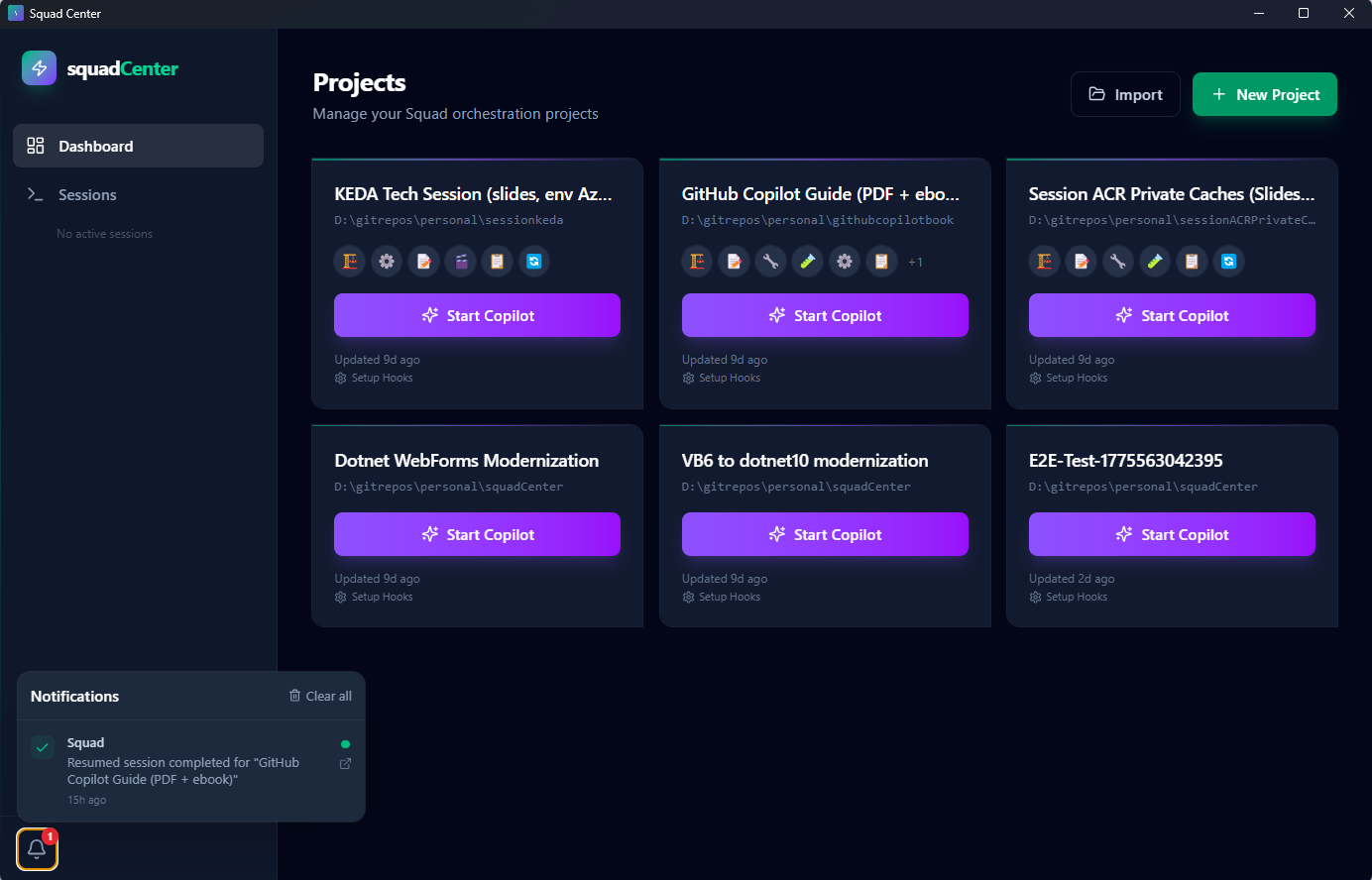 Project overview with quick-access cards, session count, and archive management.
Project Details
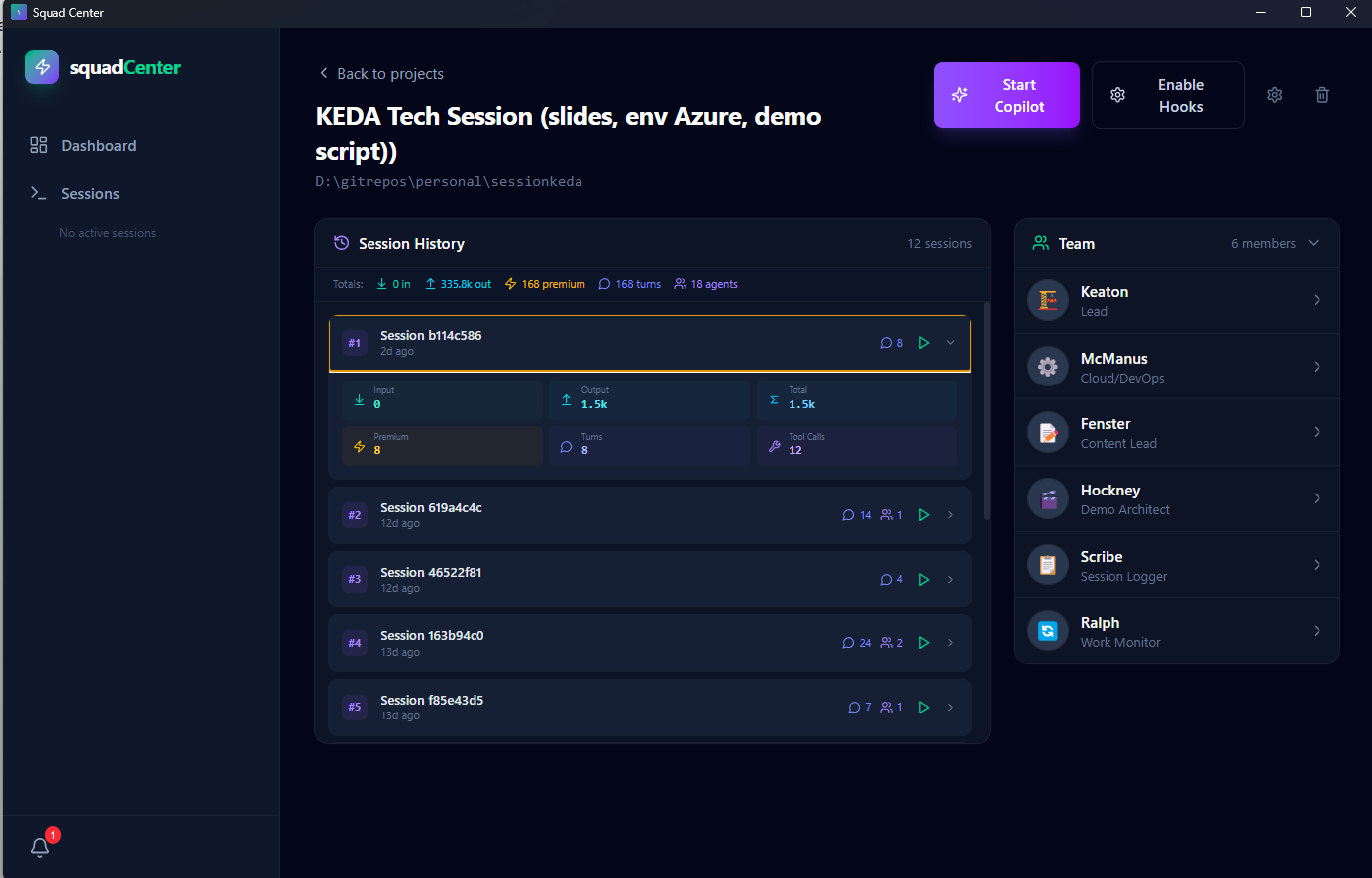 Three-column project view: Squad team roster, session launcher with configuration, and session history with resume capability.
Active Session
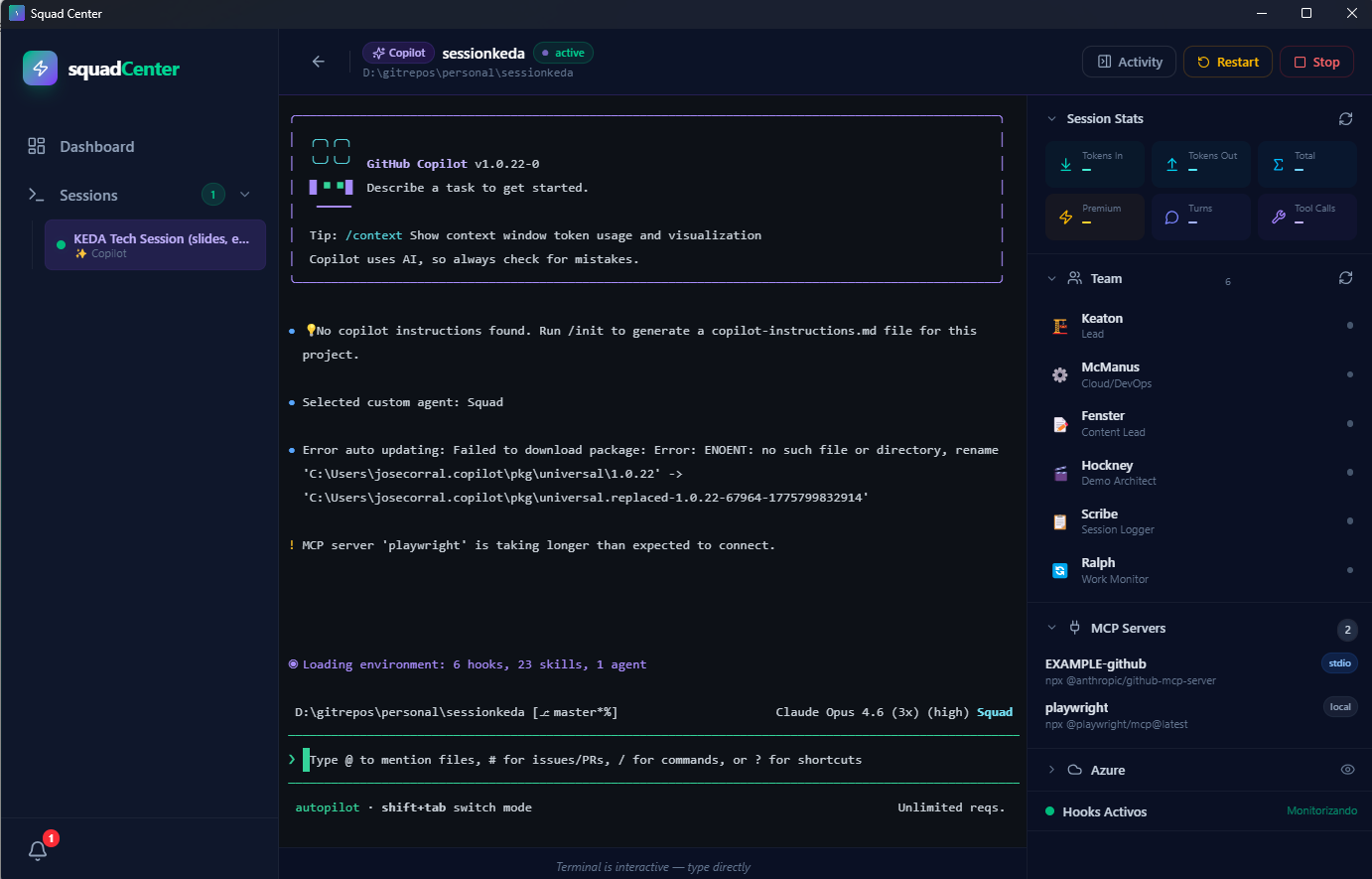 Integrated terminal with live Copilot CLI output, activity timeline, token usage stats, and real-time hook events.
🛠️ Tech Stack
| Layer | Technology |
|---|
| Language | TypeScript 5.8 |
| Framework | React 19 |
| Build Tool | Vite 6 |
| Styling | TailwindCSS v4 |
| Desktop | Electron 35 |
| Terminal | xterm.js 6 + node-pty |
| Routing | React Router v7 (HashRouter) |
| Icons | Lucide React |
| Testing | Playwright (E2E) |
🚀 Getting Started
Prerequisites
- Node.js 22+ and npm
- GitHub Copilot CLI installed and authenticated
- Squad agent configuration (optional — for team features)
Install
Choose your preferred installation method:
npm install -g squad-center
squad-center
🍫 Chocolatey (Windows)
choco install squad-center
🪟 winget (Windows)
winget install jmanuelcorral.SquadCenter
> WinGet availability depends on Microsoft accepting the package submission in
> microsoft/winget-pkgs. If the package is not found yet, use GitHub Releases,
> Chocolatey, or npm while the initial submission is pending.
🐧 apt (Debian/Ubuntu)
# Add the GPG key
curl -fsSL https://jmanuelcorral.github.io/squadcenter/gpg-key.public \
  | sudo gpg --dearmor -o /usr/share/keyrings/squad-center.gpg

# Add the repository
echo "deb [signed-by=/usr/share/keyrings/squad-center.gpg] https://jmanuelcorral.github.io/squadcenter/apt stable main" \
  | sudo tee /etc/apt/sources.list.d/squad-center.list

# Install
sudo apt update && sudo apt install squad-center
📥 Direct download
Grab the latest installer from GitHub Releases:
- Windows:
Squad-Center-Setup-x.y.z.exe
- macOS:
Squad-Center-x.y.z-arm64.dmg
- Linux:
Squad-Center-x.y.z.AppImage or squad-center_x.y.z_amd64.deb
Development Setup
# Clone the repository
git clone https://github.com/jmanuelcorral/squadcenter.git
cd squadCenter

# Install dependencies (includes native module compilation for node-pty)
npm install

# Start in development mode
npm run dev
The Electron app will launch with hot-reload enabled for both the renderer (React) and main process.
📜 Scripts
| Script | Description |
|---|
npm run dev | Start Electron app in development mode with hot-reload |
npm run build | Build the renderer (Vite) and main process for production |
npm run preview | Preview the production build |
npm test | Run the full Playwright E2E test suite |
npm run test:prereqs | Run only the prerequisites check tests |
npm run test:e2e | Build then run the full E2E suite |
📂 Project Structure
squadCenter/
├── electron/              # Electron main process
│   ├── main.ts            # App entry point, window creation
│   ├── preload.ts         # IPC bridge (contextBridge)
│   ├── hooks-server.ts    # HTTP server for Copilot hook callbacks
│   ├── ipc/               # IPC handler modules
│   │   ├── projects.ts    # Project CRUD operations
│   │   ├── sessions.ts    # Session lifecycle management
│   │   ├── filesystem.ts  # Folder browsing for import
│   │   ├── notifications.ts
│   │   └── hooks.ts       # Hook event queries
│   └── services/          # Core backend services
│       ├── session-manager.ts    # PTY process management
│       ├── storage.ts            # JSON file persistence
│       ├── squad-reader.ts       # .squad/ directory parser
│       ├── hook-manager.ts       # Copilot hooks lifecycle
│       ├── hooks-generator.ts    # Hook script generation
│       ├── hook-event-store.ts   # Hook event storage
│       ├── event-bridge.ts       # IPC event broadcasting
│       └── environment-info.ts   # System context (Azure, MCP)
├── src/                   # React renderer process
│   ├── main.tsx           # React entry point
│   ├── App.tsx            # HashRouter, routes, providers
│   ├── index.css          # Tailwind v4 + custom animations
│   ├── pages/
│   │   ├── Dashboard.tsx       # Project grid, modals
│   │   ├── ProjectView.tsx     # Project detail (3-column)
│   │   └── SessionView.tsx     # Terminal + sidebar panels
│   ├── components/
│   │   ├── Layout.tsx          # App shell with sidebar
│   │   ├── Sidebar.tsx         # Navigation + session count
│   │   ├── SessionTerminal.tsx # xterm.js terminal (PTY/message modes)
│   │   ├── ActivityTimeline.tsx # Hook event stream
│   │   ├── ProjectCard.tsx     # Dashboard project card
│   │   ├── TeamPanel.tsx       # Agent team roster
│   │   └── ...                 # Modals, panels, inputs
│   ├── hooks/
│   │   ├── useIpcEvents.ts     # Electron IPC event subscriptions
│   │   └── useNotifications.tsx # Notification context provider
│   ├── lib/
│   │   └── api.ts              # IPC invoke wrappers (23 channels)
│   └── types/
│       └── electron.d.ts       # Window.electronAPI declarations
├── shared/
│   └── types.ts           # Shared TypeScript interfaces
├── e2e/                   # Playwright E2E tests (7 spec files, 46 tests)
├── index.html             # Vite entry HTML
├── vite.config.ts         # Vite + Electron plugin config
├── tsconfig.json          # TypeScript config
└── playwright.config.ts   # E2E test configuration
⚙️ Configuration
Each project in Squad Center can be individually configured:
interface CopilotConfig {
  args: string[];              // Extra Copilot CLI arguments
  envVars: Record; // Environment variables for sessions
  preCommands: string[];       // Commands to run before session start
  startCopilot?: boolean;      // Auto-start Copilot on project open
  shell?: string;              // Shell executable (e.g., powershell, bash)
  terminalFontFamily?: string; // Terminal font (NerdFont support)
  terminalFontSize?: number;   // Terminal font size
}
Configuration is set per-project through the Project Config modal in the UI.
🧪 Testing
Squad Center uses Playwright for end-to-end testing against the built Electron application.
# Run all tests
npm test

# Run with build step
npm run test:e2e

# Run a specific test file
npx playwright test e2e/03-dashboard.spec.ts
Test coverage — 7 spec files covering:
| File | Scope |
|---|
01-prerequisites.spec.ts | Environment and dependency checks |
02-app-launch.spec.ts | Electron window creation and loading |
03-dashboard.spec.ts | Dashboard rendering and interactions |
04-project-management.spec.ts | Project CRUD operations |
05-project-config.spec.ts | Configuration modal and persistence |
06-navigation.spec.ts | Routing and navigation flows |
07-ipc-communication.spec.ts | IPC channel communication |
08-notifications-hooks.spec.ts | Notifications pipeline & hooks |
🏗️ Building
The app is built using Vite with the vite-plugin-electron plugin, which handles both the renderer (React) and main process (Electron) compilation.
# Production build (renderer + main process)
npm run build
The build outputs to:
dist/ — Renderer bundle (React app)dist-electron/ — Main process bundle (main.js, preload.js)
🤝 Contributing
Squad Center is built using a Squad agent team workflow. The team configuration lives in .squad/ and includes:
- Neo — Lead architect and coordinator
- Morpheus — Backend developer (Electron main process, IPC, services)
- Trinity — Frontend developer (React, UI components, UX)
- Tank — DevOps engineer (CI/CD, packaging, release pipelines)
Architectural decisions are documented in .squad/decisions.md.
📄 License
MIT — see LICENSE for details.