


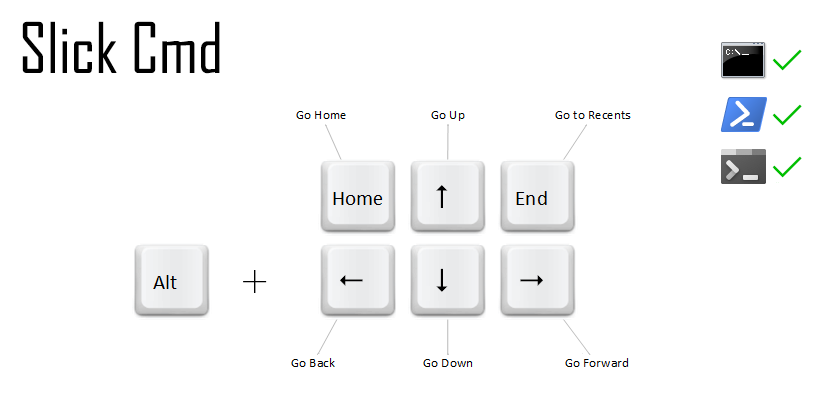
Slick Cmd is a lightweight utility designed to supercharge your Windows Command Prompt experience by making directory navigation, path completion, and command management more efficient. Slick Cmd runs quietly in your system tray, enabling you to access its powerful features through intuitive keyboard shortcuts.
Screenshots
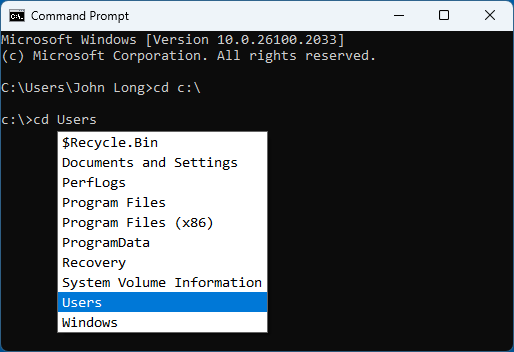
cd completion
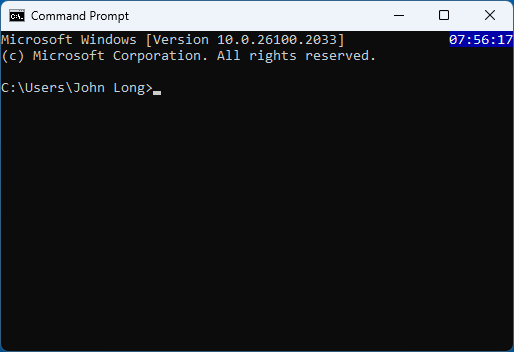
console clock
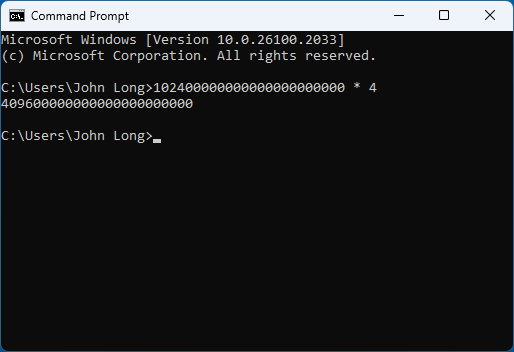
direct calculation
✨ Features
⚙️ Requirements
- Operating System: Windows 10 or above, 64-bit
- Shell Compatibility: Classic Command Prompt(cmd.exe) or PowerShell(powershell.exe or pwsh.exe)
📖 Installation
> [!NOTE]
> Before installation, please exit SlickCmd and close all running Command Prompts
> to allow the application binaries to be overwritten.
Install from GitHub Release
- Download: Get the latest version of Slick Cmd from the Releases page.
- Install: Extract the release zip to a preferred installation folder on your local filesystem.
- Launch: Start Slick Cmd by double-clicking
slickcmd.exe. A small icon will appear in your system tray, indicating it’s running.
Install with WinGet
I've submitted SlickCmd to the Windows Package Manager Community Repository
and it has passed validation. You can install SlickCmd using winget with the following command:
winget install "Slick Cmd"
After installation, you may encounter issues starting SlickCmd from the command line directly
due to the Windows SmartScreen Filter, which can silently block unrecognized apps.
To launch SlickCmd, follow these steps:
- Open Windows Explorer.
- Navigate to the following directory:
C:\Users\Your User Name\AppData\Local\Microsoft\WinGet\Links
- Click on
slickcmd.exe to run the application.
Unfortunately, this means the winget installation is less convenient at this time.
🛠️ Install from source
git clone https://github.com/johnlng/slickcmd.git
cd slickcmd
cargo build
You can find the binaries in the target folder.
Verification
After starting SlickCmd, Open a command prompt window and press Alt + Up
to see if you can navigate to the parent directory.
if you can, things should be working fine.
Note that "a command prompt window" can refer to any of the following:
- A classic windows command prompt window (
cmd.exe),
- A Windows PowerShell window (
powershell.exe)
- A PowerShell 7+ window (
pwsh.exe),
- A Windows Terminal window running any of the above shells.
📜 License
Slick Cmd is distributed under the MIT License.
💡 Contribute & Support
I’d love to hear your thoughts! If you have suggestions, feature requests, or find bugs, please open an issue on the GitHub repository.
If you like the project, please consider giving it a ⭐ and sharing it with others to show your support!
Acknowledgments
- The keyboard button image used in this project is sourced from AutoHotKey
- The calculator implementation is adapted from posixutils-rs