
Concentrésimple yet powerful focus timer
Formerly Pomodorolm
❤️ Support Concentré
Concentré is free and open source. If it helps you stay focused, consider supporting its development.
Support development on Ko-fi →
🌟 Features
📘 Installation
Windows
Installer: Download the .exe or .msi file from the latest release on https://github.com/vjousse/pomodorolm/releases/
winget: winget install pomodorolm
Archlinux
yay -S pomodorolm-bin
Mac OS X, Debian, AppImage
Download the install file for your OS from the latest release on https://github.com/vjousse/pomodorolm/releases/
Flatpak

flatpak install flathub org.jousse.vincent.Pomodorolm
flatpak run org.jousse.vincent.Pomodorolm
Snap Store

🎨 Themes
Concentré provides many themes. It's also theme-able, allowing you to customize its appearance.
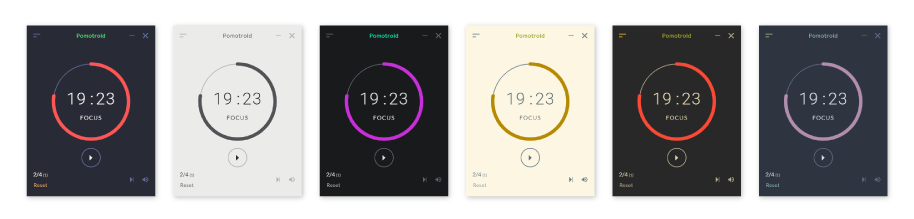
Visit the theme documentation to view the full list of official themes and for instruction on creating your own.
🤖 No IAgen policy
I am not using any IAgen (Claude, Copilot, you name it), never will and I don’t want to review any Pull Request coming from such systems. I made this choice in order to be aligned with my values so, please, respect it and don’t push code here that may have been written by an IAgen system.
I write software because I like creating things by myself for people to use it: Free software of the people, by the people, for the people.
Command Line Interface
> [!WARNING]
> This is still a huge Work In Progress and only supports Pomodoro creation/reset/stop. Nothing else is handled for now (no breaks, no sound, no config change, …).
By default, Concentré will start the GUI version, but there is a CLI interface available if you want (mainly a proof of concept for now). To get the available commands you can run the help:
pomodorolm --help
You can run the current cli program with:
pomodorolm cli
You should see the following output looping forever:
P -
P -
P -
The cli is based on https://github.com/dattanchu/pymodoro. It will look for the presence of the file ~/.cache/pomodoro_session.
To start or reset a Pomodoro:
touch ~/.cache/pomodoro_session
To stop the Pomodoro:
rm ~/.cache/pomodoro_session
You can add a Waybar/i3bar module if you want to:
  "custom/pomodorolm": {
    "exec": "pomodorolm cli",
  },
And add keybindings in your Sway/i3 config to touch and/or remove the session file.
🏷️ About the name
Concentré was called Pomodorolm until version 0.9. Package names and identifiers (pomodorolm on winget, AUR and Snap, org.jousse.vincent.Pomodorolm on Flathub) are unchanged for now, so existing installs keep updating normally.
Pomodoro® and Pomodoro Technique® are registered trademarks of Francesco Cirillo. Concentré is not affiliated with, associated with, or endorsed by the Pomodoro Technique® or Francesco Cirillo.
💻 Dev
You will need to install rust first and https://github.com/astral-sh/uv for thepre-commit hooks and the release script.
Install pre-commit hooks
uv sync
uv run pre-commit install
Install node dependencies
npm ci
Running the app
npm run tauri dev
Running only the webapp
npm run dev
Running the CLI
npm run tauri dev -- -- -- cli
🔨 Build
If you're using Linux be sure to set the NO_STRIP env var to true (see https://github.com/tauri-apps/tauri/issues/8929 ) if the build is failing.
NO_STRIP=true npm run tauri build -- --target x86_64-unknown-linux-gnu
If the build is still failing try to understand why using:
NO_STRIP=true npm run tauri build -- --target x86_64-unknown-linux-gnu --verbose
You can also try to build using docker-compose (to maximize compatibility, normal build is failing on Archlinux for example):
docker-compose run --rm --build build-linux
Build files will be placed in the target/ directory.
💀 Troubleshooting
macOS
pomodorolm is damaged and can’t be opened
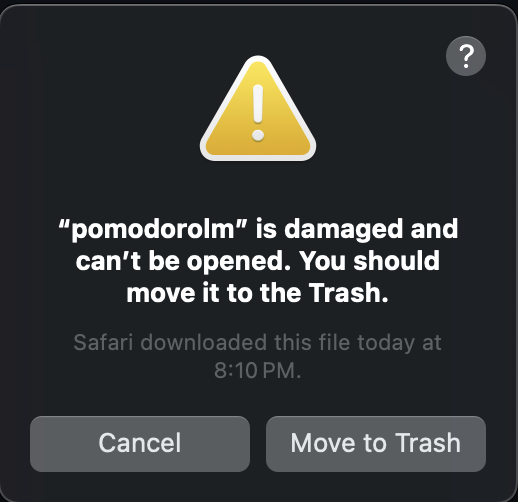
Check the following issue: https://github.com/vjousse/pomodorolm/issues/149
TLDR, in a terminal: sudo xattr -cr /Applications/pomodorolm.app.
Linux
Failed to create GBM buffer of size…
If you run into this error, it is likely because you're using nvidia drivers under Linux. They are several bug reports in Webkit, cf this issue for wails: https://github.com/wailsapp/wails/issues/2977#issuecomment-1791041741.
You can try to run pomodorolm using this command:
WEBKIT_DISABLE_DMABUF_RENDERER=1 pomodorolm
Thanks to @Bad3r for the bug report!
Error 71 (Protocol error) dispatching to Wayland display.
If you are using the flatpak, you can resolve this issue by using this command:
flatpak override --user --env=WEBKIT_DISABLE_DMABUF_RENDERER=1 org.jousse.vincent.Pomodorolm
This will set the environment variable for the flatpak, and you should be able to launch the application as normal from there on.
Windows
Check that your antivirus (Windows defender or whatever antivirus you are using) doesn't report the app as a trojan. Unfortunately, there is a known issue https://github.com/tauri-apps/tauri/issues/2486 on Tauri where a false positive is reported when executing apps generated with Tauri on Windows.
💯 Credits
Thanks to https://github.com/Splode/pomotroid for the original design and ideas.