 SelectBridge
English | 简体中文

SelectBridge is a lightweight desktop utility that forwards text selected in supported desktop applications to a configurable URL target. It runs as a native tray application on Windows and as a headless host on Windows, macOS, and Linux. The default target opens a GoldenDict-ng popup through goldendict://.
Features
- Forward globally selected text to a configurable URL target.
- Monitor global selections through selection-hook.
- Allow pausing the selection hook and toggling clipboard fallback from the Windows tray.
- Support immediate, modifier-key, custom-shortcut, icon, and dot trigger modes.
- Open a GoldenDict-ng popup or any custom URL template.
- Provide a lightweight Windows native tray host and a cross-platform headless host.
- Support Windows x64 and ARM64 Setup and Portable packages.
- Protect against duplicate selections, rapid repeats, and overlong text.
SelectBridge does not provide dictionaries or translation services. It forwards selected text to the target application or service you configure.
Install
Scoop
scoop bucket add hoarfrost https://github.com/k4if3ng/hoarfrost
scoop install hoarfrost/select-bridge
Update an existing Scoop installation with:
scoop update select-bridge
Windows packages
Download the package for your architecture from GitHub Releases
Usage
- Start SelectBridge.
- Select text in a supported desktop application.
- SelectBridge forwards the text according to the configured trigger mode.
The default immediate mode forwards automatically. Modifier and custom-shortcut modes wait for the configured key combination. Windows native mode also supports floating icon and dot indicators with click or hover activation.
Windows tray settings
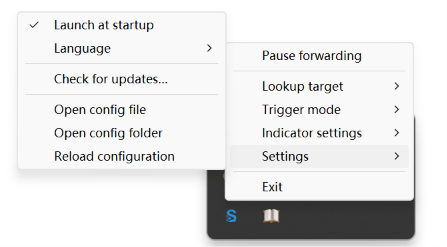
The tray icon opens the same menu with either a left or right click. The first item changes between Pause forwarding and Resume forwarding according to the current state. Use the menu to select the lookup target, trigger mode, indicator size and activation, language, startup behavior, update checks, and configuration actions.
For complete Windows behavior and troubleshooting, see the Windows guide.
Custom URL templates
Open Lookup target → Set URL template… to configure another application or service. A template must:
- start with a valid URI scheme;
- contain exactly one
{text} placeholder;
- contain no whitespace or control characters;
- be no longer than 2,048 characters.
Selected text replaces {text} after encodeURIComponent encoding. Saving a valid template immediately selects Custom URL.
Configuration and updates
Configuration paths:
- Setup:
%APPDATA%\select-bridge\config.json
- Portable:
\data\config.json
- Other platforms:
$XDG_CONFIG_HOME/select-bridge/config.json or ~/.config/select-bridge/config.json
Use SELECT_BRIDGE_CONFIG to select another configuration path. enableClipboardFallback controls whether selection-hook may use simulated copy shortcuts as a last-resort text retrieval method; it defaults to true for compatibility and can be toggled from the Windows tray. Select Settings → Check for updates… to compare the installed version with the latest stable GitHub Release. SelectBridge never downloads or installs updates automatically.
FAQ
Why does selecting text in a terminal show ^C or interrupt the command?
Clipboard fallback is enabled by default. When Windows accessibility APIs cannot read the selection, it may simulate Ctrl+C; terminals often interpret that as an interrupt. Disable Settings → Clipboard fallback to prevent simulated copy. Applications that rely on clipboard retrieval may then stop producing selections. See the Windows FAQ for details.
Development
pnpm install
pnpm build
pnpm build:native
pnpm test
See the development guide for environment setup, native builds, testing, and packaging.
Documentation:
Open-source acknowledgements
Global text-selection monitoring is powered by selection-hook. The default lookup experience works with GoldenDict-ng through its goldendict:// protocol. Thanks to these projects and their maintainers for making SelectBridge possible.
Links
- LINUX DO — A community for developers and technology enthusiasts.
License
MIT