y509



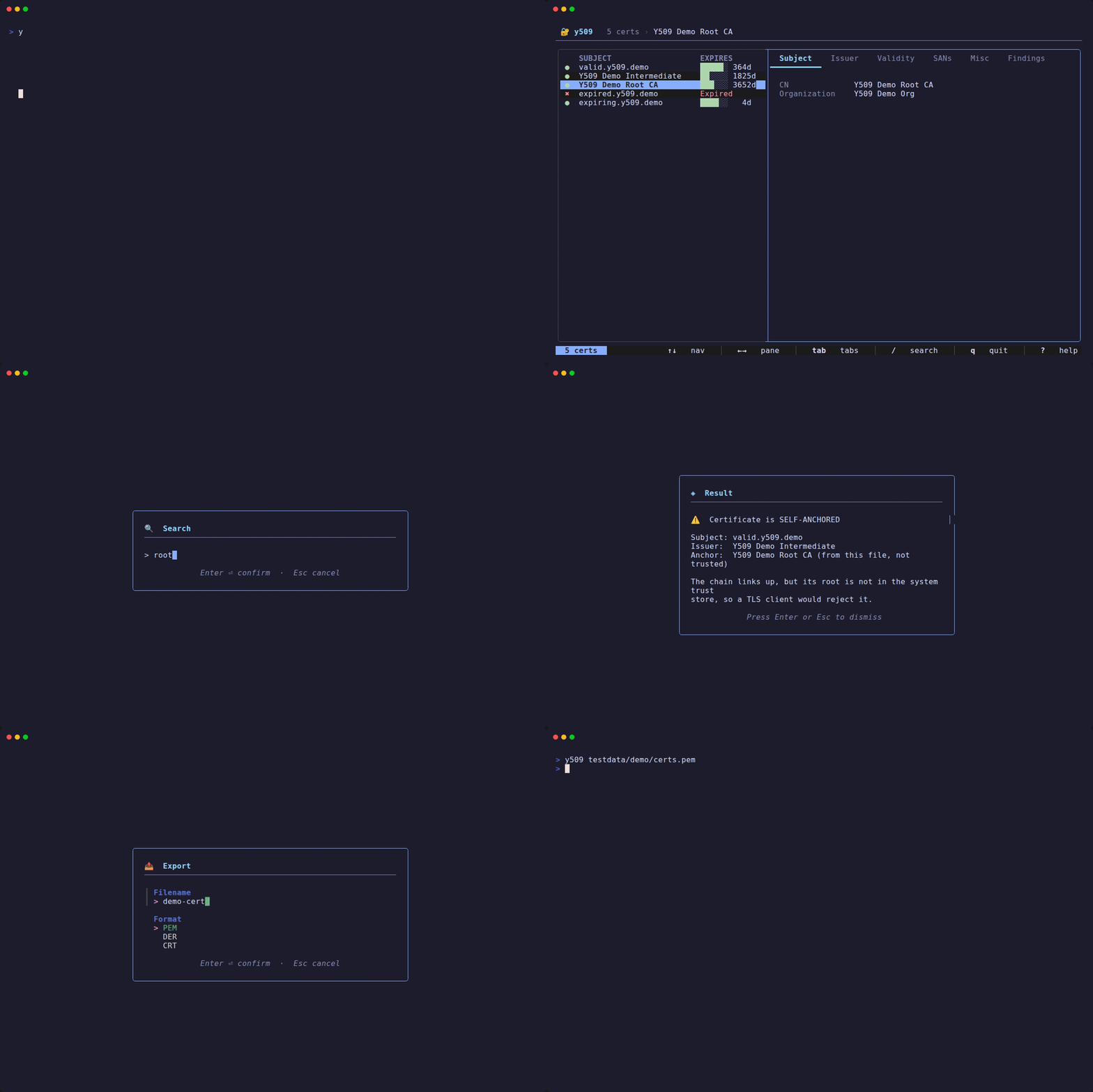
A TUI for X.509 certificate chains. It checks whether a chain verifies, and separately whether it was served correctly: missing intermediates, redundant roots, wrong order. That second check explains "works in the browser, breaks in curl".
Built on the Charm v2 stack: Bubble Tea, Lip Gloss, Bubbles, huh.
Install
# Homebrew (macOS)
brew install kanywst/tap/y509

# FreeBSD
pkg install y509

# Go 1.27+
go install github.com/kanywst/y509/cmd/y509@latest
# Windows
scoop bucket add kanywst https://github.com/kanywst/scoop-bucket
scoop install kanywst/y509
Releases also ship binaries for macOS, Linux and Windows, .deb and .rpm packages, checksums, cosign signatures and an SBOM.
- Windows: without Scoop, unzip and put
y509.exe on your PATH. Use Windows Terminal or any ANSI terminal. Completion: y509 completion powershell.
- FreeBSD: maintained as the
security/y509 port. If the binary package has not reached your repo yet: make -C /usr/ports/security/y509 install clean.
Usage
y509 cert-chain.pem                       # a file (PEM, DER or PKCS#7)
y509 example.com:443                      # a live server
y509 smtp.example.com:587 --starttls smtp # ...behind STARTTLS
cat chain.pem | y509                      # stdin
kubectl get secret tls -o json | y509     # a Kubernetes TLS secret
PKCS#7 (.p7b, .p7c), PKCS#12 (.p12, .pfx) and Kubernetes TLS secrets are detected by content, so pipes work too. A secret is read from tls.crt, then ca.crt.
PKCS#12 is tried without a password first. If one is needed, it comes from Y509_PKCS12_PASSWORD, --password-file, or a prompt. Never a flag, since flags show up in ps. Private keys are ignored.
Live servers
y509 example.com:443
y509 --connect 10.0.0.1:8443 --servername api.internal
y509 db.example.com:5432 --starttls postgres
y509 ldap.example.com:389 --starttls ldap
y509 db.example.com:3306 --starttls mysql
An existing file path is read as a file; anything else is an address. --connect forces an address. --starttls supports smtp, lmtp, imap, nntp, ftp, ldap, mysql and postgres (aliases: mariadb, postgresql).
The TUI handshake verifies nothing on purpose, so you can inspect a broken chain. Certificates are shown in the order the server sent them.
Comparing two chains
y509 diff before.pem after.pem
y509 diff node1.example.com:443 node2.example.com:443
Chain differences:
  - leaf.example.com
  + leaf.example.com
    Example Intermediate CA

The leaf was replaced:
  • serial: 8149... -> 9e2c...
  • not after: 2026-09-30 -> 2026-12-29
  • dns names: example.com -> example.com, www.example.com
Certificates are matched by SHA-256 of their DER, not by subject, since a renewal keeps the name. Exit 0 if identical, 1 if different, like diff(1). Useful for spotting a rotation, or two CDN nodes serving different chains.
Validating from a script
validate checks against the system trust store and exits non-zero on anything a TLS client would reject:
y509 validate chain.pem                        # 0 = trusted
y509 validate example.com:443                  # also checks the hostname
y509 validate chain.pem --roots internal-ca.pem
| Outcome | Exit | Meaning |
|---|
| trusted | 0 | verifies against the trust anchors |
| self-anchored | 1 | links up, but its root is not trusted (an internal PKI, or a missing root) |
| broken | 1 | does not link up: expired, bad signature, missing issuer, wrong hostname |
Multiple targets are all checked before exiting; the exit is non-zero if any failed. With --json, a single target gives the usual object and several give {"targets": [...]}.
y509 validate www.example.com:443 api.example.com:443 smtp.example.com:587
How the chain was served
Browsers fetch a missing intermediate from the AIA URL; curl, Go and Java do not. So a chain can verify and still be broken for clients. y509 reports that from what the server actually sent:
$ y509 validate incomplete-chain.badssl.com:443
✅ Certificate chain is valid.
Trust anchor: ISRG Root X1

Chain as presented:
  • missing issuer: *.badssl.com
    the chain stops at a certificate that is not a CA; its issuer "YR2" was
    never sent, so a client that does not chase AIA (curl, Go, Java) cannot
    build a chain
    fetch from: http://yr2.i.lencr.org/
The chain verified (the macOS verifier fetched the intermediate) but is still misconfigured. y509 also reports redundant roots, wrong order, duplicates and unrelated certificates.
Machine-readable output
y509 --json prints the chain without a trust verdict:
y509 chain.pem --json | jq '.chain[0].otherNames'
validate --json prints the full result to stdout and nothing else. Errors go to stderr, so the output always parses. Exit codes are unchanged.
y509 validate example.com:443 --json | jq .
{
  "host": "example.com",
  "trust": {
    "level": "self-anchored",
    "trusted": false,
    "anchor": "Internal Root CA",
    "error": "x509: certificate signed by unknown authority"
  },
  "presentation": {
    "ok": false,
    "findings": [
      {
        "problem": "missing issuer",
        "subject": "*.example.com",
        "detail": "the chain stops at a certificate that is not a CA; its issuer \"YR2\" was never sent, so a client that does not chase AIA (curl, Go, Java) cannot build a chain",
        "fetchUrls": ["http://yr2.i.lencr.org/"]
      }
    ]
  },
  "chain": [{ "index": 0, "commonName": "*.example.com", "daysUntilExpiry": 43, "…": "…" }],
  "connection": {
    "tlsVersion": "TLS 1.3",
    "cipherSuite": "TLS_AES_128_GCM_SHA256",
    "ocspStapled": true,
    "ocspStaple": {
      "status": "good",
      "serialNumber": "03d8…",
      "producedAt": "2026-09-14T09:00:00Z",
      "thisUpdate": "2026-09-14T09:00:00Z",
      "nextUpdate": "2026-09-21T08:59:59Z",
      "expired": false,
      "verified": true
    }
  },
  "conformance": { "ok": true, "findings": [] },
  "revocation": { "ok": true, "findings": [] }
}
chain is in the order presented, not sorted.level and problem are strings; findings is always an array, never null.connection exists only for a live server, not a file or stdin.ocspStaple is what the server stapled. Nothing is fetched. No staple is not a finding.
verified: false on its own means the issuer was not in the chain. With verifyError, the issuer was there and the response did not verify.- No
nextUpdate means the responder gave none: do not cache it.
- If the staple was unreadable,
ocspStapleError replaces ocspStaple. Only one of the two is ever present.
revocation judges that staple, with its own ok so presentation.ok keeps its meaning. Present only alongside connection.
problem is one of revoked, stale staple, staple not yet valid, unknown status, staple signature invalid, unreadable staple.- A signature left unchecked because the issuer was not sent is not a finding here. That is
missing issuer under presentation.
conformance checks each certificate against rules clients enforce on their own, with its own ok. Present for files too.
problem is one of weak signature (SHA-1 or MD5, except a genuine SHA-1 self-signature, which no client checks), weak key (RSA under 2048 bits), no SAN (a server certificate with a common name but no DNS, IP or URI SAN), precertificate (a CT precertificate was served), unhandled critical extension (a critical extension Go does not process), insufficient SCTs (below Chrome's CT policy).insufficient SCTs counts only SCTs whose signature verifies against the log's bundled key, as Chrome does. It is judged by validate only, for a chain trusted through the system store that carries at least one SCT, embedded or sent in the TLS handshake. A certificate with none is not judged, because an enterprise root in the system store looks the same as a public one. Nor is one that falls short only by SCTs from logs the bundled list does not know, which could close the gap, or any chain once that list is more than 70 days old, which is when Chrome stops enforcing CT too. A scheduled workflow refreshes the list twice a month.conformance.ctPolicy says how that went: met, not met, or not judged: , including why for a chain CT does not apply to, such as one trusted through --roots. conformance.ok is not affected by a check that was not judged, so a gate that must not pass an unjudged chain reads ctPolicy (the Action exposes it as ct-policy).
chain[].noExpiry is true for the RFC 5280 9999-12-31 sentinel, a certificate with no well-defined expiration. daysUntilExpiry and validityDays still carry the real arithmetic, so read noExpiry before printing them.chain[].scts lists the embedded SCTs as {logId, log, operator, logState, timestamp}, with logs named from a bundled copy of Google's CT log list (make ct-logs refreshes it). Nothing is verified or fetched. log, operator and logState are absent for a log the list does not know. If the list is damaged, sctError says why and scts keeps what was read before the damage.chain[].extensions lists every extension as {oid, name, critical}. name is absent for one y509 does not know.chain[].idns lists the internationalized names among the common name and dnsNames as {ascii, unicode}. For a name that fails IDNA validation, only the spelling the certificate carries is present and error says why. Absent when there are none.
The exit code alone cannot tell self-anchored from broken, or say anything about how the chain was served. JSON can:
# Fail the build on a chain that verifies but is mis-served.
y509 validate example.com:443 --json | jq -e '.presentation.ok'

# Warn 30 days out, without parsing prose.
y509 validate example.com:443 --json | jq '.chain[0].daysUntilExpiry < 30'

# Fail on a SHA-1 signature, a short RSA key, or a CN-only certificate.
y509 validate example.com:443 --json | jq -e '.conformance.ok'

# Fail on a revoked or stale stapled OCSP response.
y509 validate example.com:443 --json | jq -e '.revocation.ok'

# Find anything still negotiating below TLS 1.2.
y509 validate example.com:443 --json | jq -e '.connection.tlsVersion | test("1\\.[23]$")'
Taking an inventory
inventory lists what you have, without verifying anything. It exits 0 for anything it could read:
y509 inventory www.example.com:443 api.example.com:443
y509 inventory chain.pem --csv > inventory.csv
TARGET                   SUBJECT           KEY        SIGNATURE            EXPIRES     DAYS
www.example.com:443      www.example.com   ECDSA 256  ECDSA-SHA256         2026-11-02  49
www.example.com:443      R11               RSA 2048   SHA256-RSA           2027-03-12  179
Good for PCI DSS 4.0.1 inventories or finding RSA keys ahead of a post-quantum migration. --json adds fingerprints and lifetimes.
GitHub Actions
Downloads a release binary, verifies its checksum, and fails the job on the findings you pick:
- uses: kanywst/y509@v1
  with:
    target: example.com:443
    fail-on: untrusted,mis-served,expiring
    expiry-days: 30
mis-served is the one other tools miss: a chain that verifies but breaks curl, Go and Java.
| Input | Default | |
|---|
target | | host, host:port, or a PEM/DER path in the workspace |
version | latest | a release tag; pin it for a reproducible check |
fail-on | untrusted,mis-served | any of untrusted, mis-served, expiring, revocation, conformance, or none |
expiry-days | 30 | threshold for expiring |
starttls | | smtp, imap, ftp, ldap, mysql, postgres |
servername | | SNI name, when it differs from the host dialled |
roots | | PEM file of extra trust anchors, for an internal PKI |
no-system-roots | false | trust only roots |
summary | true | write a report to the job summary |
revocation fails on a stapled OCSP response that is revoked, stale, dated in the future, unknown, badly signed or unreadable. No staple passes. conformance fails on a SHA-1 or MD5 signature, an RSA key under 2048 bits, a host name only in the common name, a served precertificate, a critical extension Go does not process, or too few SCTs for Chrome's CT policy.
Outputs: trust-level, trusted, presentation-ok, days-until-expiry, problems, revocation-ok, conformance-ok, ct-policy, and report (path to the full JSON).
Findings not in fail-on still show up as warnings, so fail-on: none makes a monitor:
on:
  schedule:
    - cron: "0 6 * * *"

jobs:
  certificates:
    runs-on: ubuntu-latest
    strategy:
      matrix:
        host: [www.example.com, api.example.com, smtp.example.com:587]
    steps:
      - uses: kanywst/y509@v1
        with:
          target: ${{ matrix.host }}
          fail-on: untrusted,mis-served,expiring
Keybindings
| Key | Action |
|---|
↑/k ↓/j | Navigate list |
←/h →/l | Switch panes |
tab | Cycle detail tabs |
/ | Search |
f | Filter (expired, expiring, valid, self-signed) |
v | Validate certificate |
r | Redial the server (live connections only) |
e | Export certificate (filename + format form) |
y | Copy selected certificate as PEM (OSC52) |
esc | Clear filter / close popup |
? | Help |
q | Quit |
Configuration
~/.y509.yaml. Catppuccin Mocha by default.
# Max "expiring soon" window in days (default 30). The actual window is the
# smaller of this and a third of the certificate's lifetime, so a 6-day
# certificate warns at 2 days left.
expiry_warning_days: 30

theme:
  text: "#cdd6f4"
  border: "#45475a"
  border_focus: "#89b4fa"
  background: "#1e1e2e"
  status_bar: "#181825"
  status_bar_text: "#cdd6f4"
  command_bar: "#313244"
  command_bar_text: "#cdd6f4"
  error: "#f38ba8"
  highlight: "#89b4fa"
  highlight_text: "#1e1e2e"
  highlight_dim: "#313244"
  status_valid: "#a6e3a1"
  status_warning: "#f9e2af"
  status_expired: "#f38ba8"
  title: "#89dceb"
  section_title: "#b4befe"
  detail_key: "#9399b2"
  list_row_alt: "#181825"
Development
make build       # Build with version info
make test        # Run tests
make lint        # Run golangci-lint
make vulncheck   # Run govulncheck
See ROADMAP.md for plans and non-goals, and CONTRIBUTING.md before sending a patch.
Verifying releases
Releases include Sigstore-signed checksums, a CycloneDX SBOM and SLSA build provenance.
Provenance:
gh attestation verify y509---.tar.gz -R kanywst/y509
Checksums (signed keyless via GitHub OIDC, bundled in y509--checksums.txt.sigstore.json):
TAG=v
gh release download "$TAG" -R kanywst/y509 -p '*-checksums.txt*'

cosign verify-blob \
  --bundle "y509-${TAG#v}-checksums.txt.sigstore.json" \
  --certificate-identity-regexp 'https://github.com/kanywst/y509/.github/workflows/release.yml@refs/tags/' \
  --certificate-oidc-issuer 'https://token.actions.githubusercontent.com' \
  "y509-${TAG#v}-checksums.txt"

sha256sum -c "y509-${TAG#v}-checksums.txt" --ignore-missing
v1.0.2 and earlier ship a .sig and .pem instead. Verify those with --signature and --certificate on cosign 2.x (3.x dropped both flags).
License
Apache License 2.0