Siphon is an unofficial, community-built Windows tray utility for developers who use Claude Code. It sits in the system tray and surfaces the current 5-hour session quota, the rolling weekly limit, and daily and monthly cost totals, reading from the local Claude Code data files and the OAuth usage endpoint that Claude Code itself uses for authentication.
When a session quota reaches 100%, Siphon schedules a native Windows toast notification for the exact reset time so the next usage window is not missed. If the application is closed when the reset occurs, the missed notification fires on the next launch.
An optional always-on-top floating widget keeps the key numbers visible during work, and color-coded tray icons reflect the current quota level at a glance. The interface is available in English and Brazilian Portuguese. Siphon is open source under the MIT license and is not affiliated with, endorsed by, or sponsored by Anthropic.
README
A Windows tray app that tracks your Claude Code usage in real time.
Siphon sits quietly in your system tray and shows session quota, weekly limits, and daily/monthly usage — all pulled directly from Claude Code's local files and the Anthropic OAuth usage endpoint. No API keys, no configuration: if you use Claude Code, it just works.
The Windows-specific addition is a reset notification: when your five-hour session quota hits 100%, Siphon schedules a Windows toast for the exact moment it becomes available again. If the app was closed during that window, it fires the missed notification on the next launch.
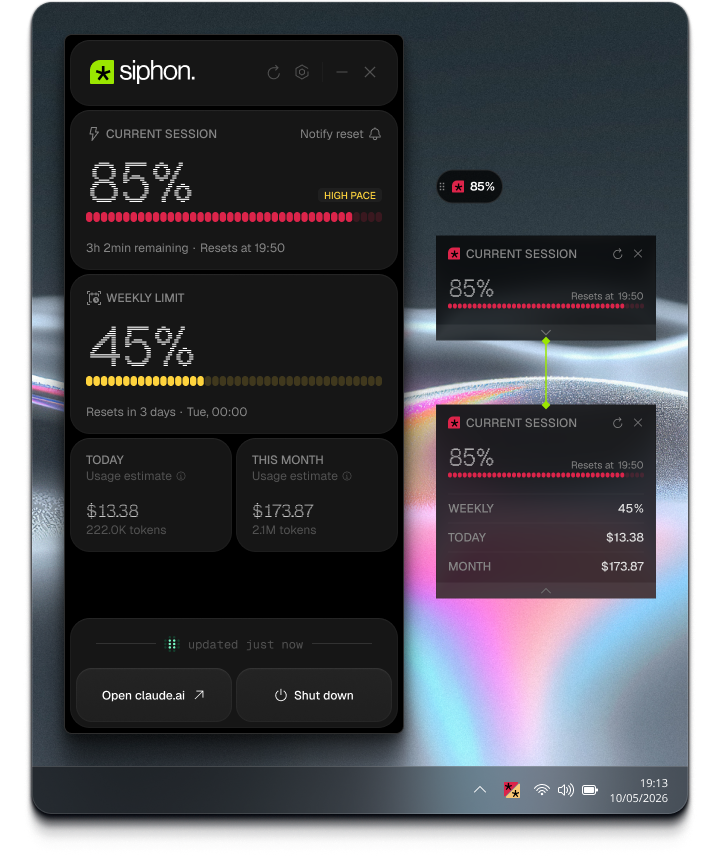
Session quota | Live progress bar showing your current 5-hour session usage with a reset countdown
Weekly limits | Tracks the all-model weekly cap returned by the OAuth usage endpoint
Usage tracking | Today's and this month's usage in USD, computed locally from Claude Code's usage and pricing files
Quota alerts | In-app warning and critical banners at 70% and 90% session usage (dismissible per session); optional Windows toasts at 70%, 90%, and 100% thresholds — each independently configurable
Reset notification | Windows toast when your session becomes available again — fires on next launch if the app was closed during the reset window
Sound alerts | Three independent audio cues: session reset, session exhausted (100%), and quota warnings (70%/90%) — each with its own toggle, test button, and volume slider
Floating widget | Always-on-top widget (PiP-style) you can drag anywhere on screen — two layouts: classic (session progress + expandable stats panel) and pill (compact icon + percentage bar)
Configurable refresh | Local refresh defaults to 30 seconds, with 1, 5, and 15 minute options in Settings
Start with Windows | Optional autostart, with a separate setting for whether the window appears after login
Pace indicator | Session card shows whether your usage pace is on track or likely to exhaust the quota before it resets
Peak-hours badge | Session card flags Anthropic's peak window (weekdays, 5–11 AM Pacific), when quota tends to run out faster — auto-adjusts for daylight saving
Launch with Claude Code | Optional integration that registers a SessionStart hook in ~/.claude/settings.json, so Siphon opens/refreshes when you start a Claude Code session
Color-coded tray icon | - Icon encodes both session and weekly quota levels simultaneously — two independent color channels in one icon
Localization | UI available in English and Brazilian Portuguese, switchable from Settings
Download the latest Siphon Setup .exe from Releases and run it. The installer is per-user — no admin elevation required. A Start Menu entry is created under Siphon, and an optional desktop shortcut is offered on the final page.
Portable
Download Siphon-Portable-.exe from Releases — no install, just run.
Via winget
winget install win-siphon
New releases go through microsoft/winget-pkgs approval, so the winget version can lag a few days behind GitHub Releases.
How it works
Siphon runs as three isolated Electron contexts:
Main process (Node, ESM)
  ├── UsageController
  │     ├── LocalDataService   — reads ~/.claude readouts or cached project JSONL on the selected cadence
  │     ├── QuotaService       — polls api.anthropic.com/api/oauth/usage with a 120 s minimum
  │     ├── OAuthService       — PKCE sign-in flow (same client ID as Claude Code)
  │     └── ResetNotificationScheduler — arms Windows toasts on quota exhaustion
  ├── FloatingWindow           — always-on-top mini widget (classic / pill layouts)
  └── IPC bridge
Preload (CJS)       — exposes window.siphon.* to the renderer
Renderer (ESM)      — vanilla JS + CSS, no framework
Usage figures are computed locally from Claude Code's usage data. Siphon first
uses the legacy token cache (readout-cost-cache.json) when present; otherwise
it scans modern per-session JSONL files under ~/.claude/projects/ and keeps an
internal incremental cache so unchanged session files are not re-read. Pricing
comes from readout-pricing.json when available, with bundled fallback prices
for known Claude models. No data leaves your machine for usage calculations.
Data stored on disk
File
Purpose
%APPDATA%\Siphon\credentials.json
OAuth tokens (mode 0600)
%APPDATA%\Siphon\reset-notification.json
Pending reset timestamp
%APPDATA%\Siphon\preferences.json
Language, notification toggle, widget position, autostart, refresh, and Claude Code launch integration settings
%APPDATA%\Siphon\local-usage-cache.json
Rebuildable incremental cache for modern Claude Code JSONL usage files
Sign-in
Siphon reuses Claude Code's OAuth PKCE flow. When you click Sign in, a browser tab opens to Anthropic's auth page. After authorizing, paste the redirect URL back into the app. Tokens are refreshed automatically 30 seconds before expiry.
Development
npm test    # node --test (built-in Node test runner)
npm run lint  # syntax-only check
Tests live in test/ and mirror the src/main/ module structure. The test for resetNotificationScheduler.test.js covers the tricky timer-clamp and persistence paths — run it whenever you touch the scheduler.
Privacy
On-device only — outbound requests go exclusively to Anthropic (api.anthropic.com). No telemetry, no analytics, no third-party data sharing.
No disk scanning — only reads known paths: ~/.claude/readout-*.json, ~/.claude/projects/ JSONL files, and %APPDATA%\Siphon\.
Protected credentials — OAuth tokens are encrypted with Windows DPAPI via Electron's safeStorage before being written to disk. Falls back to plaintext only if DPAPI is unavailable on the current machine.
Safe diagnostics — any internal logs expose service/status metadata only, never raw tokens, OAuth values, or credentials.




 - Icon encodes both session and weekly quota levels simultaneously — two independent color channels in one icon