CuePool kovvbojAV
Install CuePool with WinGet
winget install --id=kovvbojAV.CuePool -e Audio, video and lighting cue playback for live shows and installations.
winget install --id=kovvbojAV.CuePool -e Audio, video and lighting cue playback for live shows and installations.

Sound, video, and lighting cues for live shows.
User guide · Getting started · Contributing
CuePool is an open-source cue player for macOS, Windows, and Linux. Build a cue list and step through it with GO, or link cues to run in sequence.
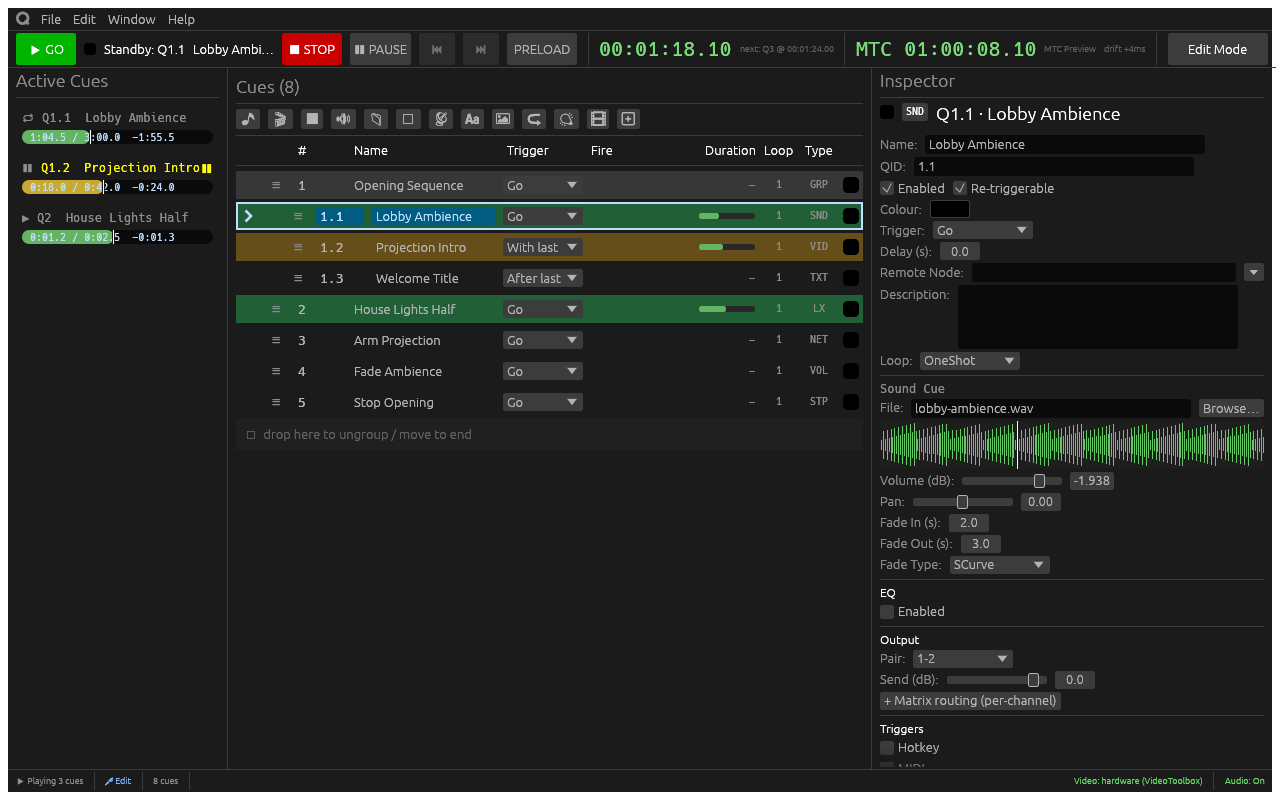
Edit mode is for programming; switch to Show mode to lock cue editing.
Projects are .qproj files. Pack a project with its media to take it to another
machine.
Follow the build instructions to install Rust and the platform dependencies, then run from the repository root:
cargo run --release --locked -p cuepool
The first-show walkthrough covers adding a cue, playing it with Space, and saving your project.
See CONTRIBUTING.md for build requirements, checks, and a map of the codebase. Report bugs or suggest improvements in GitHub issues.
CuePool began as a Rust port of QPlayer
by space928 and was renamed to avoid confusion with the original project.
It is now a standalone workspace, extracted from
rustjay-engine, and uses
rustjay-lighting (MIT) from crates.io.
Licensed under Apache 2.0 or MIT, at your option. Unless you explicitly state otherwise, contributions intentionally submitted for inclusion are dual licensed under the same terms, without additional conditions.